
Review – Kingston KC3000 2TB SSD – The Smaller Brother of Kingston Fury Renegade!
 by gabrielcariocapfz January 7, 2024 · Reviews / Reviews / SSDs and Storage / SSDs e armazenamento
Today, we will be testing a Kingston NVMe SSD from the top-of-the-line segment, the KC3000 model, which Kingston sent to us for testing. Thank you, Kingston 🙂 .
It comes in the M.2 format with a 64Gbps interface, meaning 4 PCIe 4.0 lanes, NVMe 1.4 protocol, and capacities ranging from 512GB to 4TB. Its price hovers around U$142 to U$150 for the 2TB unit, which will be tested.
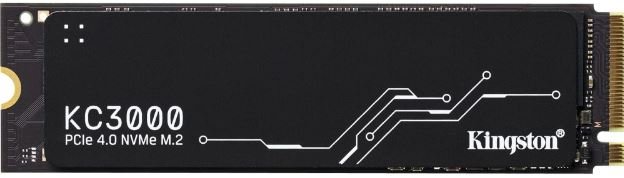
SPECIFICATIONS KINGSTON KC3000
Next, more detailed information about the SSD that will be tested (2TB unit):
SSD’s Software
Kingston also provides a program called “Kingston SSD Manager” through a download page on its website. This program offers various options for the management and control of their products, as we will see below.
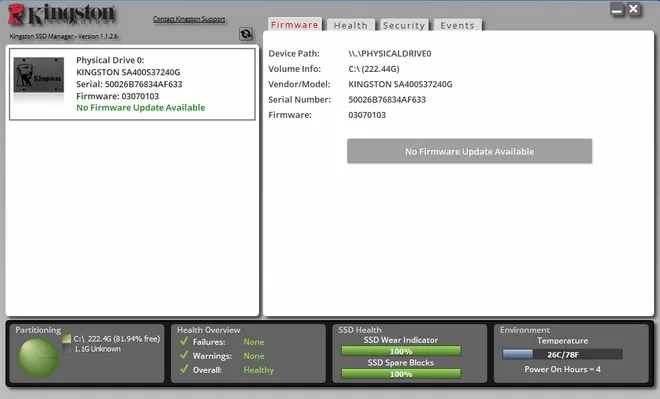
Among these functions, it is possible to update the firmware, check the integrity, and enable reading the SMART data of the SSD.
Unboxing
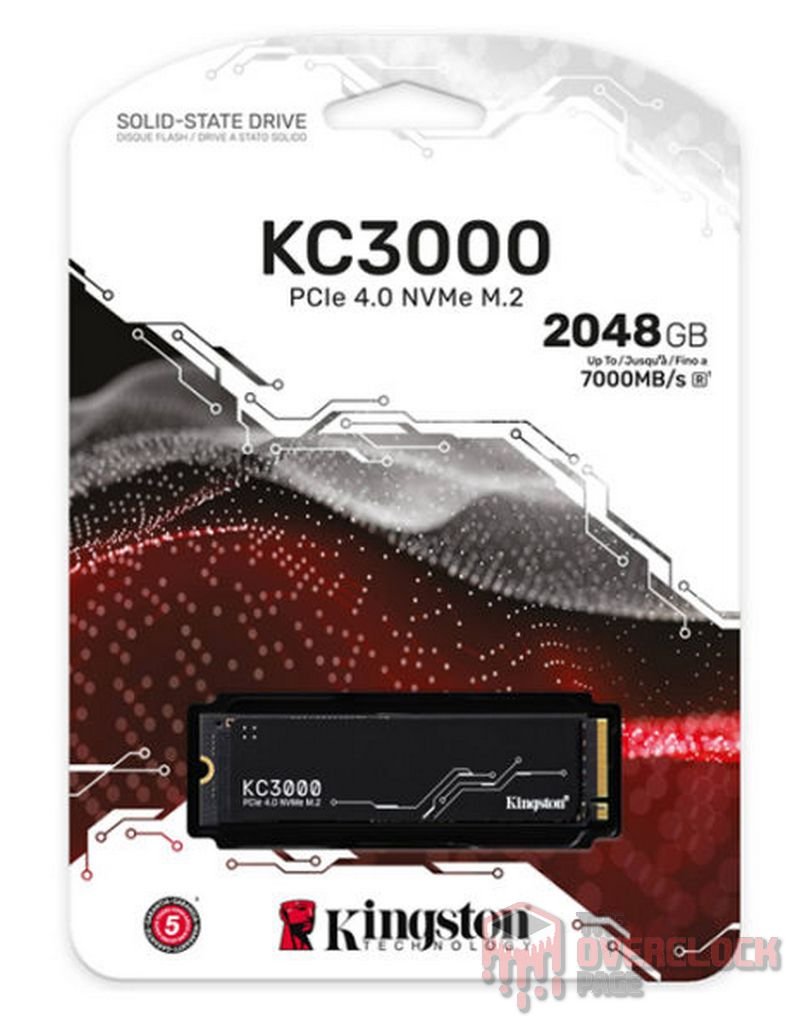
The product comes in a very simple paper packaging that, once opened, cannot be sealed again. However, the crucial aspect is what is inside the box – the SSD. It does not come with anything else, neither an instruction manual nor warranty terms.
The SSD on its front side features this “thin heat spreader,” which appears to be made of copper, while on the bottom, there is only a label displaying model information, serial number, etc.
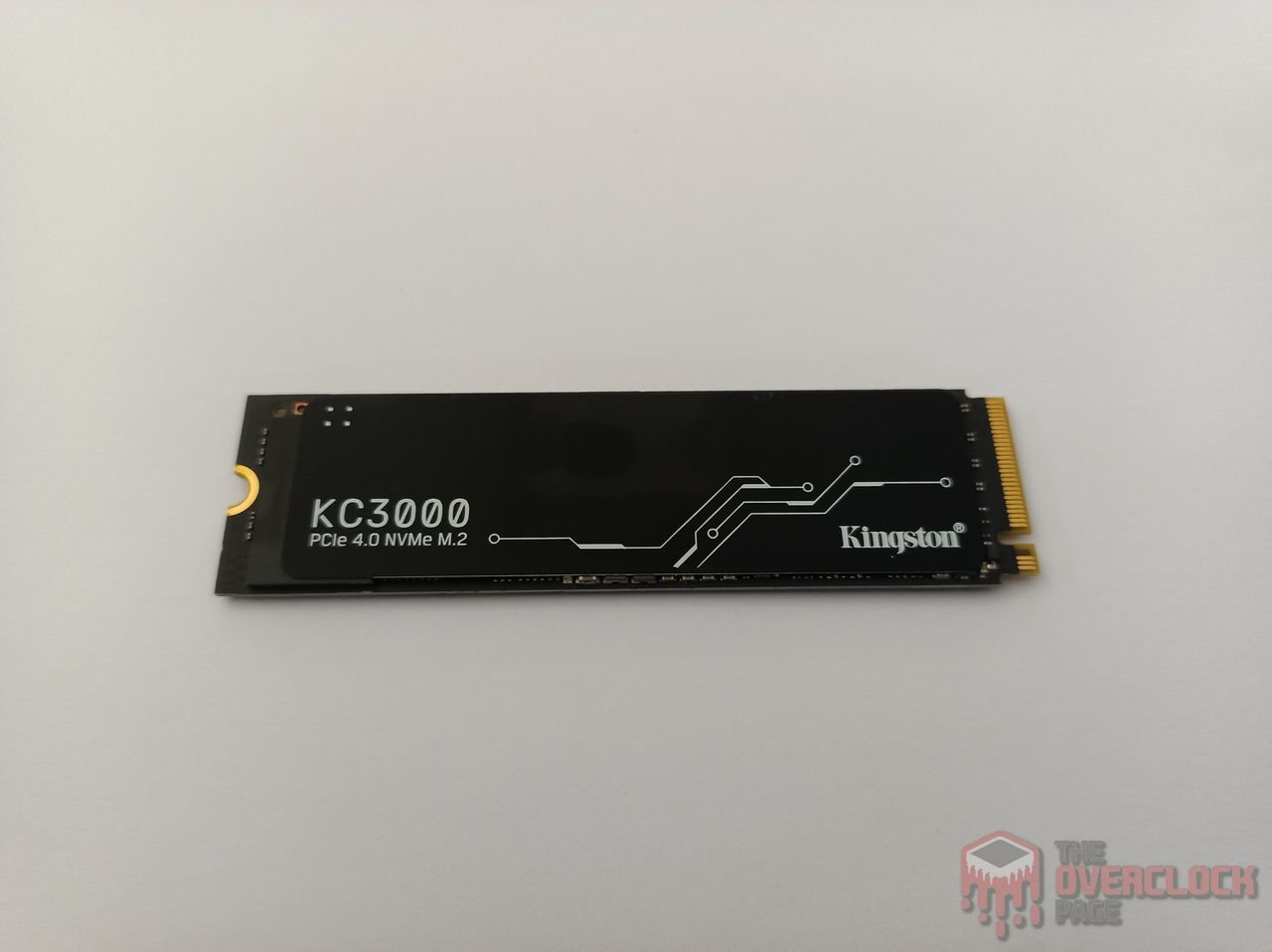
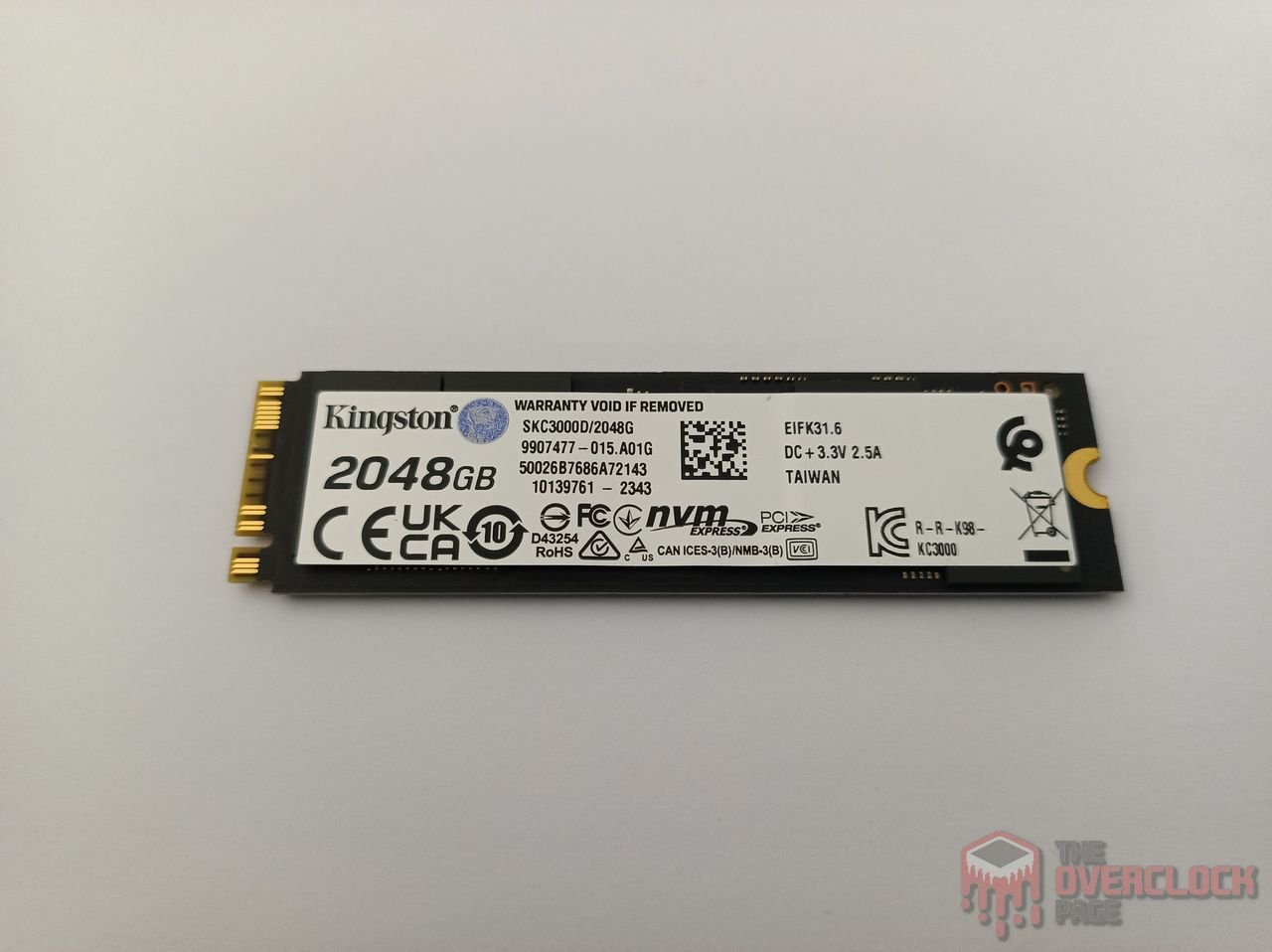
This SSD is double-sided, meaning it has components on both sides of the PCB. Upon removing the heat spreader and the label, it can be observed that on its front PCB, it includes 4 NAND Flash chips, a DRAM Cache, a PMIC, and its controller. Meanwhile, on the back PCB, there is another DRAM Cache module and an additional 4 NAND Flash chips.
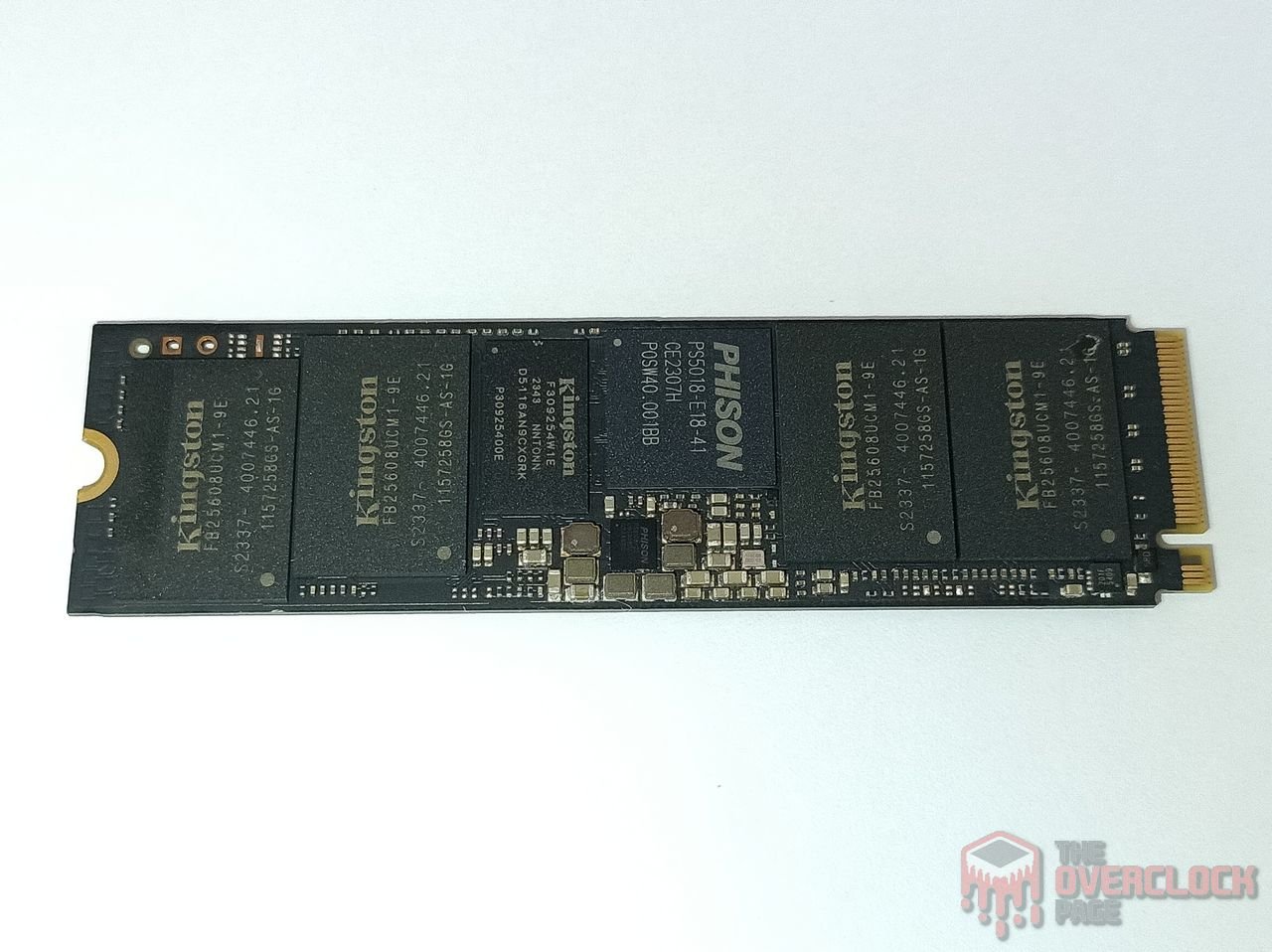

Controller
The SSD controller is responsible for handling data management, over-provisioning, garbage collection, among other background functions. Of course, this contributes to the SSD’s overall performance.
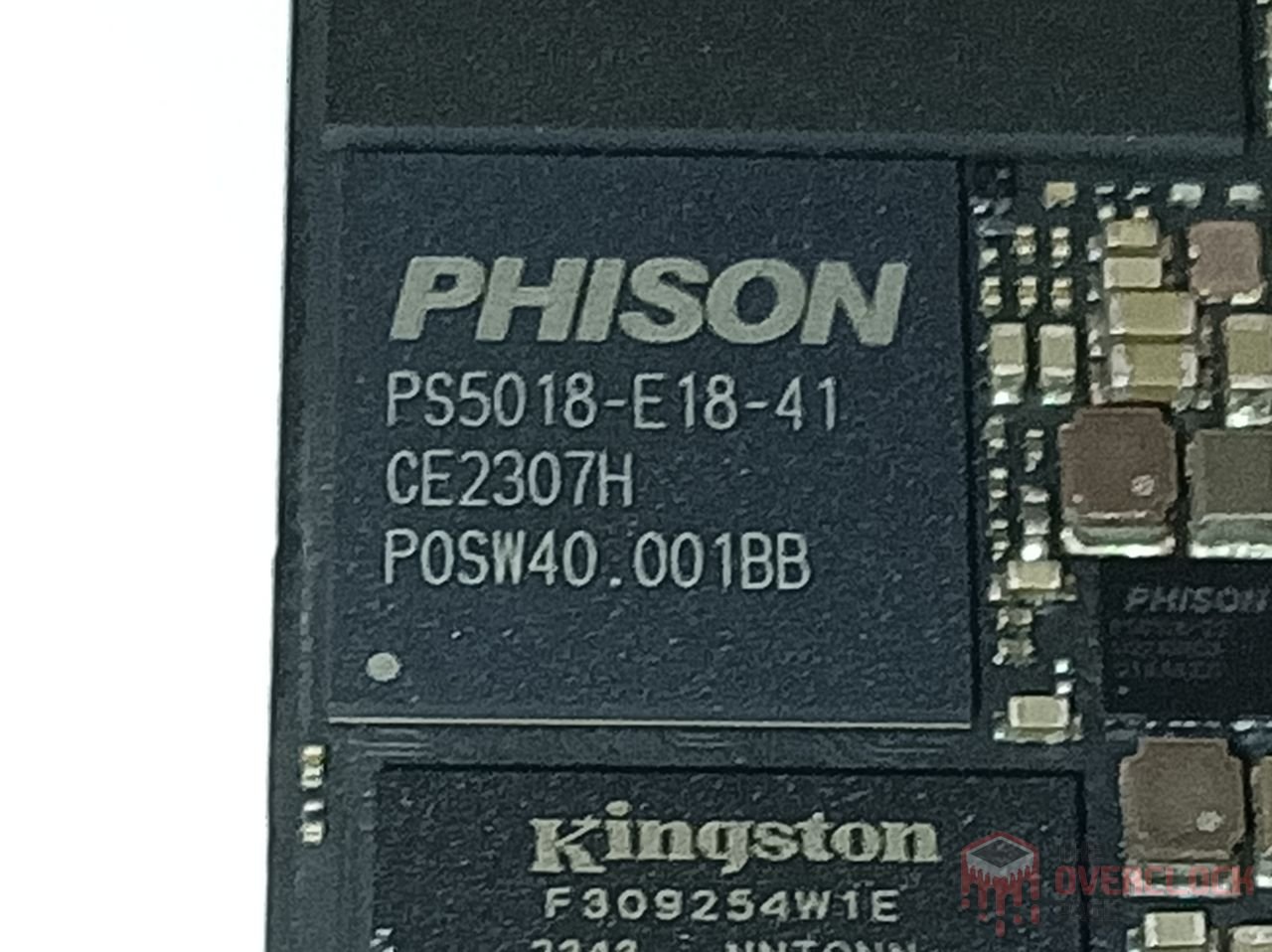
This SSD uses a high-end Phison controller: the PS5018-E18-41, an ISA ARM 32-bit “5” Cortex® R5 Penta-core model with a 12nm manufacturing process by TSMC. It operates at a clock speed of 1 GHz on its main cores. In this case, this controller is common in other top-of-the-line SSD projects such as Corsair MP600 HydroX, MP600 Pro, Galax Hall of Fame Extreme, the new Aorus Xtreme, and other models like the Sabrent Rocket 4 Plus, which we tested in the past.
In this case, it is a triple-core controller, meaning it has 3 main cores responsible for managing the NANDs, with support for a technology called “CoXprocessors” – which is essentially another Dual-Core Cortex® R5 core with a much lower frequency (usually 200~300 MHz). This is intended for simpler and predictive tasks, allowing the workload on the 3 main cores to be reduced. It also helps in decreasing power consumption and heat dissipation that could lead to thermal throttling, given that this SSD can consume almost 9W. One of these functions, for example, is to take care of repetitive sections of code and firmware functions that the main cores wouldn’t need to handle. It also manages data storage in the DRAM Cache, while the main cores are allocated for tasks such as Write/Read/Host operations.
This controller also supports up to 8 communication channels with a bus speed of up to 1600 MT/s. Each of these channels has support for up to 4 Chip Enable commands, allowing the controller to communicate with up to 32 Dies simultaneously using the Interleaving technique.
DRAM Cache or H.M.B.
Every top-of-the-line SSD aiming to deliver consistent high performance requires a buffer to store its mapping tables (Flash Translation Layer or Look-up table). This allows it to achieve better random performance and be more responsive.

We observed that this SSD uses 2 modules of DRAM Cache rebranded as Kingston, with the model D5116AN9CXGRK. These are DDR4 modules with a capacity of 8Gb (1GB) each, operating at frequencies of up to 2666 MT/s CL-19. In total, there is a capacity of 2GB DDR4.
NAND Flash
Regarding its storage integrated circuits, the 2TB SSD has 8 “FB25608UCM1-9E” NAND flash chips, which have been rebranded by Kingston. These NANDs are from the American manufacturer Micron, with the model B47R. In this case, they are dies of 512Gb (64GiB) each, containing 176 layers of data and a total of 195 gates, resulting in an array efficiency of 90.2%.
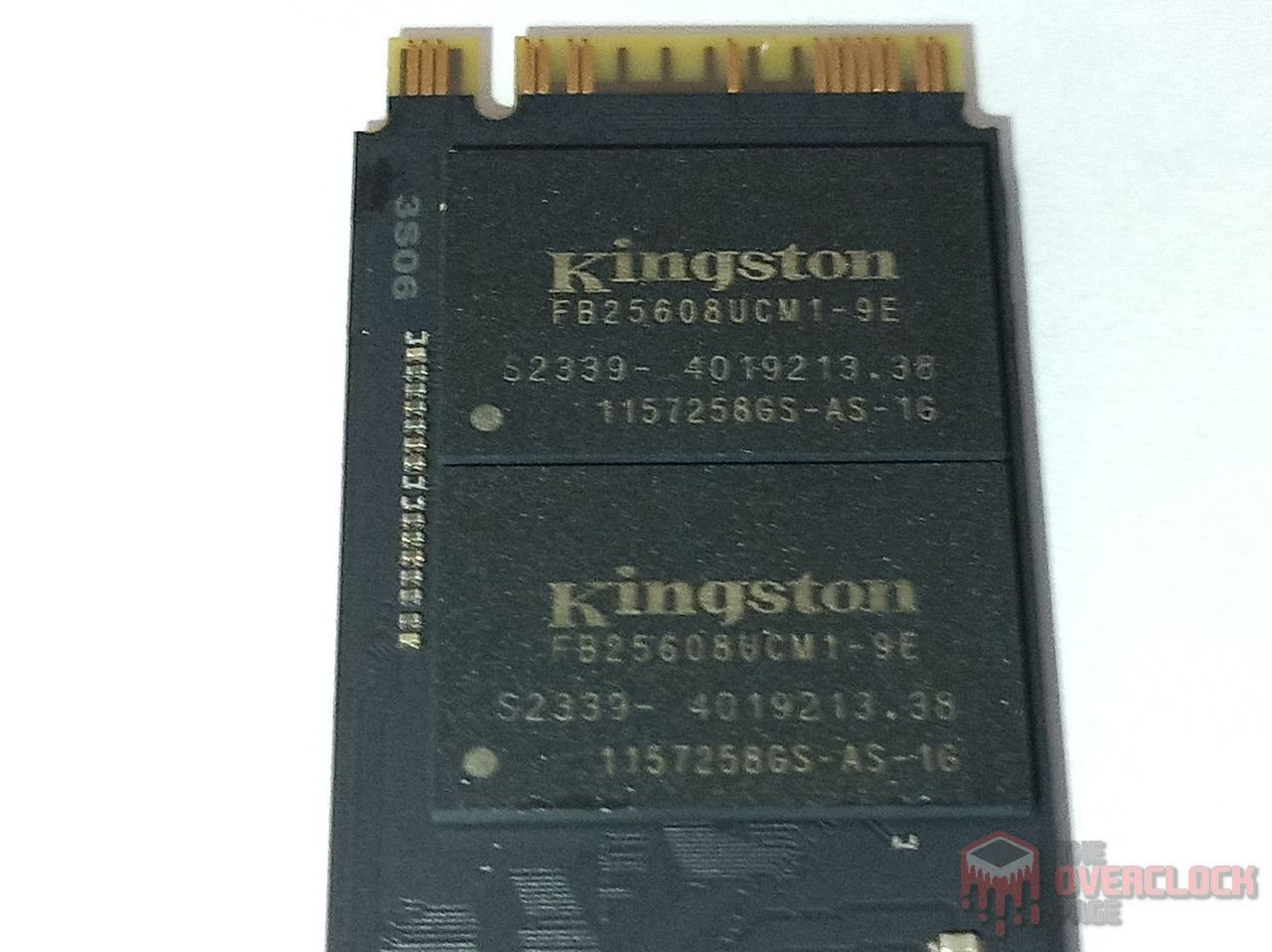
In this SSD, each NAND Flash chip consists of 4 dies with a density of 512Gb, totaling 256GB per NAND chip. This adds up to 2TB when considering all the NAND chips. They communicate with the controller using a maximum bus speed of 1600 MT/s for optimal performance.
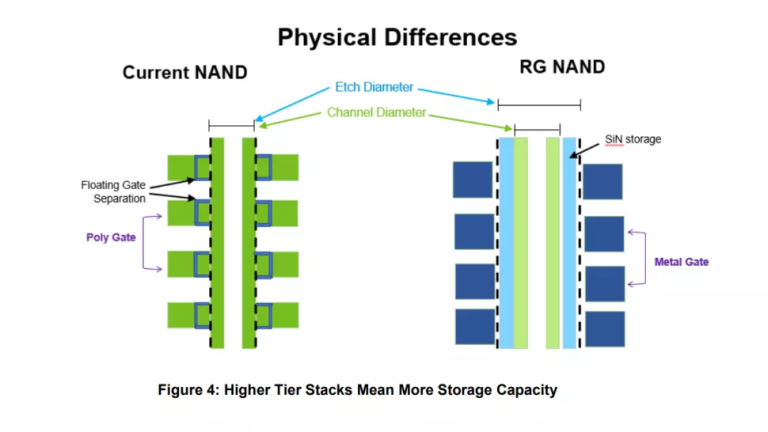
These dies feature a new Micron topology known as Replacement Gate (R.G.). This essentially combines the Charge Trap architecture with the CuA (CMOS-under-Array) technology. This configuration ensures that the Peripheral Circuitry does not occupy unnecessary space on the die, allowing for die sizes up to 30% smaller.
Another innovation they introduced was a significant reduction in the complexity of programming processes and even overhead. This was achieved by replacing Silicon Gates, which traditionally used Polysilicon, with metal only. Alongside this, they employ a different etching technique, essentially the drilling process they use for placing circuits and strings, reducing resistance.
PMIC (Power Delivery)

Just like any electronic component that performs some work, SSDs also have a power consumption level that can vary from a few milliwatts to nearly 10 watts, approaching the limit of some connectors or slots. The circuit responsible for all power management is the PMIC, which stands for “Power Management IC,” a chip responsible for providing power to other components.

In this SSD, it uses the well-known PMIC that Phison has been using for quite some time, the PS6108-22.
SSD Power States
As we always mention in energy consumption analyses, in this section, we will delve into more details about the power states of this SSD.
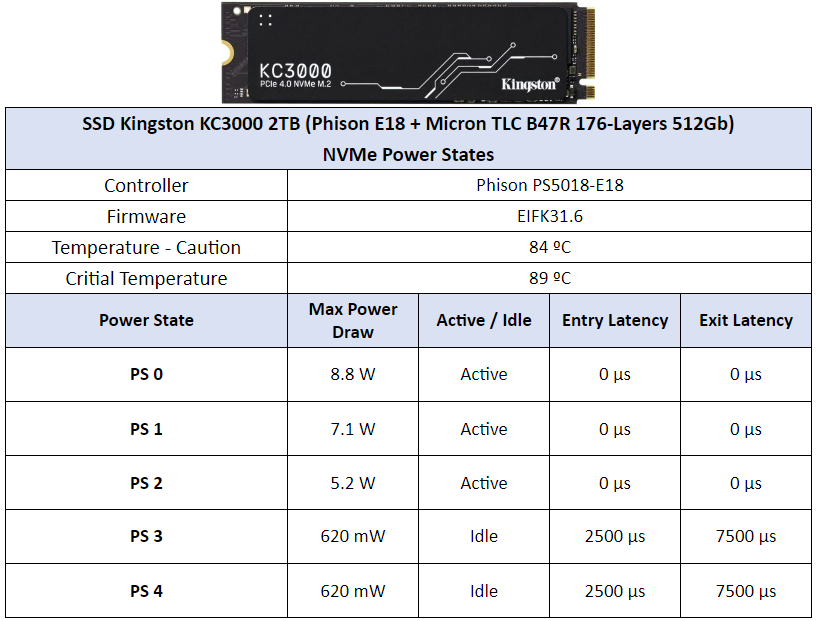
We can observe that both this SSD and the Fury Renegade have the same power state parameters, with identical consumption values and their respective latencies. They even share the same caution and protection temperatures. The SSD begins to experience thermal throttling at 84ºC, which is the point set by the manufacturer.
KC3000 CURIOSITIES
Similarly to integrated circuits in RAM modules, SSDs can undergo variations, including cases of component changes such as controllers and NAND flash chips.
As of the moment of this analysis, it hasn’t been possible to find other variants of this same SSD. However, in this section, I would like to address the “real” difference between the KC3000 and the Fury Renegade, which is not actually something significant.
If we take a closer look, the KC3000 comes in capacities of 512GB, 1024GB, 2048GB, and 4096GB, while the Fury comes in 500GB, 1000GB, 2000GB, and 4000GB. This signifies that the Fury Renegade has a slightly larger allocation of over-provisioning, which ends up contributing to reducing write amplification. This, in turn, helps increase its durability, explaining why the TBW (Terabytes Written) of the Fury Renegade is a bit higher, even though both SSDs have the same hardware configuration.
TEST BENCH
– OS: Windows 11 Pro 64-bit (Build: 23H2)
– CPU: Intel Core i7 13700K (5.7GHz all core) (E-cores e Hyper-threading desabled)
– RAM: 2 × 16 GB DDR4-3200MHz CL-16 Netac (c/ XMP)
– Motherboard: MSI Z790-P PRO WIFI D4 (Bios Ver.: 7E06v18)
– GPU: RTX 4060 Galax 1-Click OC (Drivers: 537.xx)
– (OS Drive): SSD Solidigm P44 Pro 2TB (Firmware: 001C)
– DUT SSD: SSD Kingston KC3000 2TB (Firmware: EIFK31.6)
– Chipset Driver Intel Z790: 10.1.19376.8374.
– Windows: Indexing disabled to avoid affecting test results.
– Windows: Windows updates disabled to avoid affecting test results
– Windows: Most Windows applications disabled from running in the background.
– Boot Windows: Clean Image with only Drivers
– Test pSLC Cache: The SSD is cooled by fans to prevent thermal throttling, ensuring it doesn’t interfere with the test results.
– Windows: Antivirus disabled to minimize variation in each round.
– DUT SSDs: Used as a secondary drive, with 0% of space being utilized, and other tests conducted with 50% of space utilized to represent a realistic scenario.
– Quarch PPM QTL1999 – Power consumption test: conducted with three parameters—idle, where the drive is left as a secondary, and after a period of idle, a one-hour write test is performed, and the average power consumption is recorded
WHERE TO BUY
Amazon affiliate links below:
CRYSTALDISKMARK
We conducted synthetic sequential and random tests with the following configurations:
Sequential: 2x 1 GiB (Blocks 1 MiB) 8 Queues 1 Thread
Random: 2x 1 GiB (Blocks 4 KiB) 1 Queue 1/2/4/8/16 Threads
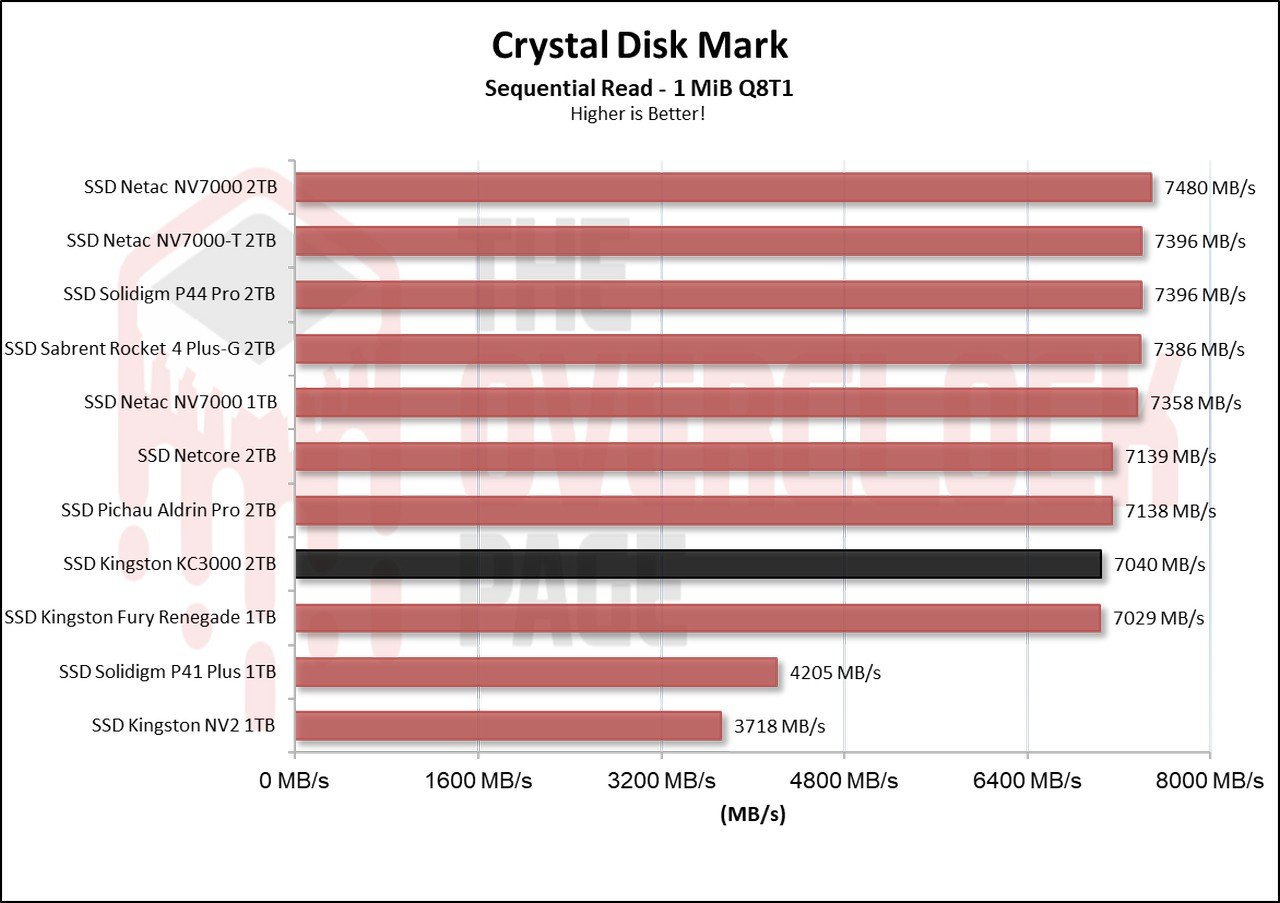
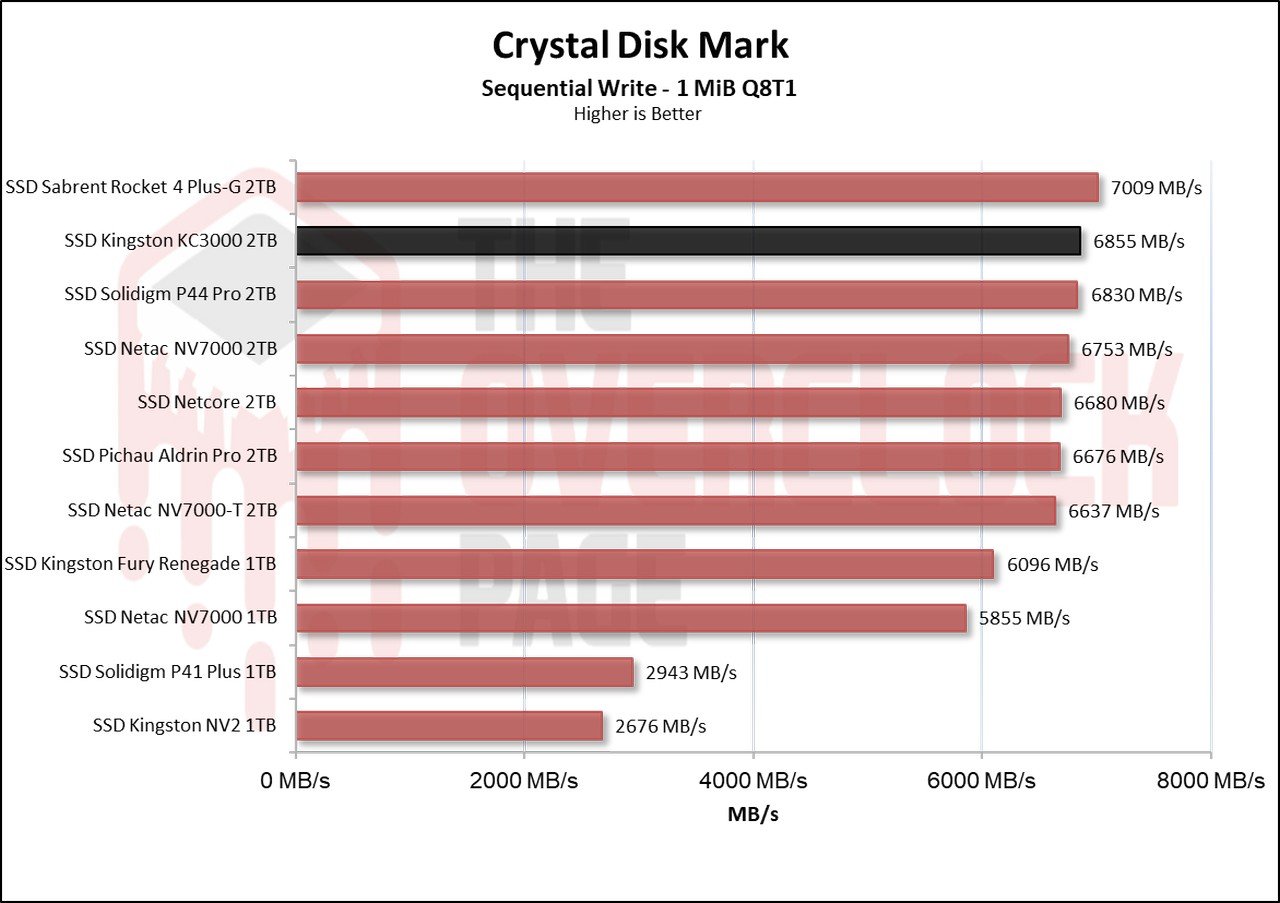
When testing their sequential speeds, both the KC3000 and the Renegade exhibit identical read speeds. Only in their write speeds, the Renegade is 800 MB/s slower, but this is due to it being the 1TB SSD; the 2TB version has similar or even higher sequential write performance than the KC3000.
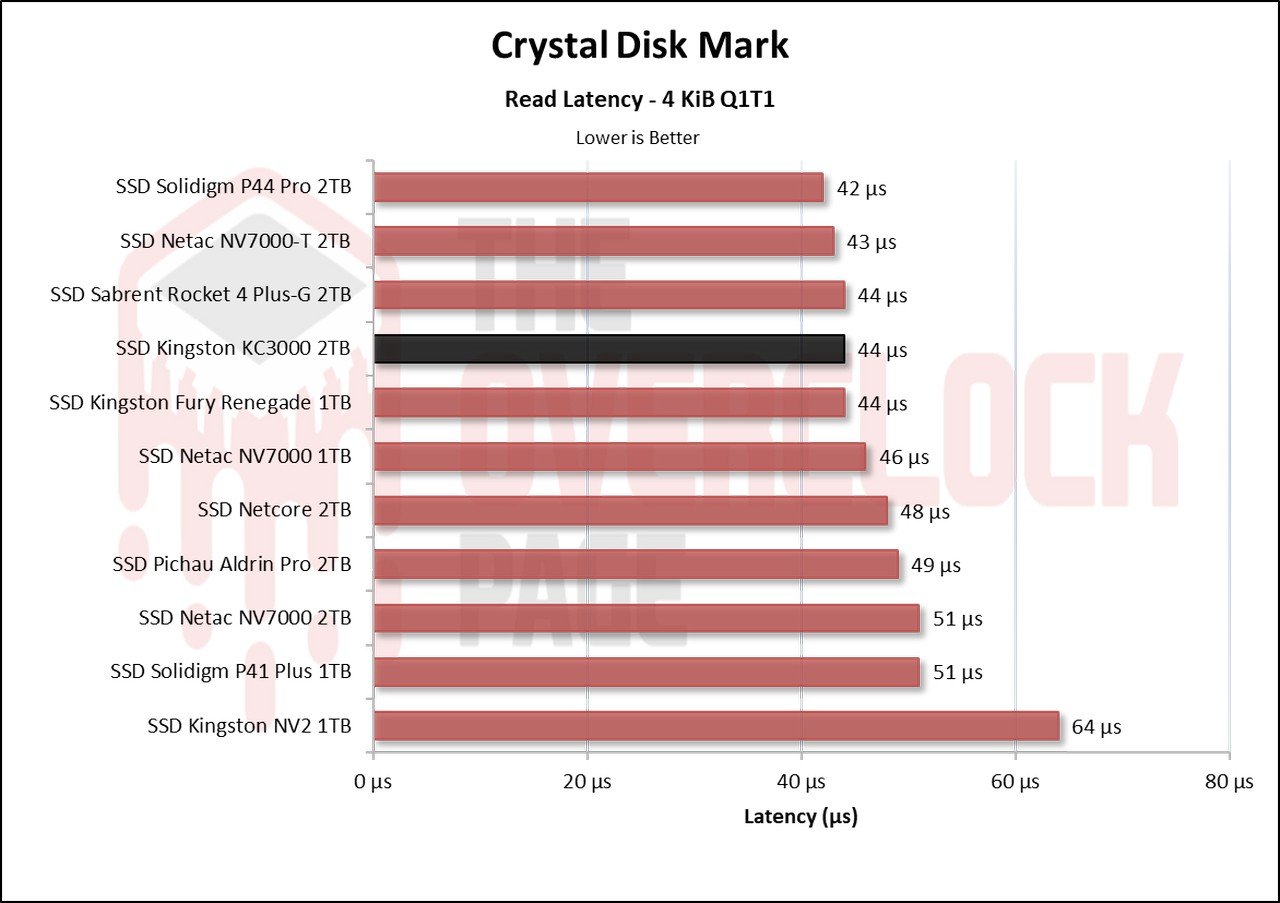
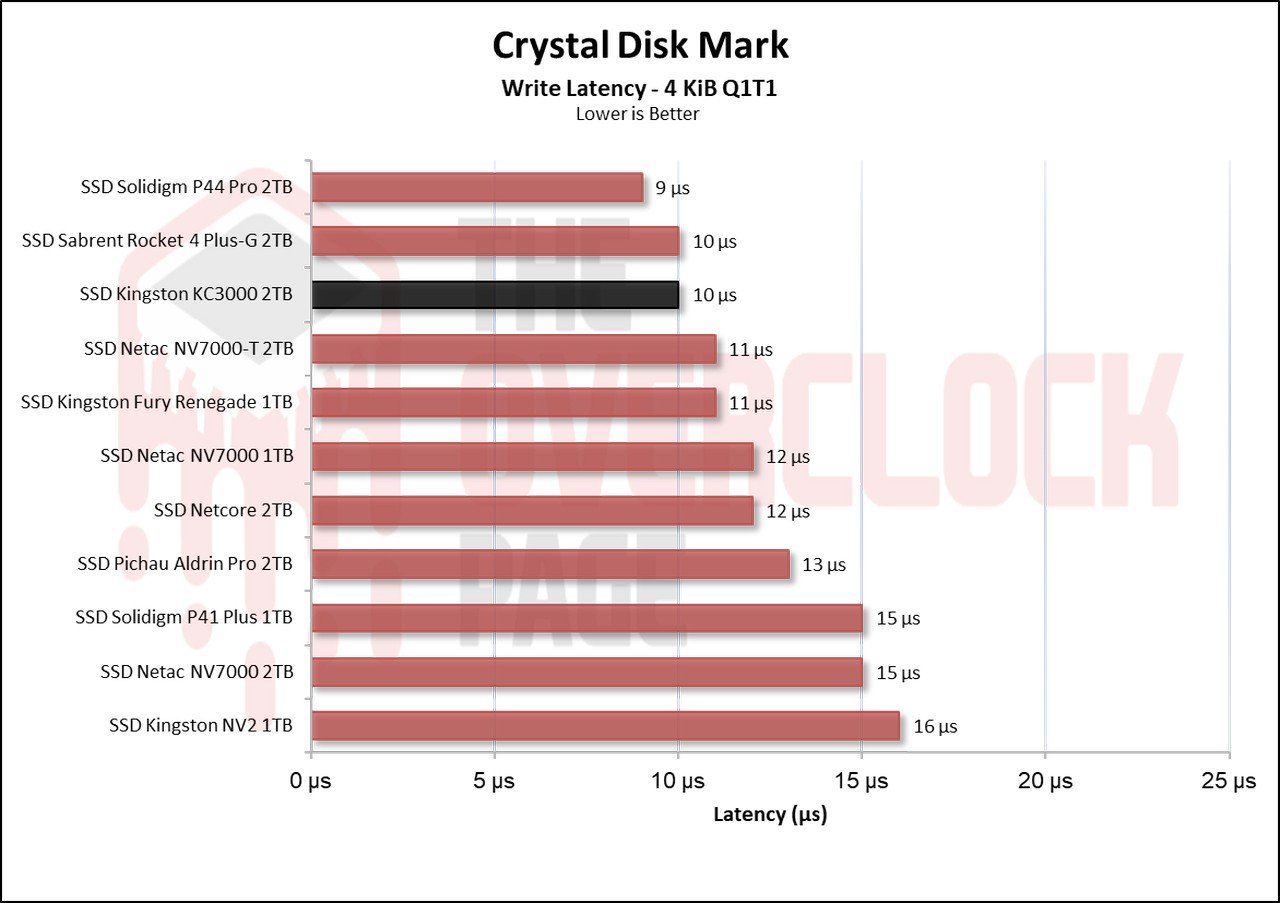
In terms of latency, again, both exhibit the same performance with a slight round-to-round variation, and both performed very well.
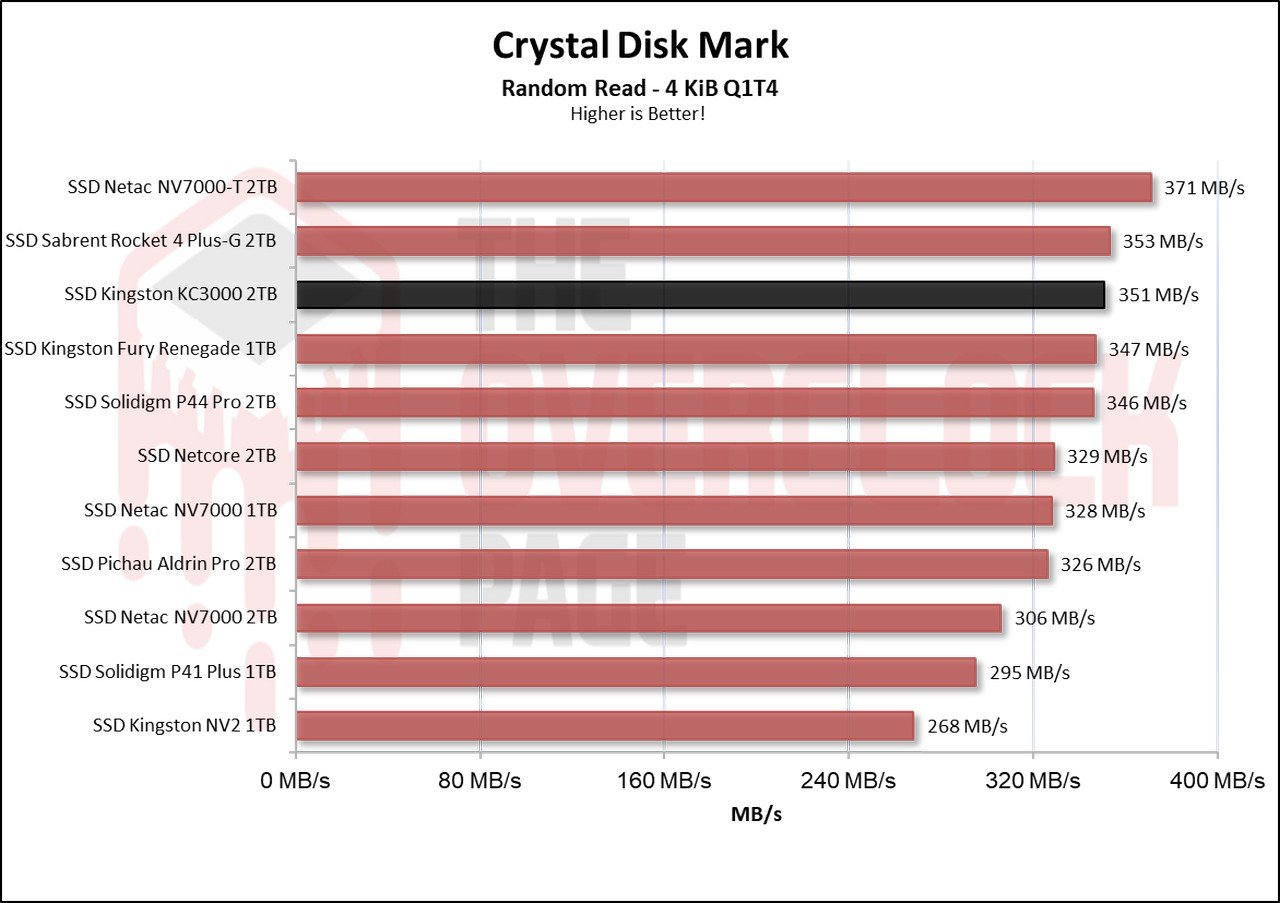
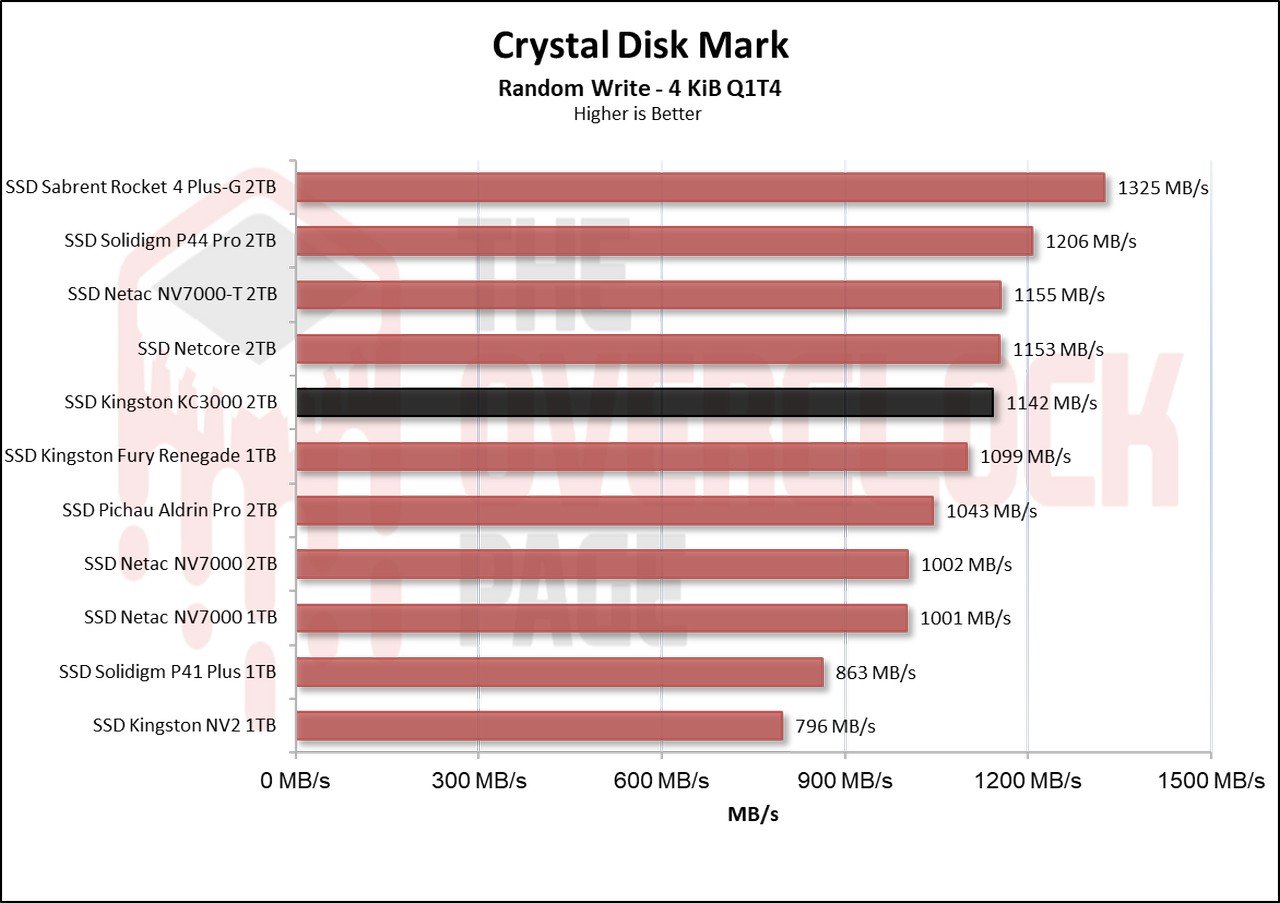
When testing their random speeds at a queue depth of 4, both Kingston SSDs achieve speeds surpassing the 1GB/s mark in writing, which is noteworthy. There is a small difference between them, both in read and write speeds.
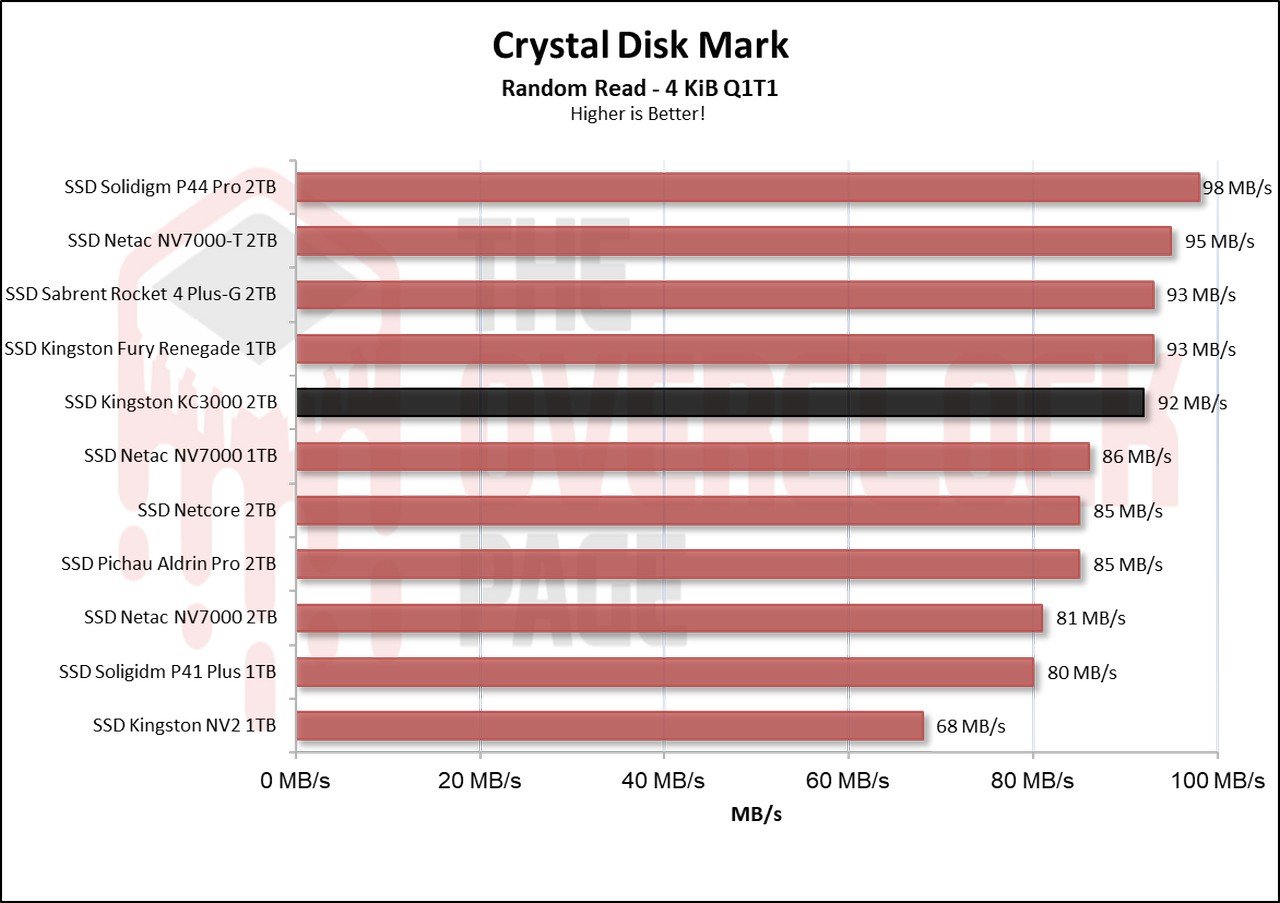
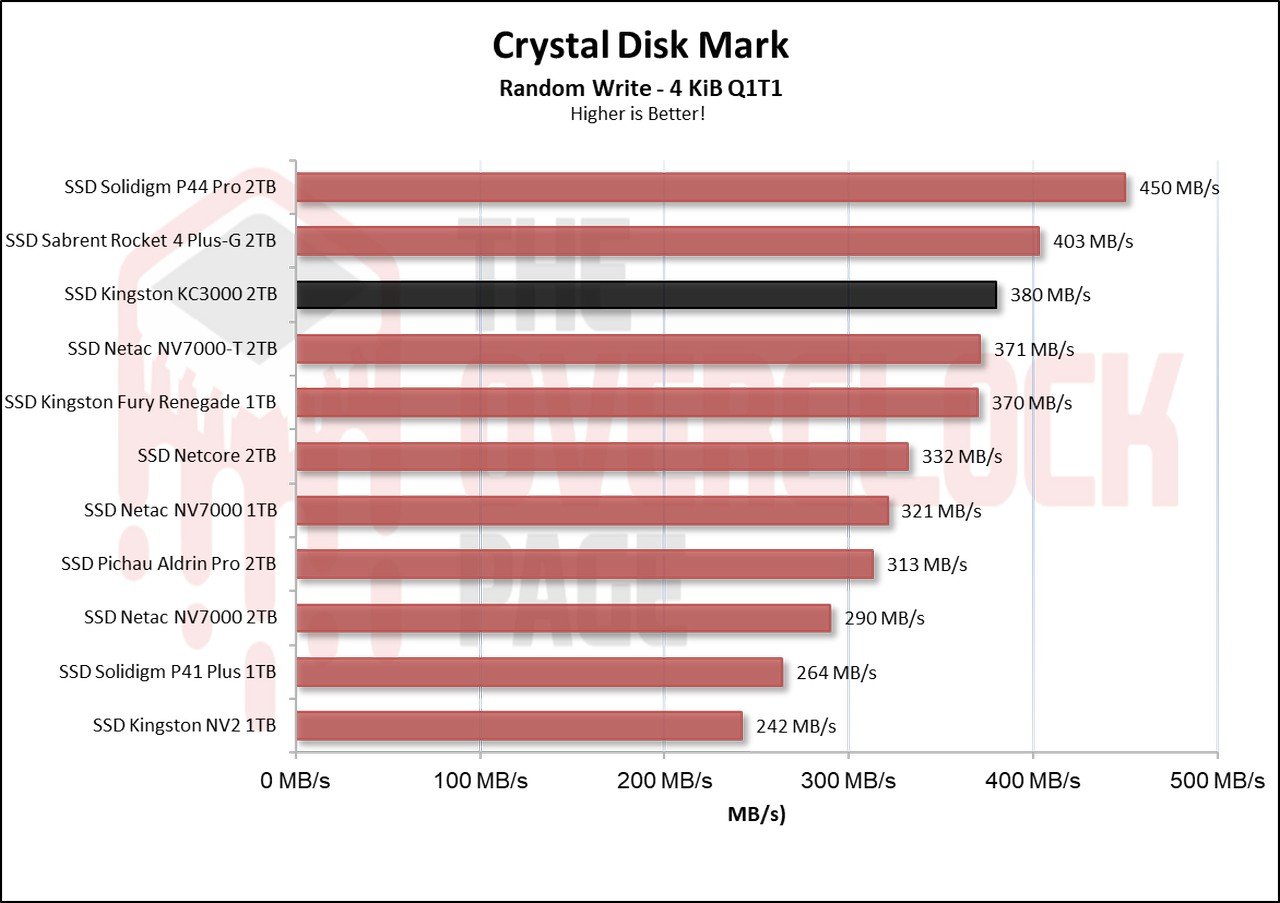
When allocating only 1 thread to better represent a typical everyday workload, we observe similar results. Both perform well, like other SSDs, reaching over 90 MB/s in read speeds, which is quite impressive, and their write speeds surpassing 350 MB/s.
ATTO Disk Benchmark QD1 and QD4
We conducted a test using ATTO to observe the speed of the SSDs at different block sizes. In this benchmark, it was configured as follows:
Blocks: 512 Bytes up to 8 MiB
File Size: 256MB
Queue Depth: 1 e 4.
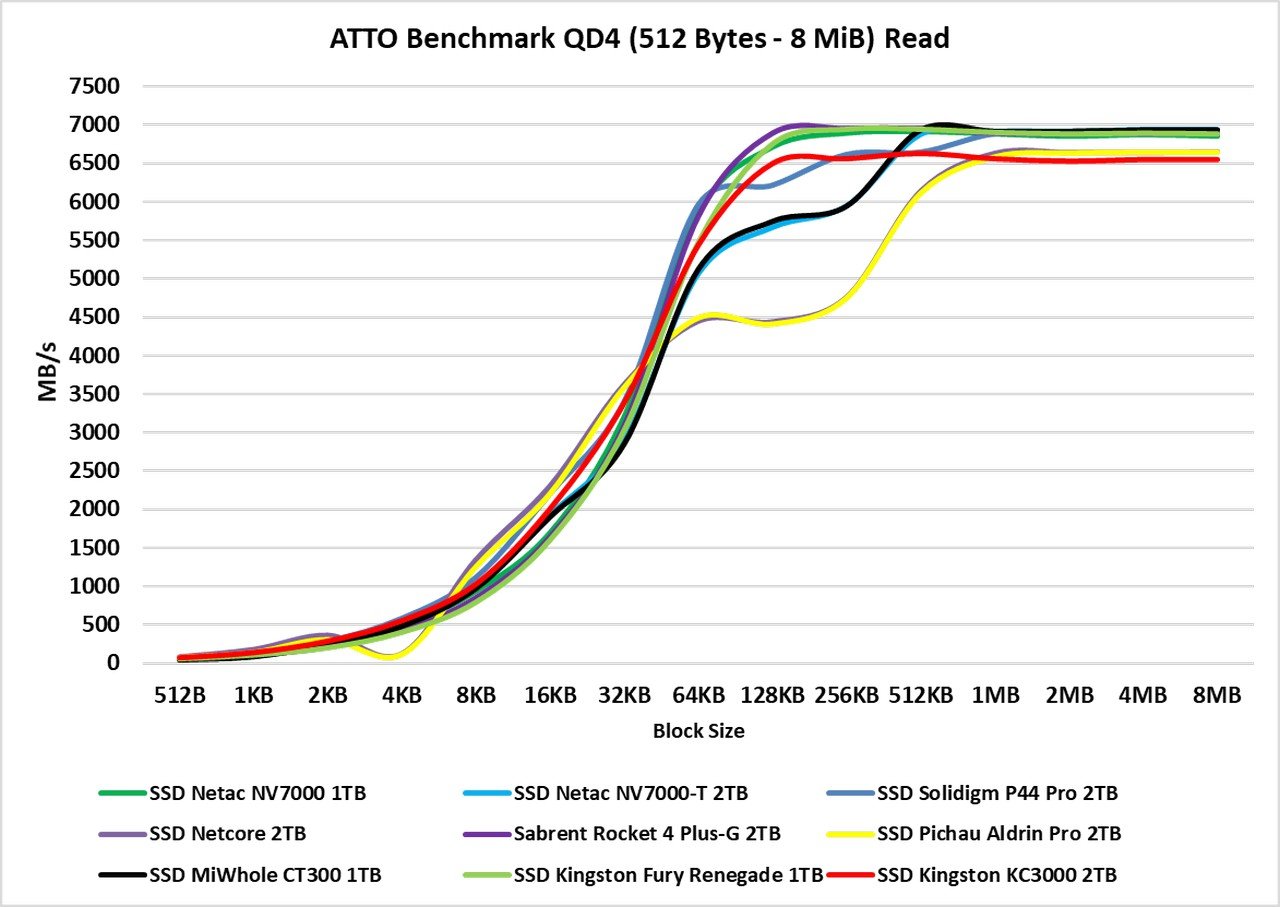
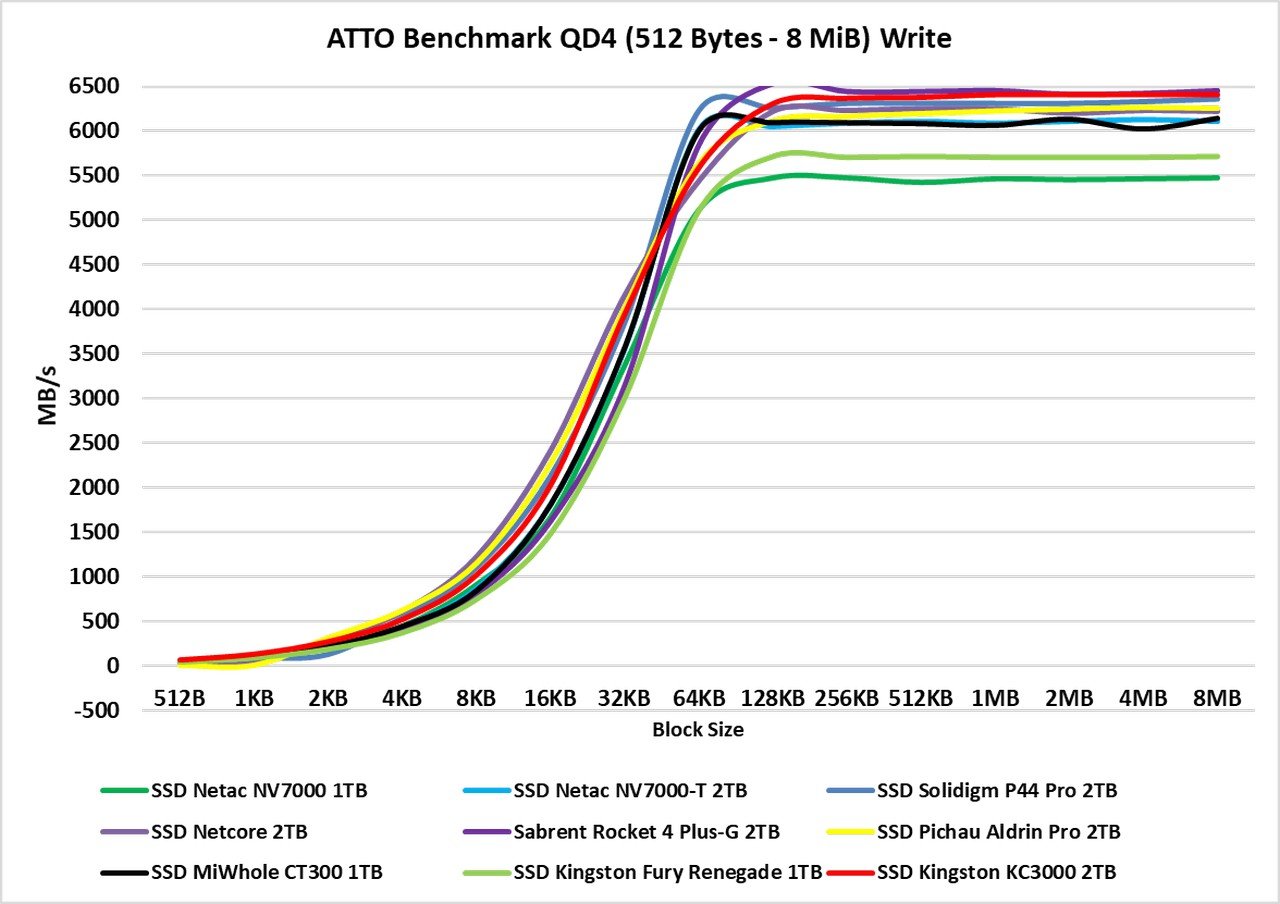
The ATTO Disk Benchmark is software that performs a sequential speed test with compressed files, simulating a data transfer load similar to that in Windows. Typically, we observe block sizes ranging from 128KB to 1 MiB. In the reading test, we again see a tie between the KC3000 and the Fury Renegade, both exhibiting performance similar to other SSDs with the Phison E18 controller, such as the Sabrent drives.
In the writing test, the difference was a bit smaller, but this is expected as we are comparing the 2TB KC3000 with the 1TB Fury Renegade.
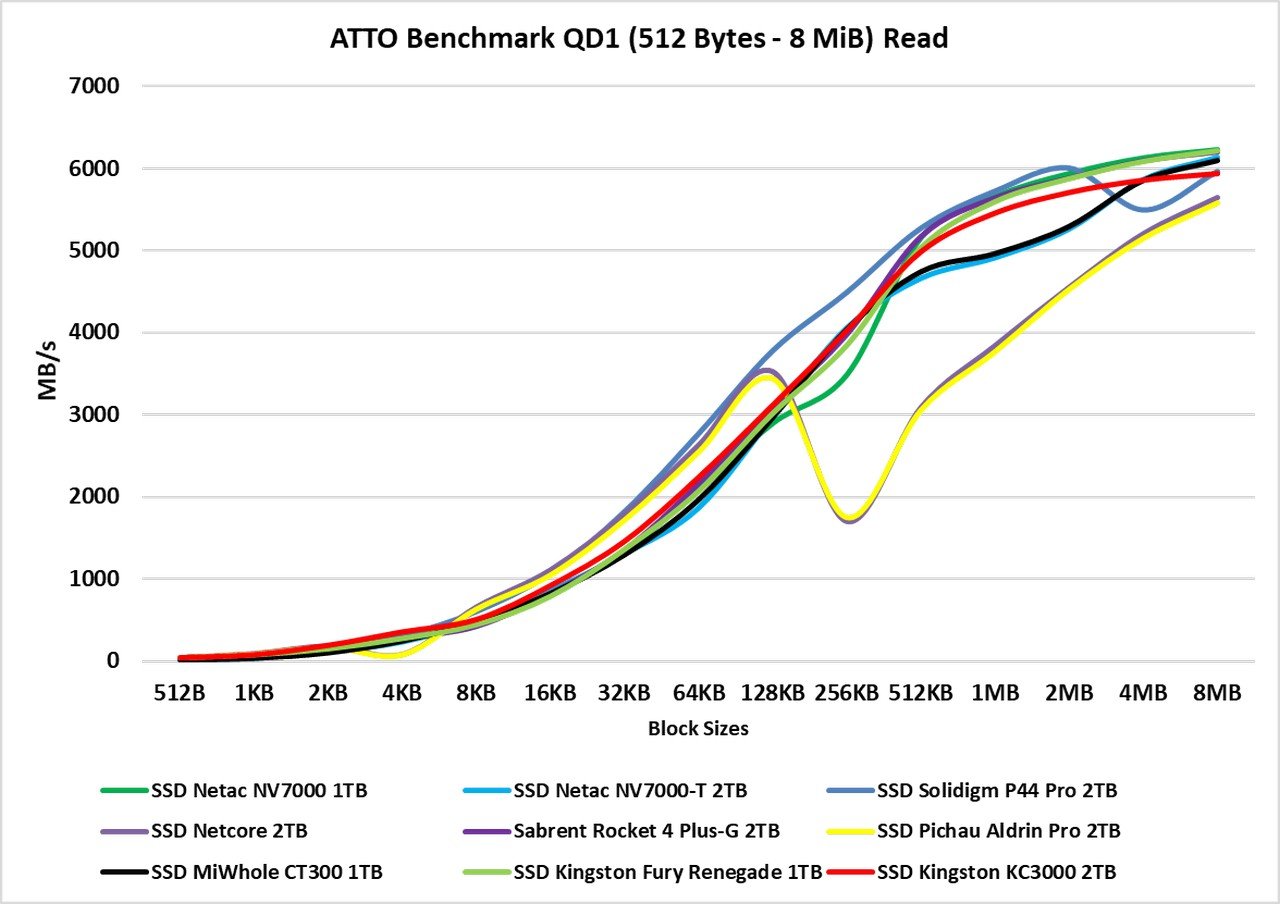
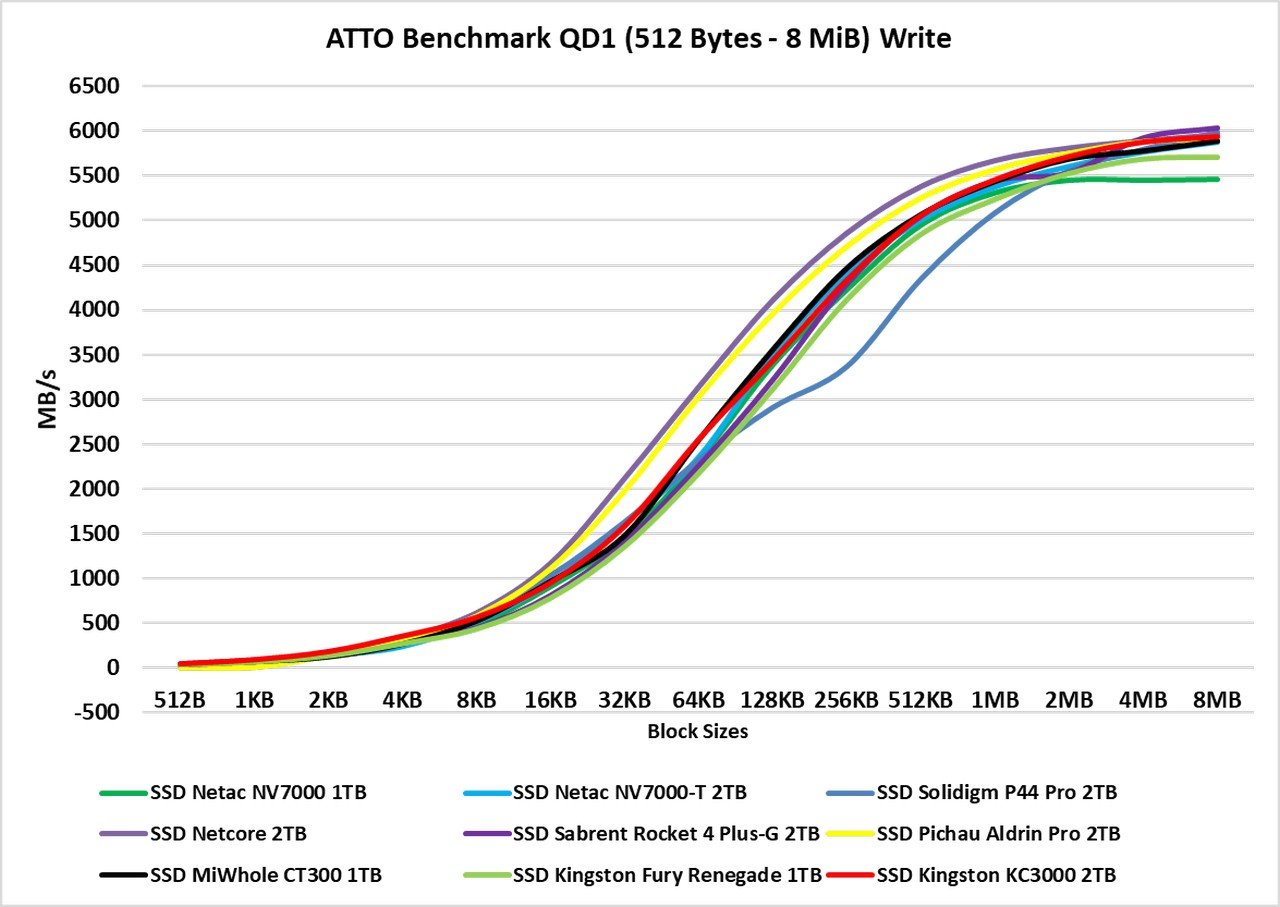
Once again, we observe the same behavior from these two SSDs, and in their write performance, the difference was almost imperceptible throughout most of the benchmark.
3DMark – Storage Benchmark

In this benchmark, various storage-related tests are conducted, including game loading tests for games like Call of Duty Black Ops 4, Overwatch, recording and streaming gameplay at 1080p 60 FPS with OBS, installation of some games, and file transfers of game folders.
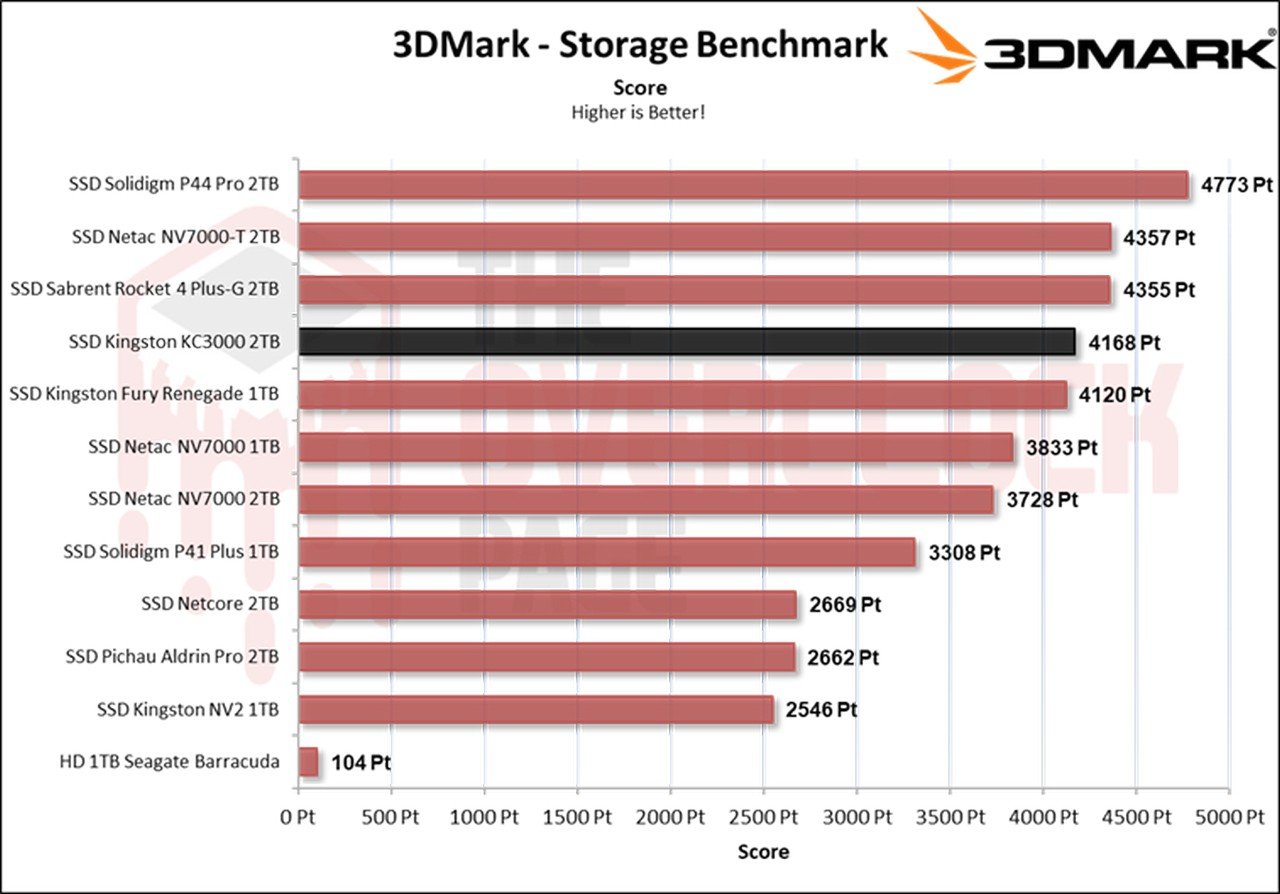
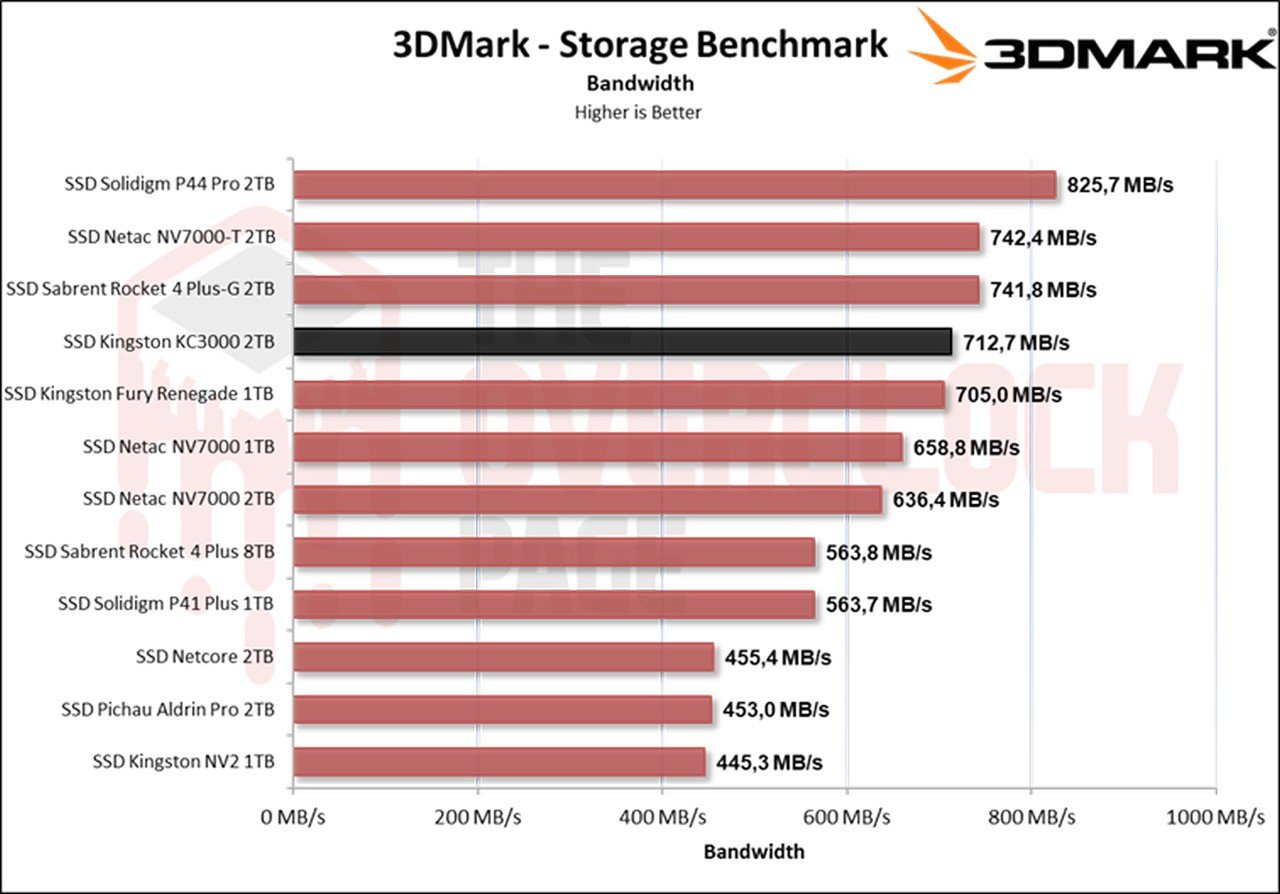
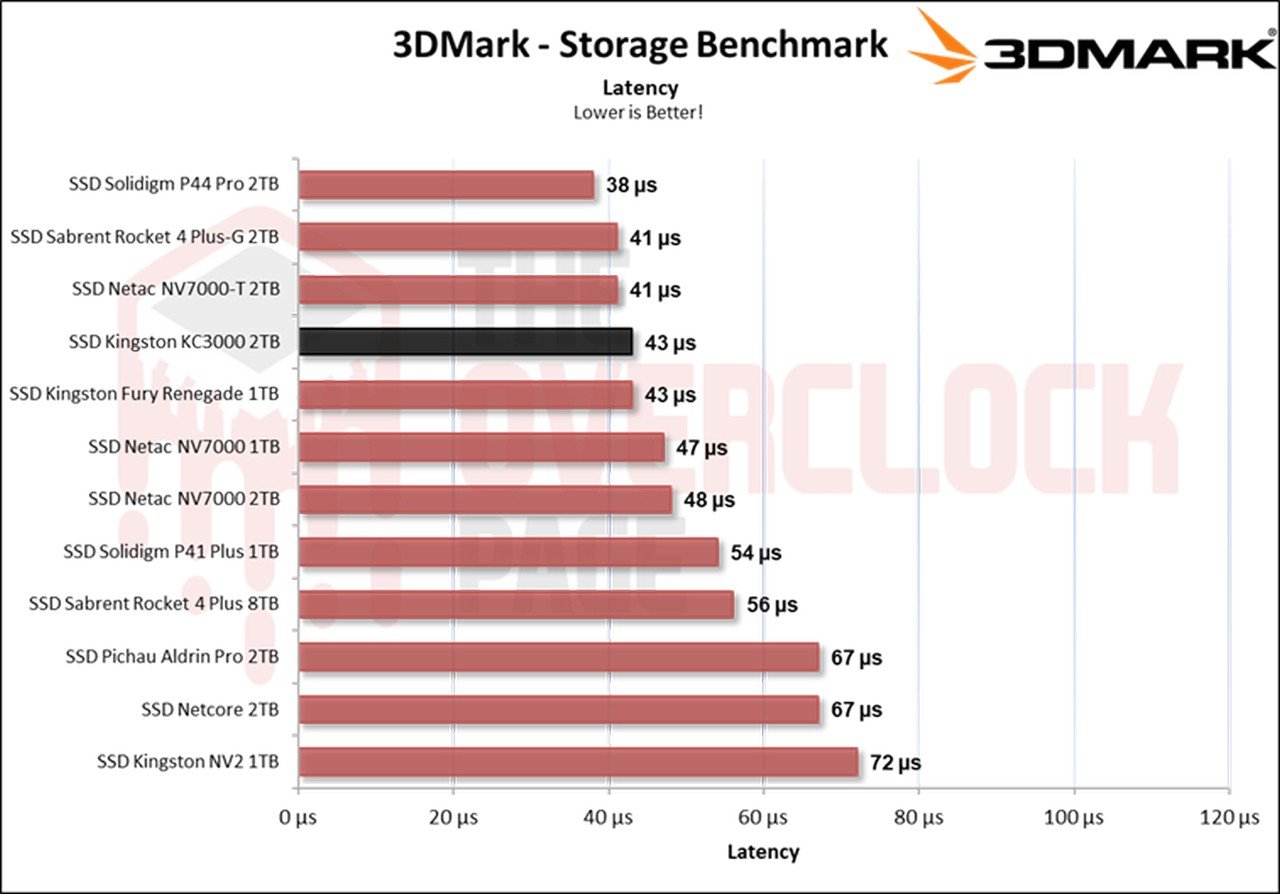
In this benchmark with a greater focus on casual environments, such as game simulation and streaming among other simulations, we can observe that both Kingston SSDs yielded good results. However, the 1TB Fury Renegade came very close to the 2TB KC3000, suggesting that the 2TB Fury might even surpass the KC3000.
PCMARK 10 – FULL SYSTEM DRIVE BENCHMARK
In this test, the Storage Test tool was used, specifically the “Full System Drive Benchmark,” which conducts both light and heavy tests on the SSD.

Among these traces, we can observe tests such as:
- Boot Windows 10
- Adobe After Effects: Launch the application until it is ready for use
- Adobe Illustrator: Launch the application until it is ready for use
- Adobe Premiere Pro: Launch the application until it is ready for use
- Adobe Lightroom: Launch the application until it is ready for use
- Adobe Photoshop: Launch the application until it is ready for use
- Battlefield V: Loading time until the main menu
- Call of Duty Black Ops 4: Loading time until the main menu
- Overwatch: Loading time until the main menu
- Using Adobe After Effects
- Using Microsoft Excel
- Using Adobe Illustrator
- Using Adobe InDesign
- Using Microsoft PowerPoint
- Using Adobe Photoshop (Intensive use)
- Using Adobe Photoshop (Lighter use)
- Copying 4 ISO files, a total of 20GB, from a secondary drive (Write test)
- Performing the copy of the ISO file (Read-write test)
- Copying the ISO file to a secondary drive (Read)
- Copying 339 JPEG files (Photos) to the tested drive (Write)
- Creating copies of these JPEG files (Read-write)
- Copying 339 JPEG files (Photos) to another drive (Read)
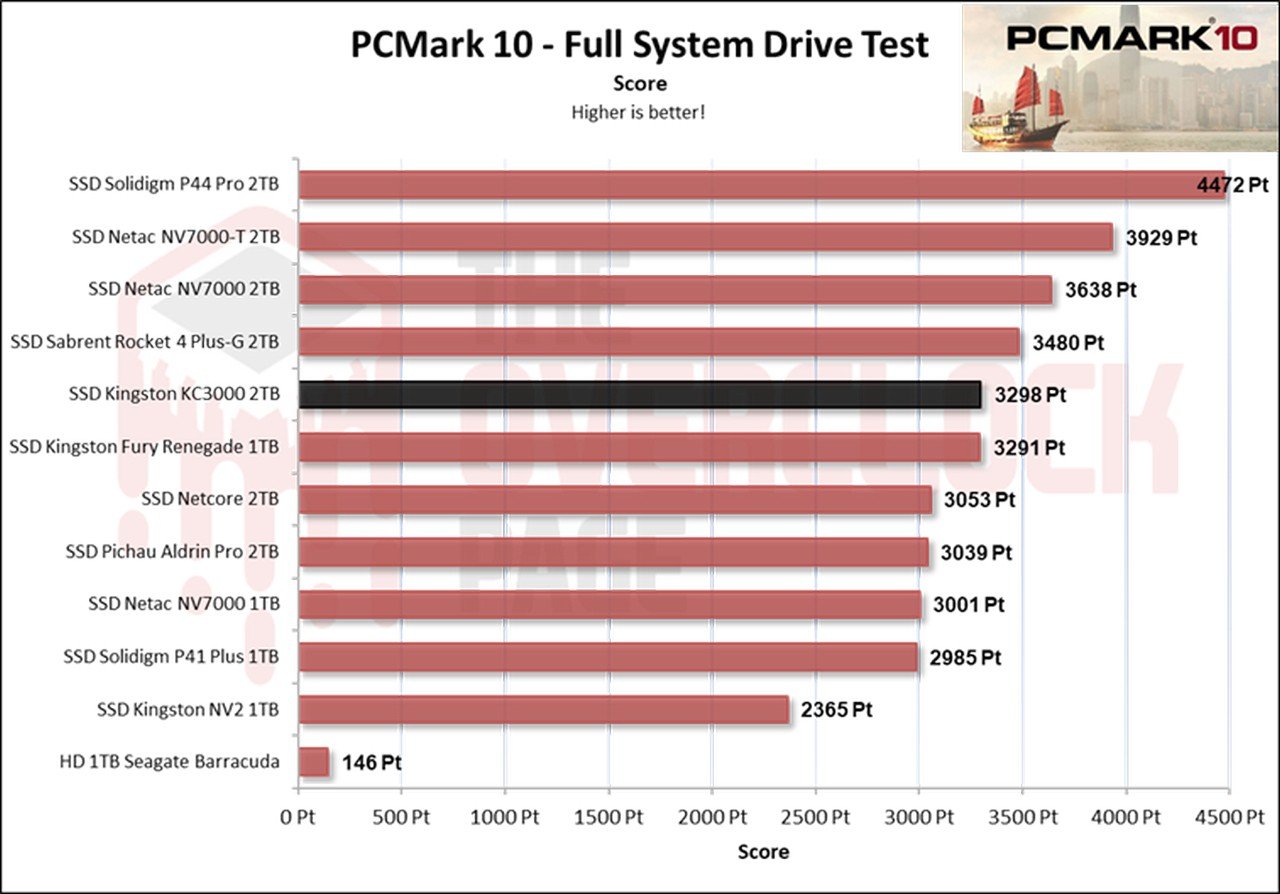
In this scenario, which is a practical benchmark with a slightly greater focus on writing than the 3DMark, we once again see the KC3000 taking the lead. This is likely due to its larger capacity, allowing for more significant parallelism.
PROJECT – Adobe Premiere Pro 2021
Next, we used Adobe Premiere to measure the average time it takes to open a project of about 16.5GB with a 4K resolution, 120Mbps bitrate, and full of effects until it was ready for editing. It’s worth noting that the tested SSD is always used as a secondary drive without the operating system installed, as this could affect the result, leading to inconsistencies.
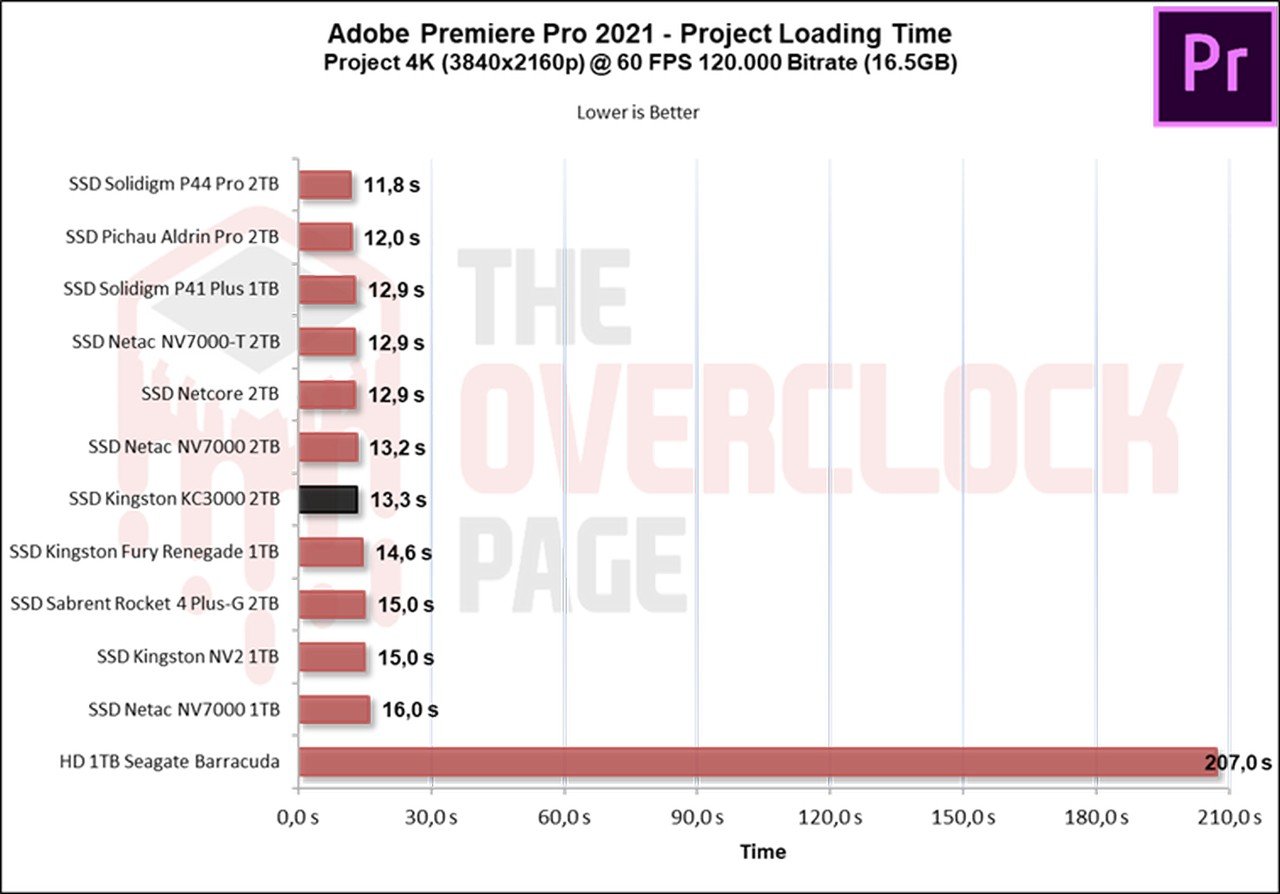
When using Premiere to load a project of over 16GB, we can see that the difference between one SSD and the other was just over 1 second, which is not much. Only in scenarios where projects are several times larger can we expect to feel a more significant difference.
GAME LOADING TIMES AND WINDOWS BOOT TIME
We conducted a comparison between multiple SSDs and an HDD, using a clean installation of Windows 10 Build 22H2 along with the benchmark of Final Fantasy XIV in campaign mode. The test consists of the best result after three consecutive system boots, considering the total time until it finishes on the desktop with the score provided by the application. Therefore, it is slower than the boot until the desktop screen is displayed.
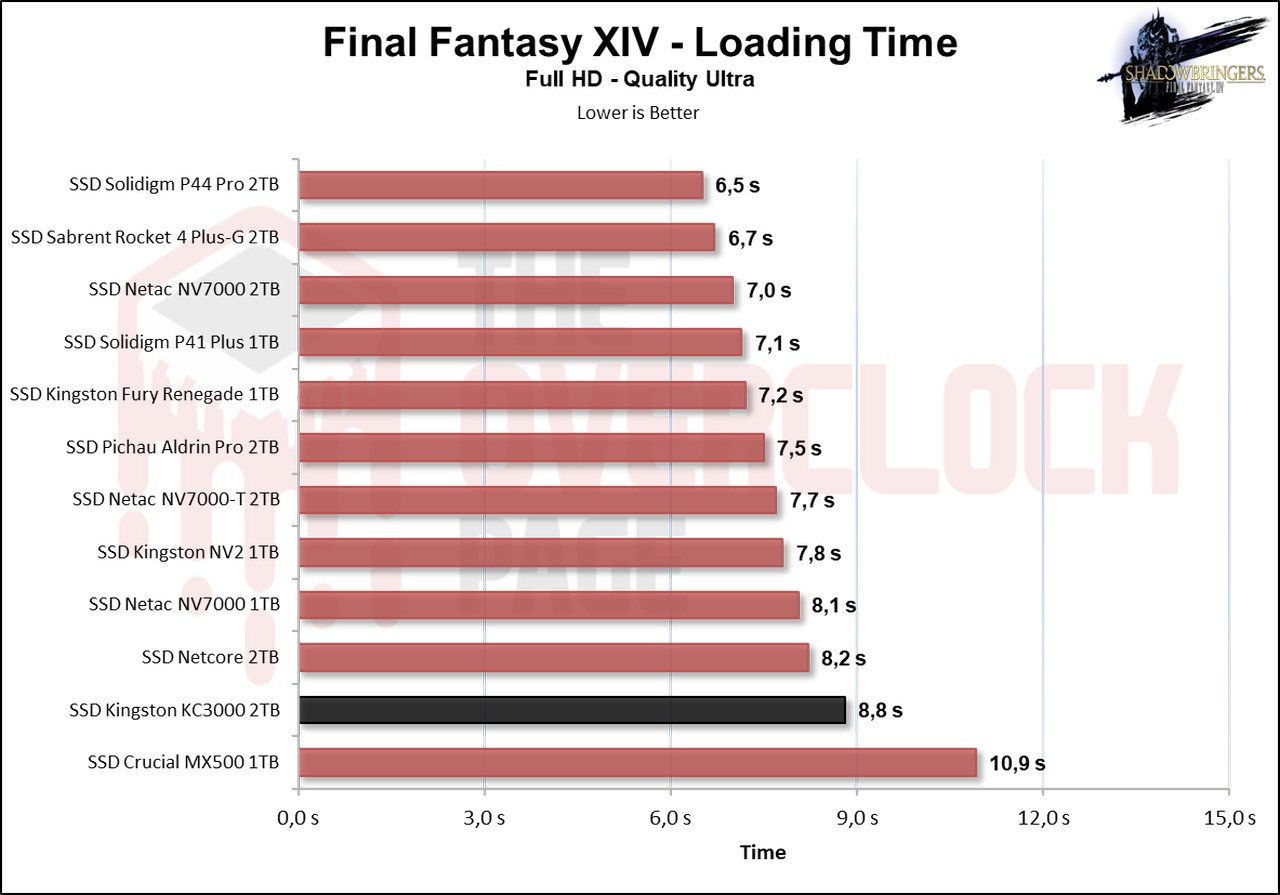
Here, interestingly, the KC3000 took the longest time to load the game, while the Renegade was 1.6 seconds faster, although, once again, this is an insignificant difference.
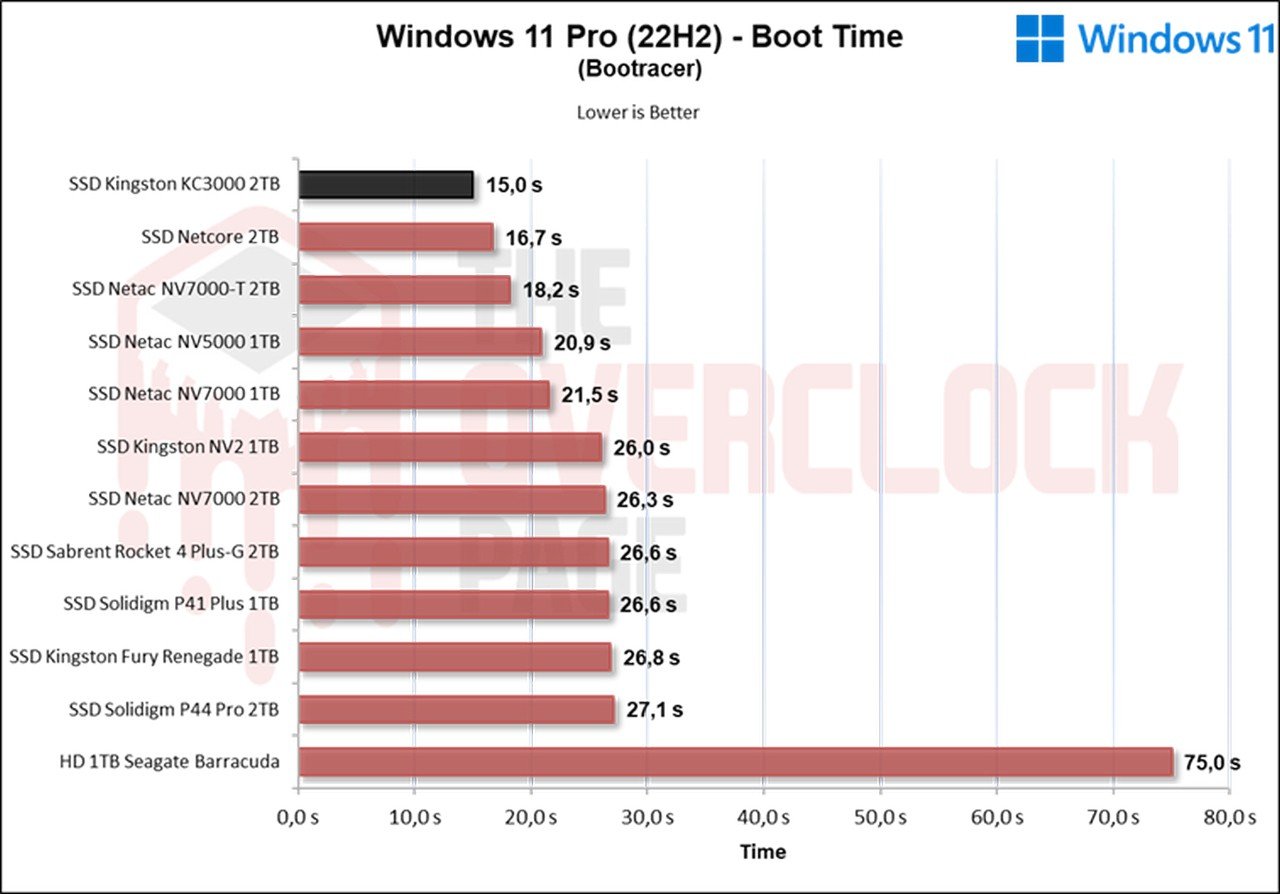
In this program, it includes the time from boot to the loading of the last OS drivers. In this case, a clean installation is performed with only operating system drivers such as Network, Wireless + Bluetooth, Audio, Nvidia drivers, PCH, among others. We are pleased to see that it had the shortest loading time so far, coming in at 15 seconds.
SUSTAINED WRITE SPEEDS | SLC CACHING
A significant portion of SSDs on the market today uses SLC Caching technology, where a certain percentage of its storage capacity, whether it’s MLC (2 bits per cell), TLC (3 bits per cell), or QLC (4 bits per cell), is utilized to store only 1 bit per cell. In this case, it is used as a read and write buffer, where the controller initiates the writing process, and when the buffer is depleted, it writes to the native NAND Flash (MLC / TLC / QLC).

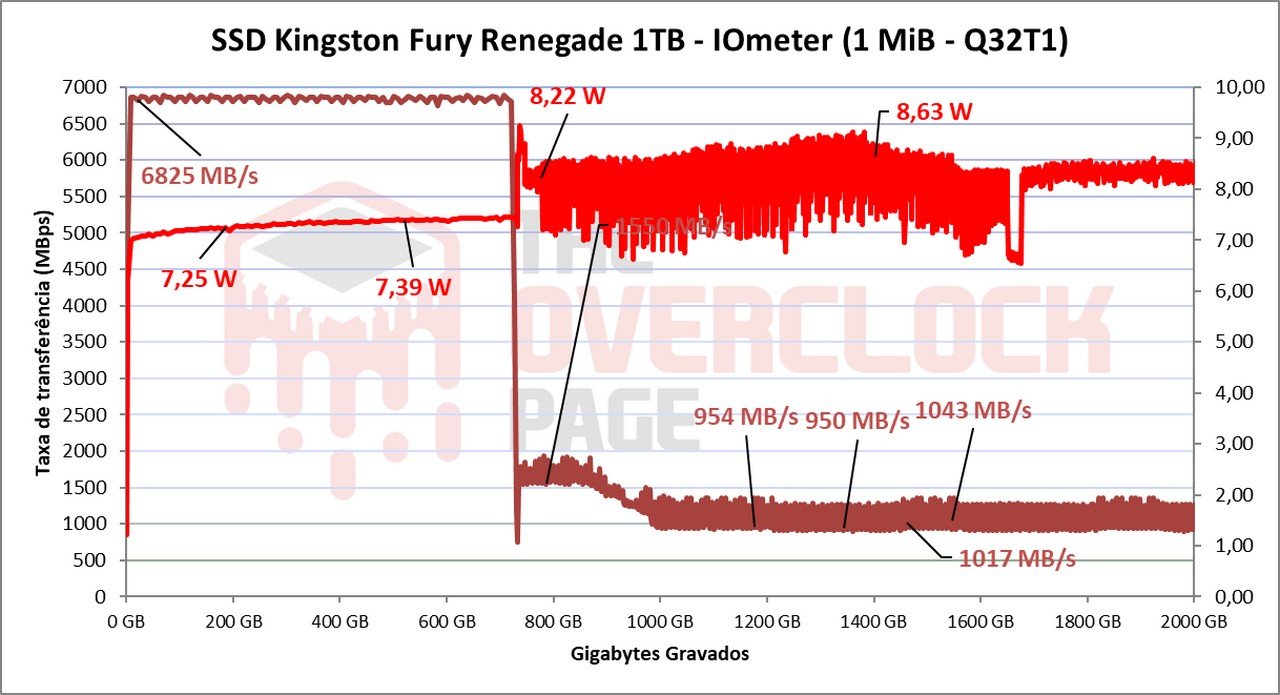
Using IOmeter, we can get an idea of the size of the SLC cache of this SSD, as manufacturers often do not provide this information. From the tests conducted, it was observed that it has a seemingly dynamic and substantial pSLC cache of around 731GB. It maintained an average speed of approximately 6766MB/s until the end of the buffer, which is a good speed, considering it is a PCIe 4.0 SSD with a capacity of 2TB and 32 dies.
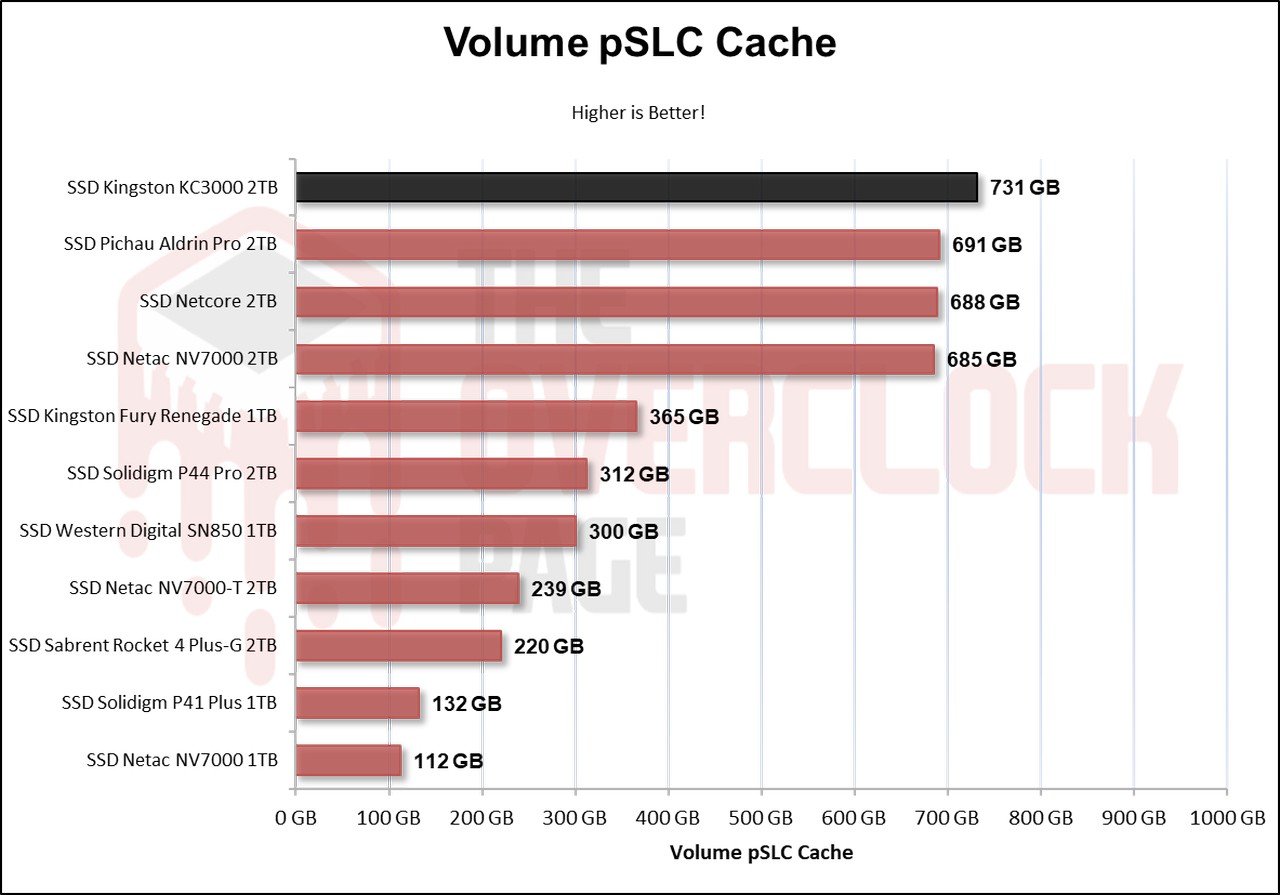
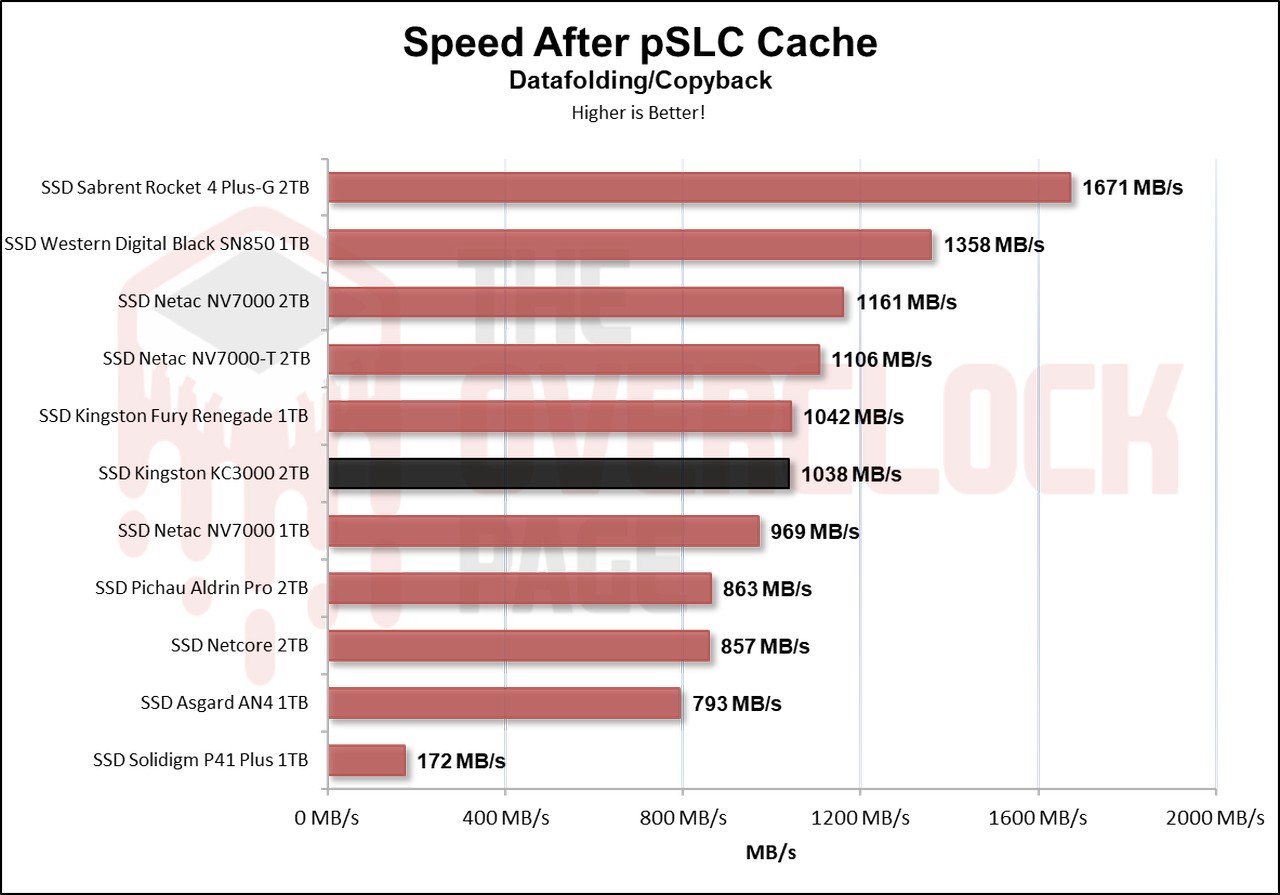
After writing 731GB, it starts to enter the folding process as it has allocated its entire capacity to work as pSLC. Therefore, we see here the scenario of the worst state of the SSD, where it went from 732GB to 2TB, writing at an average speed of 1038 MB/s.
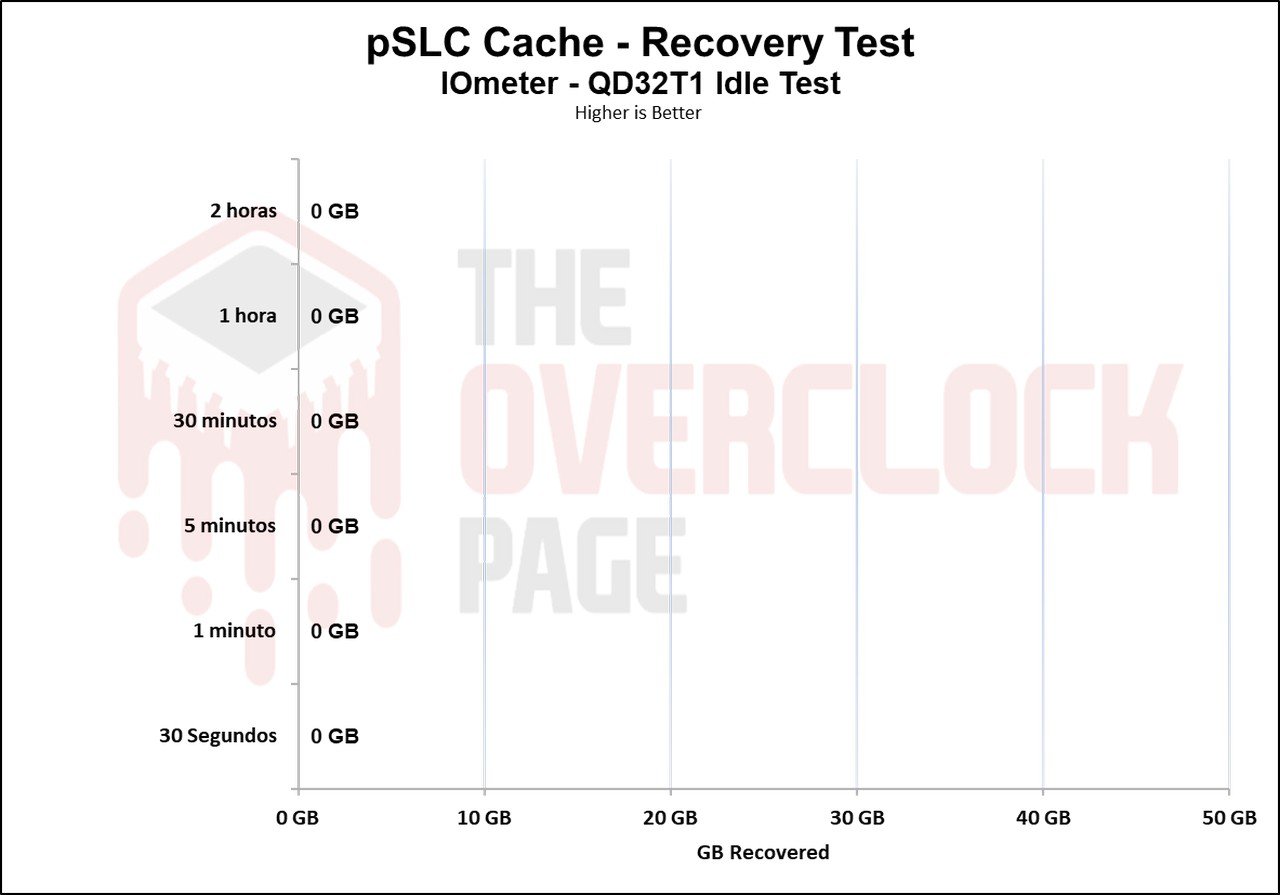
We also conducted a test to see how long it would take for the SSD to recover part of its buffer. Throughout our test battery, lasting from 30 seconds to 2 hours in idle, we utilized TRIM and garbage collection versus not using TRIM/GC. When testing without using TRIM/GC, it is observed that it doesn’t recover any GB without using TRIM. However, we can see that it writes at its native speed of over 3600 MB/s during this time.
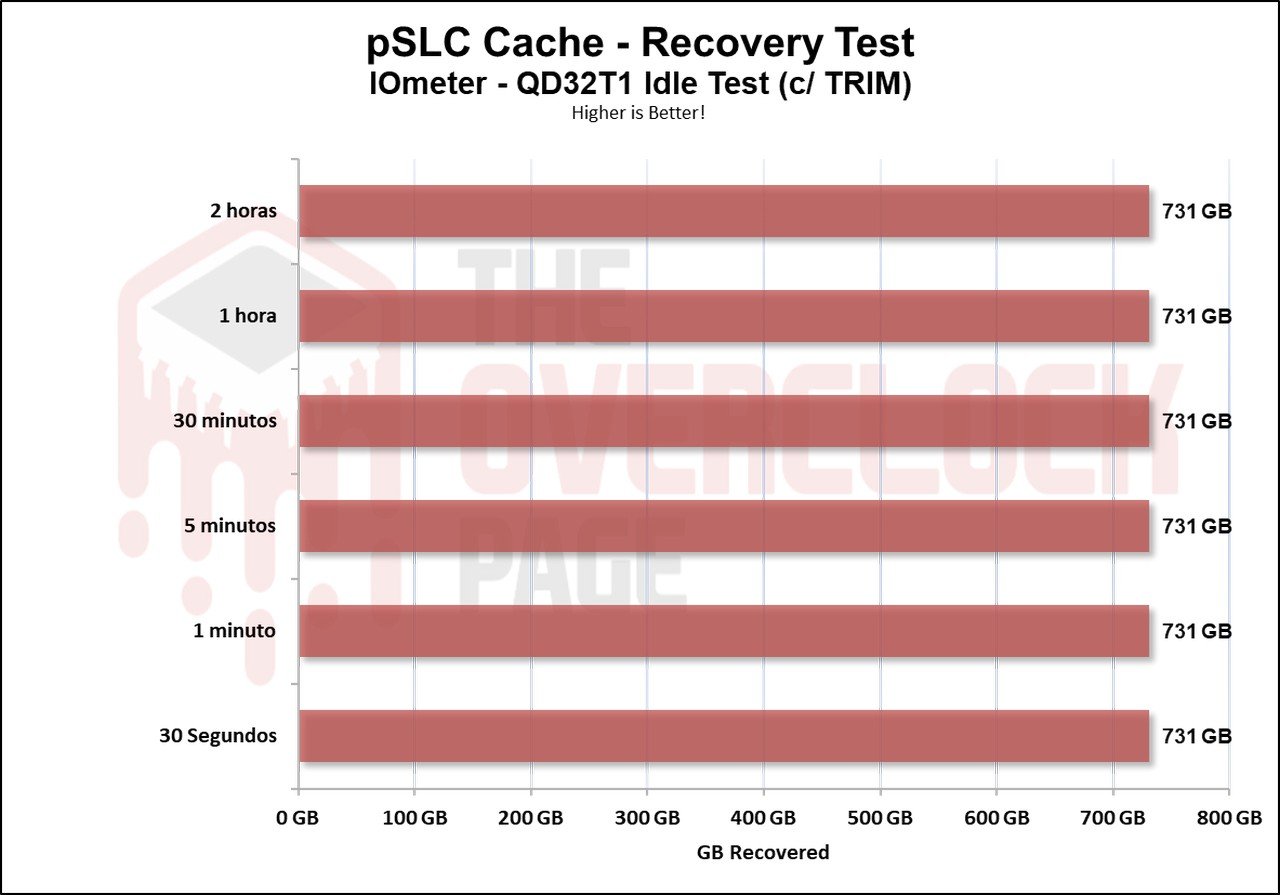
But when testing with TRIM/GC activated, it can recover its complete volume in just a few seconds.
FILE COPY TEST
In this test, the ISO files and CSGO were copied from a RAM Disk to the SSD to see how it performs. The Windows 10 21H1 ISO of 6.25GB (1 file) was used along with the CSGO installation folder of 25.2GB.
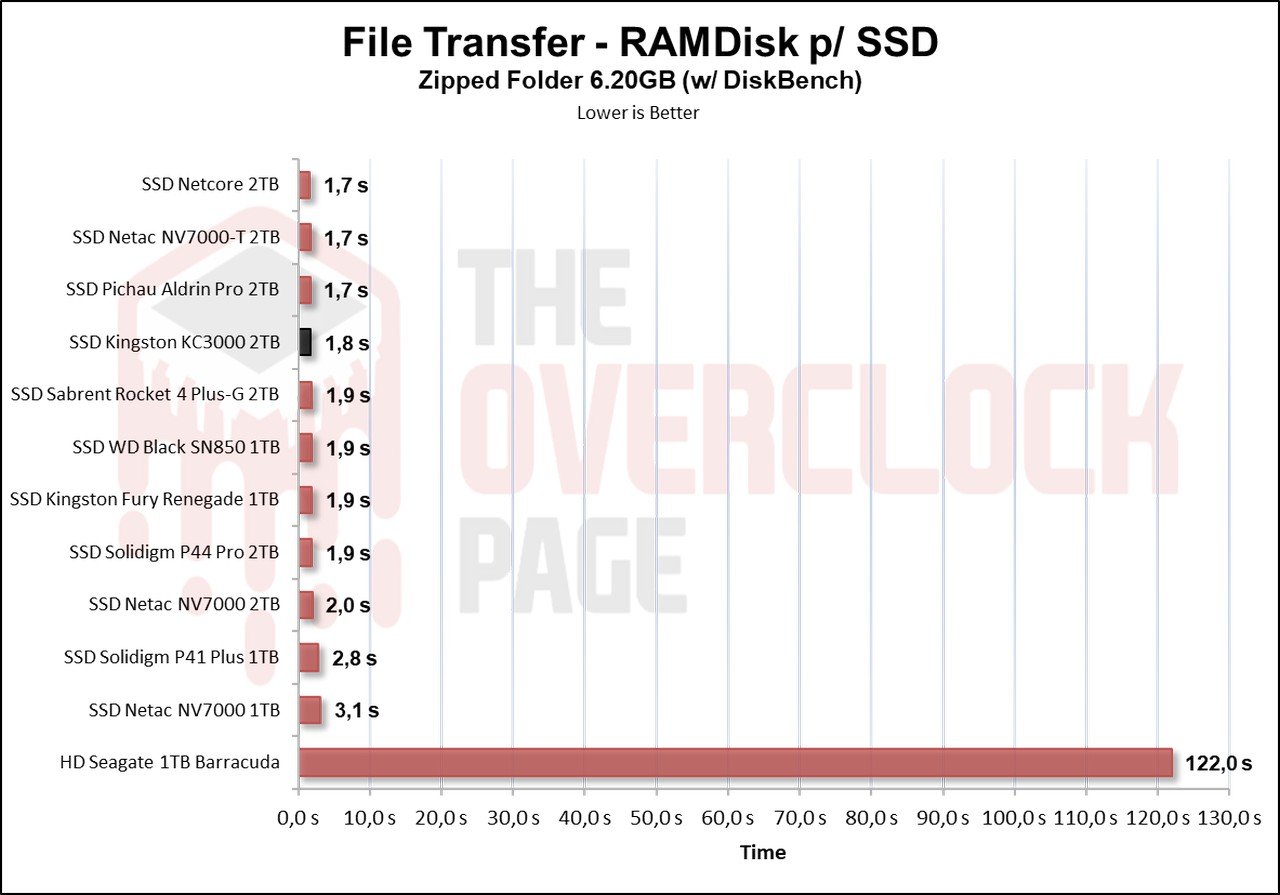
When using the Windows 10 .ISO image, we can see that many Gen4 SSDs have a small difference, and the same can be said for the KC3000 compared to the Fury Renegade.
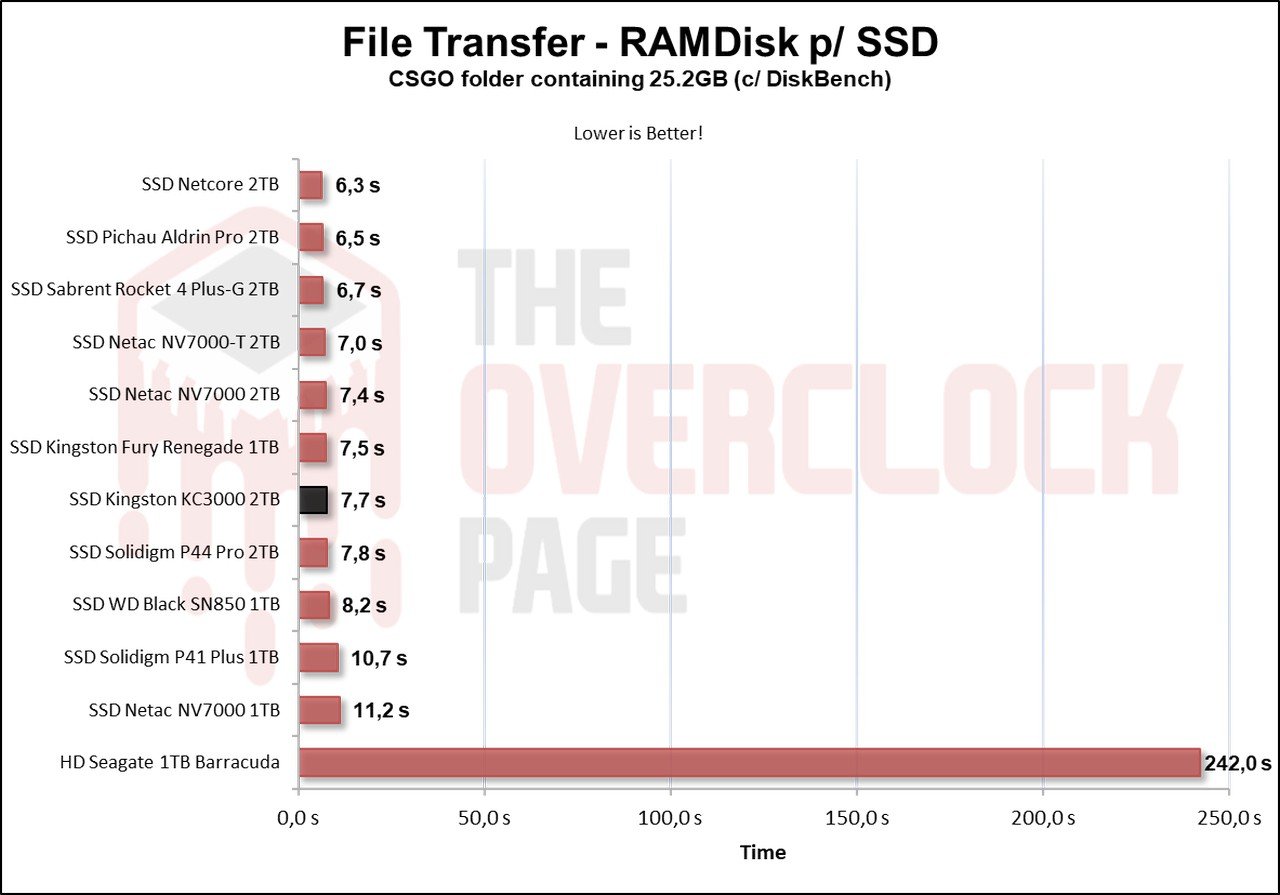
When performing the same test with a much larger game folder, we see a similar result. This is because of its immense SLC cache volume that levels the performance of these Gen4 SSDs.
TEMPERATURE TEST
In this section of the analysis, we will observe the temperature of the SSD during a stress test, where the SSD receives files continuously. This is done to determine if there was any thermal throttling with its internal components that could lead to a bottleneck or performance loss.
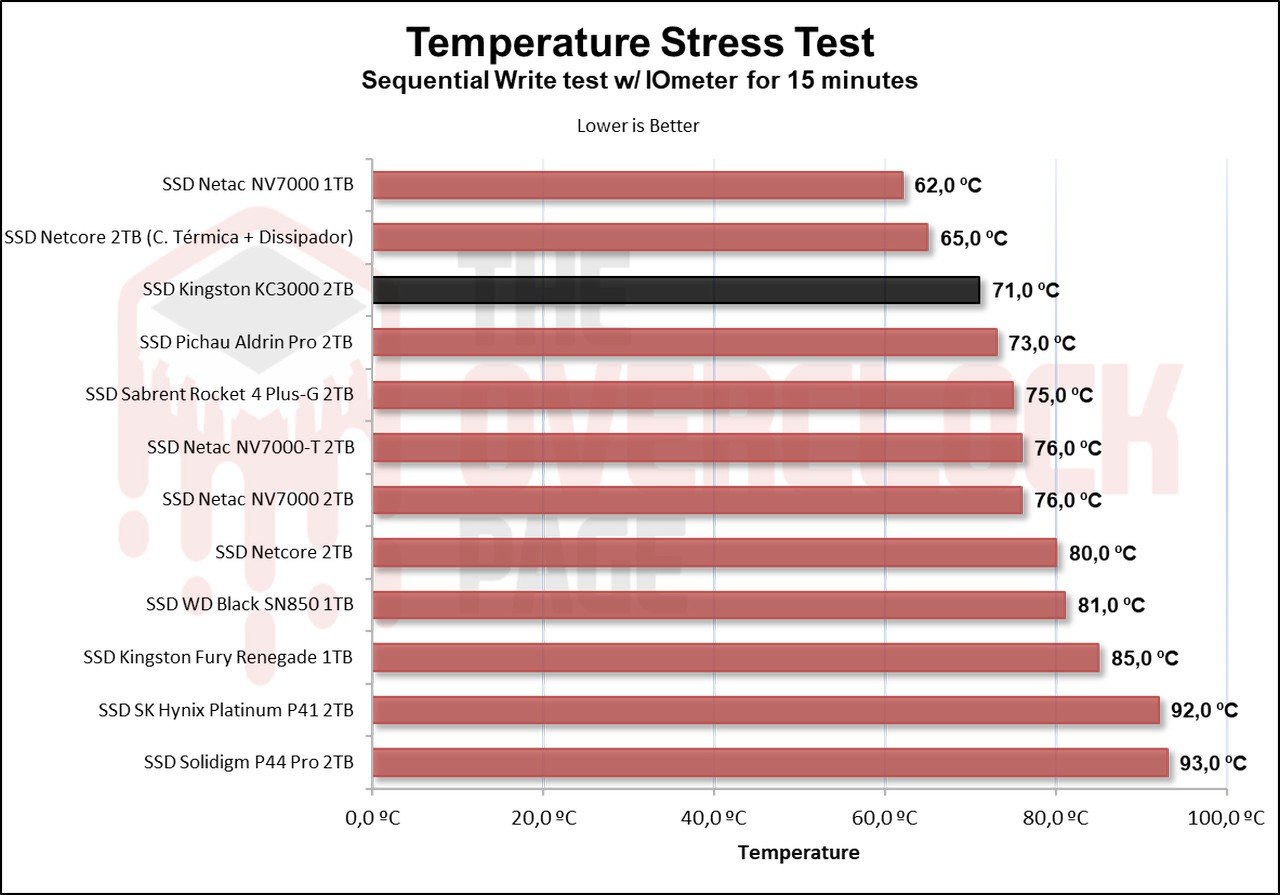
As seen above, this SSD has a default thermal throttling limit of 84 to 89?°C, which is an acceptable value. However, although the sensor is showing 71ºC, it was noted with a thermal sensor that the SSD reached over 80ºC and experienced thermal throttling.
POWER CONSUMPTION AND EFFICIENCY
SSDs, like many other components in our system, have a certain power consumption. The most efficient ones can perform tasks quickly and with relatively low consumption, allowing them to transition back to their idle power states where consumption tends to be lower.
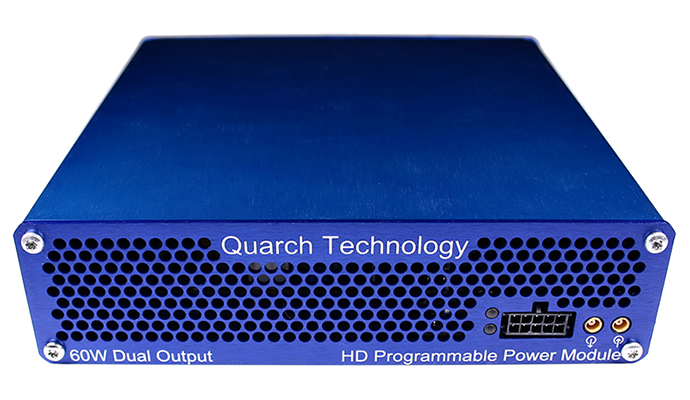
In this section of the analysis, we will use the Quarch Programmable Power Module that Quarch Solutions sent us to conduct these tests and assess how efficient the SSD is. In this methodology, three tests will be performed: the maximum power consumption of the SSD, an average in practical and casual scenarios, and the power consumption in an idle state.
This set of tests, especially those related to efficiency and idle power consumption, is crucial for users planning to use drives in laptops. SSDs spend the vast majority of their time in low-power states (Idle), so these metrics are essential for optimizing battery usage.
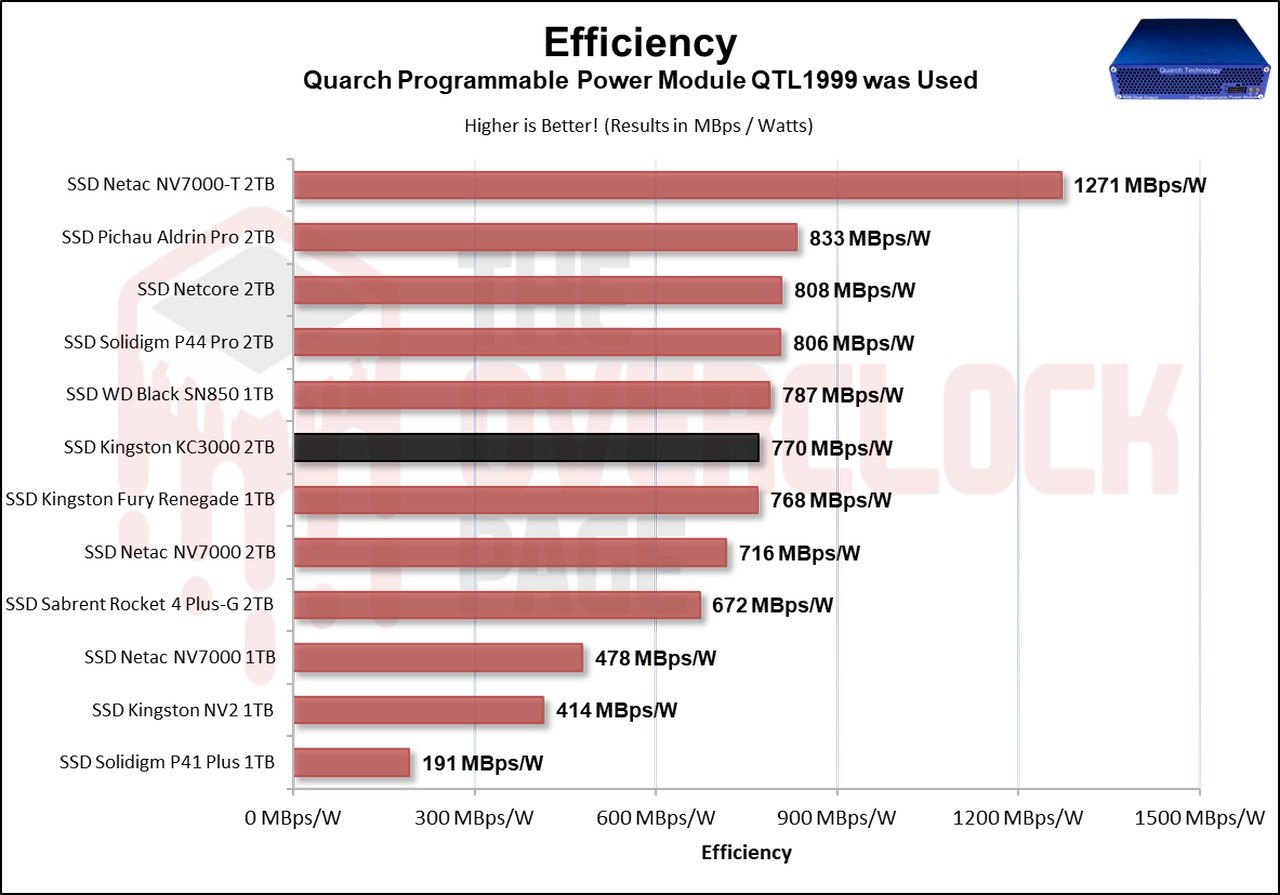
The SSD showed an “OK” efficiency, not reaching the highest in the comparison. Although its bandwidth was quite high, its power consumption was also elevated, which slightly reduces its overall score.
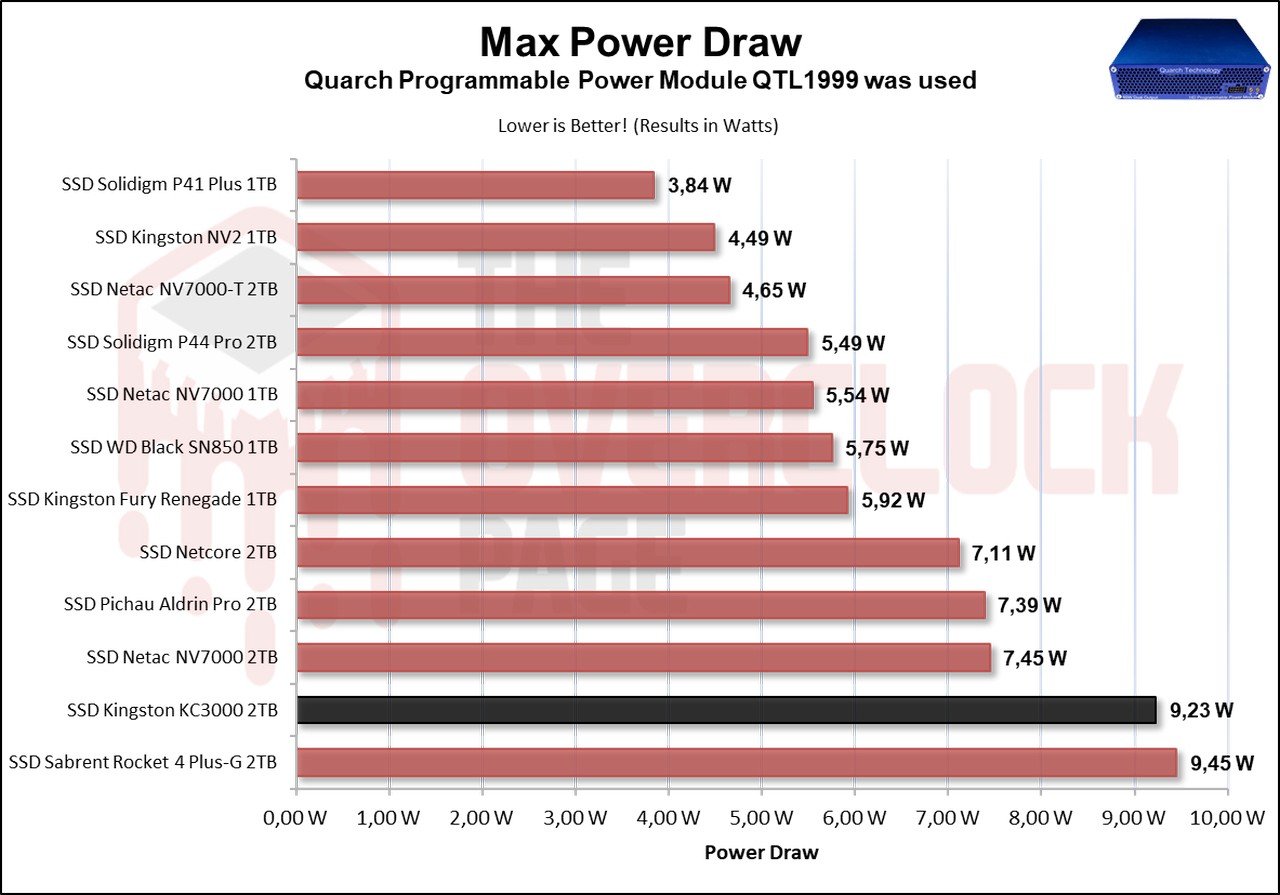
Regarding its maximum power consumption, it almost reached the record for the highest power-consuming Gen4 SSD in the comparison, which is obviously a negative point.
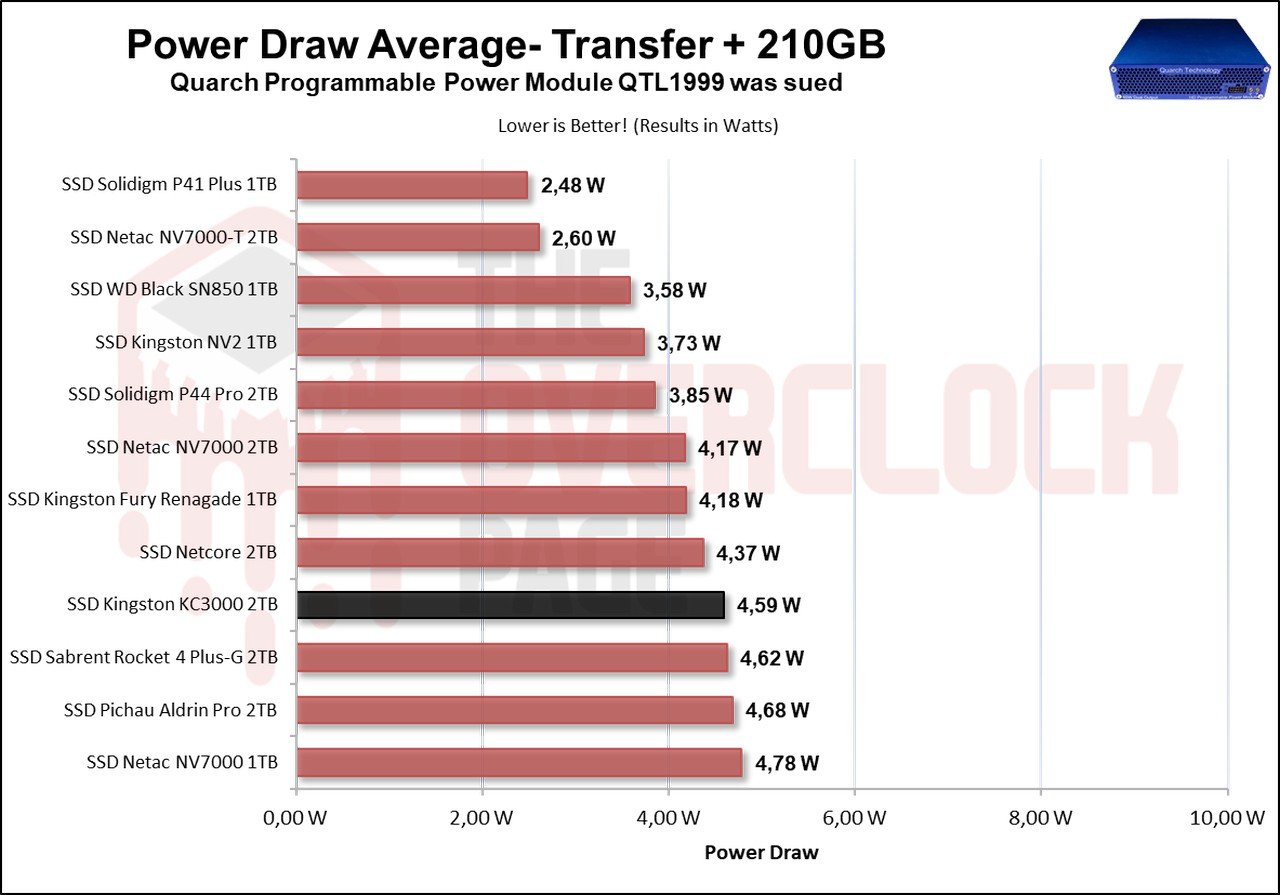
In terms of its average power consumption, a significant portion of these Phison E18-based SSDs has a consumption of over 4.5W, which is quite high and ultimately affects the overall efficiency of the SSD.
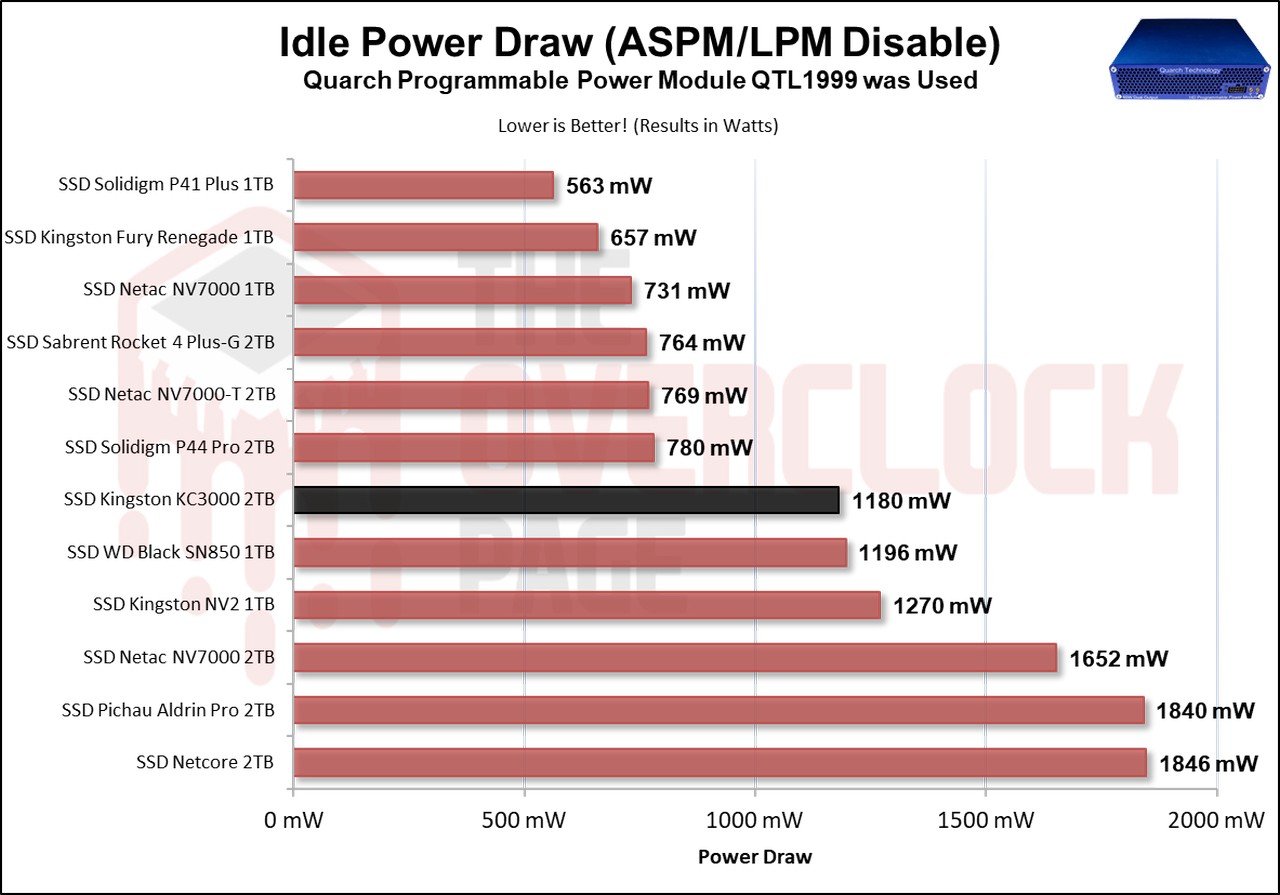
Lastly, and most importantly, the Idle test, which represents the scenario where the vast majority of SSDs are during daily or routine use. Interestingly, it was observed that the KC3000 had a higher consumption than expected, with an Idle power consumption of almost 1.2W, while the Fury Renegade had a consumption almost half that of the KC3000.
CONCLUSION
Taking all of this into account, is it really worth investing in this SSD?
Certainly, it is worth it, as it not only offers a good price, but also good performance.
But if we were to choose between the KC3000 and the Fury Renegade, which one would be more worthwhile? In this scenario, go for the cheaper option, as it has been observed that both SSDs had very similar performance. Obviously, one may have an advantage or disadvantage that the other doesn’t, but it’s up to the end user to rely on these factors to make the purchase.
ADVANTAGES
- Exceptional Sequential Speeds
- Great Random Speeds
- Good Latency Results
- Excellent practical performance for casual scenarios and even professional environments such as video editing, etc.
- No variants with different components
- Excellent internal construction, high-quality controller, and NAND Flash
- Immense pSLC Cache volume
- Nice post-SLC Cache speed
- Comes with basic management software
- Durability in line with other SSDs
- 5-year warranty
- Aggressive pricing
DISADVANTAGES
- Suffers from thermal throttling
- SLC Cache takes time to recover (without using TRIM, which is a somewhat unrealistic scenario)
- High power consumption in Idle
- Overall high power consumption
- Lacks encryption


kc3000 2tb: Look at the read data value written to the smart data and print something large and see that the smart value is 3 times the written value.
It causes the SSD to run out of life quickly.
corrected fw required.
SSD health is reduced by making it appear as if it has been overwritten.
fake smart spelling value.
Fw update EIFK31.7 test pls