Review – SSD Kootion X16 Plus 2TB – One of the fastest AliExpress SSD we’ve ever tested!
 by gabrielcariocapfz March 20, 2024 · Reviews / SSDs and Storage
Today, we will be testing a top-of-the-line NVMe SSD from Kootion, the X16 Plus model, which Kootion has sent us for testing. Thank you 🙂 .
It comes in the M.2 form factor with a 64Gbps interface, meaning 4 PCIe 4.0 lanes, NVMe 2.0 protocol, and capacities ranging from 1TB to 4TB. Its price is around U$85 for the 1TB unit, while the 2TB one is close to U$140. So far, the 4TB unit has not been found.

Specs of KOOTION X16 Plus

SSD’s Software
Unfortunately, these SSDs do not have proprietary software, requiring third-party programs for SSD management.
Unboxing
Interestingly, the packaging is quite generic. There’s no manufacturer name on the front, just indicating that it’s a Gen4 M.2 SSD. On the back, there are brief details provided.


The SSD on its front side has this thin adhesive paper, which probably doesn’t help much with heat dissipation. However, as we’ll see throughout the analysis, the heatsink that comes separately in the packaging greatly assists with thermal dissipation.


This SSD has a single-sided design, meaning it only has components on one side of the PCB, across all capacities. This facilitates the cooling of the SSD.


We can see on its front PCB the presence of its controller chip, 4 NAND Flash modules, as well as the PMIC and other components of the VRM.
Controller
The SSD controller is responsible for managing all data, over-provisioning, garbage collection, among other background functions. And, of course, this ensures that the SSD performs well.

This SSD uses a controller from MaxioTech: the MAP1602A model, which is a 32-bit ARM ISA controller with 4 Cortex® R5 cores (Quad-core) manufactured by TSMC using a 12nm process, similar to solutions from other well-known manufacturers in the market such as Phison and Silicon Motion. This controller is DRAM-Less, so it uses technologies like H.M.B. to store metadata tables.
Additionally, it supports 4 communication channels with a bus speed of up to 2400 MT/s, which is a differentiating factor because many DRAM-Less Gen4 controllers with 4 channels typically support only up to 1600 MT/s. It provides support for up to 16 dies using “Chip enable” commands, which are direct and physically connected to the Dies. As we’ll see shortly, its NAND Flash operates at 2400 MT/s.
DRAM Cache or H.M.B.
Every top-of-the-line SSD aiming to deliver high and consistent performance requires a buffer to store its mapping tables (Flash Translation Layer or Look-up table). With this, it can achieve better random performance and responsiveness.
As mentioned, being a DRAM-Less controller, it doesn’t support DRAM Cache. Therefore, to store the metadata table, it allocates 40 MB of system RAM memory to expedite access to this table.
NAND Flash
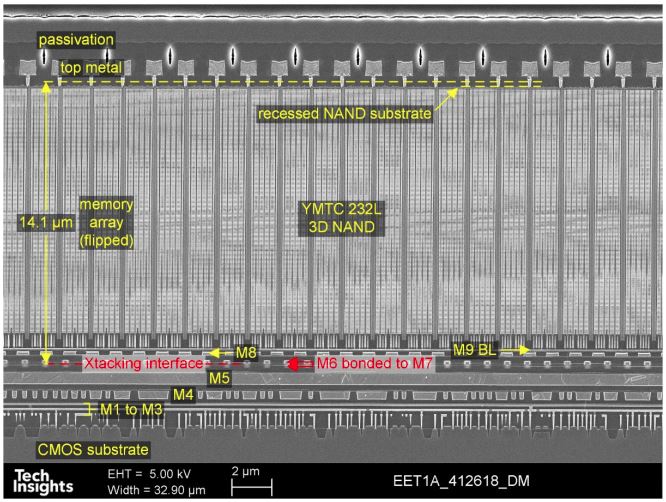
In terms of its storage integrated circuits, the 2TB SSD features 4 NAND flash chips labeled “YMN0ATF1B1HPAD.” These are NANDs from the Chinese manufacturer YMTC, model EET1A, with dies of 1Tb (128GB) capacity containing 232 layers of data and a total of 253 gates, resulting in an array efficiency of 91.7%. Out of the 253 layers in the SSD, 232 are allocated for storage, resulting in this efficiency.


In this SSD, each NAND flash contains 4 dies with 1Tb of density, totaling 512GB per NAND, resulting in a total of 2TB. They communicate with the controller using their maximum bus speed of 2400 MT/s for better performance.
Each of these dies has 6 planes so that when the controller accesses each die, it can increase parallelism and thus performance. It is important to highlight that this represents a significant performance increase compared to previous models from YMTC with 128 layers.
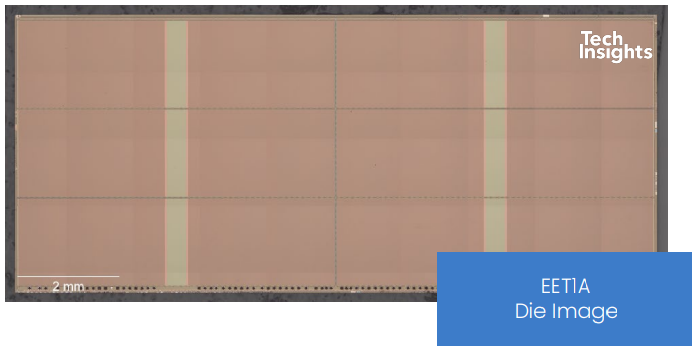
The new dies feature 2 decks, generating a total of 253 layers (Gates), of which 232 layers are allocated for storage. Their density has increased from 512Gb (128-Layers CDT1B and CDT2A) to 1Tb (EET1A), resulting in a significant increase in die density. The previous dies had sizes of approximately 60.42 mm² (CDT1B) and 59.93 mm² (CDT2A), while these new dies (EET1A) have a size of 68.15 mm², representing a substantial increase in density from 8 Gb/mm² to over 15.03 Gb/mm².
PMIC (Power Delivery)

Just like any electronic component that performs work, SSDs also have a level of power consumption that can range from a few milliwatts to nearly 10 watts, nearing the limit of some connectors or slots. The circuit responsible for all power management is the PMIC, which stands for “Power Management IC,” a chip responsible for providing power to other components.


In this SSD, we find this IC marked as 8102, which is a Synchronous Step Down Converter from the manufacturer M3Tek. It’s a kind of MOSFET with embedded PWM in a single package, and this IC operates with switching frequencies of up to 2.5MHz, supporting a continuous current of up to 2A with input voltages ranging from 2.7V to 6V.
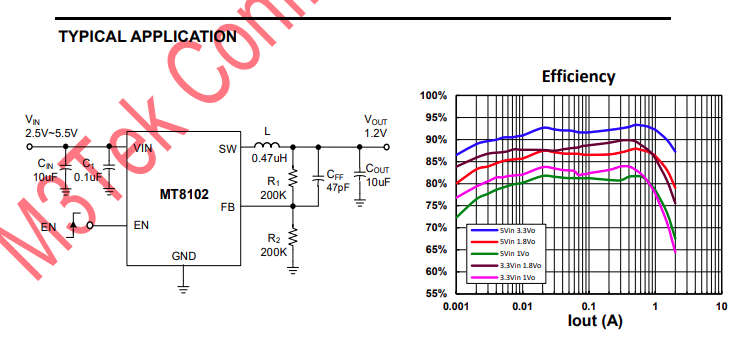
The PMIC is quite similar to those of other SSDs we have tested before, which I believe are from Sylergy.
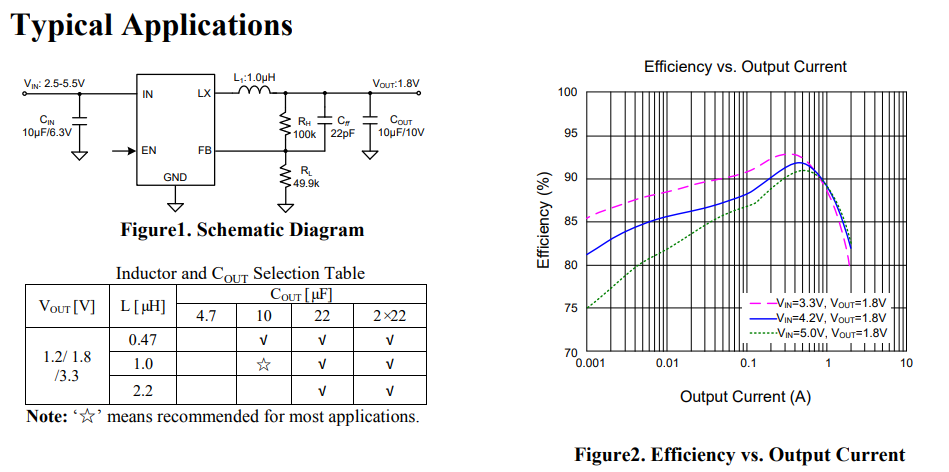
It manages to achieve good efficiency when delivering 1A at 3.3V, which is typical for this SSD as we will see throughout the analysis, where it came close to that.
The “ZB” marking could refer to either the ONsemi NCP4587DMX33TCG or the Ricoh RP201K331D, both of which are linear voltage regulators.
SSD Power States
As always mentioned in power consumption analyses, in this section we will delve further into the power states of this SSD.

Of the 5 power states it has, we have 3 active ones with excellent latencies and 2 idle ones with higher latencies. Another curious thing to note is that the manufacturer decided to set the SSD with a relatively high thermal throttling temperature, ranging from 90°C to 95°C, but as we will see in the analysis, it doesn’t even come close to that.
CURIOSITIES FROM THE KOOTION X16 PLUS
Similarly to integrated circuits on a RAM module experiencing variation, the same happens with SSDs, where there are cases of component changes such as the controller and NAND flash chips.
I found out this week that last Year Kootion had this same model, but using a different controller and NAND Flash. Older models were using the infamous Innogrit IG5236 controller alongside YMTC’s CDT1B 128-Layers NAND.
TEST BENCH
– OS: Windows 11 Pro 64-bit (Build: 23H2)
– CPU: Intel Core i7 13700K (5.7GHz all core) (E-cores e Hyper-threading desabled)
– RAM: 2 × 16 GB DDR4-3200MHz CL-16 Netac (c/ XMP)
– Motherboard: MSI Z790-P PRO WIFI D4 (Bios Ver.: 7E06v18)
– GPU: RTX 4060 Galax 1-Click OC (Drivers: 537.xx)
– (OS Drive): SSD Solidigm P44 Pro 2TB (Firmware: 001C)
– DUT SSD: SSD Kootion X16 Plus 2TB (Firmware: SN11273)
– Chipset Driver Intel Z790: 10.1.19376.8374.
– Windows: Indexing disabled to avoid affecting test results.
– Windows: Windows updates disabled to avoid affecting test results
– Windows: Most Windows applications disabled from running in the background.
– Boot Windows: Clean Image with only Drivers
– Test pSLC Cache: The SSD is cooled by fans to prevent thermal throttling, ensuring it doesn’t interfere with the test results.
– Windows: Antivirus disabled to minimize variation in each round.
– DUT SSDs: Used as a secondary drive, with 0% of space being utilized, and other tests conducted with 50% of space utilized to represent a realistic scenario.
– Quarch PPM QTL1999 – Power consumption test: conducted with three parameters—idle, where the drive is left as a secondary, and after a period of idle, a one-hour write test is performed, and the average power consumption is recorded
WHERE TO BUY
In the following links, I’ll be providing the product being sold on AliExpress with global shipping.
Aliexpress – SSDs Kootion X16 Plus 1TB – U$85
Aliexpress – SSDs Kootion X16 Plus 2TB – U$140
CRYSTALDISKMARK
We conducted synthetic sequential and random tests with the following configurations:
Sequential: 2x 1 GiB (1 MiB Blocks) 8 Queues 1 Thread
Random: 2x 1 GiB (4 KiB Blocks) 1 Queue 1/2/4/8/16 Threads


It seems like you’re describing the sequential speed tests, and while it doesn’t have the highest sequential speeds, it’s comparable to other Gen4 SSDs in the comparison.


In terms of latency, it’s evident again that it can deliver results similar to other SSDs with the same build, and even outperforming some with ostensibly superior hardware.


When testing its random speeds at a ‘Queue depth’ of 4, it surprised with its speeds, particularly in reading, which exceeds 375 MB/s, reaching the second position in the comparison.


When allocating only 1 thread to better represent a typical daily workload, we see that once again it impresses with very high speeds, reaching almost 100 MB/s in reading, which is impressive for a DRAM-Less SSD, and surpassing 400 MB/s in writing.
ATTO Disk Benchmark QD1 e QD4
We conducted a test using ATTO to observe the speed of SSDs at different block sizes. In this benchmark, it was configured as follows:
Block sizes: from 512 Bytes to 8 MiB
File size: 256MB
Queue Depth: 1 and 4.


The ATTO Disk Benchmark is a software that conducts a sequential speed test with compressed files, simulating data transfer loads like those in Windows. Typically, we observe block sizes ranging from 128KB to 1 MiB. Now, starting with its read performance, we noticed that up to 64 KB, it was one of the fastest SSDs in the comparison, trailing behind others above 64KB.
Regarding its write performance, a similar trend is observed, but it’s closer to 128 KB. However, the difference between SSDs immediately after was slightly smaller.


At QD1, initially, we see a scenario identical to QD4, with it leading the pack, but shortly after, all other SSDs become similar to each other, making it almost impossible to discern a difference. In its write performance, the difference was even smaller.
3DMark – Storage Benchmark

In this benchmark, various storage-related tests are conducted, including game loading tests for titles like Call of Duty Black Ops 4 and Overwatch, gameplay recording and streaming at 1080p 60 FPS using OBS, game installations, and file transfers of game folders.


In this benchmark, which focuses more on casual environments such as game simulation and streaming, we see that it really showcased its capabilities. Not only did it achieve nearly 4500 points, securing second place in the comparison, but it also managed to surpass the well-known NV7000-T, which until now was the fastest DRAM-Less SSD we tested.
PCMARK 10 – FULL SYSTEM DRIVE BENCHMARK
In this test, the Storage Test tool and the “Full System Drive Benchmark” test were used, which conduct both light and heavy tests on the SSD.

Among these traces, we can observe tests such as:
- Boot Windows 10
- Adobe After Effects: Launching the application until it’s ready for use
- Adobe Illustrator: Launching the application until it’s ready for use
- Adobe Premiere Pro: Launching the application until it’s ready for use
- Adobe Lightroom: Launching the application until it’s ready for use
- Adobe Photoshop: Launching the application until it’s ready for use
- Battlefield V: Loading time until the main menu
- Call of Duty Black Ops 4: Loading time until the main menu
- Overwatch: Loading time until the main menu
- Using Adobe After Effects
- Using Microsoft Excel
- Using Adobe Illustrator
- Using Adobe InDesign
- Using Microsoft PowerPoint
- Using Adobe Photoshop (Intensive use)
- Using Adobe Photoshop (Light use)
- Copying 4 ISO files, totaling 20GB, from a secondary disk (Write Test)
- Performing the copy of the ISO file (Read-Write Test)
- Copying the ISO file to a secondary disk (Read Test)
- Copying 339 JPEG files (Photos) to the tested disk (Write Test)
- Creating copies of these JPEG files (Read-Write Test)
- Copying 339 JPEG files (Photos) to another disk (Read Test)

In this scenario, which is a practical benchmark with a slightly greater focus on writing than the 3DMark, the same thing that happened in the 3DMark repeated here, but the difference was slightly smaller. Although it was still an excellent result for a DRAM-Less SSD.
Adobe Premiere Pro 2021
Following that, we used Adobe Premiere to measure the average time it took to open a project of about 16.5GB with a resolution of 4K, a bitrate of 120Mbps, full of effects, until it was ready for editing. It’s worth noting that the tested SSD is always used as a secondary drive without the operating system installed, as this could affect the result, causing inconsistencies.

When using Premiere to load a project of over 16GB, we observe that the “fastest SSDs” are not always the best here. While it performed very well in other practical benchmarks, here it ended up among other top-of-the-line models. Nevertheless, it’s still an incredible result.
GAME LOADING TIMES AND BOOT TIME
We conducted a comparison between multiple SSDs and an HDD, using a clean installation of Windows 10 Build 21H1 along with the Final Fantasy XIV benchmark in campaign mode. The test involves recording the best result after three consecutive system boots, considering the total time until reaching the desktop with the score reported by the application. Therefore, it’s slower than the boot-up time until the desktop screen appears.

Now, when testing game loading times like this, we see that it really doesn’t disappoint, having the best loading time among all that I’ve tested so far. Obviously, 0.1 seconds won’t change anything; we can consider it a technical tie. However, since it’s a game with loading times that are not as long as those of GTA V, for example, it’s a representative and interesting benchmark.

In this program, it includes the boot time until the loading of the last OS drivers, which in this case, is done with a clean installation with only operating system drivers, such as Network, Wireless + Bluetooth, Audio, Nvidia drivers, PCH, among others. So, we are happy to see that it had one of the shortest loading times so far, at 15-16 seconds.
SLC CACHING
Indeed, a considerable portion of SSDs on the market today employs the SLC caching technology. In this approach, a certain percentage of the storage capacity, whether it’s MLC (2 bits per cell), TLC (3 bits per cell), or QLC (4 bits per cell), is utilized to store only 1 bit per cell. This configuration serves as a buffer for read and write operations, where the controller initiates the writing process, and when the buffer is exhausted, it writes to the native NAND Flash (MLC/TLC/QLC).


Through IOmeter, we can gain insight into the volume of SLC cache of this SSD, as manufacturers often do not provide this information. Based on the tests we conducted, it was evident that it has a seemingly dynamic, immense pSLC cache of around 231GB. It managed to maintain an average speed of approximately 5771MB/s until the end of the buffer, which is quite impressive considering this is a PCIe 4.0 2TB SSD with 16 TLC dies.

After writing 231GB, it starts writing to its native NANDs operating in TLC mode, and we see that in this scenario, it works at an average speed of 2627 MB/s, which is quite high. It remains at these speeds for a good amount of time, writing over 1400GB at speeds above 2.6 GB/s, which is incredible.
Right after it has exhausted its SLC cache space, it begins the folding process because it has allocated all its capacity to work as pSLC. So now we see the true Achilles’ heel of SSDs. However, its sustained speed was quite decent, with an average of 1031 MB/s, which is well above the sustained speed of many SSDs out there.


We also conducted a test to see how long the SSD would take to recover part of its buffer, and during our test battery, which lasts from 30 seconds to 2 hours in idle, using TRIM and garbage collection versus not using TRIM/GC. When testing without using TRIM/GC, we observed that it was able to recover about 40GB to 69GB between 1 minute and 1 hour in idle, which was an excellent result considering such an unrealistic scenario.


But when testing with TRIM/GC activated, it was able to recover its full volume in just a few seconds.
FILE COPY TEST
In this test, the ISO files and the CSGO installation folder were copied from a RAM Disk to the SSD to see how it performs. The Windows 10 21H1 ISO file, which is 6.25GB in size (1 file), and the CSGO installation folder, which is 25.2GB in size, were used.

When using the Windows 10 ISO image, we observed that it performed similarly to the NV7000 (IG5236 + CDT1B) 2TB SSD.

When we conduct this benchmark with a bigger folder size, we see a similant result, this happened because of the size of the SSD’s SLC Cache which is way bigger than the File benchmark size.
TEMPERATURE TEST
When conducting the same test with a much larger folder from a game, we see a similar result. This happens due to its immense volume of SLC Cache, which levels the performance of these Gen4 SSDs significantly.

As seen above, this SSD has a default thermal throttling limit of 90ºC to 95?°C, which is a bit high. Through sensors, we observe that when the included heatsink is not used, it reaches above 81ºC, nearing the thermal throttling metric. When the heatsink was used, there was a significant drop in temperature, so it is recommended to use it if the drive is used in very intense activities or for extended periods.
On the video above, we can see its temperatures using a thermal camera, and we can indeed conclude that its heatsink is quite efficient. Without using the heatsink, the controller reaches temperatures of 89ºC, slightly above the SSD sensor temperatures, while with the heatsink attached, the camera detected a maximum of 59ºC on the heatsink, an immense difference of 30ºC.
POWER CONSUMPTION AND EFFICIENCY
SSDs, like many other components in our systems, have a certain level of power consumption. The most efficient ones can perform tasks quickly with relatively low power consumption, allowing them to transition back to idle power states where they consume less energy.
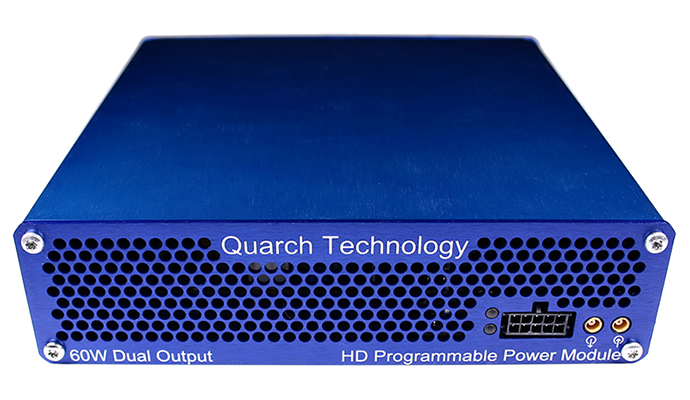
In this segment of the analysis, we will be using the Quarch Programmable Power Module provided by Quarch Solutions (as shown in the image above) to conduct a series of tests and evaluate the efficiency of the SSD. This methodology will include three types of tests: measuring the SSD’s maximum power consumption, averaging power consumption in practical and everyday scenarios, and measuring power consumption in idle state.
This set of tests, especially those focusing on efficiency and idle power consumption, is crucial for users who intend to use SSDs in laptops. Since SSDs spend the majority of their time in low-power states (idle), measuring their efficiency in such scenarios is essential for optimizing battery life and overall power consumption in portable devices.

We can see that it also exhibited excellent efficiency. This is because the SSD’s average power consumption during the benchmark was relatively low, and it achieved a high bandwidth, resulting in the high efficiency observed above.

Regarding its maximum power consumption, it’s possible to observe that it had a very low consumption rate, literally half the consumption of a top-of-the-line SSD like the Sabrent Rocket 4 Plus Gaming.

During this benchmark, we see that its average power consumption was also excellent, averaging around 3W, which is quite low compared to other SSDs with different controller and NAND configurations.

Finally, and most importantly, the idle test, which represents the scenario where the vast majority of SSDs are during everyday use. Here, we see that it performs remarkably well, with very low power consumption, almost matching its idle power states similar to the PS4 and PS5, which range between 720mW to 750mW. This demonstrates its efficiency and delivers an excellent result.
CONCLUSION
Taking all of this into account, is it really worth investing in this SSD?
Definitely, because besides delivering excellent performance, its sold at a reasonable price. Although it might be a little difficult to find this drive in some markets, it will be easier to find this one on AliExpress.
ADVANTAGES
- Good sequential speeds
- One of the best random performant drive i’ve tested
- Great latency results
- Great practical performance use case and even for some professional use cases
- Doesn’t thermal throttle when using it’s default heatsink
- Great component choices
- Big SLC Cache pool
- SLC Cache recovers quite quickly
- High sustained write speeds after SLC Cache
- Average Endurance ratings
- 5-Year warranty
- High energy Efficiency
- Low Idle power draw
- Low price
DISADVANTAGES
- Doesn’t offer any software support from the manufacturer
- Have multiple hardware variants (older models)
- Doesn’t offer encryption