Kingston FURY Renegade 96GB (2x48GB) DDR5 6400CL32 Review: Maximum Performance and density with Hynix M-Die 24-Gbit
 by Giancarlo C. Dalmedico "NoMS" September 15, 2024 · DRAM Memory / Memórias / Reviews / Reviews
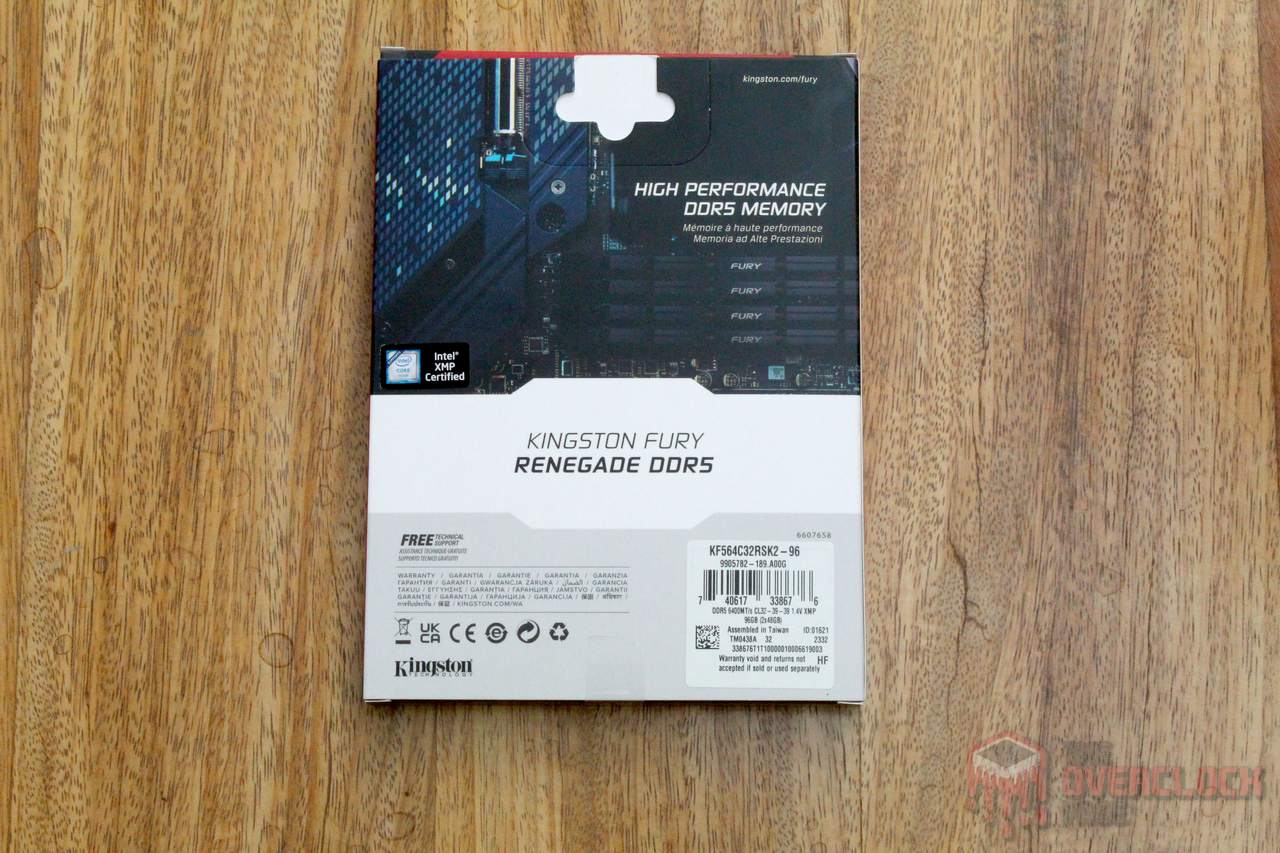
In this review, we will be analyzing a Kingston DDR5 memory kit from the FURY Renegade series. This lineup offers models ranging from 6000 to 8000 MT/s, with module sizes of 16, 24, 32, or 48 GB, available individually or in kits of 32 GB, 48 GB, 64 GB, or 96 GB. The product under review consists of two 48 GB modules, forming a 6400 MT/s kit, with timings of 32-39-39-80 and an operating voltage of 1.4V.

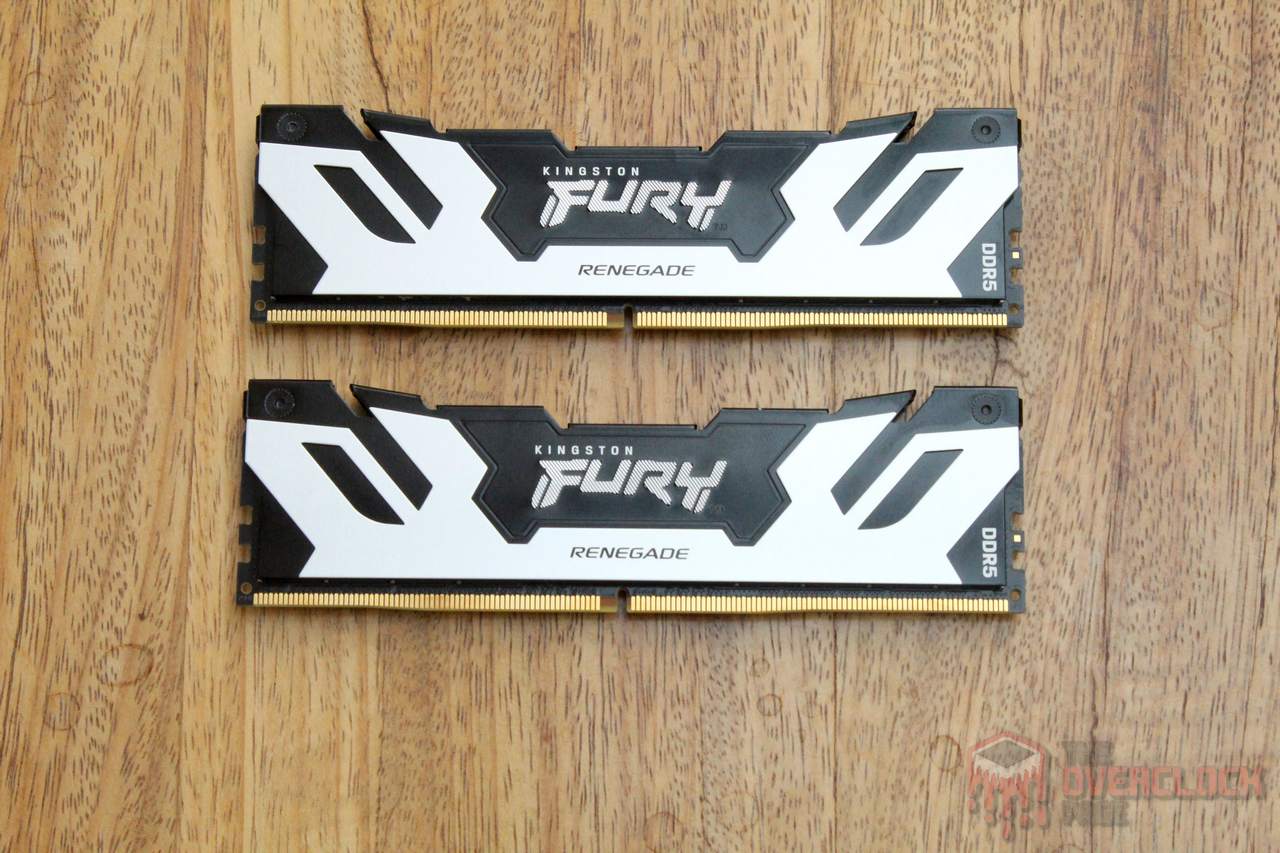
The memory sticks come in a rectangular box featuring an illustration of the product, along with the manufacturer’s logo and model name. On the back, the model is highlighted again, along with a label listing the specifications. The memory’s product code is KF564C32RSK2-96.


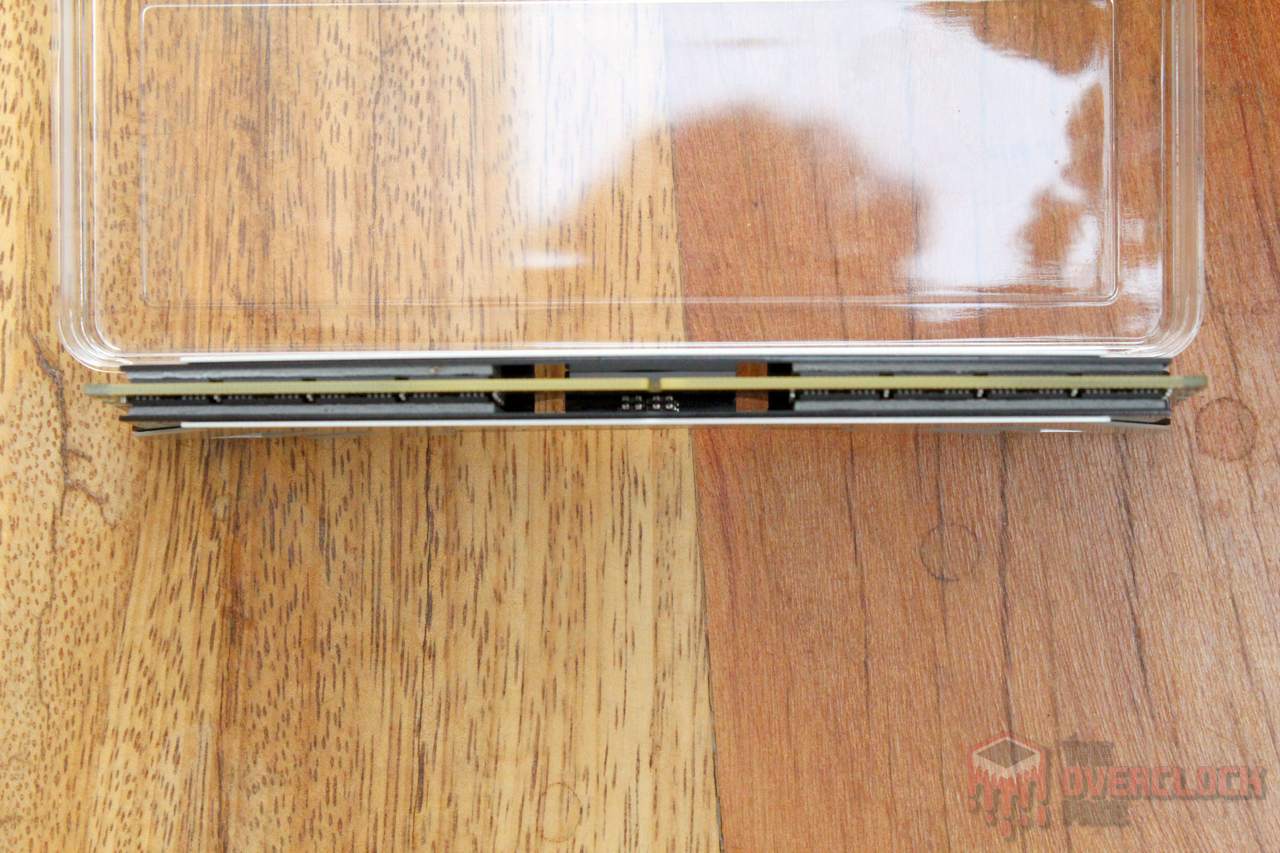
Regarding the heatsink, it is the same one used by Kingston for the Fury Renegade series, with two aluminum parts held together by screws and featuring thermal pads on both the memory chips and the PMIC.
The model we tested does not include any lighting, but Kingston also offers versions with the same specifications under the Fury Renegade RGB line, which, as the name suggests, comes with RGB lighting.
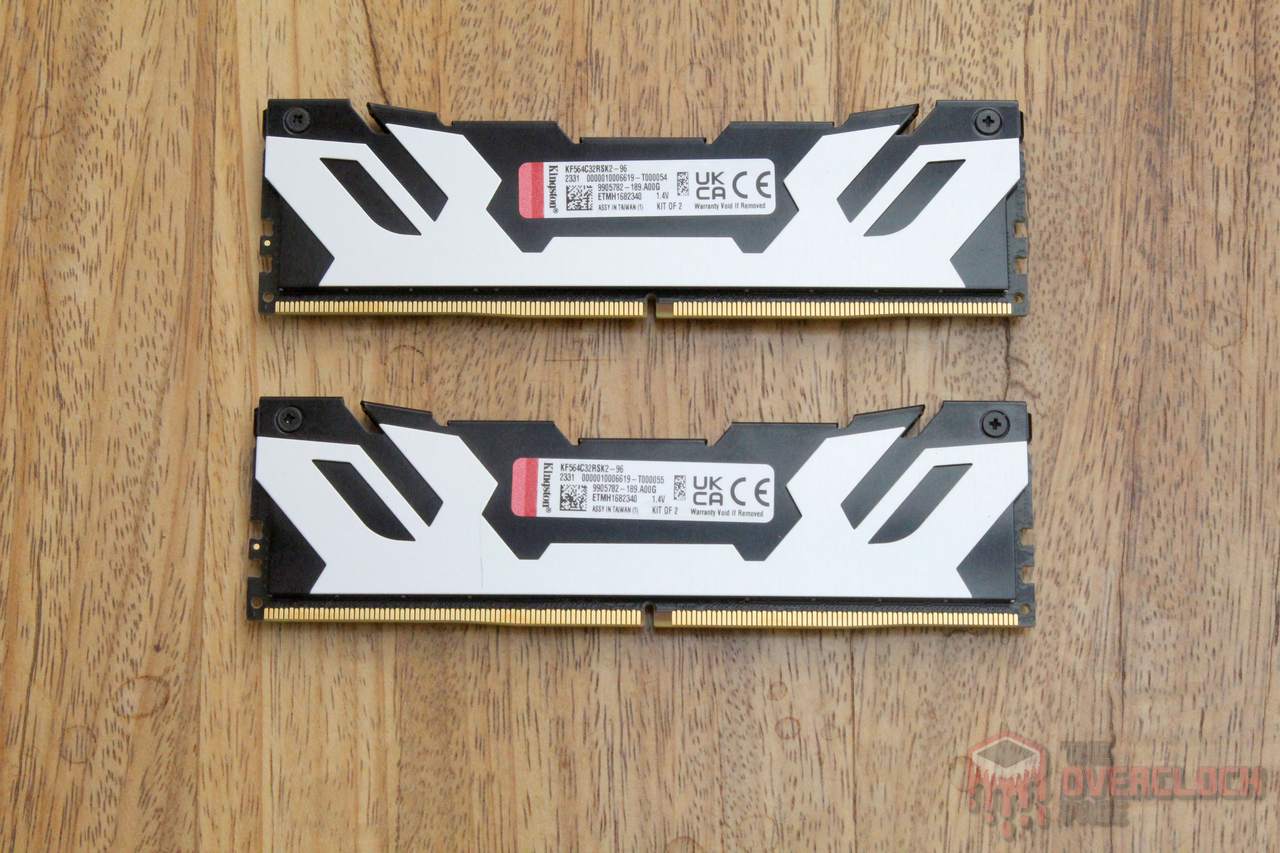
The memory chips used in this kit are SK Hynix M-Die. However, unlike the first-generation chips with the same name, these have a density of 24 Gbit, meaning 3 GB per chip. This allows manufacturers to produce UDIMM modules with capacities of 12, 24, or 48 GB.
To reach the 96 GB total, Kingston uses ‘Dual Rank’ (DR) modules, which have memory chips on both sides of the PCB, utilizing 16 ICs to create a 48 GB module. Naturally, this places more stress on both the memory controller and the motherboard, as they need to manage more chips.
Below, you can see the SPD dump, extracted using PassMark’s RAMMon tool.
Regarding the PMIC, which is the integrated circuit responsible for powering the memory module, Kingston has used a unit from Richtek. This PMIC supports “High Voltage Mode,” allowing VDD/VDDQ voltages above 1.43V on motherboards that support this feature.
Hardware used
CPU: AMD Ryzen 7 8700G (Obrigado AMD!)
MOBO: ROG Crosshair X670E Gene (BIOS: 2302 Beta)
RAM: 2×48 GB Kingston FURY Renegade 6400CL32 1.4V – KF564C32RSK2-96 – (Obrigado Kingston!)
GPU: Powercolor RX 6800 XT Red Devil 16 GB
PSU: Coolermaster MWE 1250 Gold V2 (Obrigado Cooler Master)
COOLER: 1STPlayer TS-360
SSD: Goldenfir 256GB NVMe
Software: Windows 11 23H2 x64, TM5 0.13.1 1usmus, Geekbench 3.4.4, y-cruncher 0.85, Horizon: Zero Dawn, Shadow of the Tomb Raider and Black Myth: Wukong Benchmark Tool.
Testing methodology:
The goal was to find the daily-use limit of the Kingston memory when paired with the Ryzen 7 8700G, leveraging the powerful memory controller integrated into these processors, which allows for pushing memory to its limits. To make the results easier to understand, they were divided into two groups:
- XMP/EXPO: The aim here was to test if it’s possible to run the memory stably using the factory XMP or EXPO profile, if available, eliminating the need for overclocking tests in these conditions.
This shift was necessary because the concept of “easy overclocking” no longer makes sense with DDR5 memory. The performance gains from this are negligible, as motherboards tend to loosen the subtimings significantly, which cancels out any benefits.
- 24/7 with fine-tuning: Here, manual adjustments were made to all possible parameters to achieve the best possible results for daily use, pushing the limits of 1:1 and 1:2 memory modes.
In both cases, stability was tested using TM5 0.13.1 with the 1usmus profile, while performance was assessed using Geekbench 3.4.4 and y-cruncher 1b for synthetic benchmarks. For gaming benchmarks, Horizon: Zero Dawn, Shadow of the Tomb Raider, and Black Myth: Wukong were used, running the built-in benchmarking tools at 1080p and 720p with both maximum and minimum quality settings.
For these tests, the CPU was locked at 5.0 GHz with 1.25V, and the FCLK at 2400 MHz. It’s important to note that with Ryzen AM5, there’s no longer a need to match the FCLK to the memory clock. Before adjusting the memory, it’s a good idea to test the FCLK limit, which ranges from 2000 to 2200 MHz for Ryzen 7000 processors and from 2200 to 2700 MHz for Ryzen 8000 processors.
Timings – AMD
XMP / EXPO:
For this model, Kingston opted to include only XMP profiles for DDR5-6400 and DDR5-6000, both of which worked well on the test hardware, with the motherboard automatically setting the UCLK to 1:2 at 6400 MT/s.
It’s important to note that this is a limitation of the specific sample tested, and it may also occur with Ryzen 7000 processors. Some units may not be stable with UCLK running at a 1:1 ratio with memory at 6400 MT/s. In such cases, it might be better to aim for the highest stable performance while maintaining the 1:1 ratio.
24/7 with fine tuning:
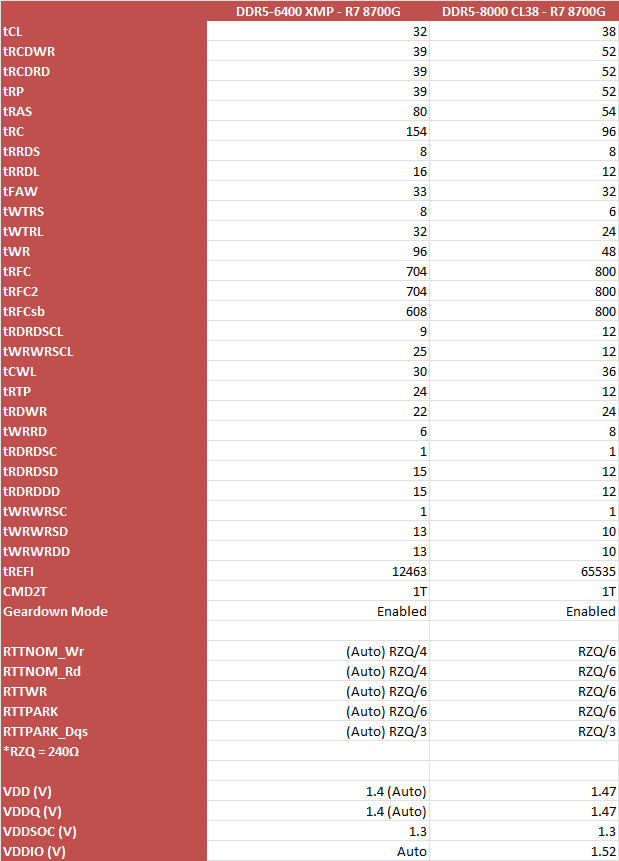
With fine-tuning, we were able to improve virtually all timings and reach 8000 MT/s. To achieve this, it was necessary to increase the VDD/VDDQ to 1.47V, which is considered completely safe for these DDR5 modules with Hynix chips. However, there are several important considerations regarding this result.
- DRAM Termination
Unlike Single Rank (SR) modules, which already benefit from a well-optimized AGESA for termination impedances and “Drive Strength” with Ryzen 8000G, the same cannot be said for Dual Rank (DR) kits, especially 96 GB ones like this. These require a fair amount of tweaking to run properly at higher frequencies.
Getting the RTTNOM_WR and RTTNOM_RD settings right was crucial for achieving stability with these modules. The automatic settings caused instability, even at 7400 MT/s, an issue that was resolved by manually setting RZQ/6 for both parameters. With these adjustments, we were even able to boot the system at 8400 MT/s and run light benchmarks.
It’s important to note that future BIOS updates may improve support for these high-density modules. However, even then, these settings can vary significantly between different motherboards, with only a few being capable of reaching 8000 MT/s.
- Timings
The primary timings are somewhat universal for these 24-Gbit M-Die chips and are similar to those of the 48GB Hynix M-Die kit (2x24GB) we tested previously. The exception is the tRFC, which is more relaxed in this 96 GB kit compared to its 48 GB counterpart. This difference is likely related to the CPU’s memory controller or the quality (bin) of the chips used.
However, it’s in the secondary timings where things have changed significantly, especially with tRDRD_SD, tRDRD_DD, tWRWR_SD, and tWRWR_DD—the delays between different ranks and modules. With configurations using only two Single Rank (SR) modules, these timings can often be set to 1. But with Dual Rank (DR) modules, the situation is different. It’s necessary to relax these parameters to ensure stable operation, as seen with this kit and likely with 2x32GB modules featuring 16 chips of 16 Gbit.
- Temperature
As always, we conducted our tests on an open bench with a fan blowing directly over the modules. This is important because temperature-related errors can commonly occur during stress tests, especially with more aggressive tREFI settings, as tolerance tends to decrease with higher values.
The same was true for this 96 GB kit. Due to temperature issues, we had to stop at 1.47V for VDD/VDDQ. At 1.5V, the memory started showing errors after a few minutes of TM5 testing because temperatures exceeded 60°C.
It’s worth noting that this is not an issue for memory operating at standard frequencies with XMP settings, as tREFI is much lower in these conditions, providing better temperature tolerance. However, if aiming for more aggressive overclocking, it might be beneficial to invest in a more robust cooling solution for the memory modules.
Benchmarks
Next, we have the performance numbers from the benchmarks. It’s important to note that these results can vary depending on the processor and platform. For instance, higher memory frequencies often show more noticeable performance gains on Intel 12th/13th/14th generation CPUs, while on Ryzen 7000 processors, the performance boost in games tends to be negligible in 1:2 mode, even at 8000 MT/s.
It’s worth mentioning that all these results passed the TM5 0.13.1 stability test and, at least for these specific samples, represent performance that can be used daily.
2D Benchmarks
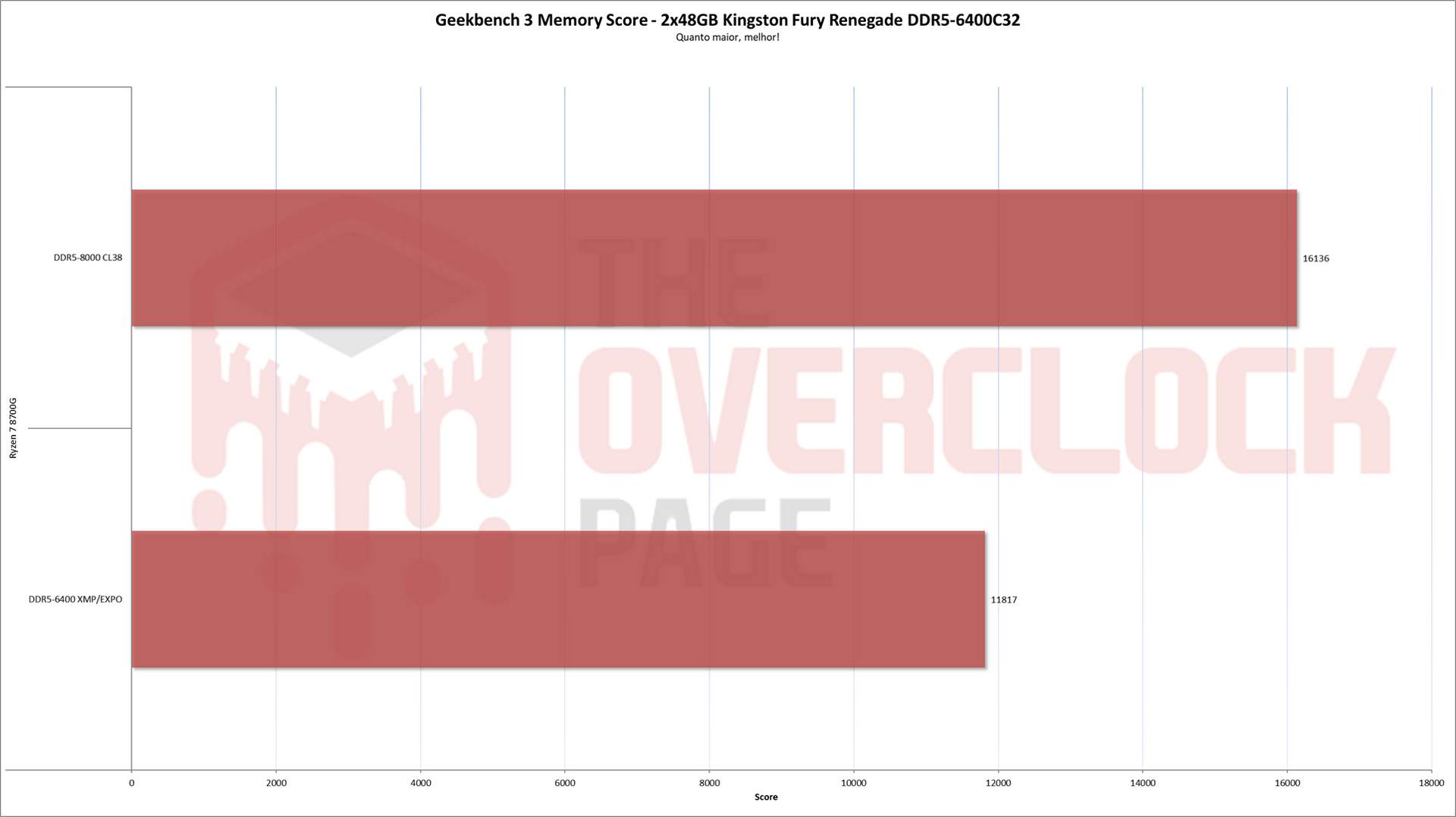
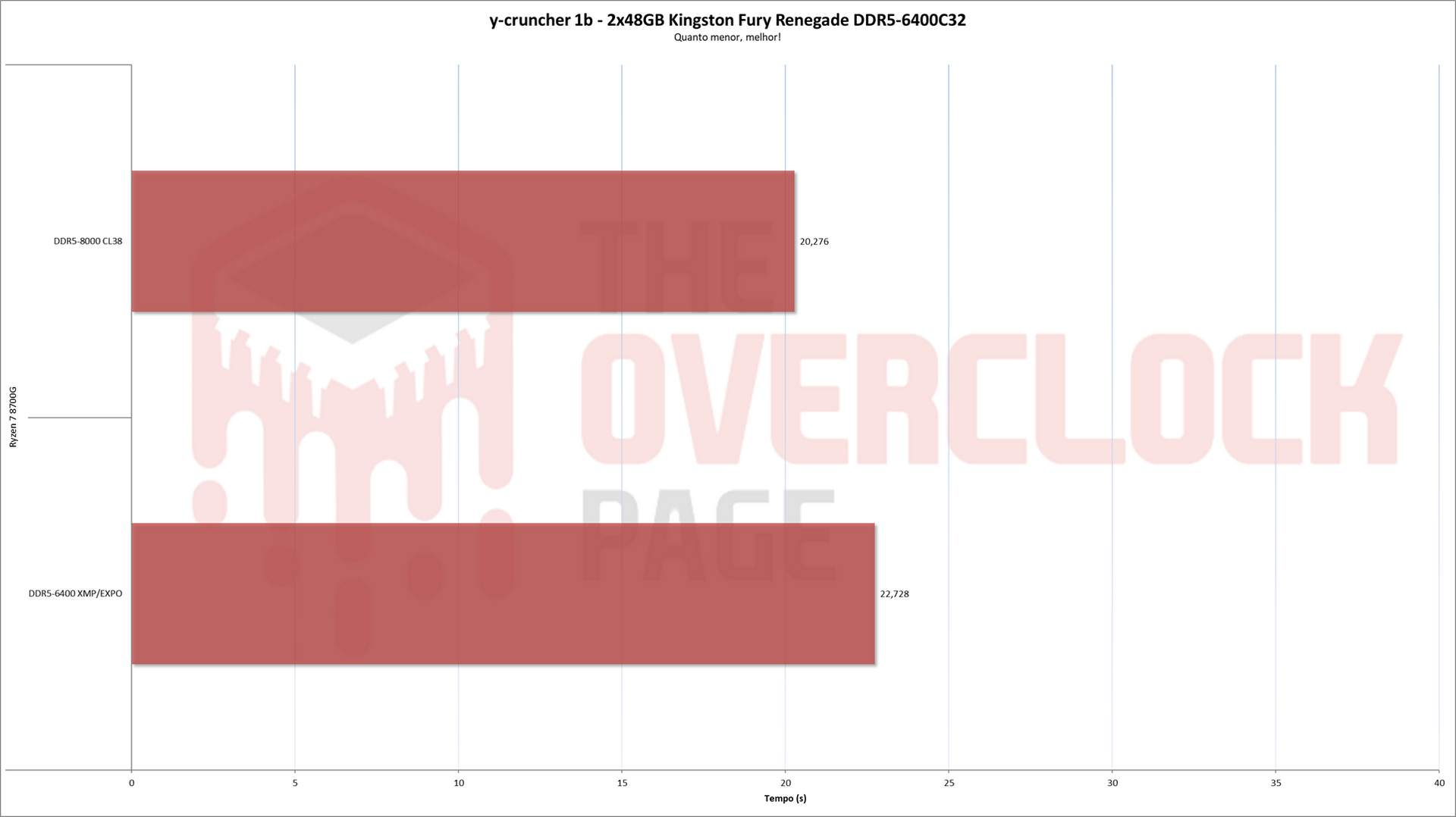
In synthetic memory benchmarks, the difference from overclocking is often more pronounced. Both Geekbench and y-cruncher 0.85 1b showed significant gains with overclocking, which isn’t always the case with other 2D applications, as observed in our Ryzen 7 8700G optimization guide.
3D Benchmarks
In addition to the 2D tests, we also performed gaming tests to assess the performance gains from optimizing timings and frequency. The tests were conducted at 720p Low to simulate a CPU-limited scenario and at 1080p High to reflect a situation where the GPU typically becomes the limiting factor.
- 720p Low


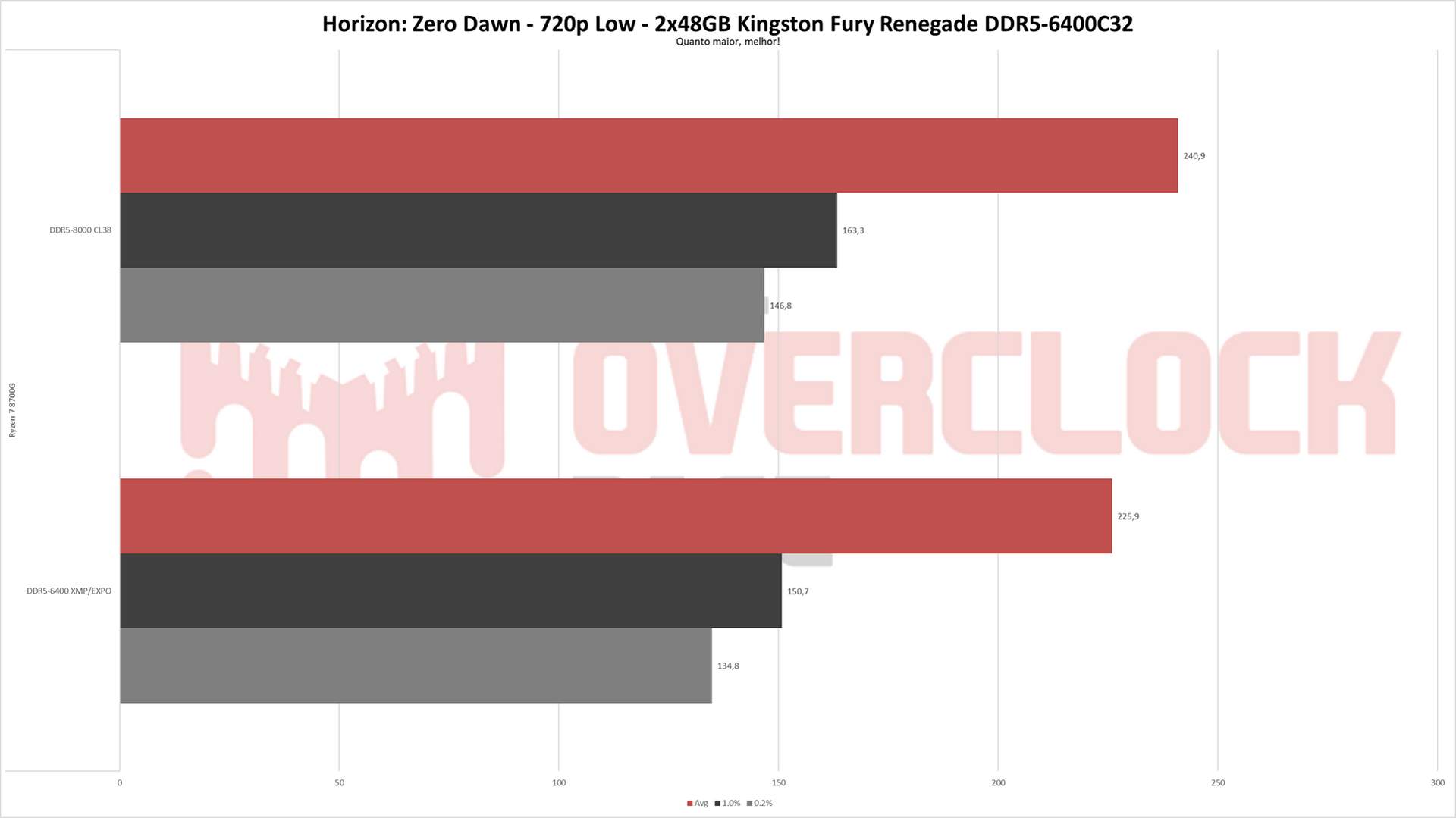
At 720p, the average performance gains ranged between 6.5% and just over 10%, with Shadow of the Tomb Raider (SOTTR) showing notable improvements. However, the most significant gains were seen in the 1% and 0.2% low metrics, particularly for Black Myth: Wukong.
- 1080p High
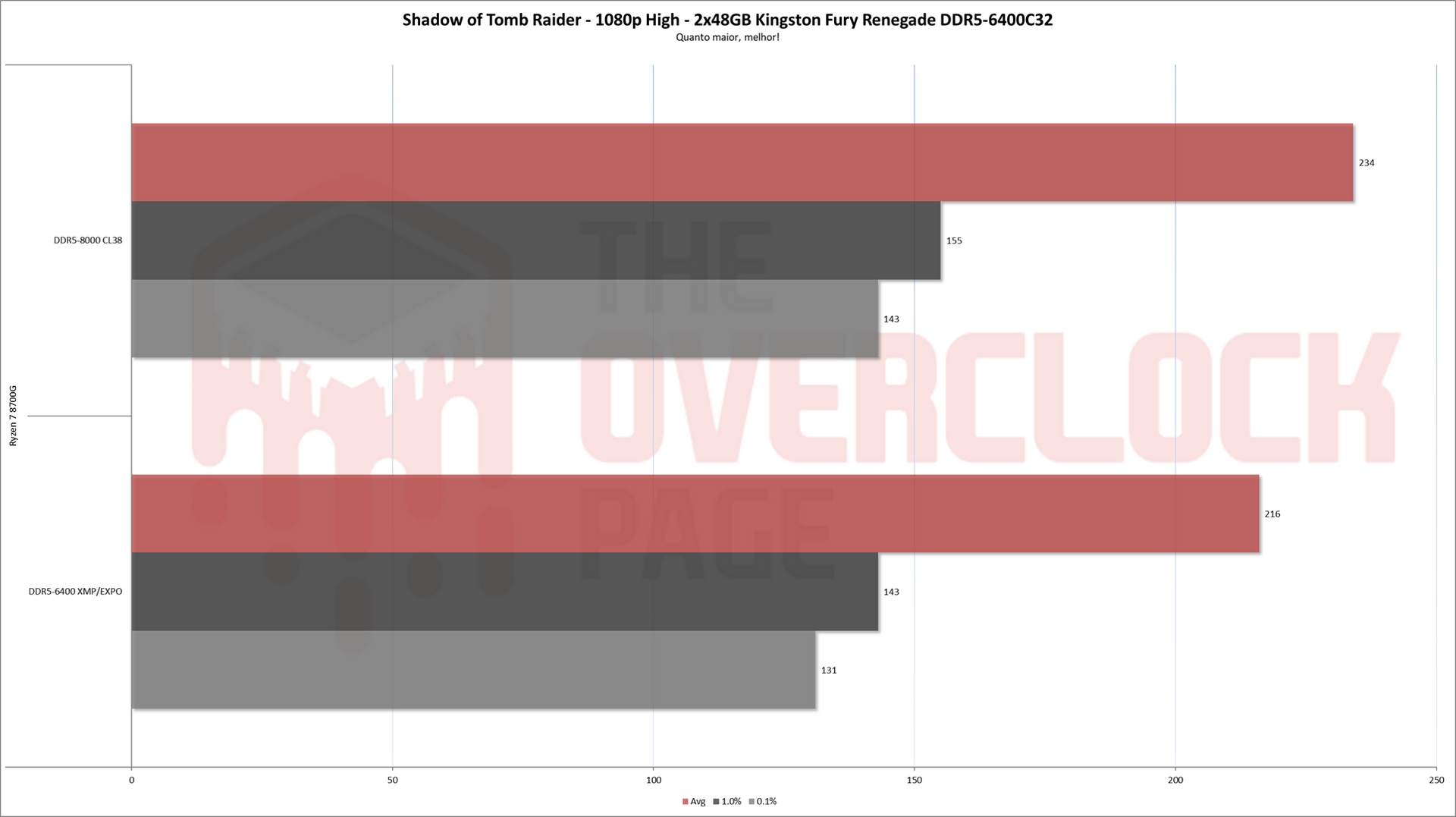

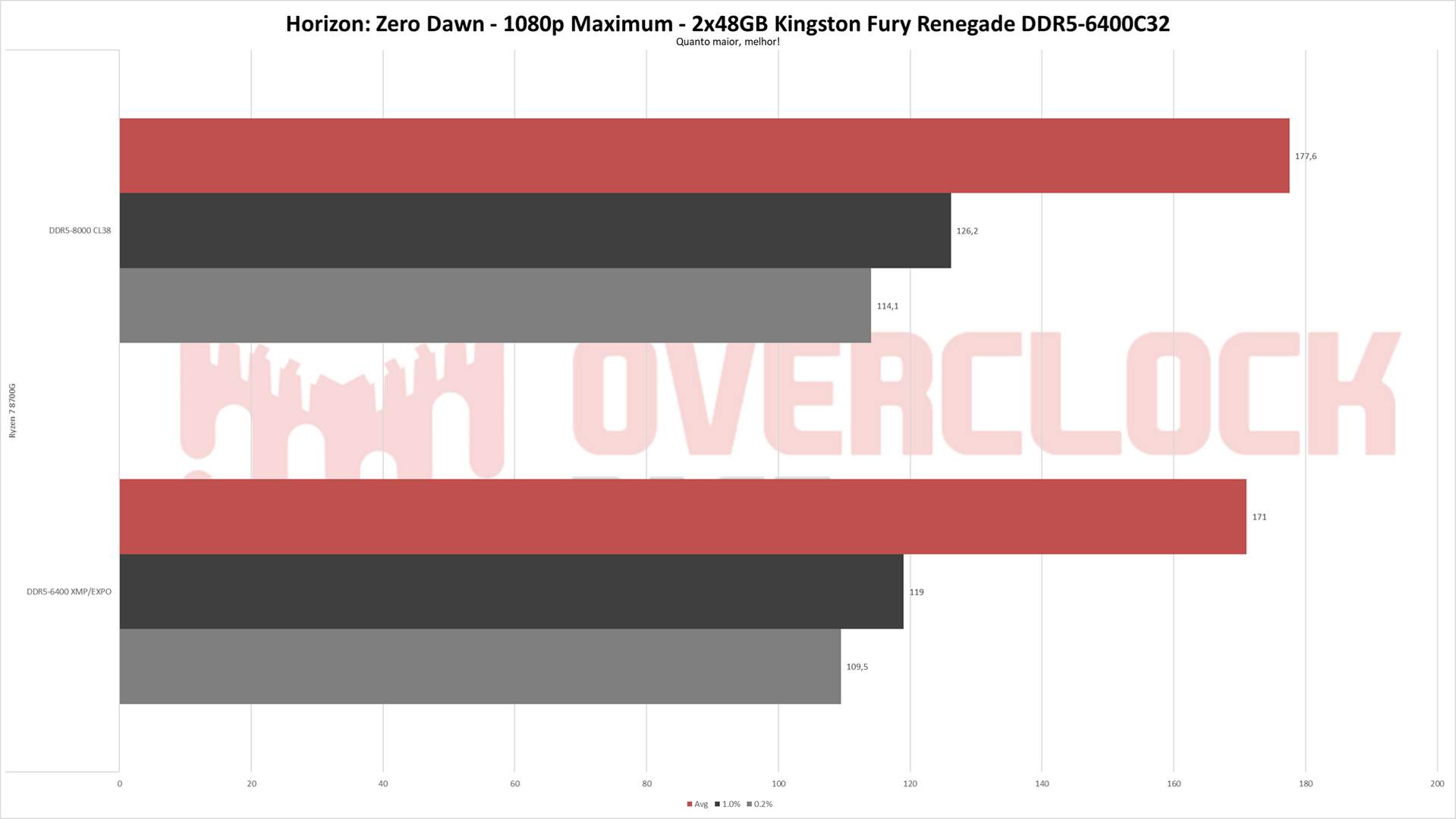
At 1080p, the gains were more modest, ranging from virtually nonexistent improvements in Black Myth: Wukong to a healthy 9% increase in Shadow of the Tomb Raider (SOTTR).
Additional Tests: Ryzen 7000 and Other Motherboards
In addition to the Ryzen 8000G, we also test with Ryzen 7000 processors, as there are differences in timings, and it’s valuable to find the best 1:1 (MCLK) configuration for these chips. Unfortunately, our Ryzen 7 7700X died, which prevented us from completing the tests. However, we did make some noteworthy observations!
Firstly, the Ryzen 7000 can also achieve 8000 MT/s with these DR kits, successfully running benchmarks like y-cruncher and Geekbench under fairly demanding conditions. While we didn’t have time to finalize daily-use settings for DDR5-8000 due to the CPU failure, it’s clear that reaching this performance level is indeed possible!

It’s important to emphasize that not all motherboards can push DR modules to 8000 MT/s. This capability is typically restricted to models like the Crosshair X670E Gene and the B650E Aorus Tachyon, both of which are 1DPC and designed for more intensive overclocking. Generally, it’s more advisable to target something between 6000 and 6400 MT/s if using a Ryzen 7000 processor, or 6800 MT/s if using an Intel CPU from the 13th or 14th generation.
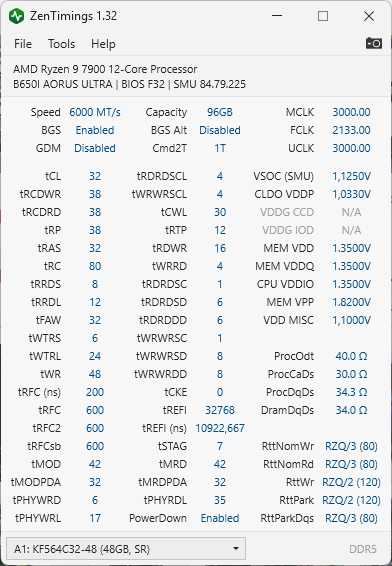
Finally, when installing the memory in the SFF machine equipped with a Ryzen 9 7900 and a B650I Aorus Ultra, we were able to achieve DDR5-6000 CL32 with stability, though some concessions had to be made on tREFI and tCL due to the modules’ temperature, which was reaching around 70°C during TM5 and causing errors.
For those interested, here is a screenshot from ZenTimings with the parameters used, which were not included in the official table due to the different testing conditions.
Conclusion
The Kingston FURY Renegade 96 GB (2×48 GB) DDR5-6400 kit, although equipped only with XMP profiles, showed good compatibility with the AMD platform, working normally at the 6400 MT/s profile without user intervention. However, this results in UCLK running in 1:2 mode, which can vary depending on the CPU and motherboard used and is mostly independent of the memory itself.
With manual adjustments, it was possible to achieve DDR5-8000 CL38 with stability—a remarkable feat for a Dual Rank kit like this, though it remains out of reach for most available AM5 motherboards.
It’s important to keep an eye on temperatures if you plan to overclock. You might need to go beyond the traditional fan directly blowing over the memory to keep things under control.
Regarding availability and price, the 96 GB Kingston FURY Renegade DDR5-6400 CL32 kit can be found for around 370 USD. While this is certainly not a low price, if you truly need 96 GB and want to extract the maximum performance from your memory, this product is excellent and should meet your needs well.