Review – SSD Acer Predator GM7 4TB – The most efficient 4TB SSD we tested so far!
 by gabrielcariocapfz October 26, 2024 · Reviews / Reviews / SSDs and Storage / SSDs e armazenamento
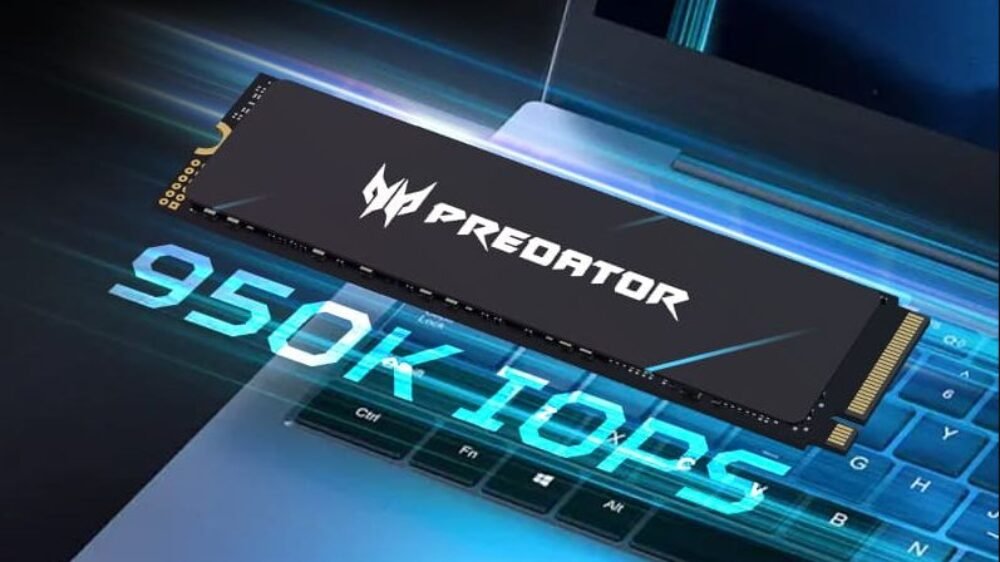
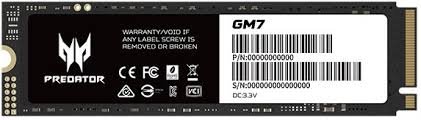
Today, we’re testing a high-end NVMe SSD from Acer, the GM7 model, provided directly by Biwin.
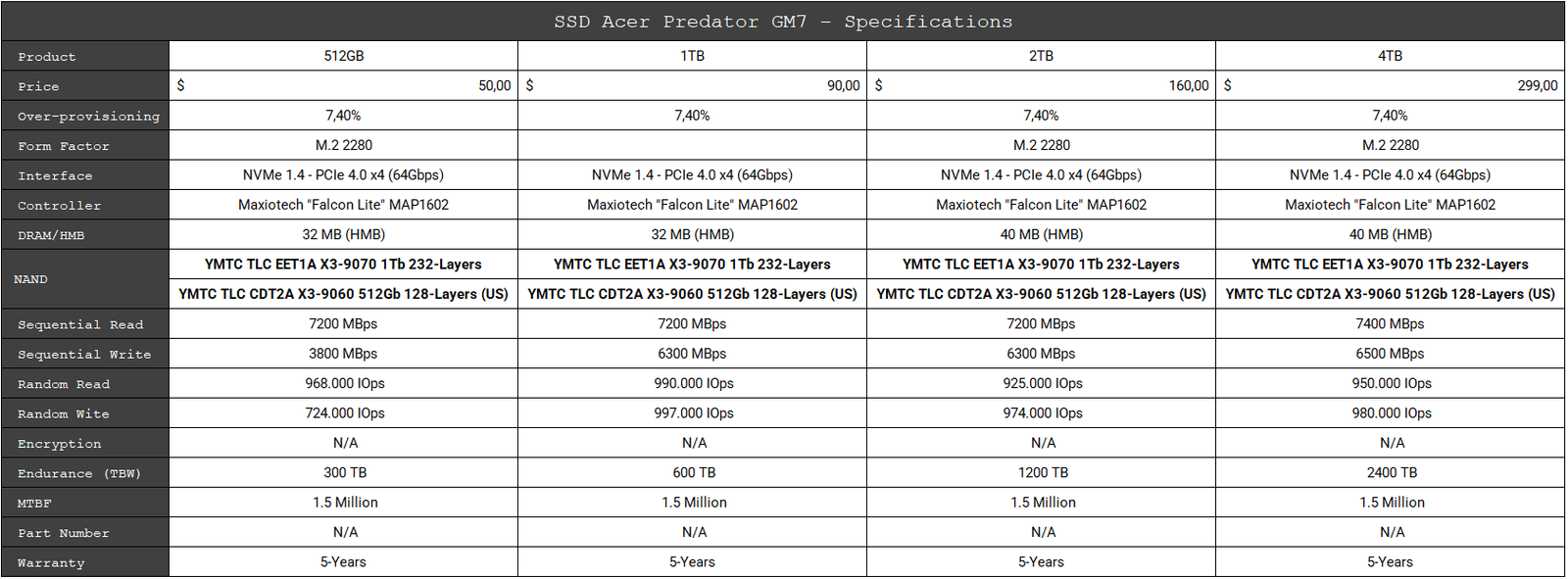
This drive comes in the M.2 form factor with a 64Gbps interface, utilizing 4 PCIe 4.0 lanes and the NVMe 2.0 protocol, and is available in capacities from 512GB to 4TB. The 4TB model is priced around $299, a competitive price point for this capacity.
Specifications Acer Predator GM7 4TB
Below are more detailed specifications of the SSD that will be tested (4TB unit):
SSD’s Software
The manufacturer does not provide any software for managing these SSDs, making it necessary to use third-party software.
Unboxing
The front of the box features a sleek black design with the PREDATOR logo, Acer’s premium lineup for notebooks, memory, SSDs, and other products, along with an illustrative image of the SSD. The back is more understated, containing only the product information.
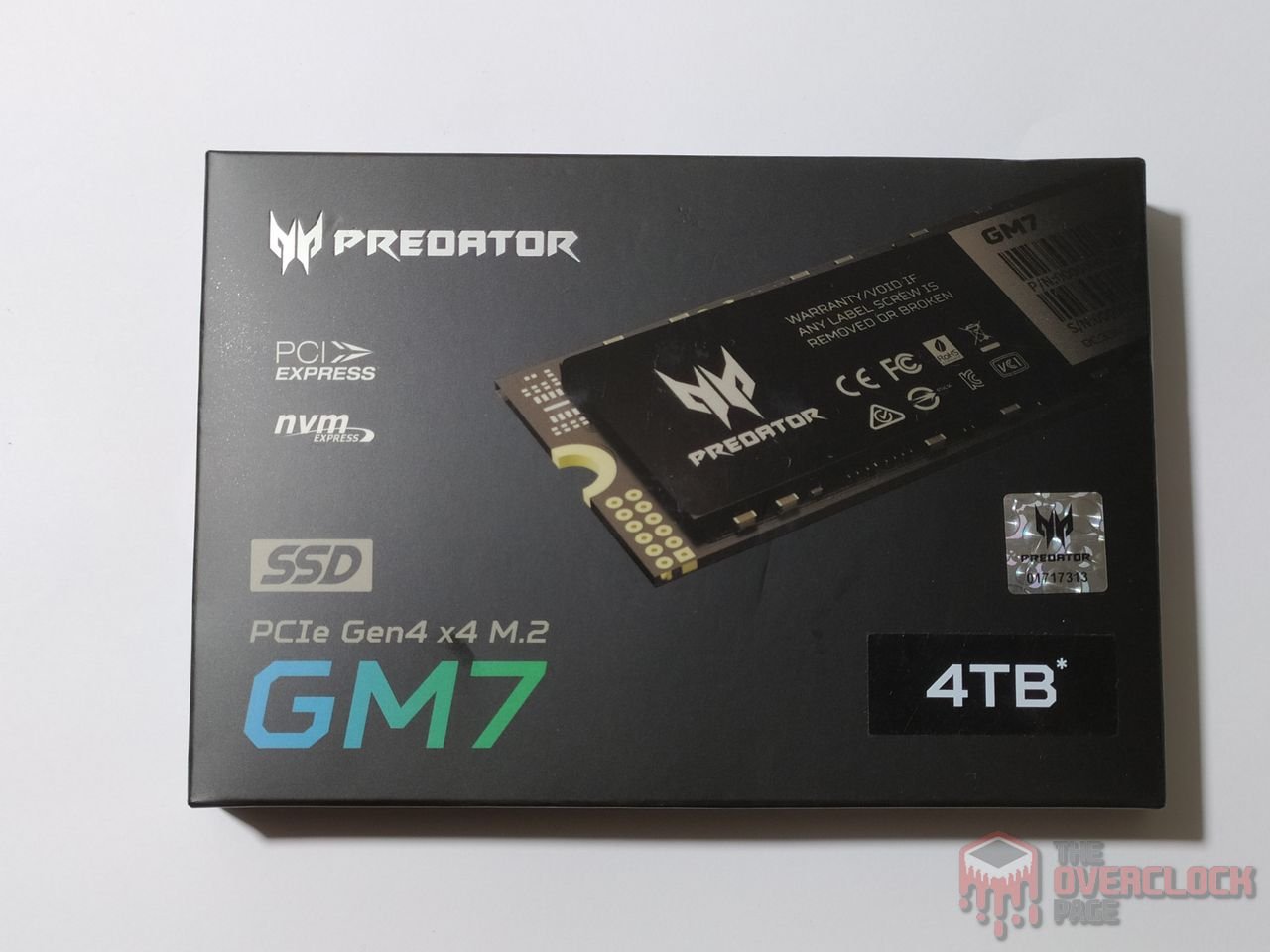

Upon unboxing, the SSD is securely placed in a plastic holder alongside an installation guide and warranty terms. It also includes an SSD mounting screw—a welcome addition, as these small screws are easy to misplace if we’re not careful.

This is a single-sided design, which is great for use in notebooks.
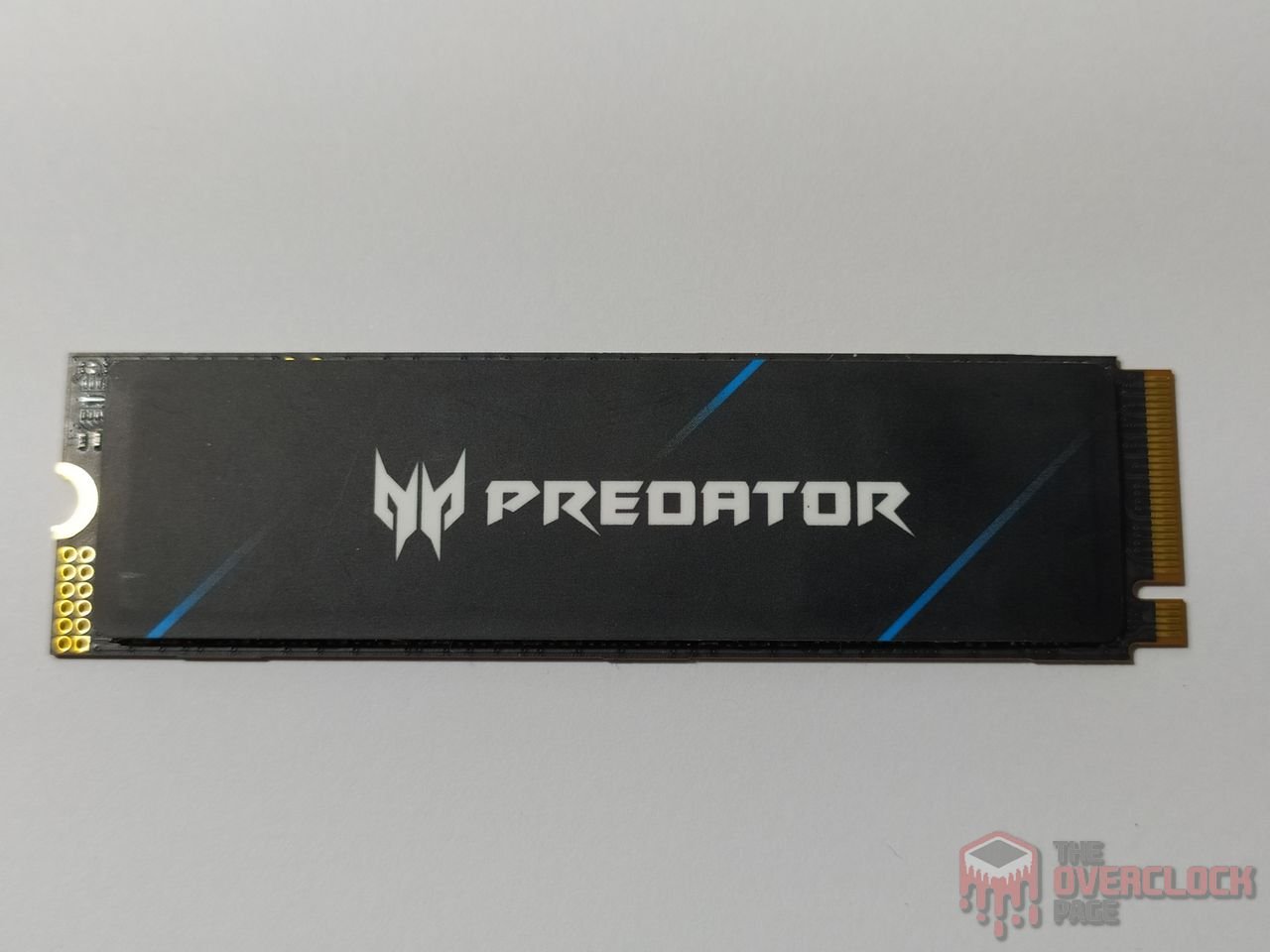

On the top, there’s a sleek sticker, although it doesn’t aid in heat dissipation. We’ll assess whether this affects performance due to thermal throttling. The back contains only a label with the SSD’s serial number and capacity.
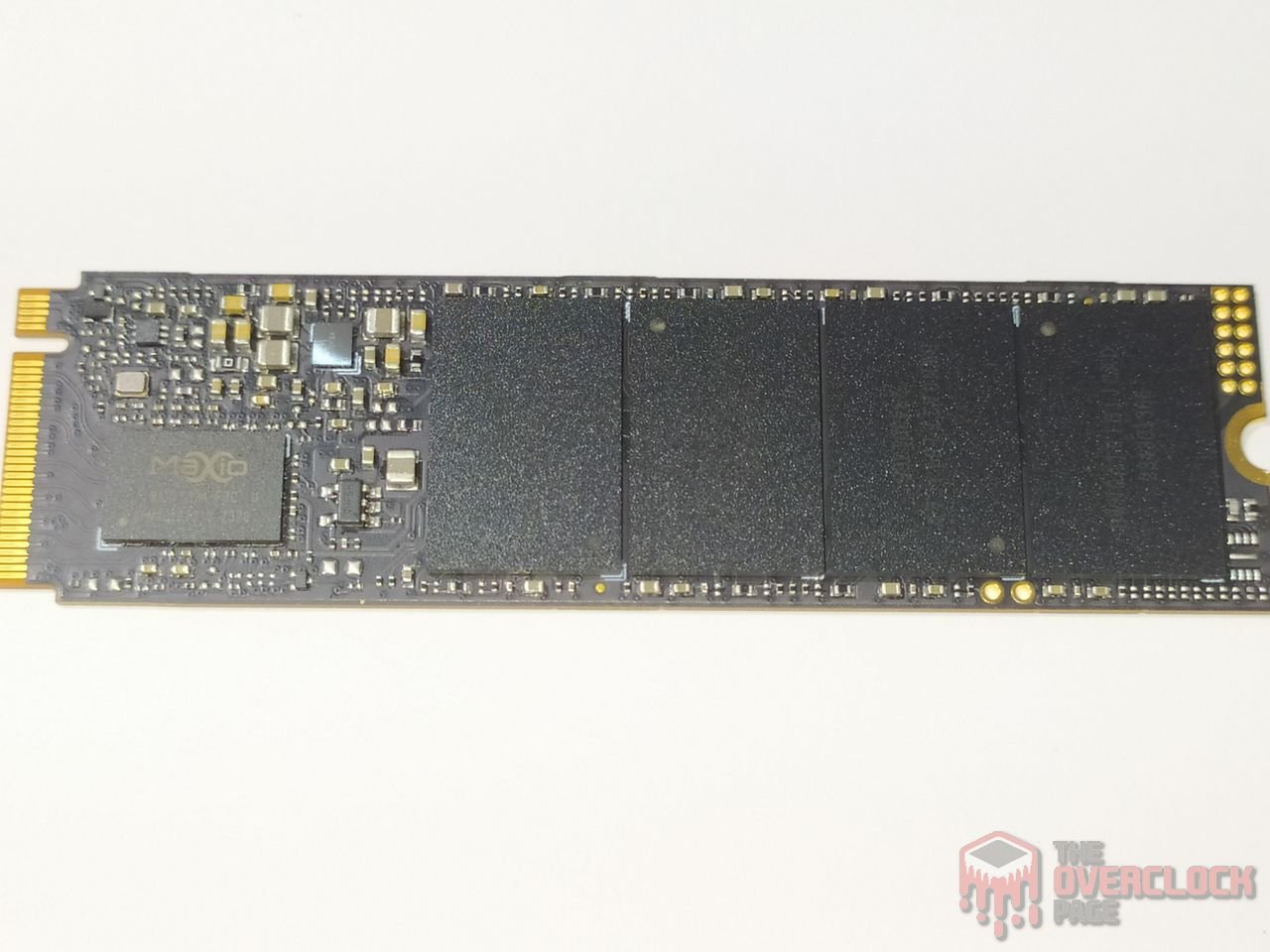

On the front of the PCB, we find its controller, NAND Flash chips, PMIC, and some additional components supporting the SSD’s VRM.
Controller
The SSD controller is responsible for managing all data, over-provisioning, and garbage collection, among other background functions. This, of course, helps the SSD achieve good performance.
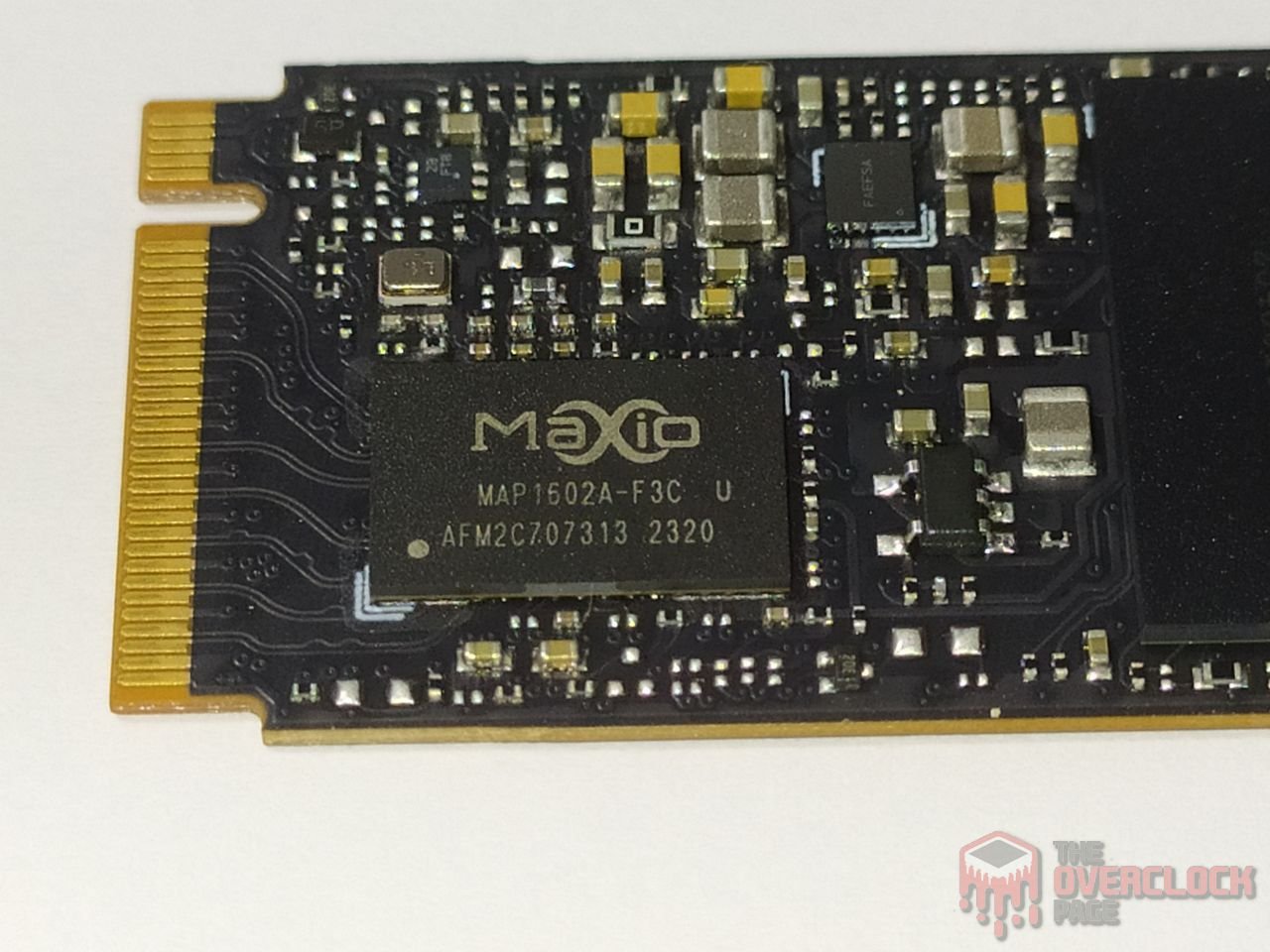
This SSD uses a controller from the manufacturer MaxioTech, the MAP1602A model, which is a 32-bit ARM ISA controller featuring four Cortex® R5 cores (quad-core) and manufactured using TSMC’s 12nm process. It’s comparable to solutions from well-known manufacturers like Phison and Silicon Motion. This controller is DRAM-less, so it relies on technologies like H.M.B. (Host Memory Buffer) to store metadata tables.
Additionally, it supports 4 channels with a bus speed of up to 2400 MT/s, distinguishing it from most Gen4 DRAM-less 4-channel controllers, which typically support speeds up to 1600 MT/s. It supports up to 16 dies using “Chip Enable” commands, which are directly and physically connected to the dies. As we’ll see shortly, its NAND Flash operates at 2400 MT/s.
Interestingly, the MAP1602 controller has several variants, including the F1C, F2C, and the F3C used in this SSD. This version is specifically designed for high-density units like this 4TB model, though all variants share the same architecture.
DRAM Cache or H.M.B.
Every high-end SSD aiming to deliver consistently high performance requires a buffer to store its mapping tables (Flash Translation Layer or lookup table), enhancing random performance and responsiveness.
As this SSD uses the well-known MAP1602 controller from MaxioTek, it lacks a DRAM cache. Instead, it allocates 40MB of the system’s RAM via H.M.B. (Host Memory Buffer) to store metadata tables.
NAND Flash
Regarding its NAND flash, the 4TB SSD is equipped with four NAND chips labeled “BWN0ATF1B1JCAD.” These chips are from the Chinese manufacturer YMTC, specifically the YMTC TLC EET1A X3-9070 “WDS.” Each die is 1Tb (128GB), featuring 232 layers of data and a total of 253 gates, resulting in an impressive array efficiency of 91.7%.
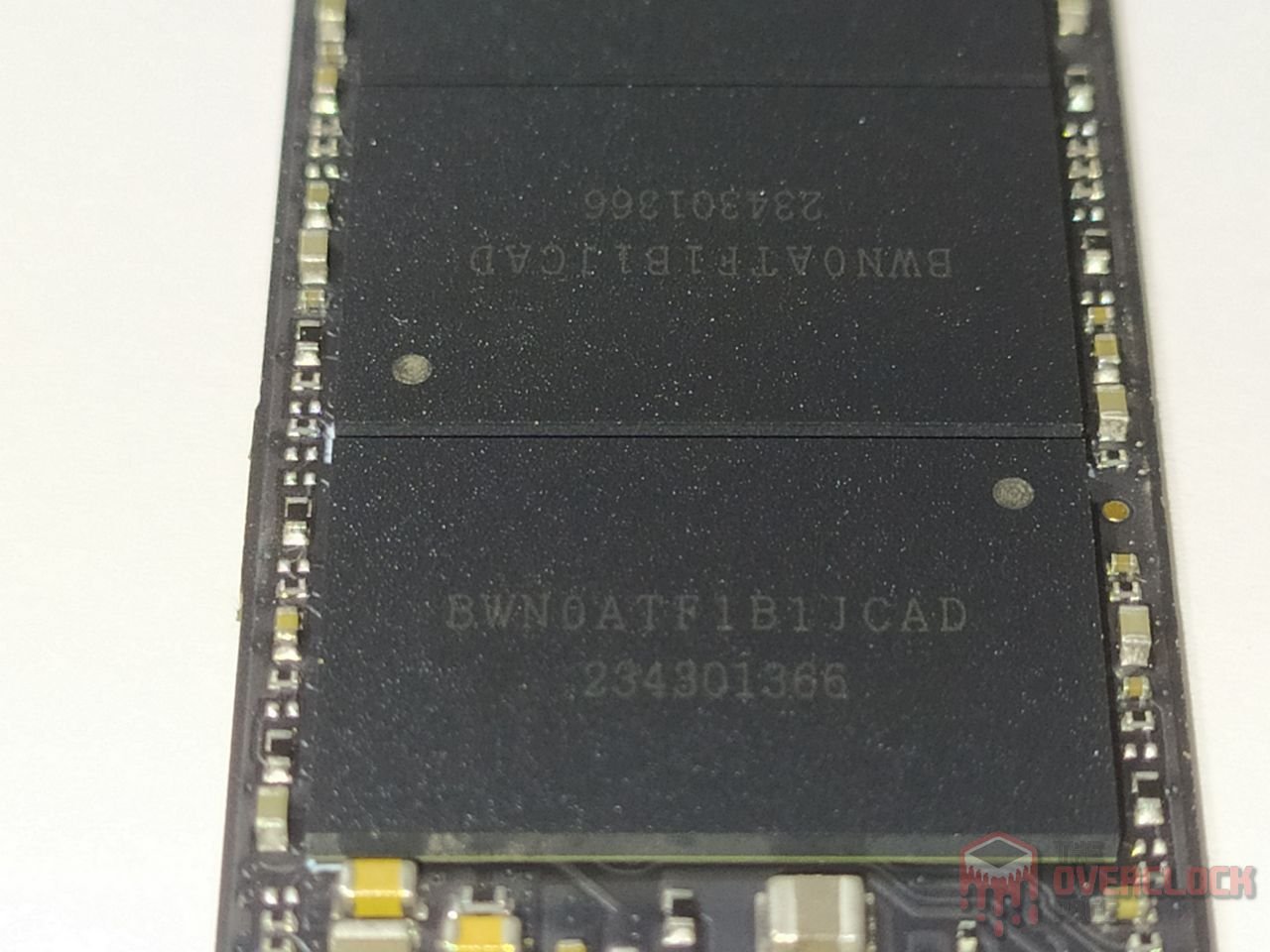
In this SSD, each NAND Flash has 8 dies with a density of 1Tb, totaling 1TB per NAND, resulting in 4TB overall. They communicate with the controller through a 2400 MT/s bus, which is the maximum speed for both these NANDs and the controller.
PMIC (Power Delivery)

Like any electronic component under load, SSDs have varying levels of power consumption, ranging from just a few milliwatts to nearly 10 watts, approaching the limits of some connectors or slots. Power management is handled by the PMIC (Power Management IC), which supplies power to the other components.
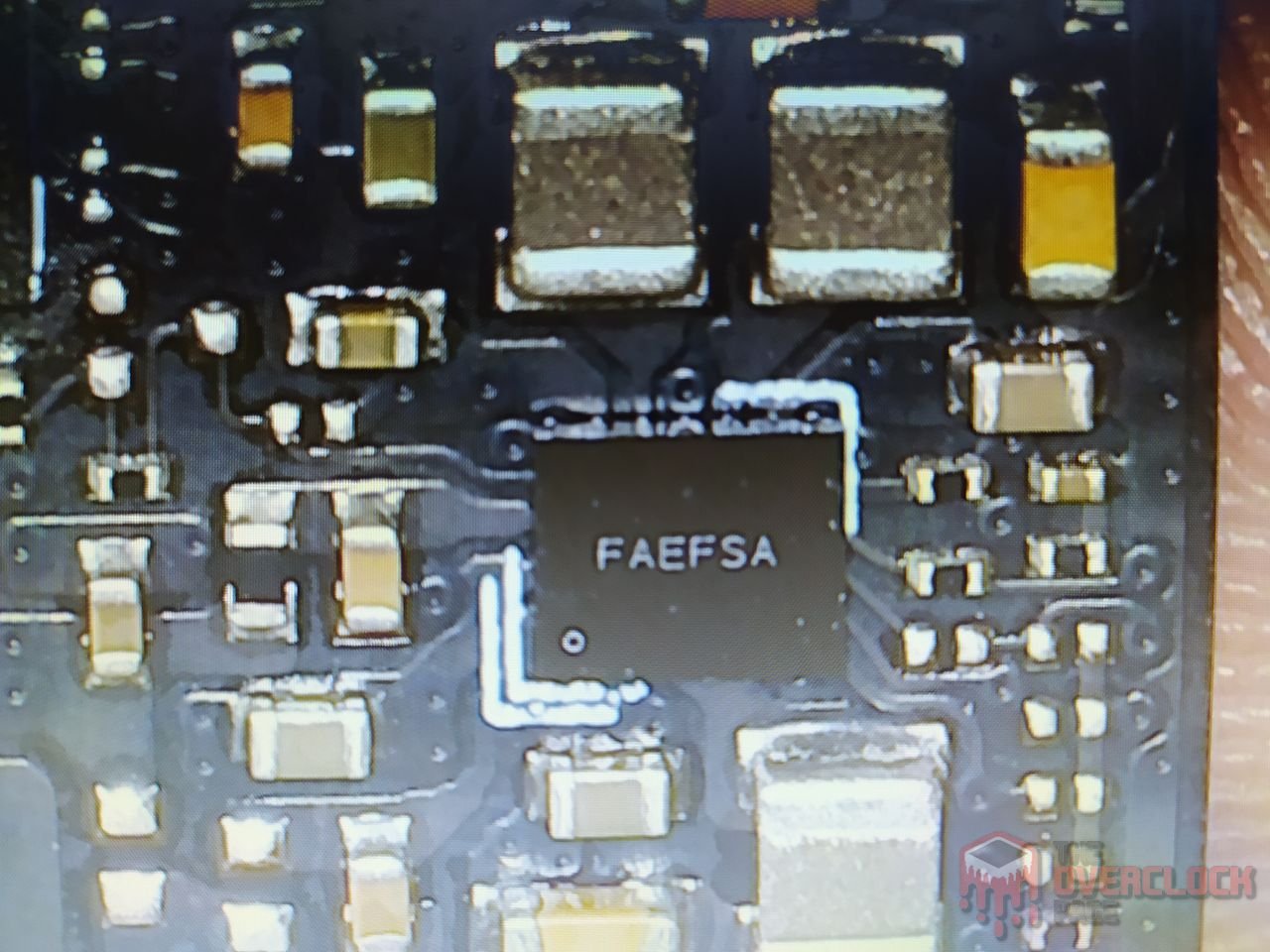


In this SSD, it uses the well-known PMIC marked as 9HFGH, which is a Step-down Regulator operating with a switching frequency of up to 1.5MHz. It provides 2A of current and supports operating with voltages ranging from 2.5V to 5.5V.

It achieves good efficiency when supplying 1A and 3.3V, which is typical for this SSD, as we will see throughout the analysis where it operated close to this range.
The “ZB” could either be the ONsemi NCP4587DMX33TCG or the Ricoh RP201K331D, which are Linear Voltage Regulators.
The PMIC is likely from Sylergy, although it was not possible to find the datasheet for the “FAEFSA” component.
SSD Power States
As we always mention in power consumption analyses, in this section we will take a closer look at the power states of this SSD.
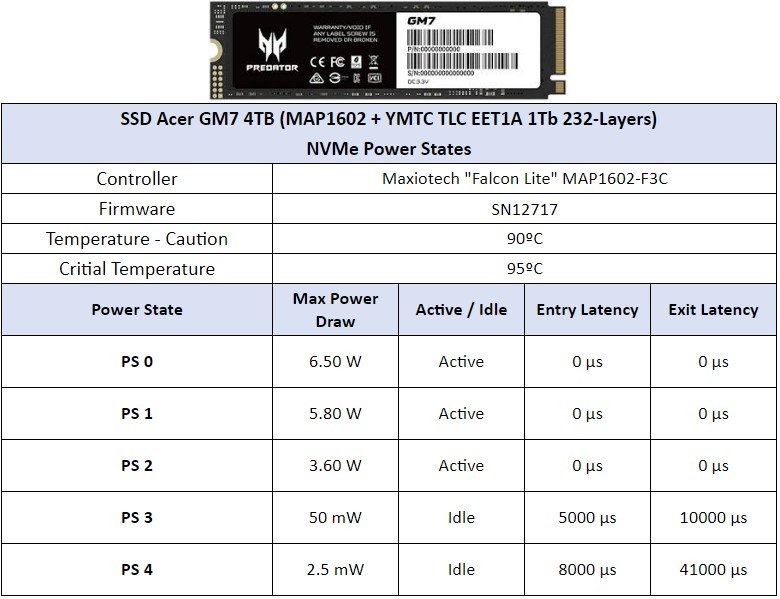
By default, there are 5 primary power states: 3 active and 2 idle. Interestingly, even though PS 0 has a power consumption of 6.50 W, as we will see throughout the analysis, it operates close to this value.
CURIOSITIES ABOUT SSD ACER GM7
Just as RAM modules can vary in integrated circuits, SSDs can also experience component changes, such as different controllers or NAND flash chips.
This SSD lineup has two variants, resulting from a launch issue when the U.S. government banned the import of YMTC X3-9070 TLC NAND chips.

Tom’s Hardware – Review SSD Acer GM7 2TB
As observed in our analysis, the NANDs used in our SSD are the “BWN0ATF1B1JCAD,” whereas the ones used in the SSD tested by Tom’s Hardware were the “BWN09TC1B1RCAD.”

Due to the government restrictions, Acer, HP, and other manufacturers opted for different NAND flash chips with similar performance. By using YMTC’s own NAND decoder, we observed the following:
In our SSD’s NAND, the “5th” digit, which is “A,” indicates the die density, where “A” represents a 1Tb die. The only 1Tb TLC die currently offered by YMTC is the 232-layer EET1A, which features 6 planes. In contrast, the SSD tested by Tom’s Hardware had a “9” in this position, signifying a 512Gb TLC die, of which YMTC has several, including the problematic CDT1B and CDT2A.
To determine the specific die, we examine the last letter of the NAND flash. In both SSDs, the letter “D” signifies the new generation of YMTC’s Xtacking 3.0 NANDs. Therefore, the die in Tom’s Hardware’s SSD is actually the YMTC TLC CDT2A X3-9060, featuring 128 layers (“WYS”).
Another identifying factor is that the CDT1B dies have a maximum bus speed of 1600 MT/s. While not slow, this speed limits performance; in a project like this with a 4-channel controller, 1600 MT/s NANDs cannot exceed speeds above 7GB/s. This is because 4 x 1600 MT/s equals 6400 MB/s, and accounting for overhead, it would be close to 5GB/s, which aligns with our review of the Kingbank KP260.
In contrast, both the CDT2A and EET1A support a bus speed of 2400 MT/s, enabling the SSD to reach the required speeds specified in the GM7 spec sheet.
TEST BENCH
– OS: Windows 11 Pro 64-bit (Build: 23H2)
– CPU: Intel Core i7 13700K (5.7GHz all core) (E-cores e Hyper-threading desabled)
– RAM: 2 × 16 GB DDR4-3200MHz CL-16 Netac (c/ XMP)
– Motherboard: MSI Z790-P PRO WIFI D4 (Bios Ver.: 7E06v18)
– GPU: RTX 4070 Ti Super Colorful (Drivers: 555.xx)
– (OS Drive): SSD Solidigm P44 Pro 2TB (Firmware: 001C)
– DUT SSD: SSD Acer Predator GM7 4TB (Firmware: SN12717)
– Chipset Driver Intel Z790: 10.1.19376.8374.
– Windows: Indexing disabled to avoid affecting test results.
– Windows: Windows updates disabled to avoid affecting test results
– Windows: Most Windows applications disabled from running in the background.
– Boot Windows: Clean Image with only Drivers
– Test pSLC Cache: The SSD is cooled by fans to prevent thermal throttling, ensuring it doesn’t interfere with the test results.
– Windows: Antivirus disabled to minimize variation in each round.
– DUT SSDs: Used as a secondary drive, with 0% of space being utilized, and other tests conducted with 50% of space utilized to represent a realistic scenario.
– Quarch PPM QTL1999 – Power consumption test: conducted with three parameters—idle, where the drive is left as a secondary, and after a period of idle, a one-hour write test is performed, and the average power consumption is recorded
WHERE TO BUY
For those looking to purchase this SSD model, here are some affiliate links if you’d like to support us
CRYSTALDISKMARK
We conducted synthetic sequential and random tests with the following configurations:
Sequential: 2x 1 GiB (Blocks 1 MiB) 8 Queues 1 Thread
Random: 2x 1 GiB (Blocks 4 KiB) 1 Queue 1/2/4/8/16 Threads
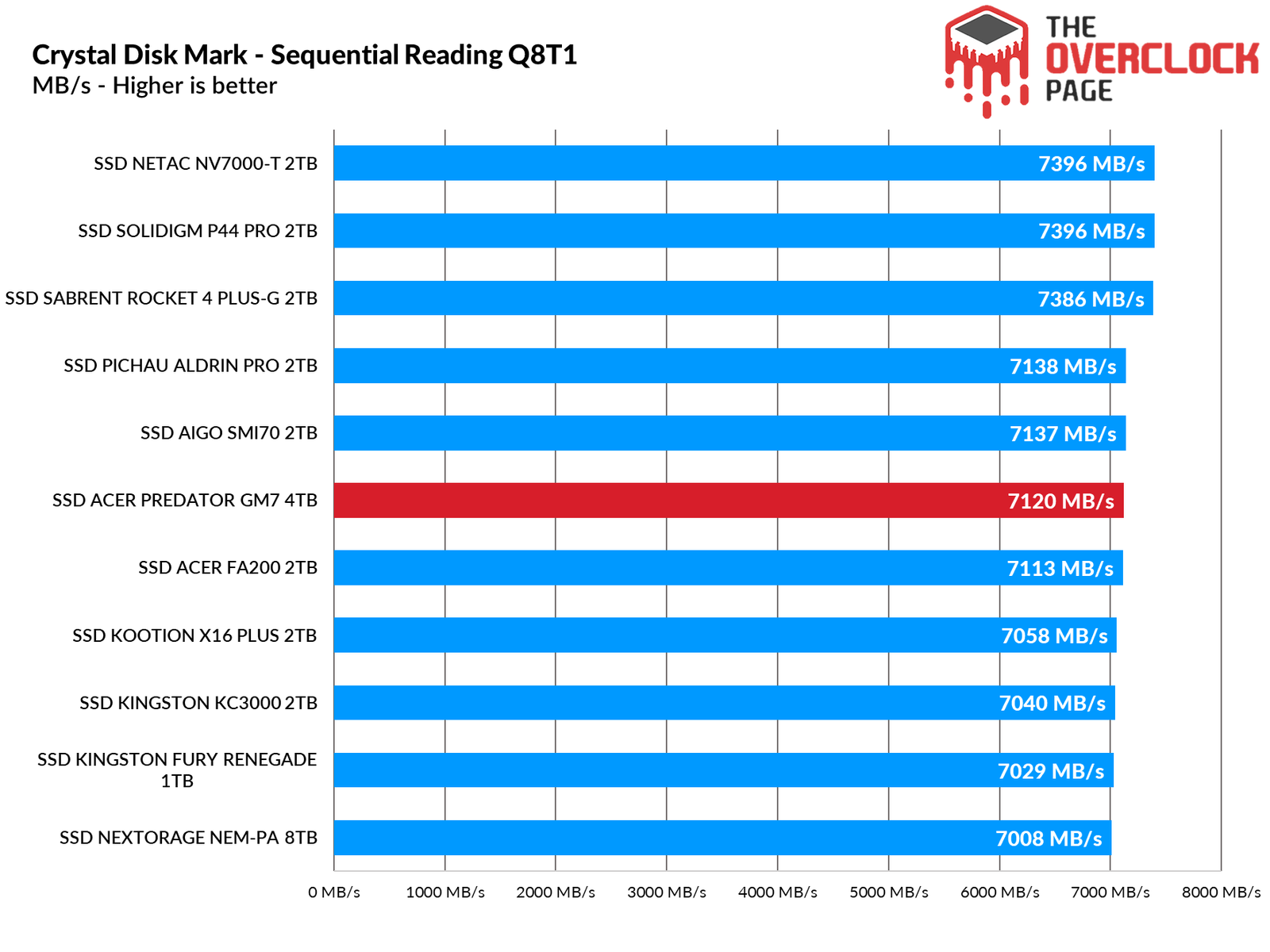
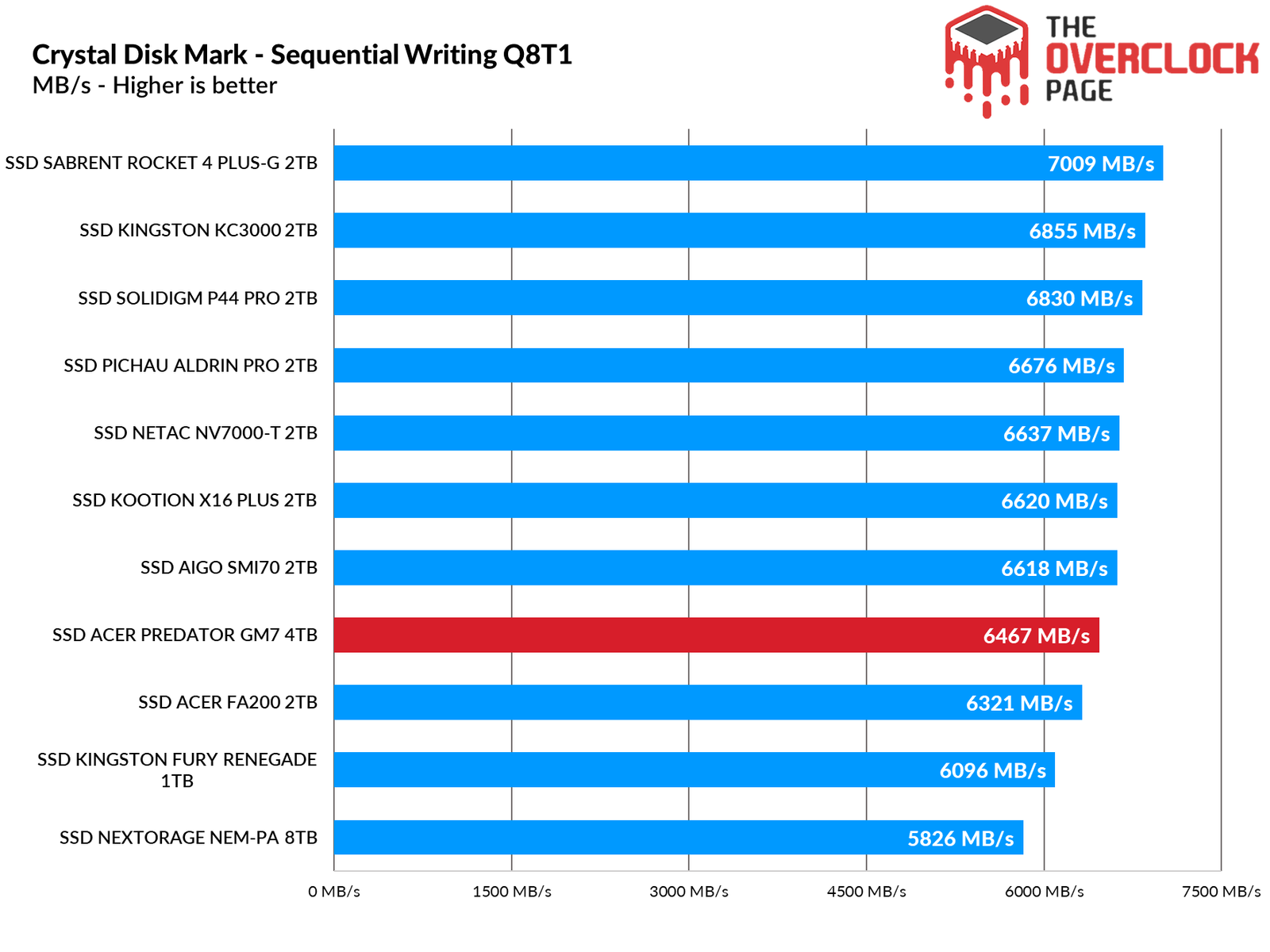
As we’ve seen many times before, sequential speed tests often show no noticeable difference in casual use, only in synthetic benchmarks. In these tests, the GM7 performs on par with other SSDs.
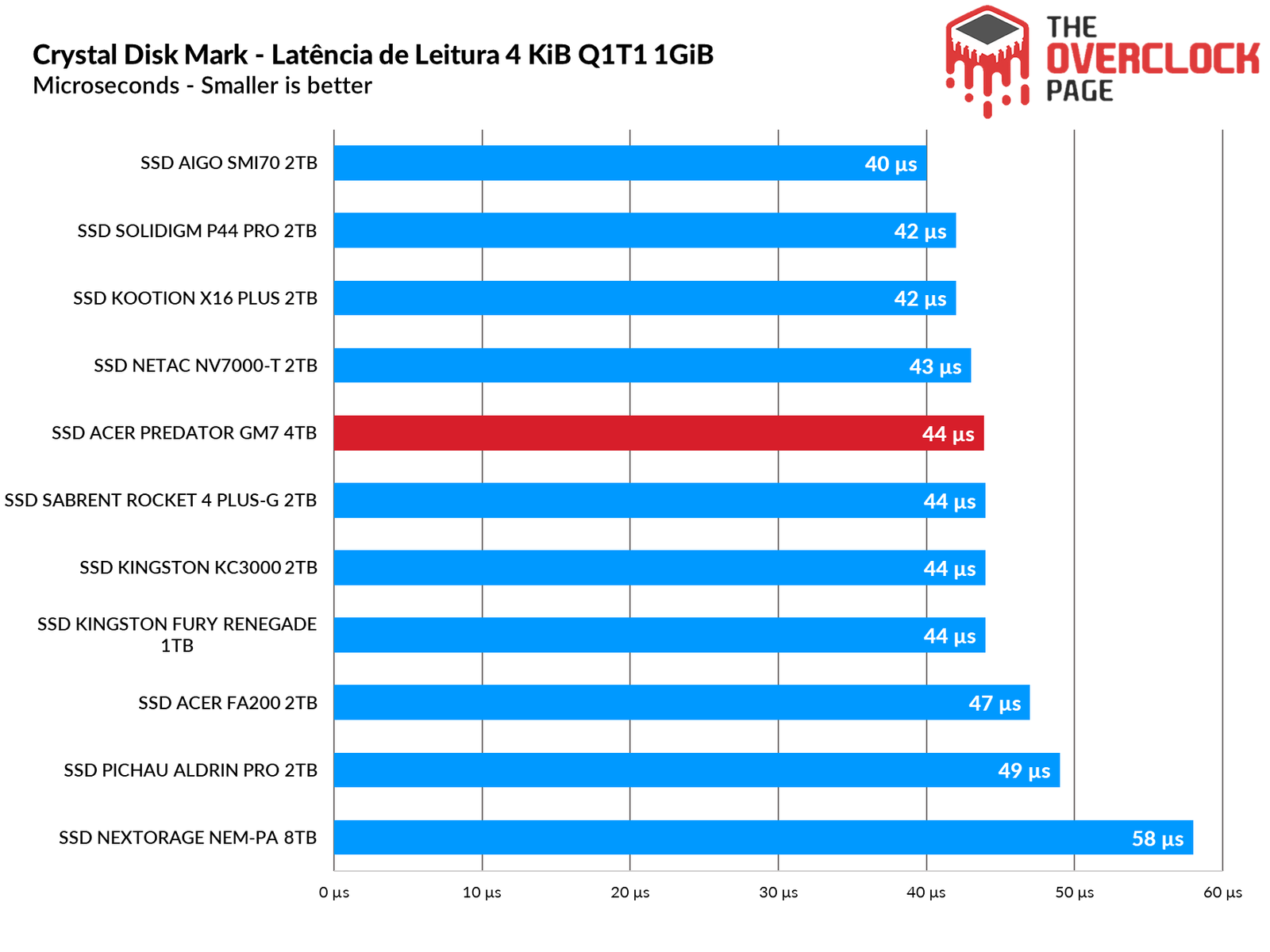
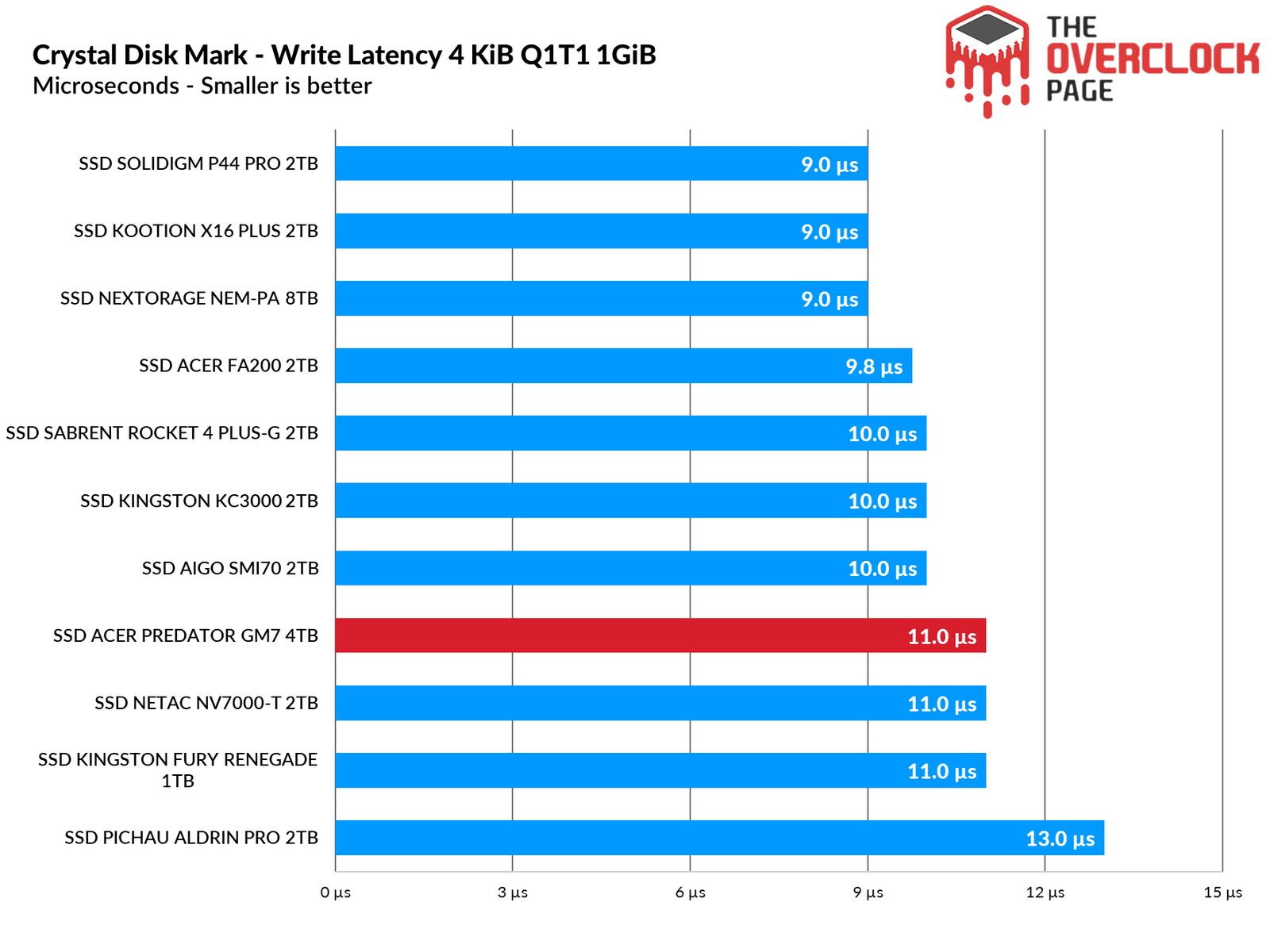
Its latencies also show excellent results, remaining similar to other SSDs with the MAP1602 controller that we have tested over the years.
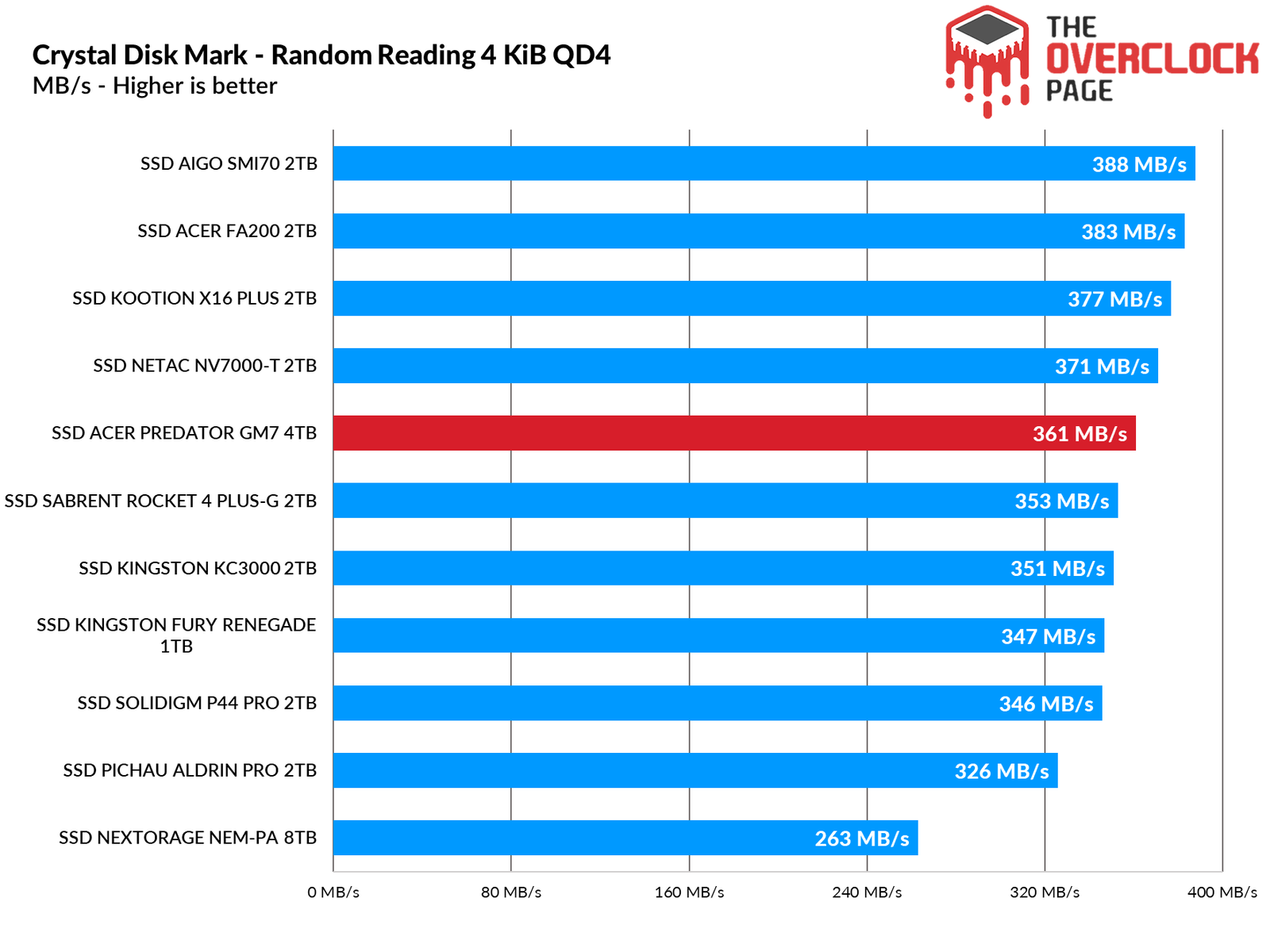
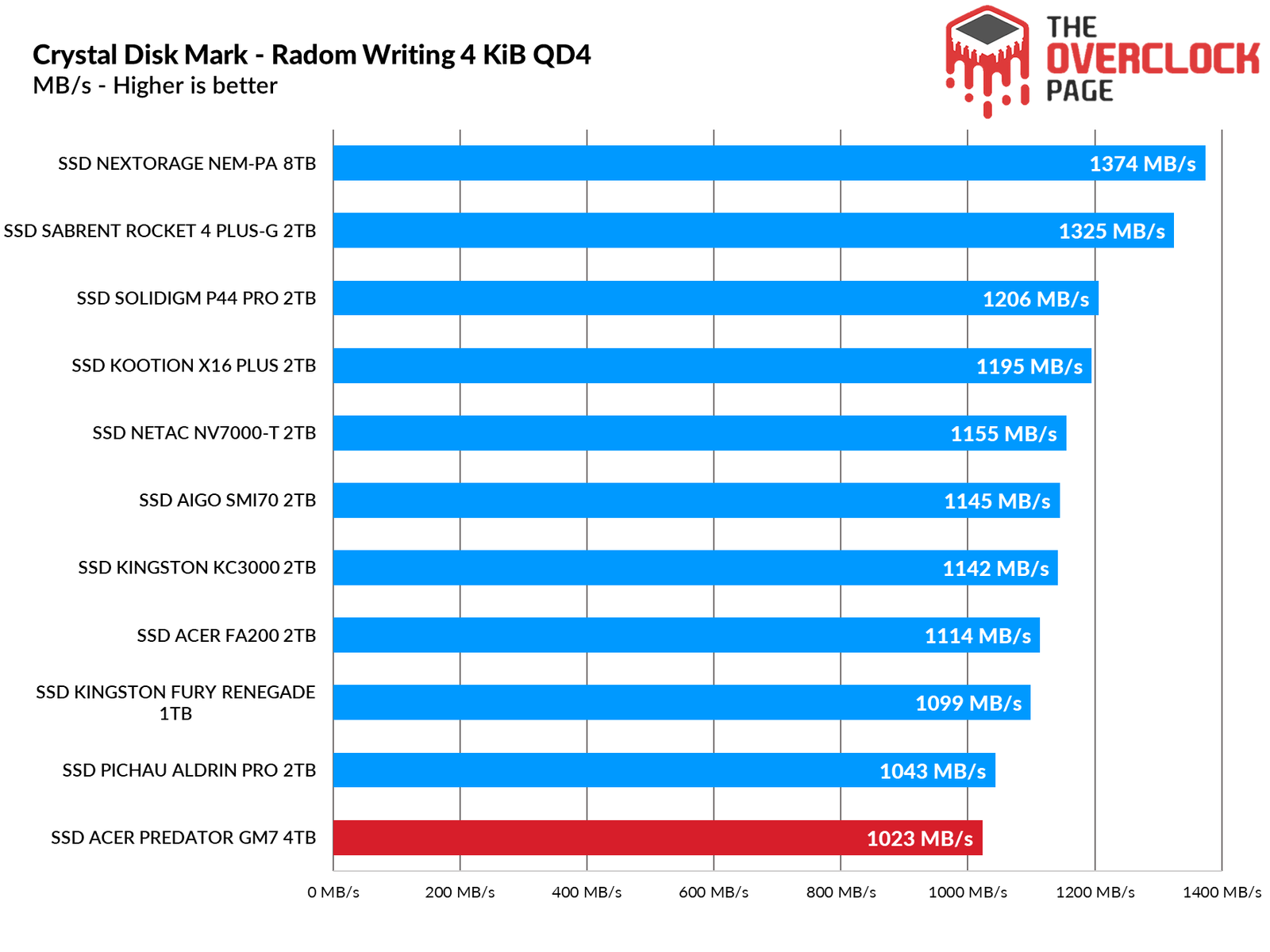
Its random read speeds at QD4 are decent and comparable to other SSDs using the MAP1602 controller. However, interestingly, it delivered the weakest write performance.
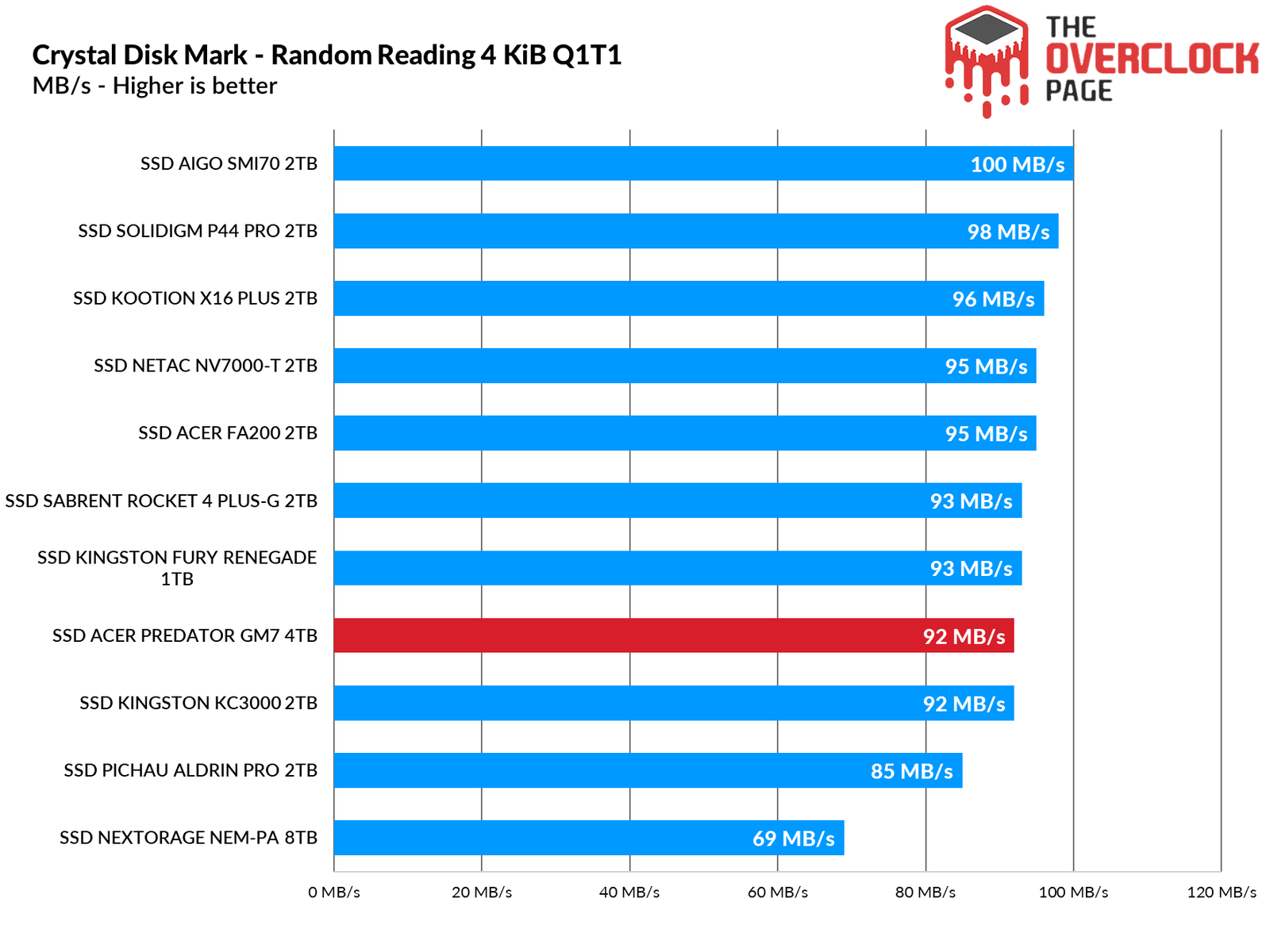
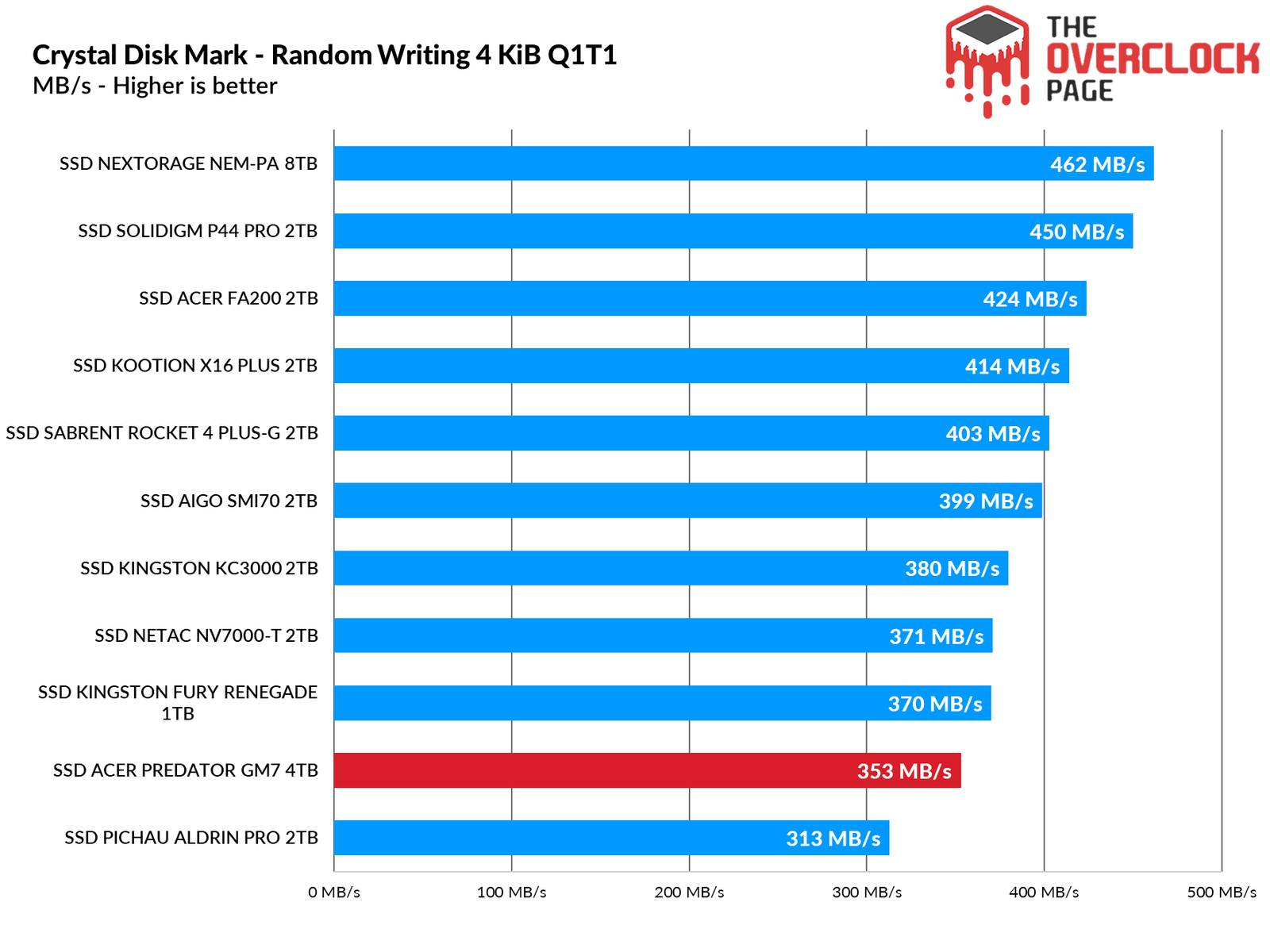
In its QD1 read performance, it reached 92 MB/s, which is a decent result compared to other SSDs. However, its write performance remained relatively low, indicating that some firmware improvements might be necessary in this area.
ATTO Disk Benchmark QD1 e QD4
We conducted a test using ATTO to observe the speed of the SSDs with different block sizes. The benchmark was configured as follows:
Blocks: from 512 Bytes to 8 MiB
File Size: 256MB
Queue Depth: 1 and 4.
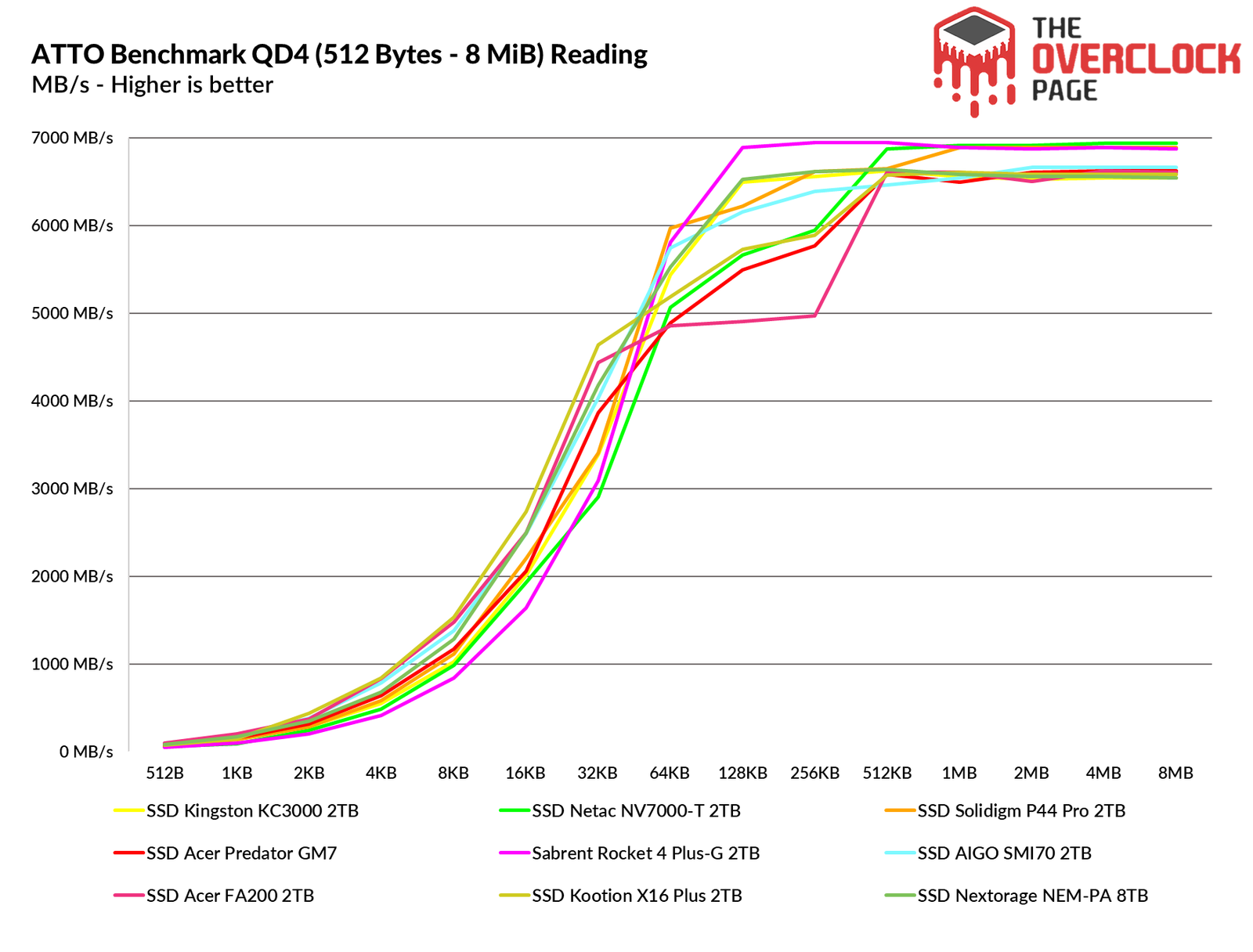
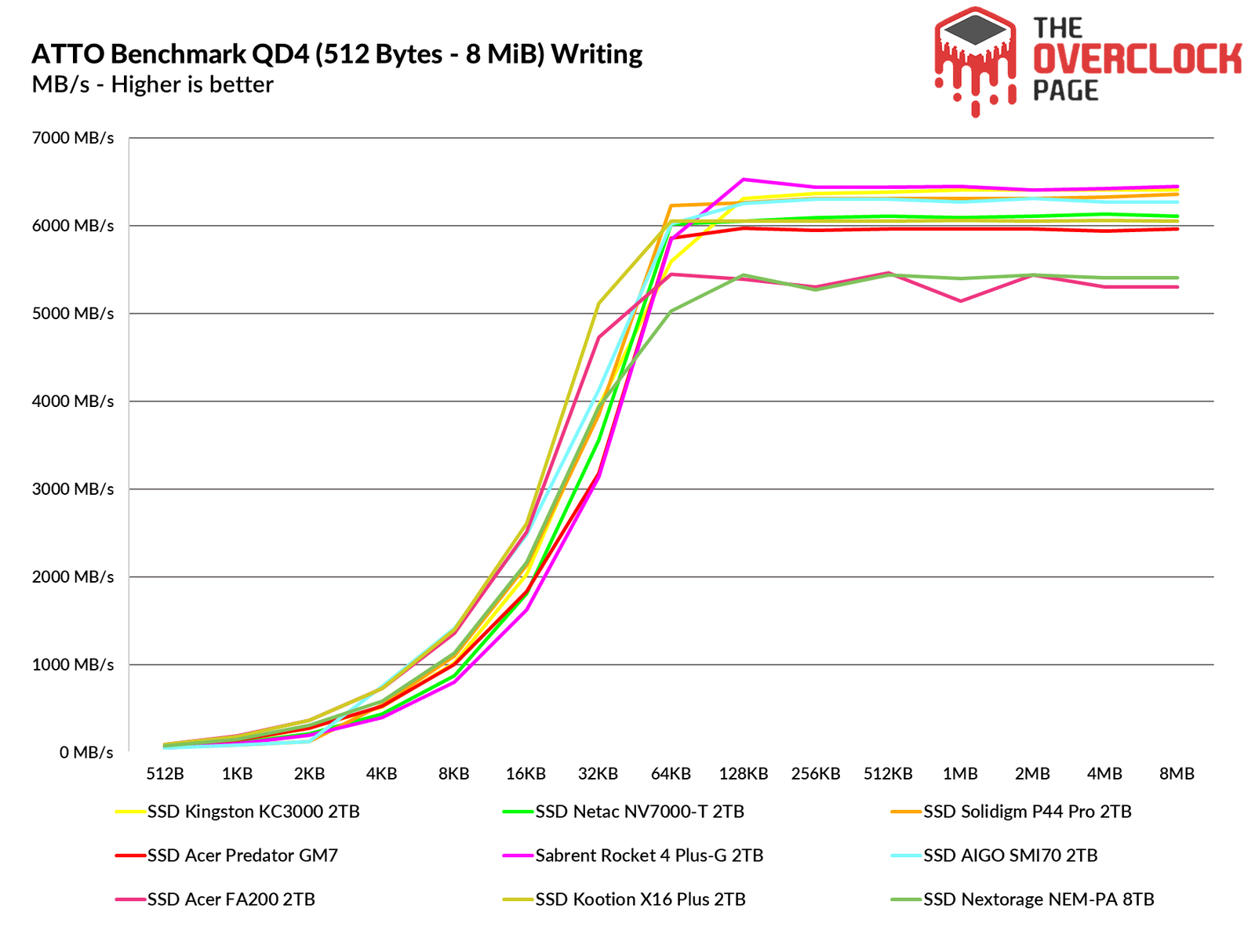
The ATTO Disk Benchmark is a tool that performs sequential speed tests using compressed files, simulating data transfer loads similar to those experienced in Windows. Typically, block sizes range from 128KB to 1 MiB. In both read and write operations, the competition among Gen4 SSDs is intense, with the GM7 holding a position in the middle of the pack.
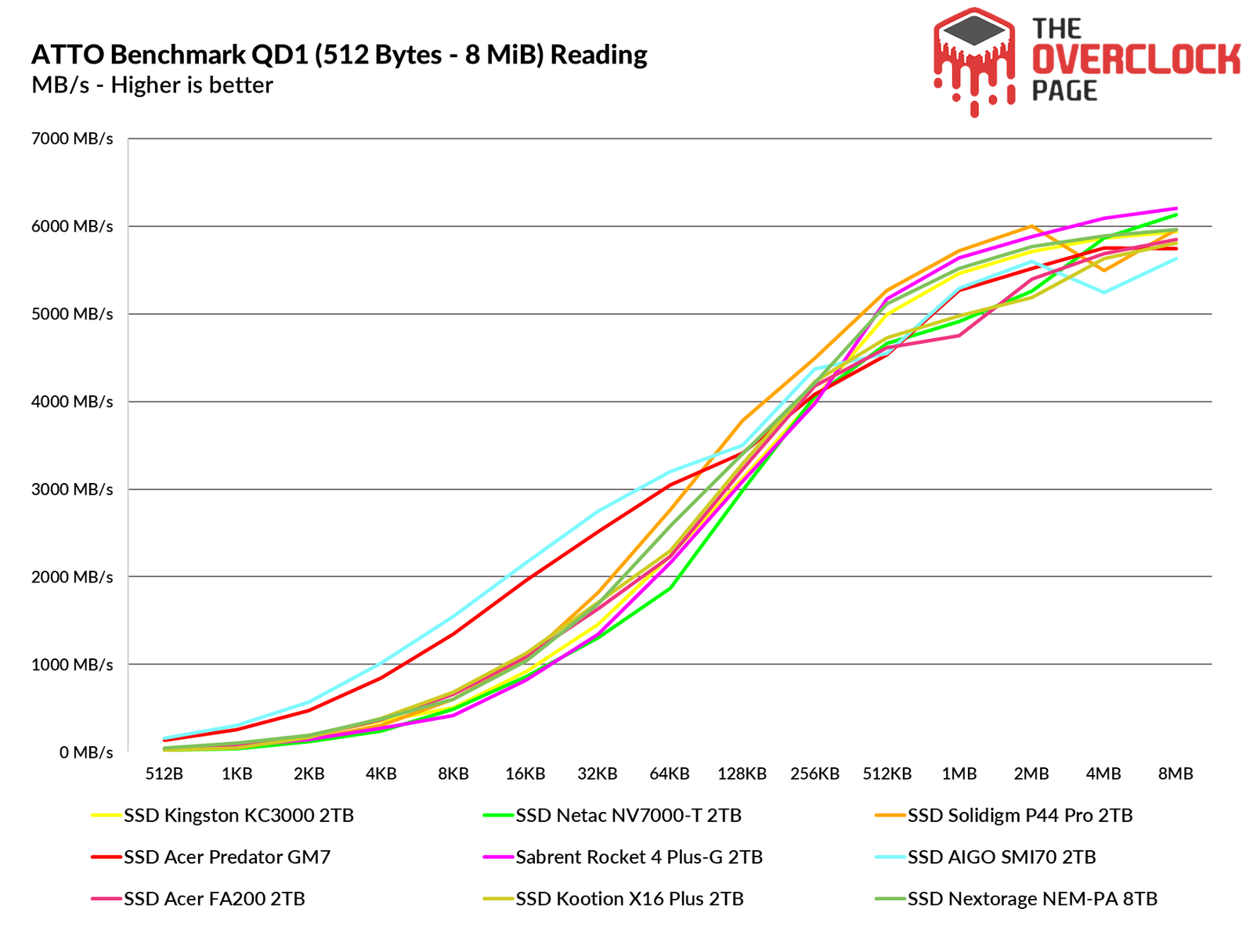
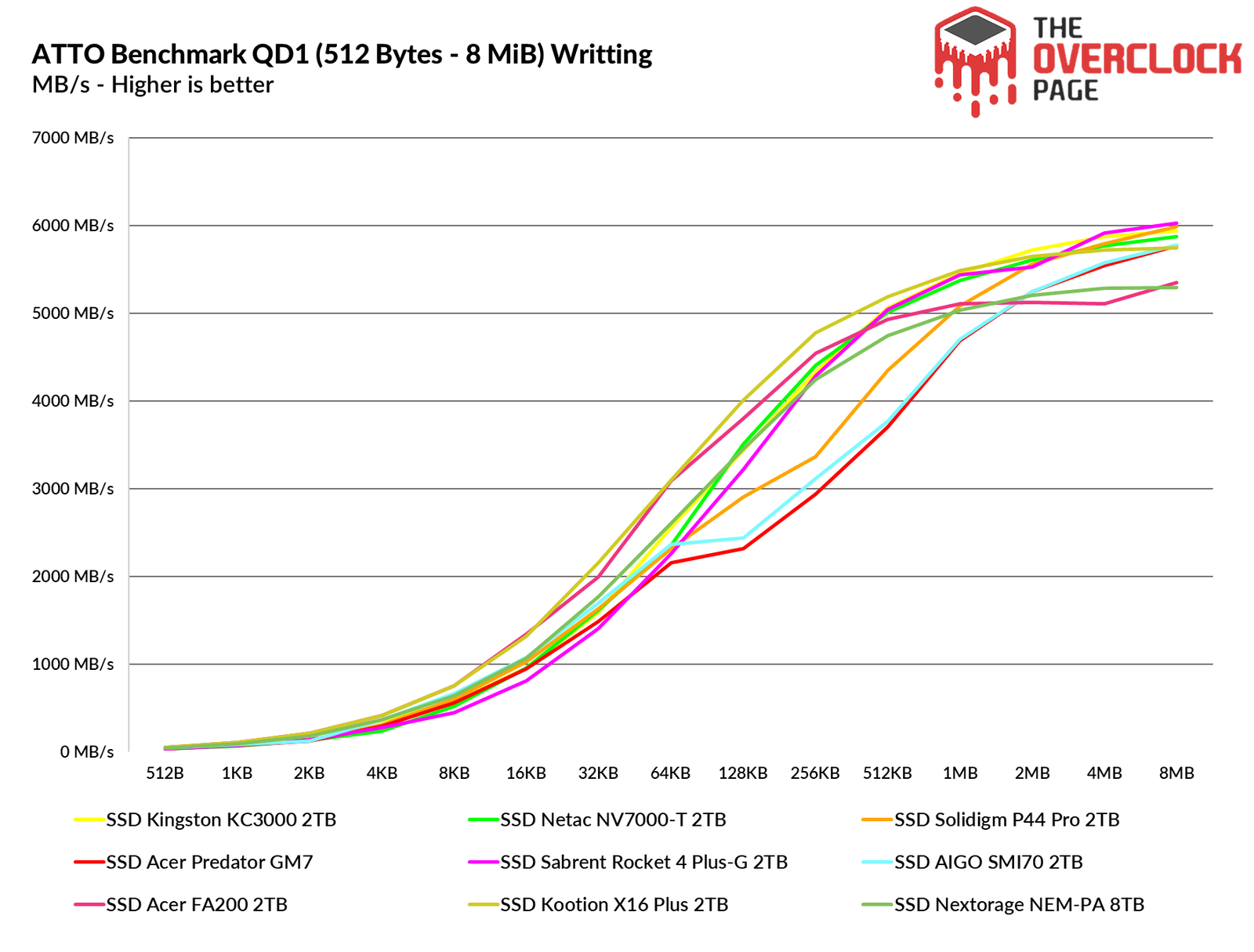
In QD1, its read performance was significantly higher than that of the other SSDs for block sizes up to 64KB, after which it remained average until the end. Regarding write performance, it started strong compared to the other SSDs but then fell slightly behind, alongside the SMI70 we tested recently.
3DMark – Storage Benchmark

In this benchmark, several storage-focused tests are conducted, including game loading tests for titles like Call of Duty: Black Ops 4 and Overwatch, as well as recording and streaming gameplay using OBS at 1080p 60 FPS. The tests also involve installing games and transferring game folder files.
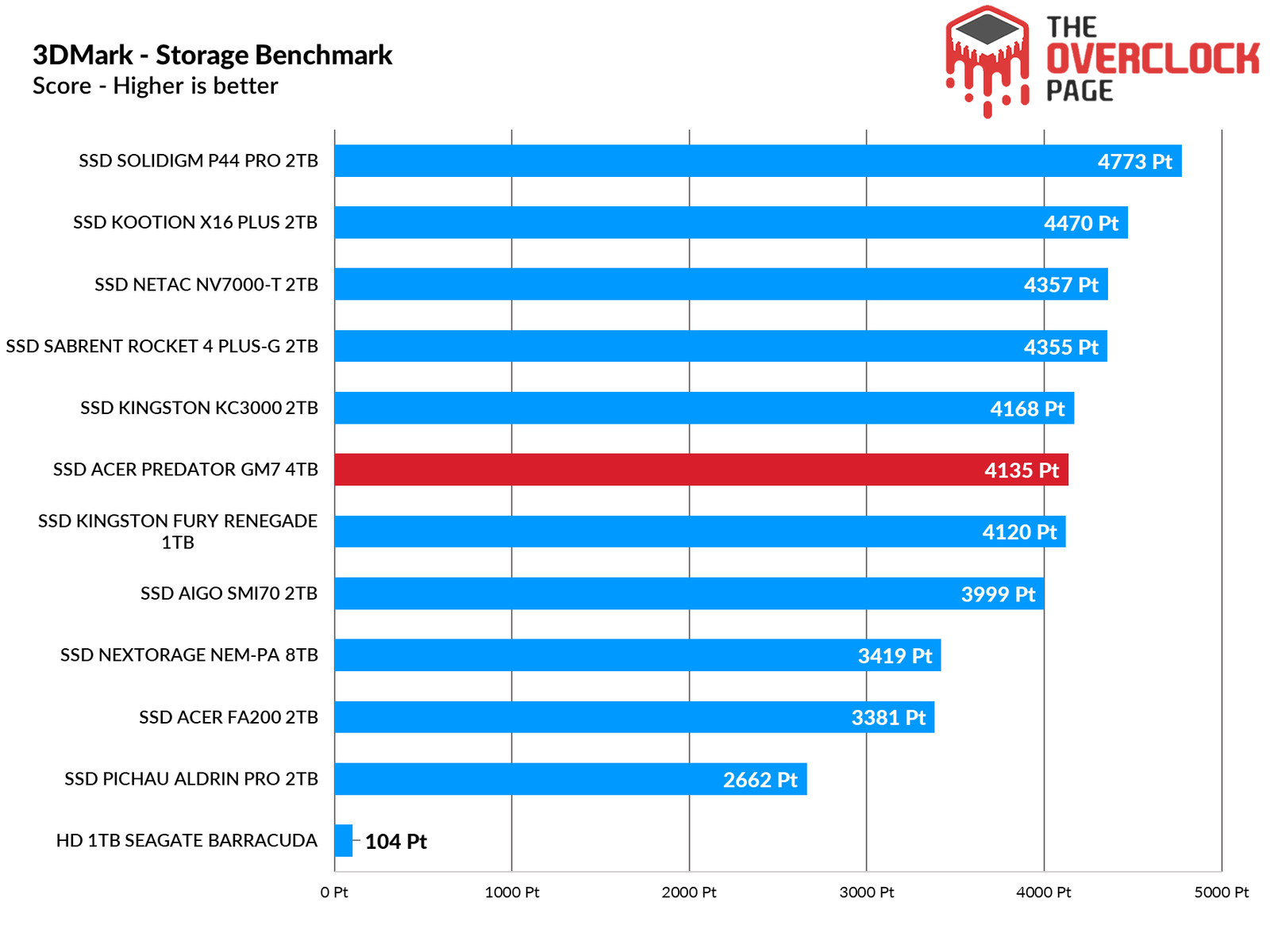
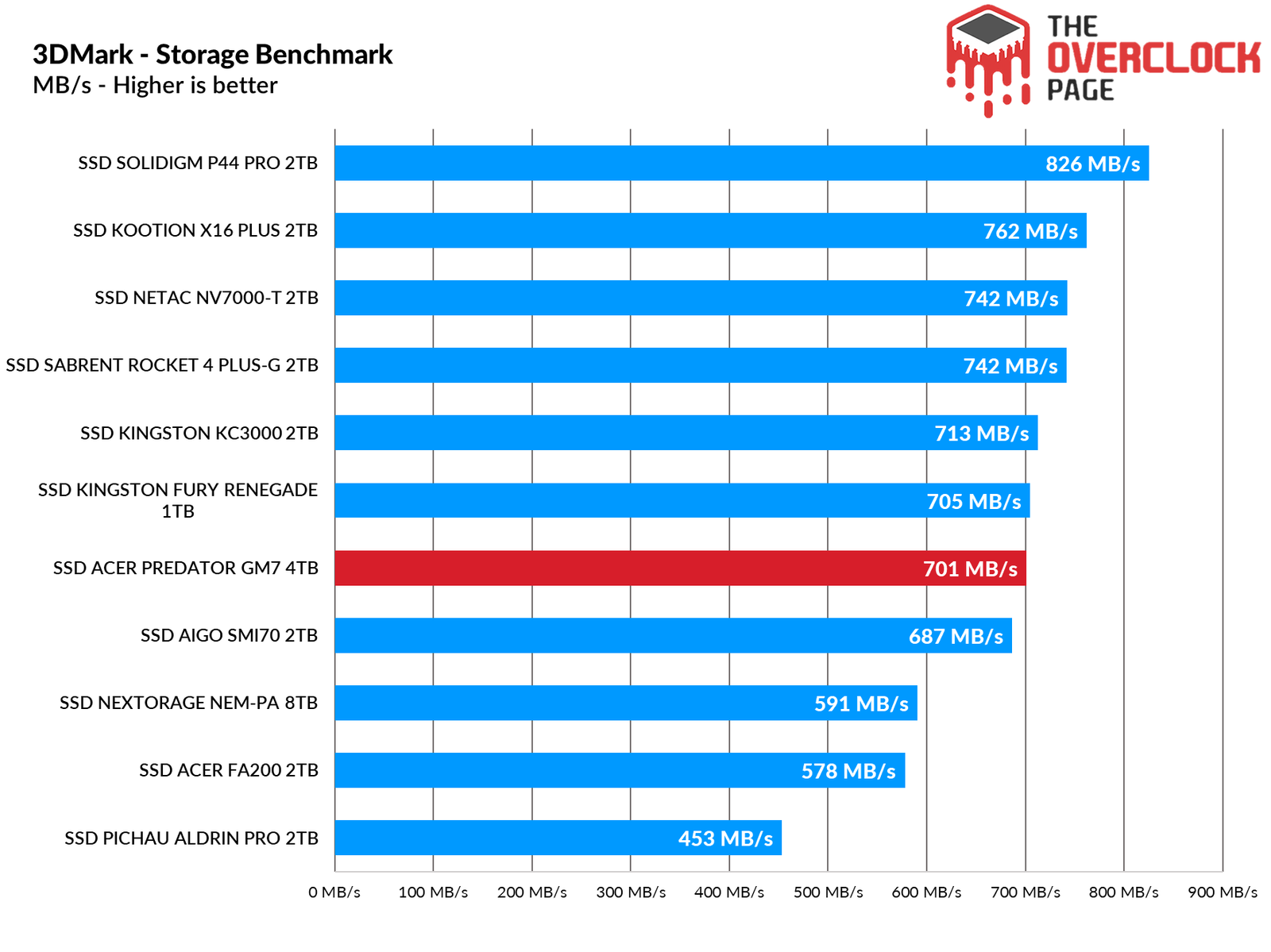
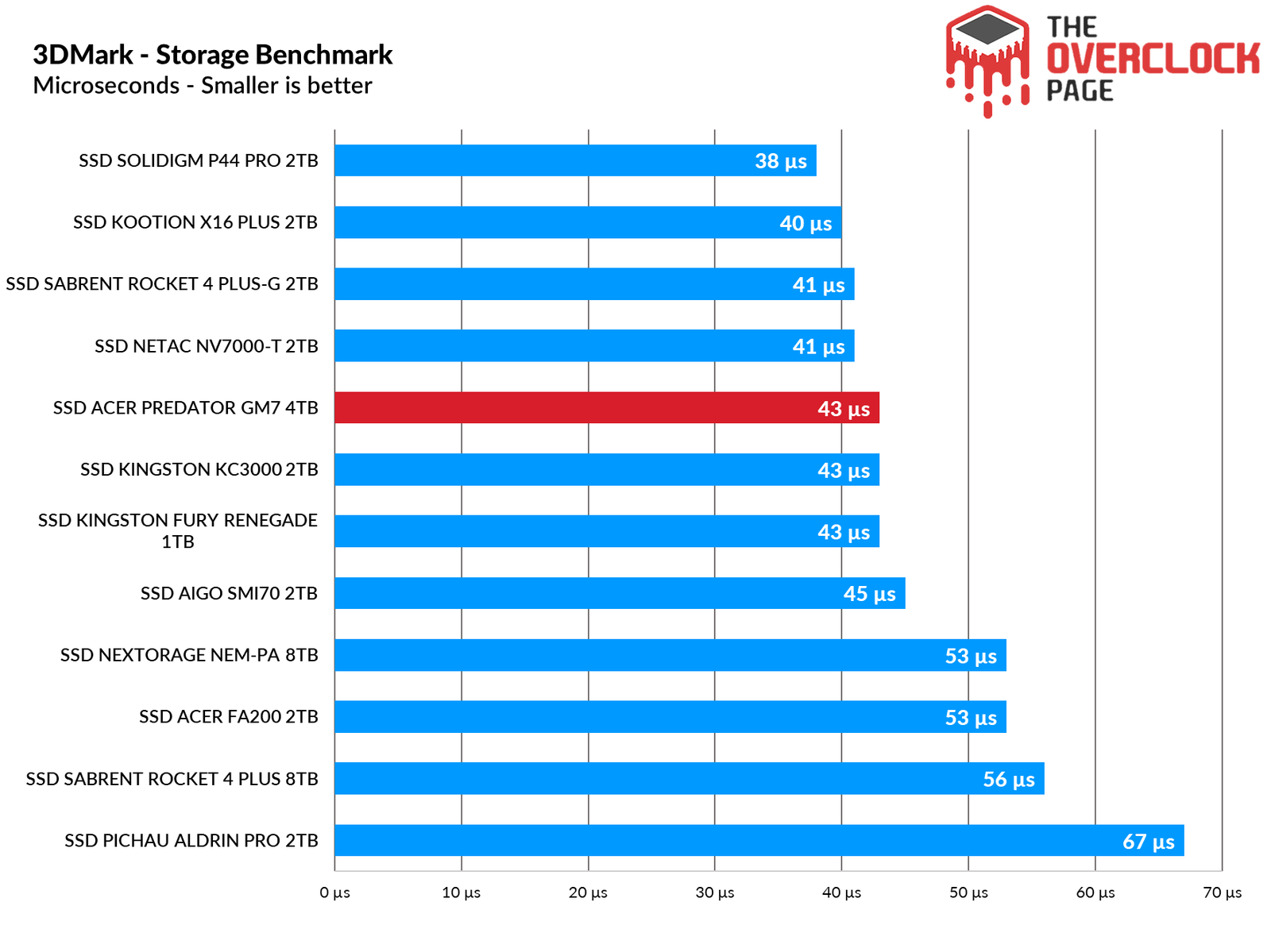
In this benchmark, which includes numerous realistic workloads for both work and everyday use, the GM7 performed on par with the Kingston KC3000, which we tested last year. This is quite an achievement, considering the Kingston SSD features an 8-channel controller with DRAM cache.
PCMARK 10 – FULL SYSTEM DRIVE BENCHMARK
Here, we used the Storage Test tool and the “Full System Drive Benchmark,” which performs both light and heavy tests on the SSD.

Among these traces, we can observe tests such as:
– Booting Windows 10
– Adobe After Effects: Launching the application until it’s ready for use
– Adobe Illustrator: Launching the application until it’s ready for use
– Adobe Premiere Pro: Launching the application until it’s ready for use
– Adobe Lightroom: Launching the application until it’s ready for use
– Adobe Photoshop: Launching the application until it’s ready for use
– Battlefield V: Loading time until the main menu
– Call of Duty Black Ops 4: Loading time until the main menu
– Overwatch: Loading time until the main menu
– Using Adobe After Effects
– Using Microsoft Excel
– Using Adobe Illustrator
– Using Adobe InDesign
– Using Microsoft PowerPoint
– Using Adobe Photoshop (Intensive use)
– Using Adobe Photoshop (Lighter use)
– Copying 4 ISO files, totaling 20GB from a secondary disk (Write test)
– Performing ISO file copy (Read-write test)
– Copying ISO file to a secondary disk (Read)
– Copying 339 JPEG files (photos) to the tested disk (Write)
– Creating copies of these JPEG files (Read-write)
– Copying 339 JPEG files (photos) to another disk (Read)
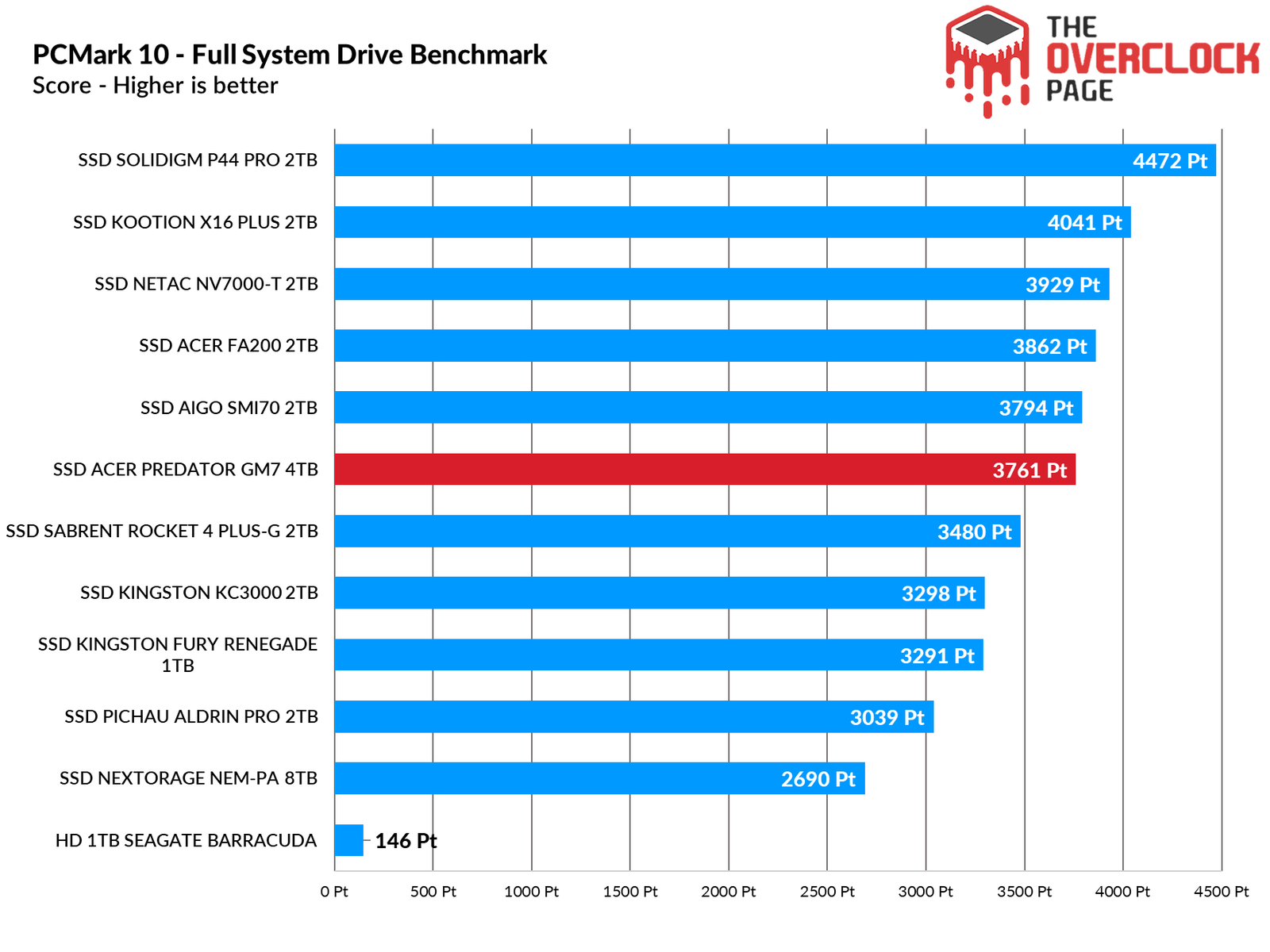
In this benchmark, which also includes realistic traces with a greater emphasis on productivity, the GM7 outperformed the KC3000 and came very close to matching the SMI70, marking another impressive result.
Adobe Premiere Pro 2021
Next, we used Adobe Premiere to measure the average time it took to open a 16.5GB project in 4K resolution, with a bitrate of 120Mbps, full of effects, until it was ready for editing. It’s important to note that the tested SSD was always used as a secondary drive without the operating system installed, as having the OS on the same drive could affect the results and introduce inconsistencies.
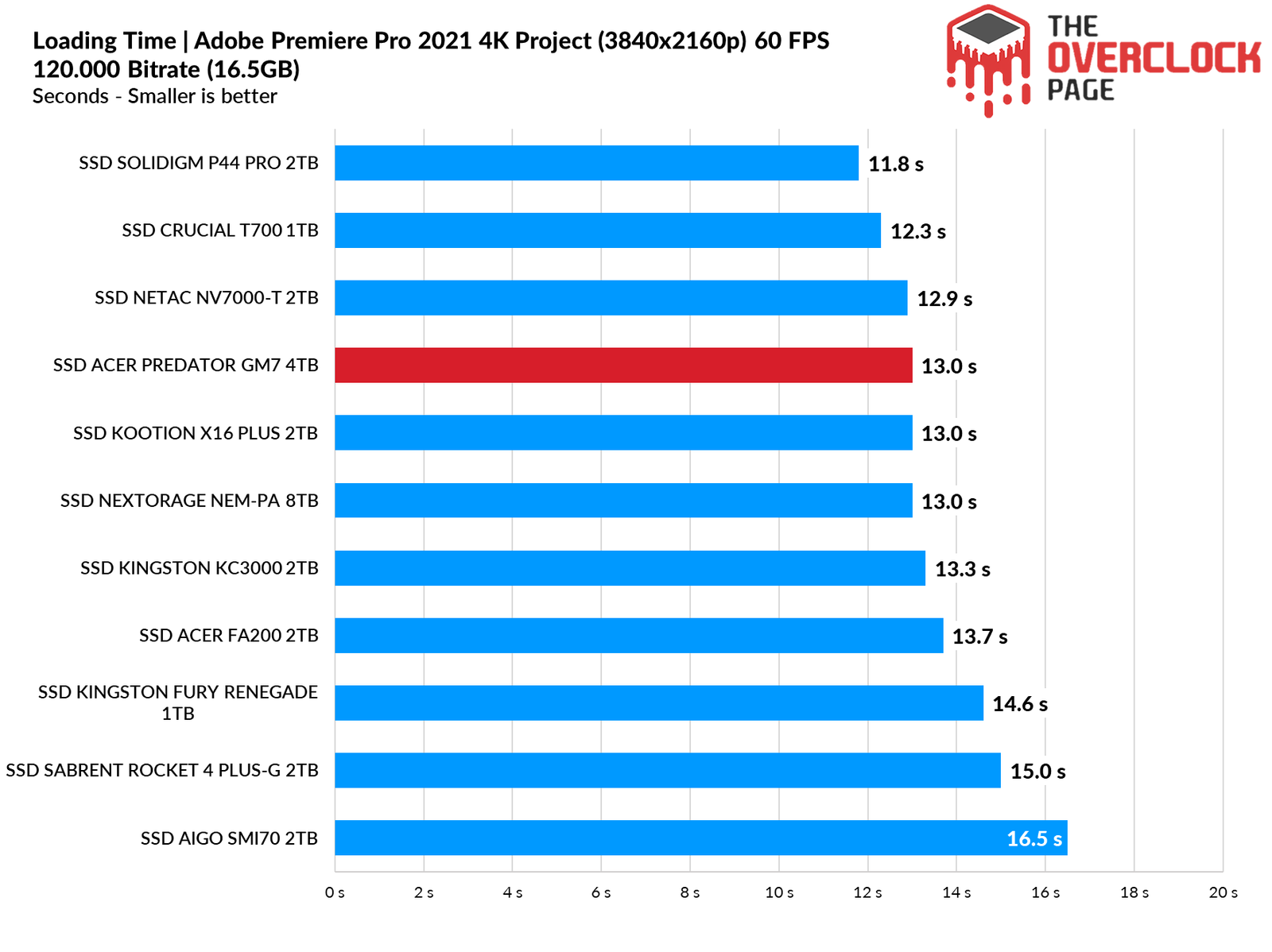
When using Premiere to load a project over 16GB, while it didn’t achieve the best time, the difference between Gen4 SSDs is minimal. The performance gap may become more noticeable with larger projects.
WINDOWS BOOT TIME AND GAME LOADING TIMES
Here we present a comparison between multiple SSDs and a hard drive, utilizing a clean installation of Windows 10 Build 21H2 along with the Final Fantasy XIV benchmark for launching the campaign mode. The test measures the best result after three consecutive system boots, considering the total time until reaching the desktop and the score reported by the application. This method is slower than simply measuring the time until the desktop screen is displayed.
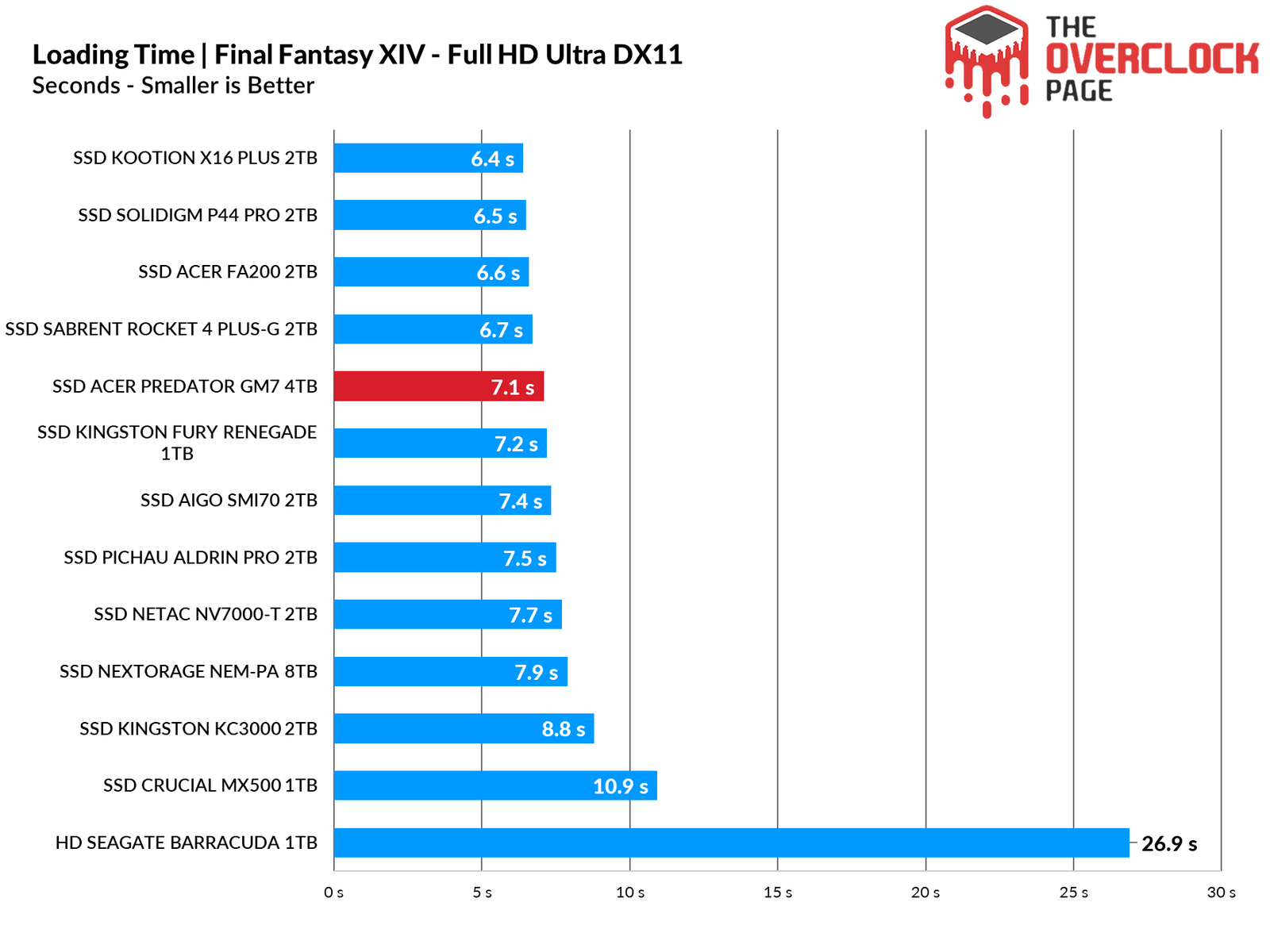
In game loading times, there is no significant difference between NVMe SSDs; it’s just a matter of a few seconds.
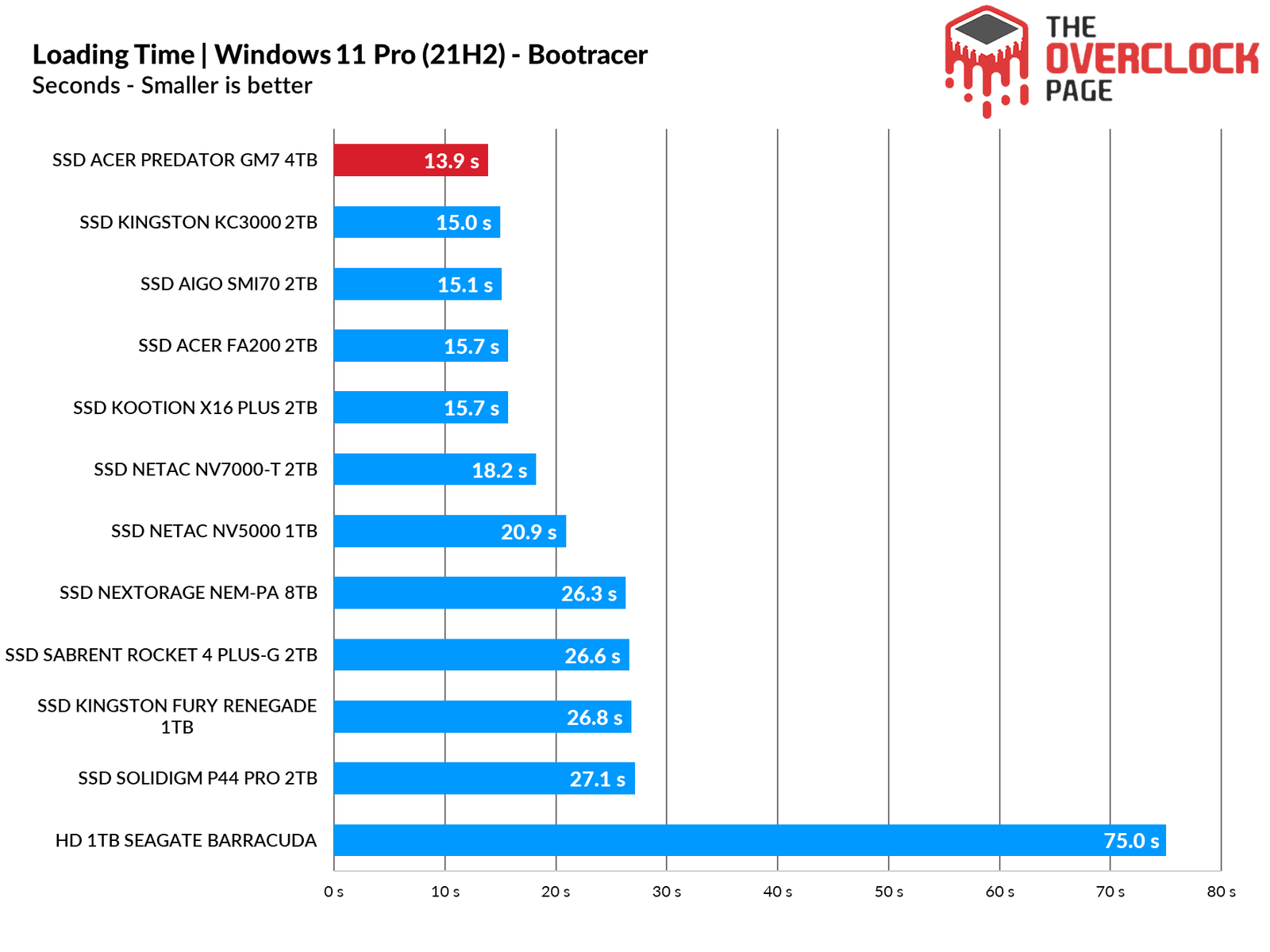
In this program, the boot time is measured until the last OS drivers are loaded. For this test, a clean installation was performed with only essential operating system drivers, including network, wireless + Bluetooth, audio, Nvidia drivers, PCH, and others. So far, this setup has yielded the best result in the comparison.
SLC CACHING
Many SSDs on the market today utilize SLC caching technology, where a certain percentage of their storage capacity—whether MLC (2 bits per cell), TLC (3 bits per cell), or QLC (4 bits per cell)—is reserved for storing only 1 bit per cell. This area serves as a write and read buffer; the controller begins the writing process here, and when the buffer is full, it writes to the native NAND flash (MLC/TLC/QLC).

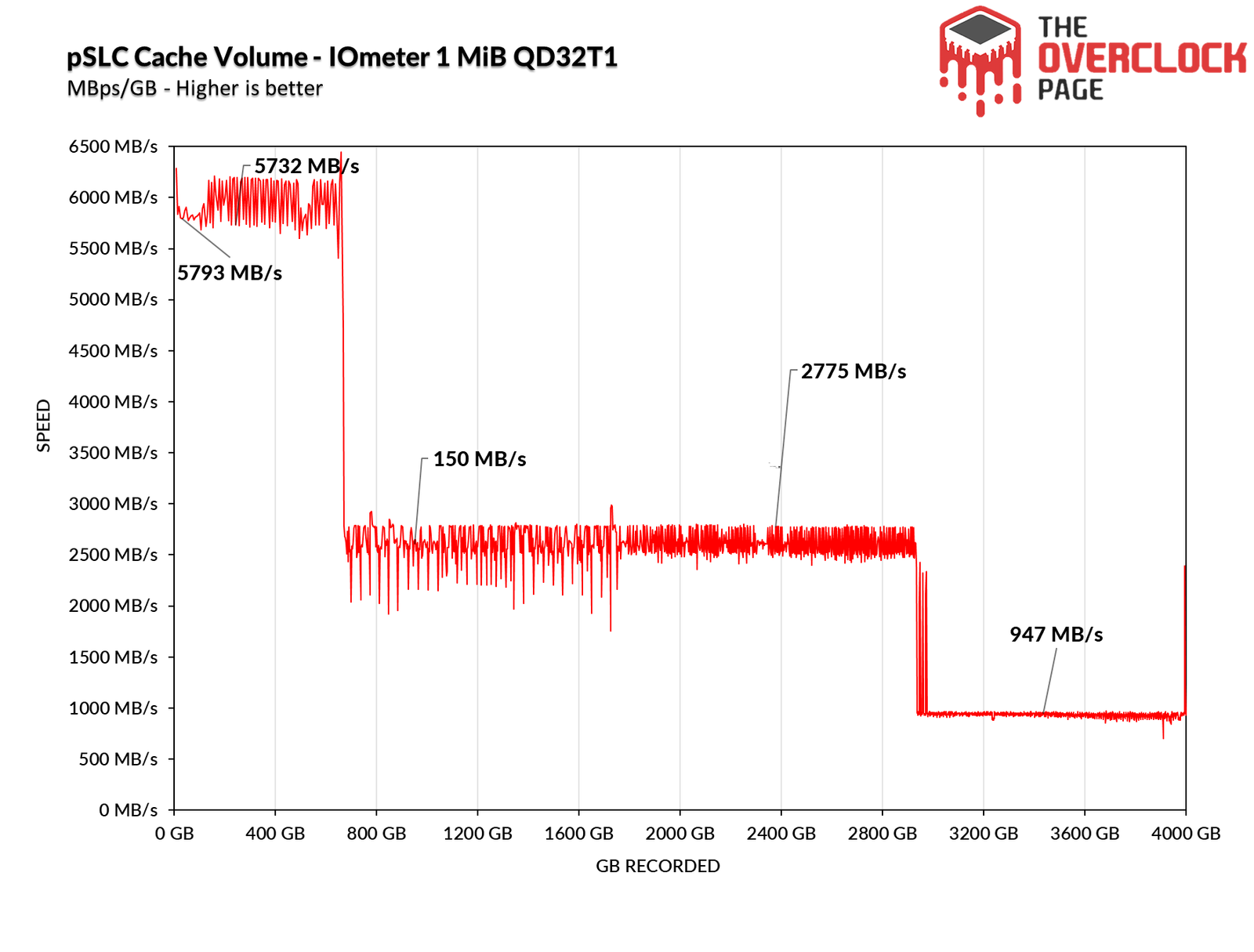
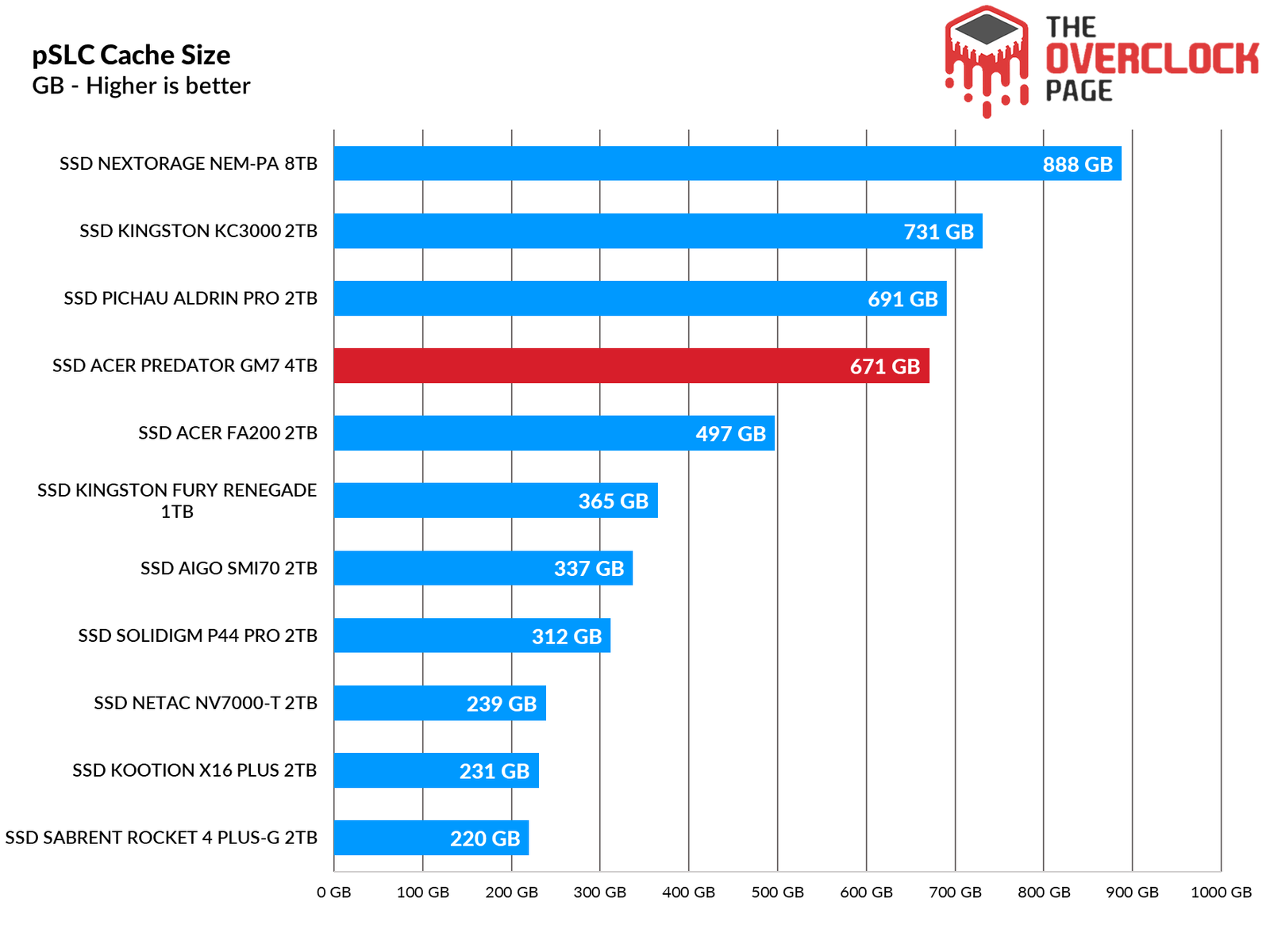
Using IOmeter, we can gauge the SLC cache volume of this SSD, as manufacturers often do not provide this information. From the tests we conducted, we determined that it has a dynamic pSLC cache volume of approximately 671GB, maintaining an average speed of about 5939MB/s until the buffer was exhausted.
After writing 671GB, the SSD begins to write to its NANDs natively in TLC mode. In this scenario, it operates at an average speed of 2609 MB/s, which is commendable for a 4TB SSD, as it fully leverages its maximum parallelism. It maintains these speeds for a considerable duration, writing over 2200GB (or 2.2TB) at speeds exceeding 2.6GB/s.
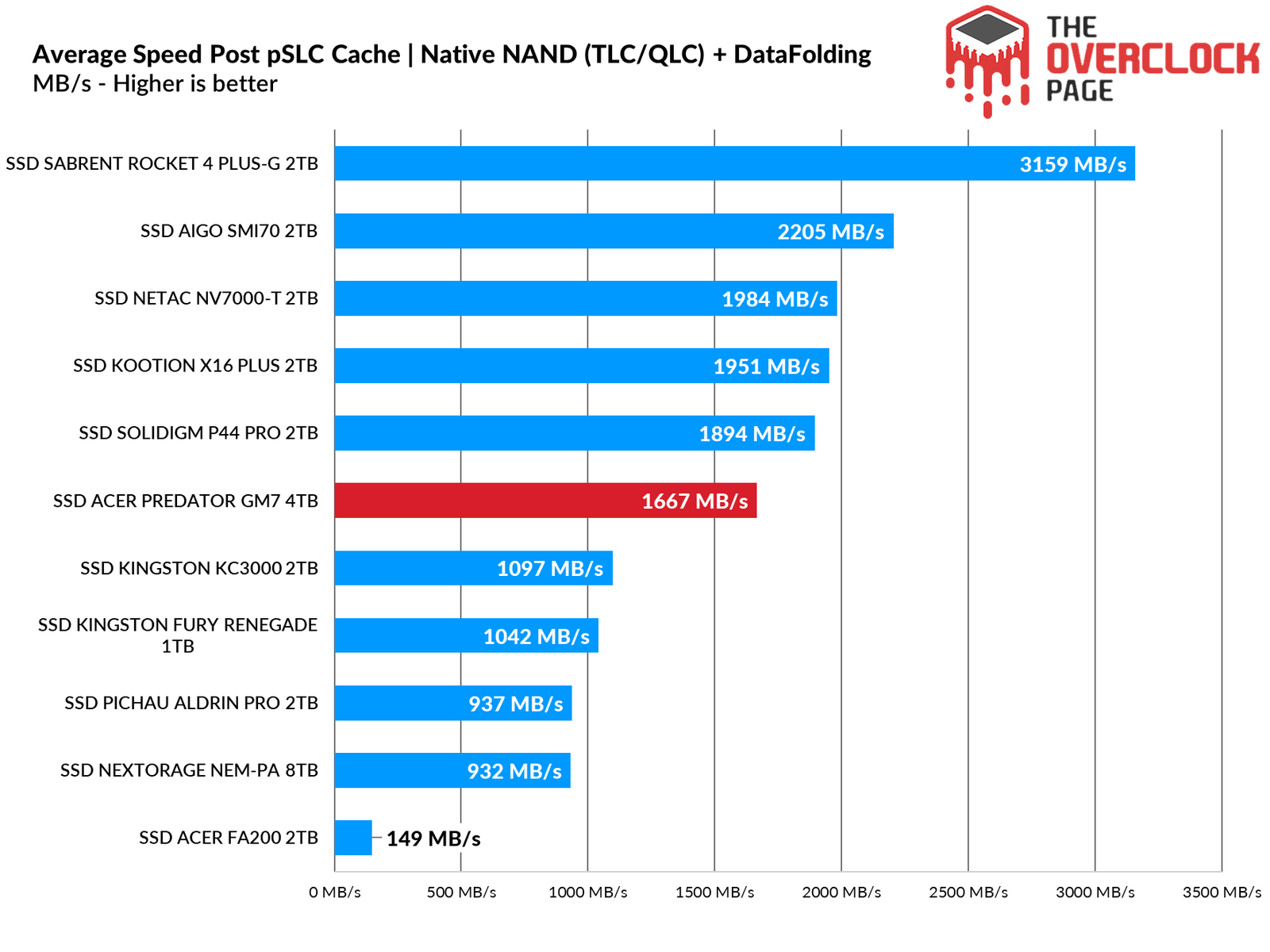
Shortly after exhausting its SLC cache, the SSD begins the folding process, having allocated all its capacity to operate as pSLC. At this point, we see the true “Achilles’ heel” of these SSDs. Despite this, its sustained speed remained quite high, averaging 943 MB/s.
Overall, accounting for both the folding and native states, it achieved an average speed of 1667 MB/s, surpassing other Gen4 SSDs of 1TB and some 2TB models.
We also conducted a test to determine how long it would take for the SSD to recover part of its buffer. During our testing, which lasted from 30 seconds to 2 hours in idle, we compared scenarios using TRIM and garbage collection against those without TRIM/GC. In tests without TRIM/GC, we observed that the SSD managed to recover over 100GB in a short period, demonstrating that even in unrealistic situations, its firmware is well-optimized for recovery.
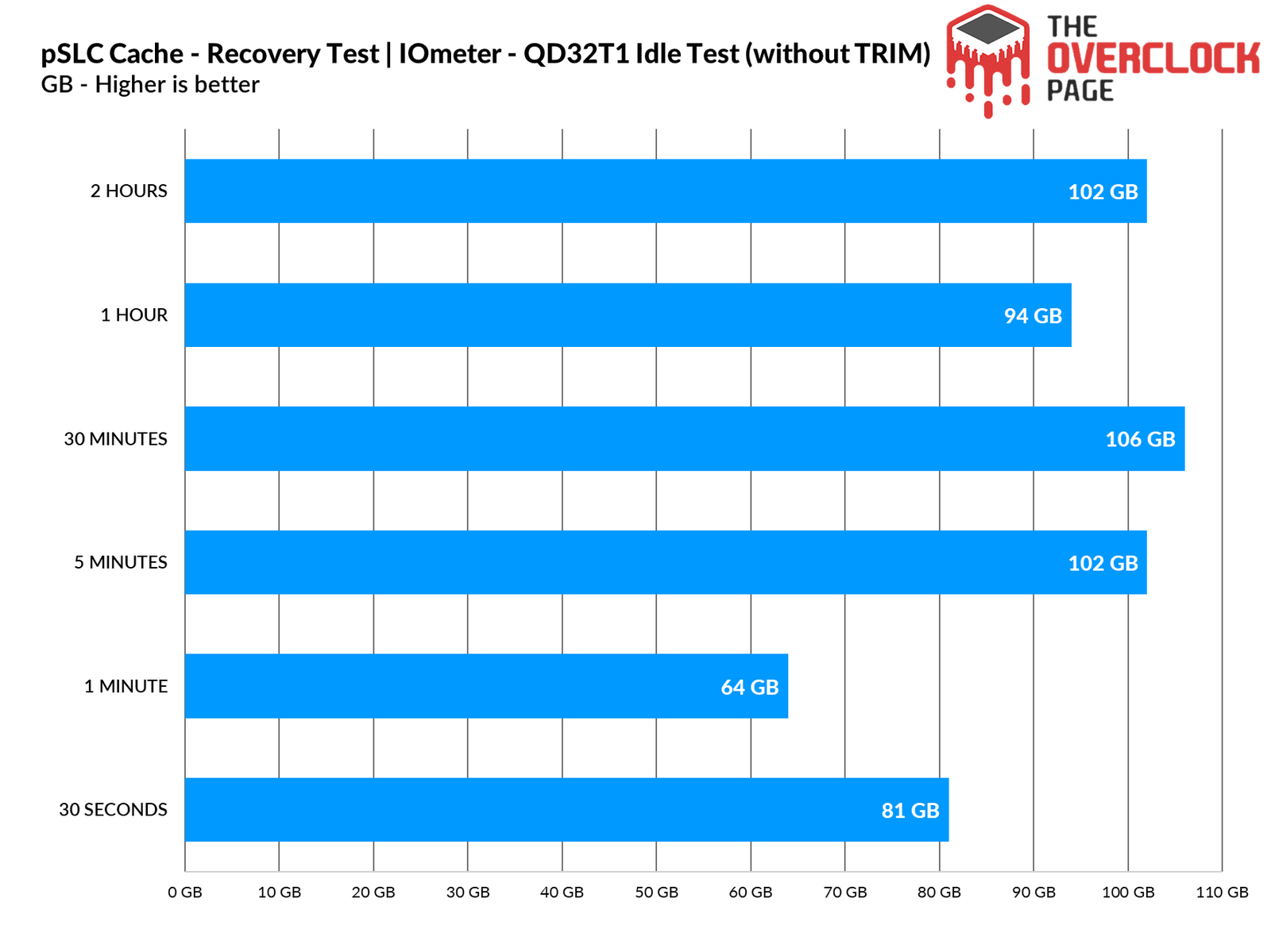
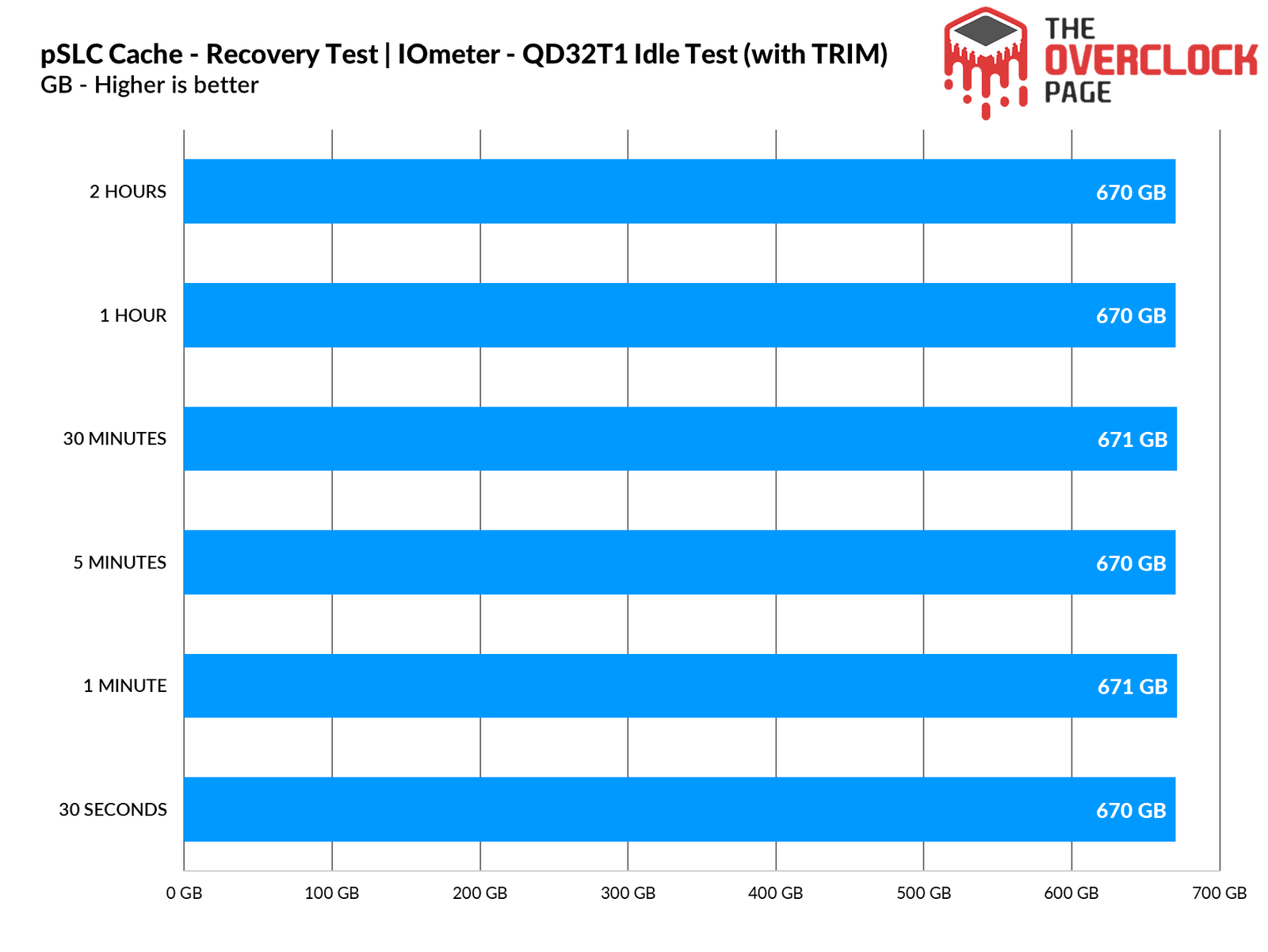
However, when testing with TRIM/GC activated, it was able to recover its entire volume in just a few seconds.
FILE COPYING
In this test, files including ISO files and CSGO were copied from a RAM Disk to the SSD to see how it performs. The Windows 10 21H1 ISO of 6.25GB (1 file) was used alongside the installation folder of CSGO, which is 25.2GB.
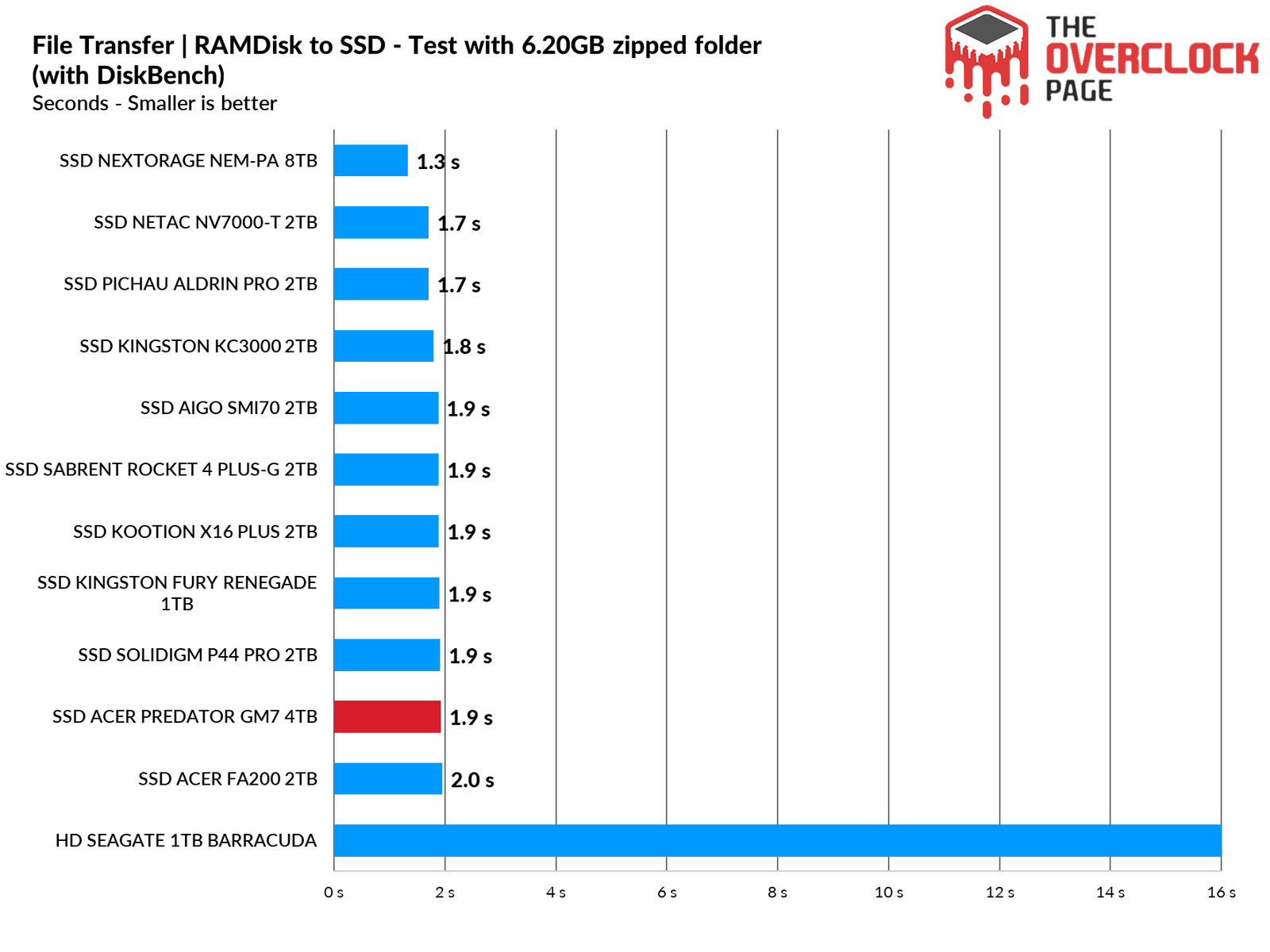
When using the Windows 10 .ISO image, it ended up tying with most other SSDs due to the small file size, making it difficult to discern any differences among the competing models in this scenario.
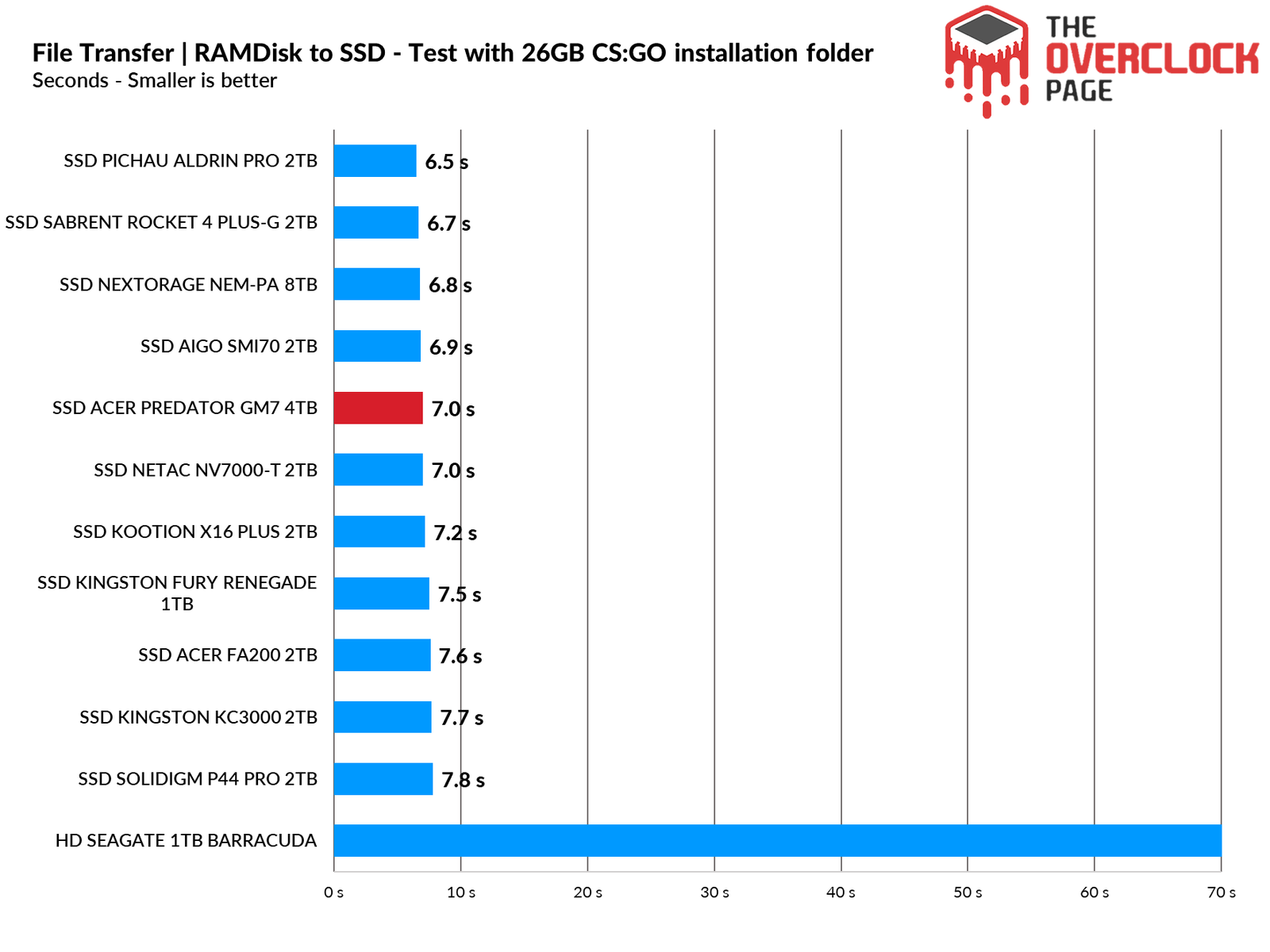
Now, with a larger folder of files, we were able to see that it outperformed other SSDs, achieving a tie with its sibling, the NV7000-T, which has the same hardware as this SSD.
TEMPERATURE STRESS TEST
In this section of the analysis, we will monitor the temperature of the SSD during a stress test, where it continuously receives files. This will help us determine whether there was any thermal throttling of its internal components that could lead to bottlenecks or performance loss.
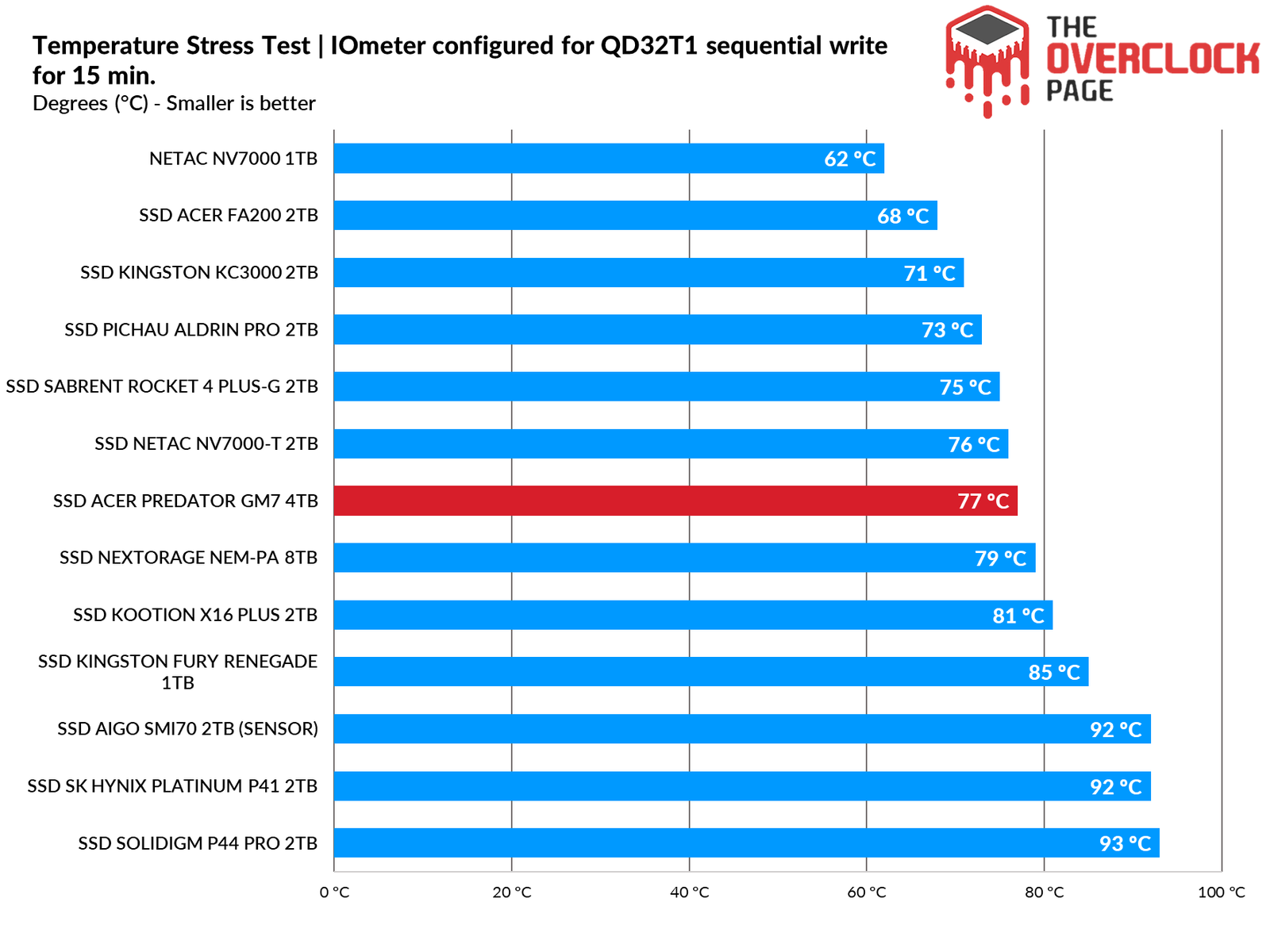
As noted above, this SSD has a default thermal limit ranging from 90°C to 95°C, which is reasonable. During testing, the SSD’s sensors indicated that it did not exceed 77°C and did not experience thermal throttling.
POWER DRAW AND EFFICIENCY
SSDs, like many other components in our system, have a specific power consumption. The most efficient ones can perform requested tasks quickly and with relatively low power consumption, allowing them to transition back to their idle power states, where they tend to consume less energy.
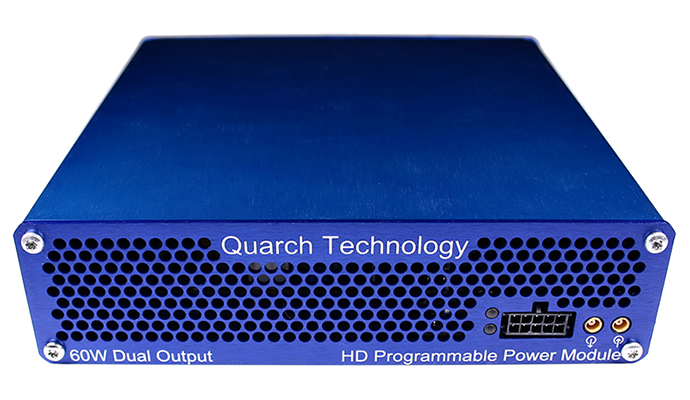
In this section of the analysis, we will utilize the Quarch Programmable Power Module, provided by Quarch Solutions (see photo above), to conduct tests and evaluate the SSD’s efficiency. This methodology will involve three tests: maximum power consumption of the SSD, average power consumption in practical and casual scenarios, and idle power consumption.
These tests, especially the efficiency and idle tests, are particularly important for users planning to use SSDs in laptops. Since SSDs spend the vast majority of their time in low-power states (idle), optimizing this aspect significantly helps conserve battery life.
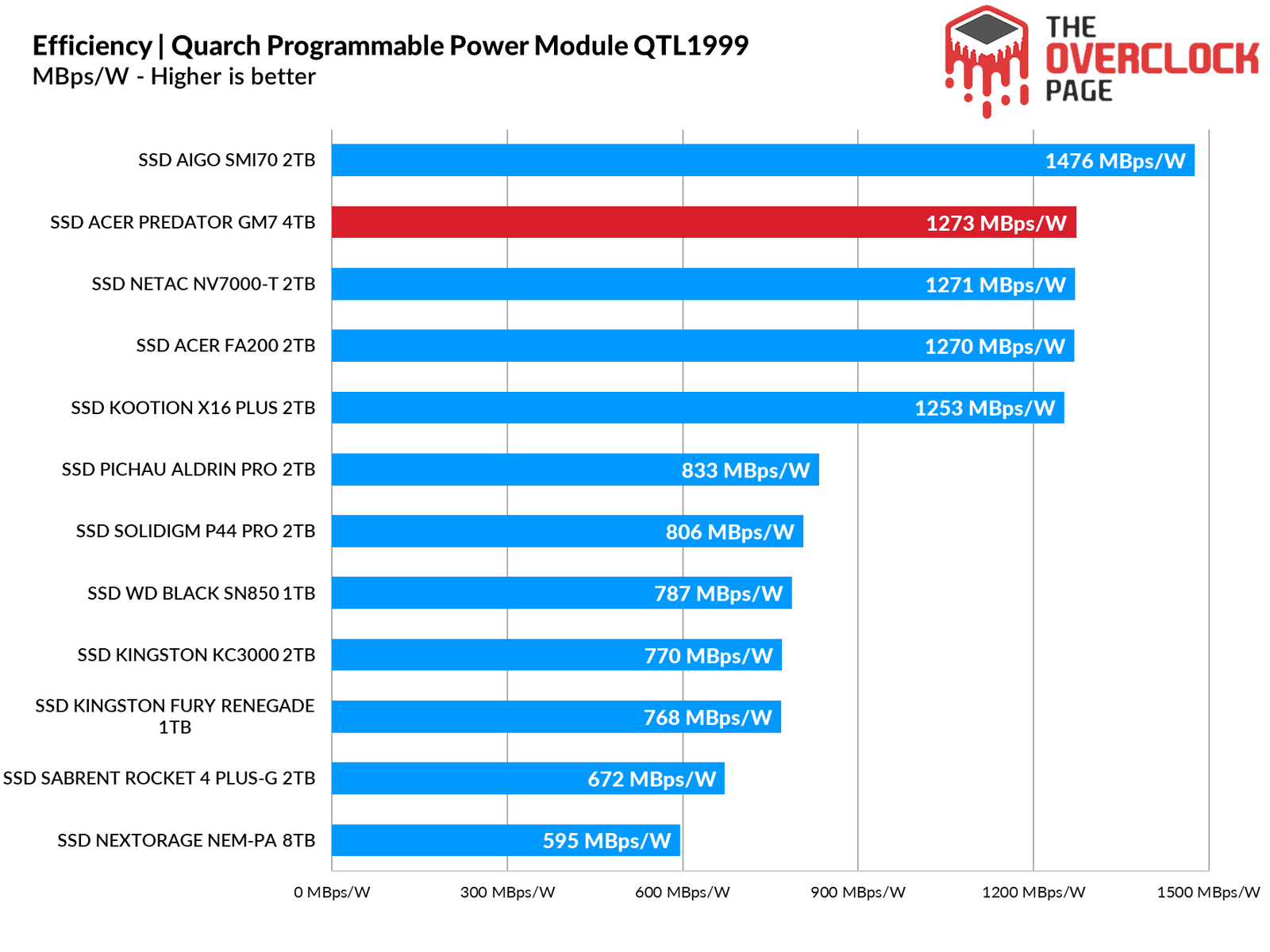
Here, we observe a pattern where all these early SSDs use low-power controllers with YMTC NANDs, whether they are TLC or QLC, which has proven to be a very efficient combination.
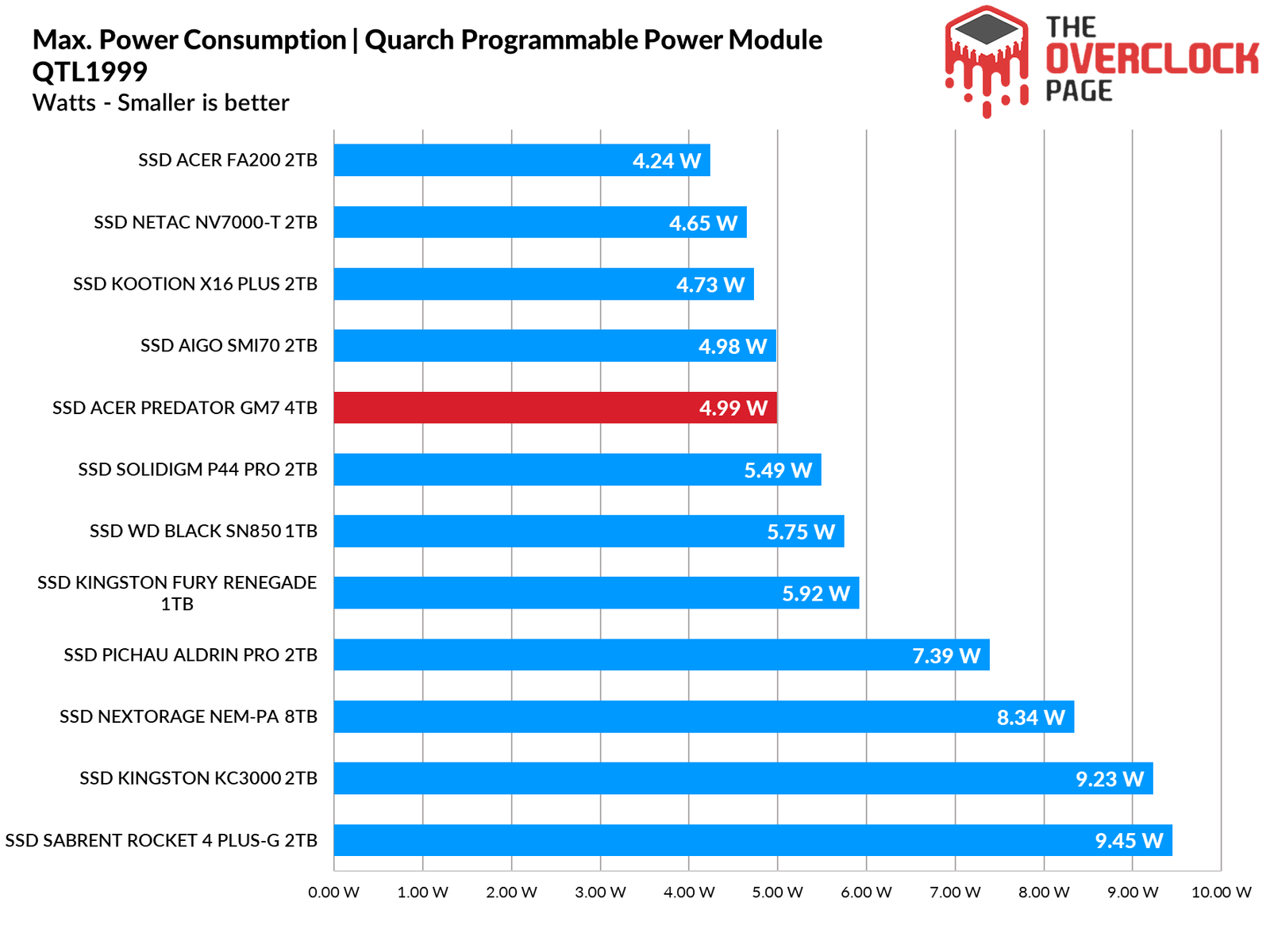
When we think of high-capacity SSDs, we typically expect relatively high power consumption. Generally, this is true, but thanks to the impressive efficiency of the MAP1602 + YMTC X3-9070 combination, it didn’t even exceed 5W—lower than the consumption of the 1TB SN850. This is truly an impressive result!
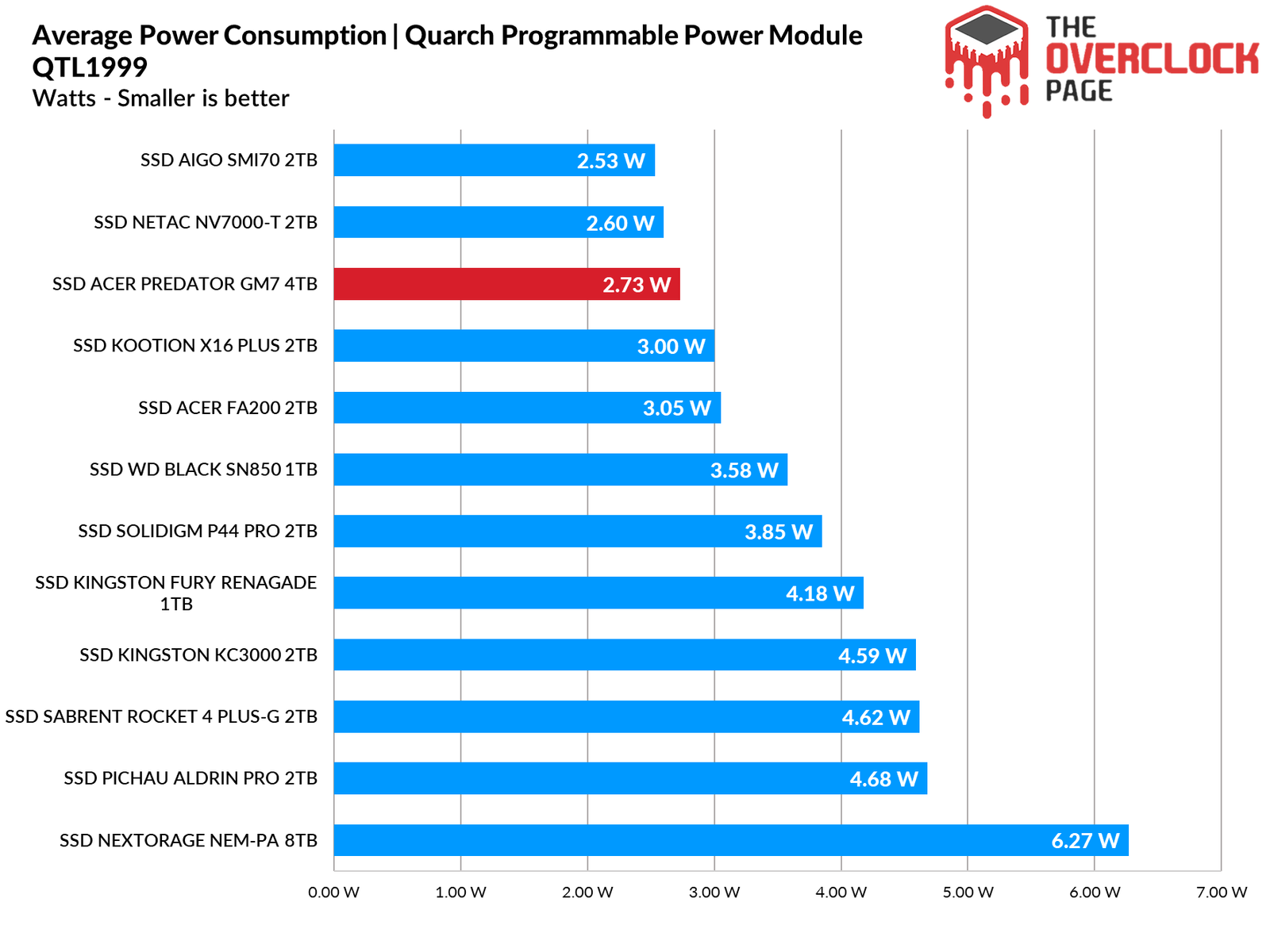
In our average consumption test battery, it once again surprised us with extremely low power consumption for an SSD of this density. Despite having twice the capacity of the NV7000-T and the SMI70 that we tested previously, it demonstrated remarkable efficiency.
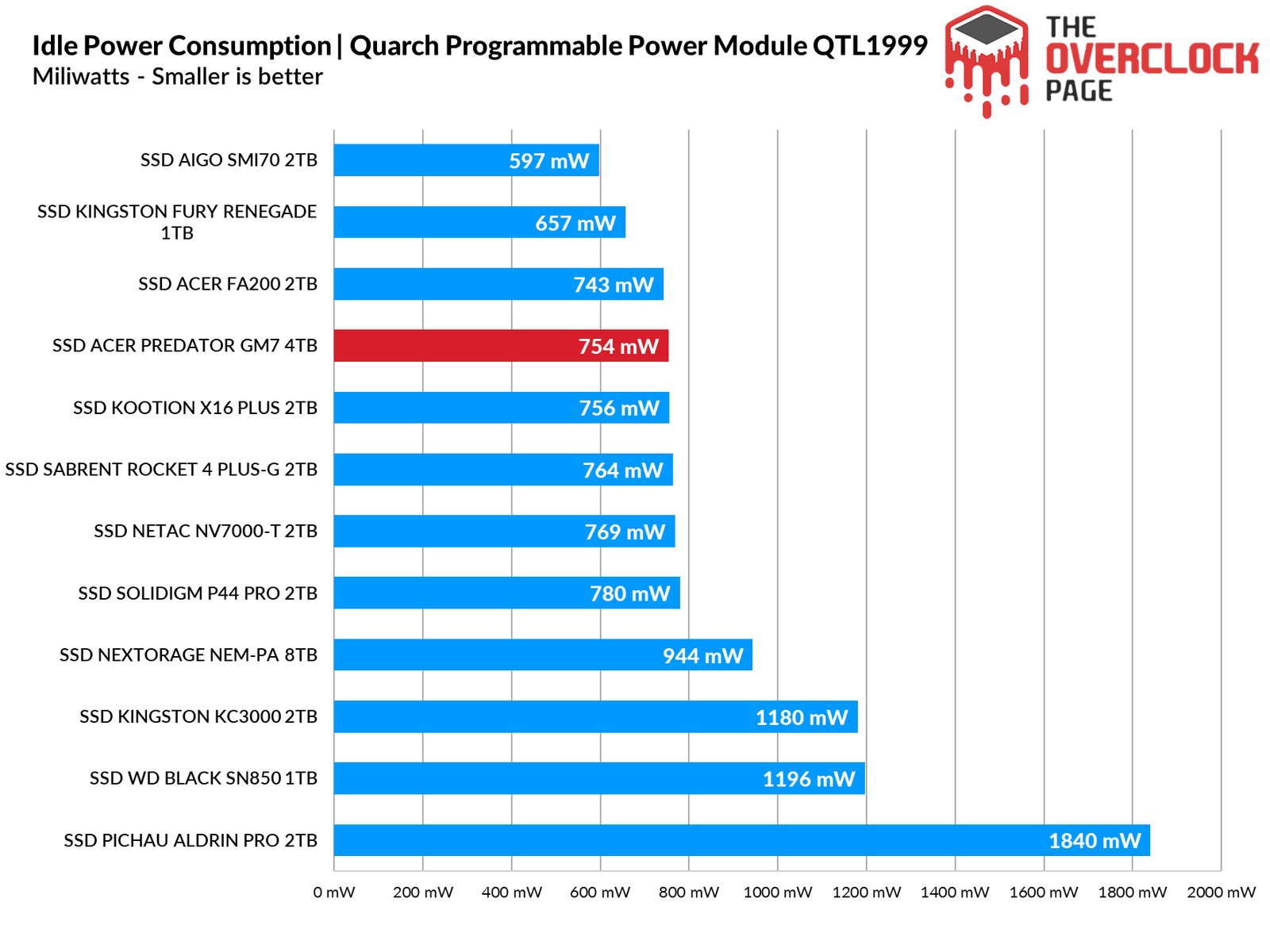
Lastly, and most importantly, we conducted the idle test, which represents the scenario in which the vast majority of SSDs operate during everyday use. This once again demonstrates that it is indeed possible to create high-density SSDs in a highly efficient manner.
CONCLUSION
Is it worth the extra investment in these types of SSDs?
Absolutely! Through numerous reviews we’ve conducted using this combination of controller and NAND flash, we’ve observed a consistent pattern of excellent performance, competitive pricing, and remarkable efficiency. Therefore, it lives up to its name and is a fantastic choice for PCs, laptops, and even consoles like the PlayStation 5.
ADVANTAGES
- Great Sequential speeds
- Great random speeds
- Great latency, specially on it’s read performance
- Great drive for daily use case and even professional workloads
- Good hardware choice, good controller + NAND
- Didn’t suffer Thermal Throttling
- Huge pSLC Cache size
- Efficient SLC Cache design, recovers extremely quickly
- Huge sustained write speeds
- Decent endurance, on average with other Gen4 and Gen5 drives
- 5-Years warranty
- Highest power efficiency on a 4TB we tested so far
- Low power draw
- Decent price
DISADVANTAGES
- Low write speeds at some low QD
- Has 2 hardware variance, although, one was design to be sold more in U.S. soil
- No software for SSD management
- No encryption support