Review – SSD DapuStor Roealsen5 R5100 7.68TB – One of the best Gen4 SSD for datacenter we’ve tested so far
 by gabrielcariocapfz November 6, 2024 · Reviews / Reviews / SSDs and Storage / SSDs e armazenamento
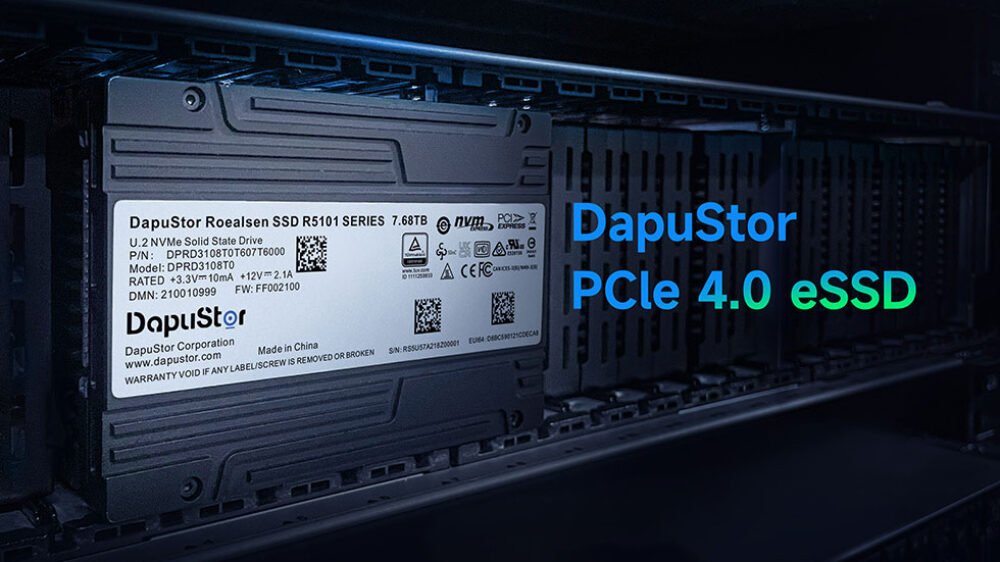
Today, we are testing a high-end NVMe datacenter SSD from DapuStor, the Roealsen5 family of SSDs, model R5100 which is a high end Gen4, one of the SSDs they offer in the U.2 format. Special thanks to the DapuStor team for sending us this SSD for testing directly from China.
The R5100 uses a unique format called U.2, which resembles the well-known, older 2.5″ SATA connector but features a 64Gbps interface, delivering 4 PCIe 4.0 lanes and NVMe 1.4 protocol. Capacities range from 1.92TB to 15.36TB. The price is around $900 to $950(for the 7.68TB model) but may vary and is generally lower than that of direct competitors. Also this price is almost close to regular consumer M.2 drives such as Sabrent Rocket 4 8TB or WD SN850X of which the 8TB SKU costs a little below $899
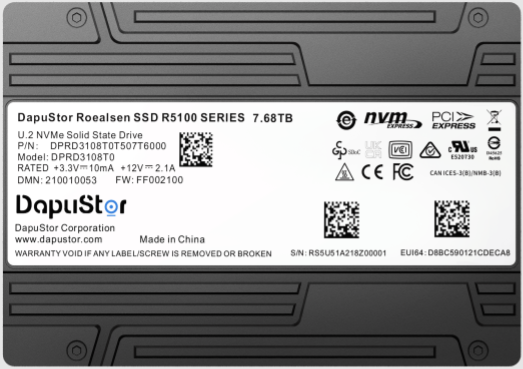
It’s worth mentioning that DapuStor offers this lineup in both the U.2 format and the HHHL AIC (Half-Height, Half-Length Add-in Card) format.
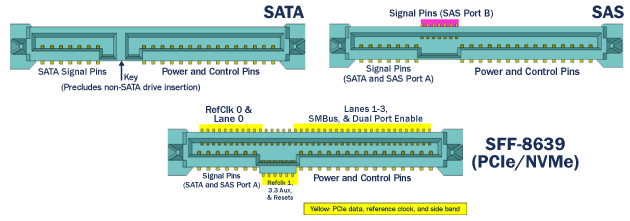
We can see that the pinout of both connectors is quite different; the SATA connector has 2 connectors, while the U.2 uses only 1. Not to mention that the SATA connector utilizes the AHCI protocol to communicate with the host, whereas the U.2 uses the NVMe 1.4 protocol with a PCIe 4.0 x4 interface.
SSD’s Specifications
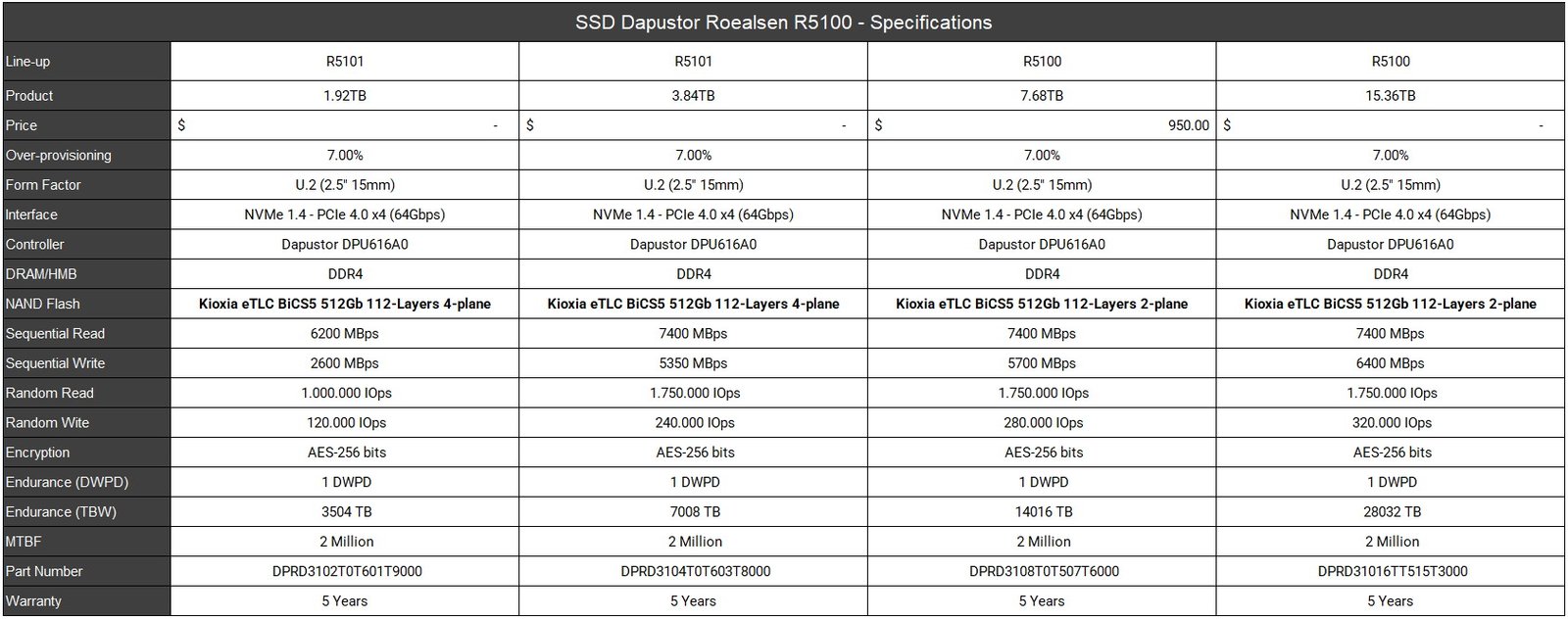
Next, here are some more detailed specifications about the SSD that will be tested (7.68TB unit):
SSD’s Software
DapuStor does not provide a management software suite, but it is entirely possible to perform diagnostics using third-party software, and firmware updates can be done via command line.
Unboxing
On the front of the SSD, there is a sleek design with a black aluminum casing that aids in heat dissipation, featuring a label with product information. Meanwhile, on the back, there are no stickers, just the aluminum casing.
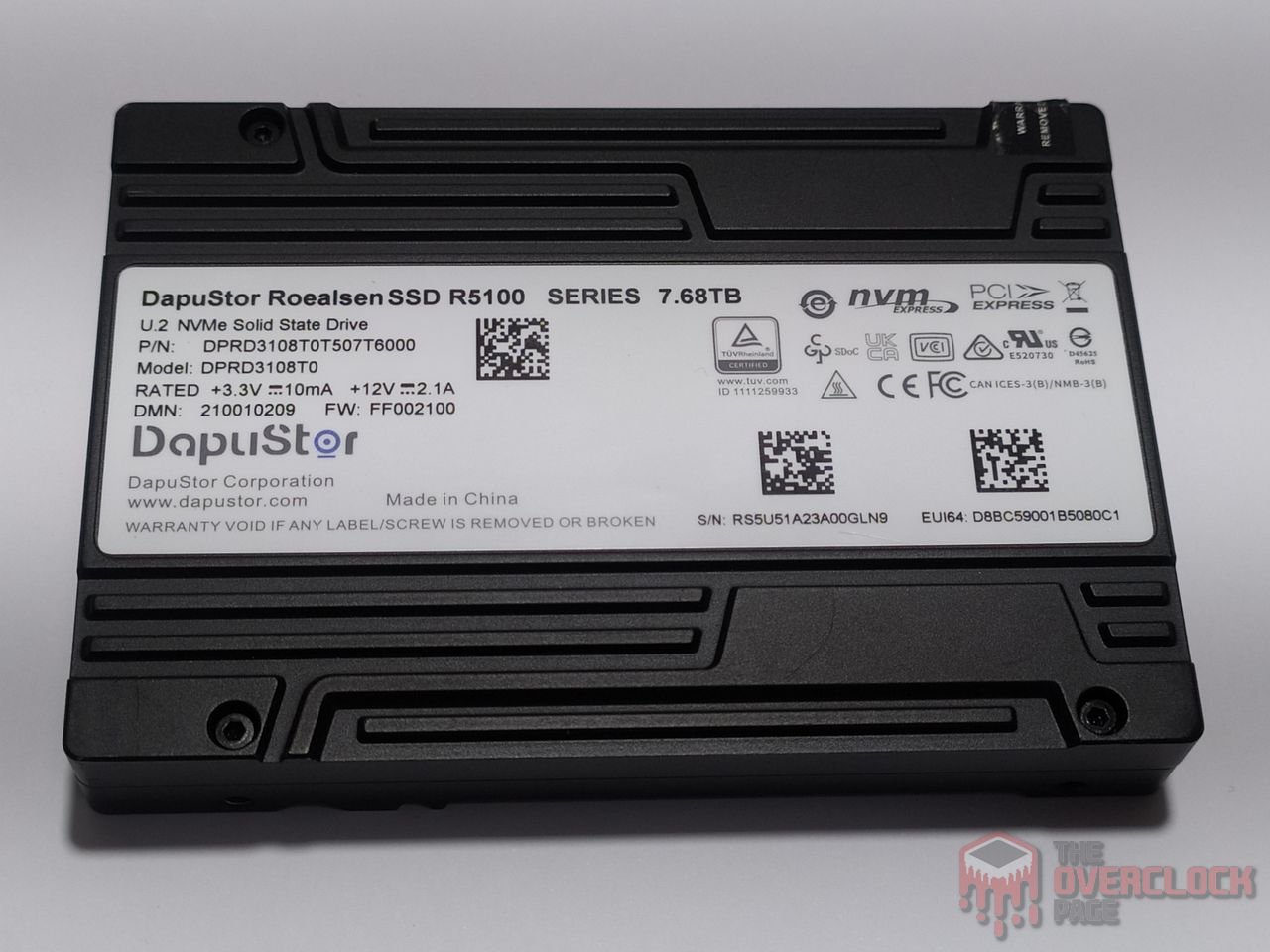
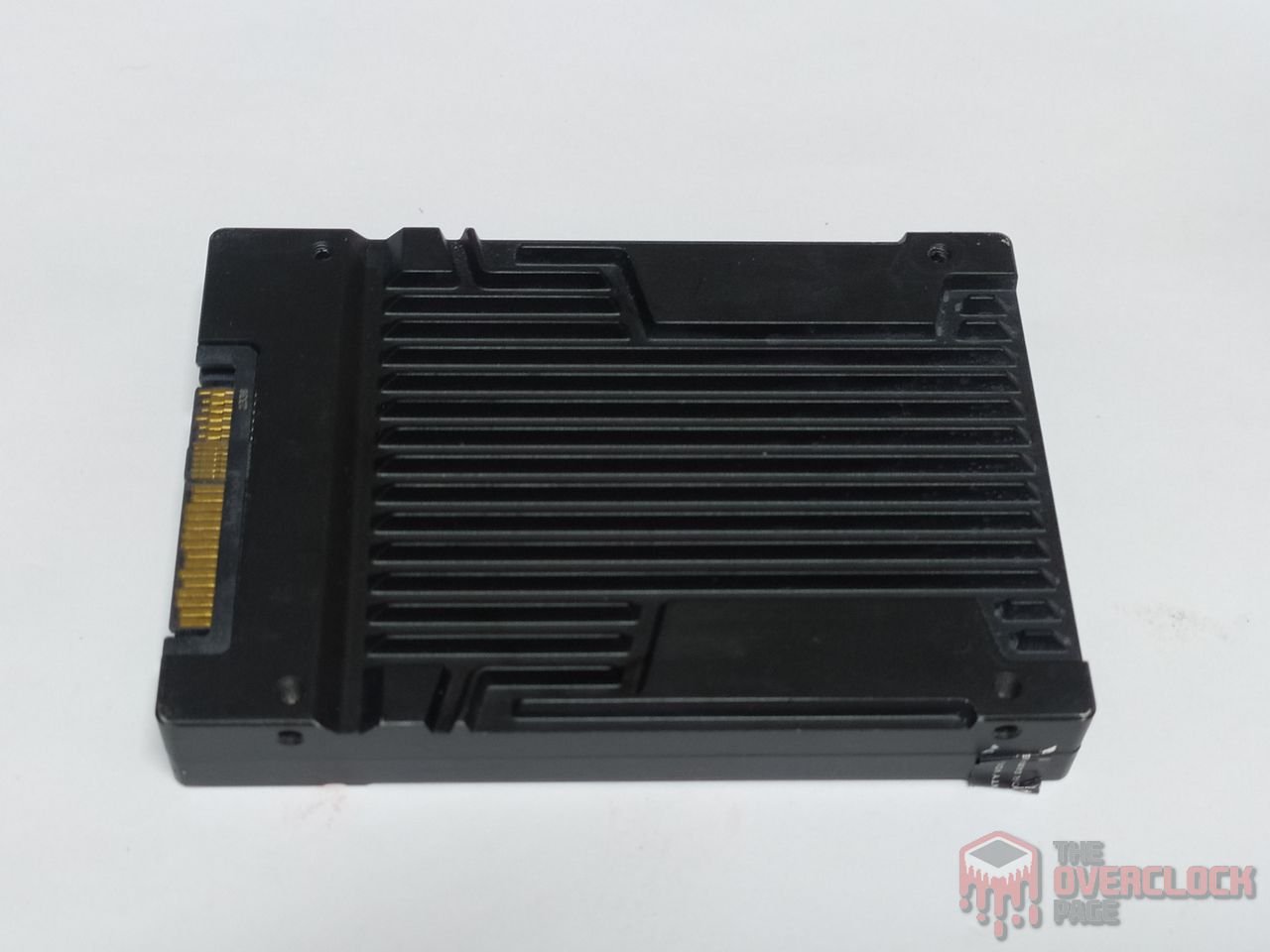
To open the SSD, there are four Torx T6H screws, with two on each side of the device. One of these screws is covered by a warranty seal, which, if broken, voids the warranty.
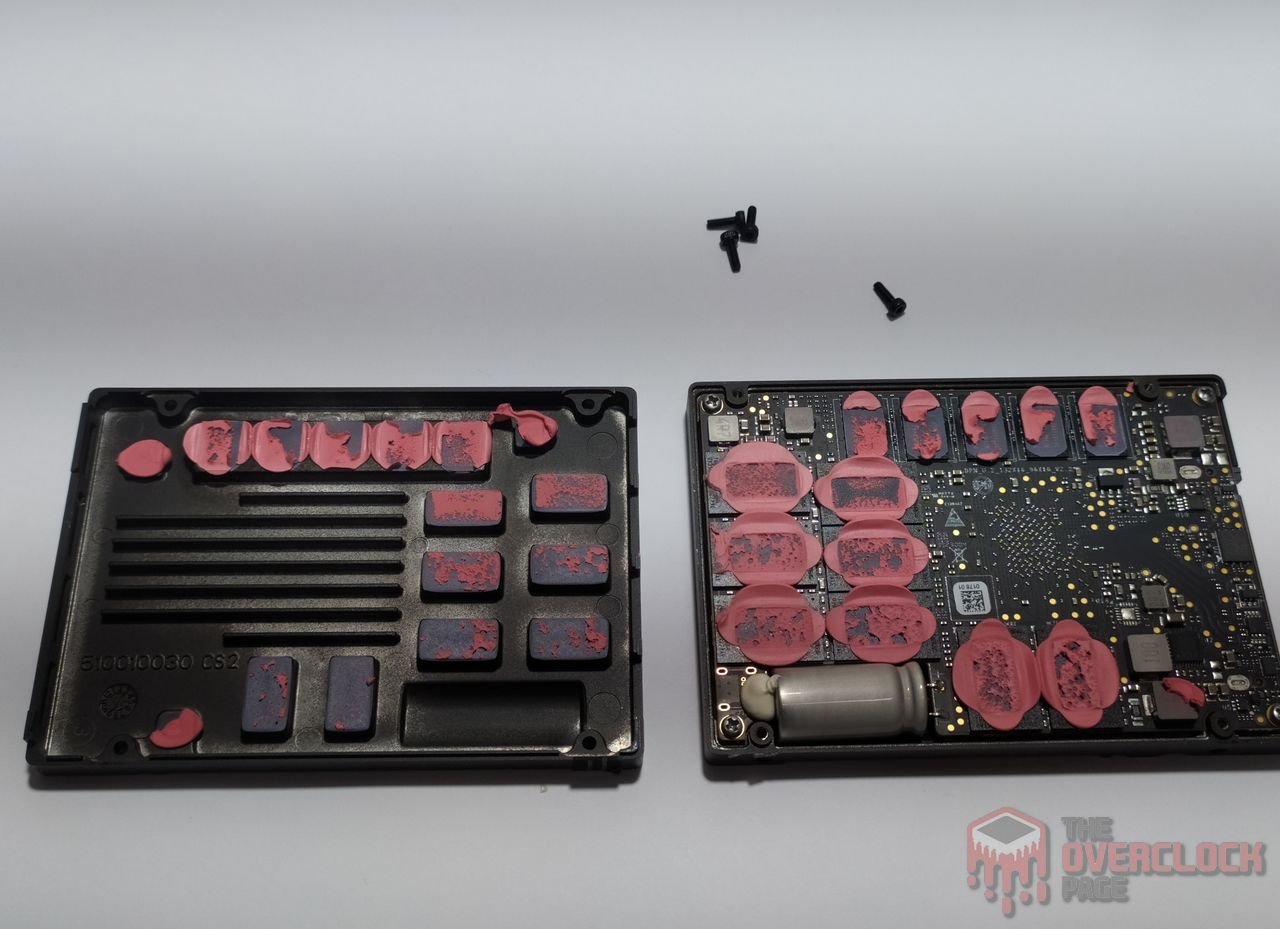
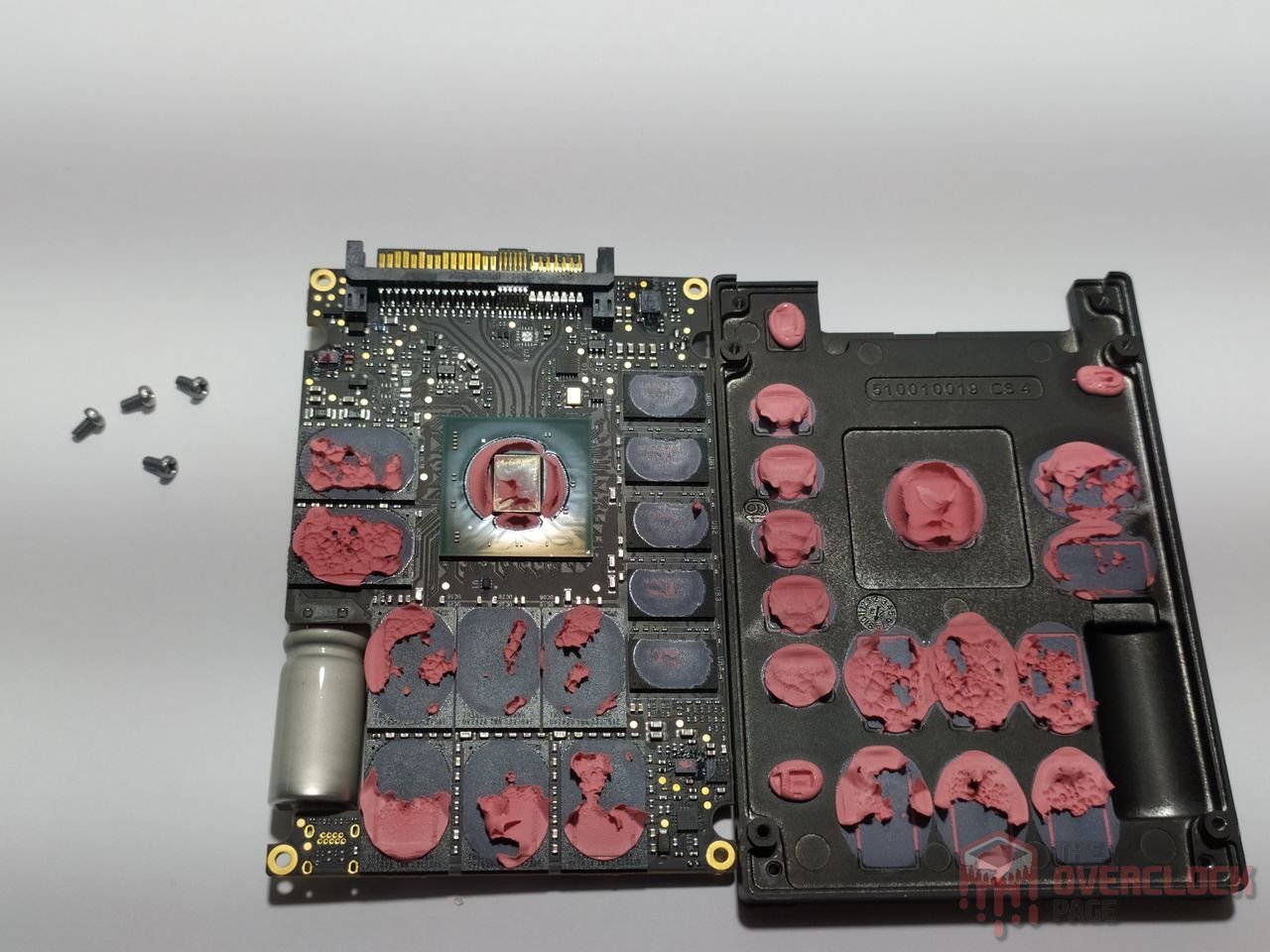
Once we remove the four screws and take off the front cover, we see the PCB covered with pink thermal pads. We also note that the PCB is secured to the casing by four additional Phillips screws.
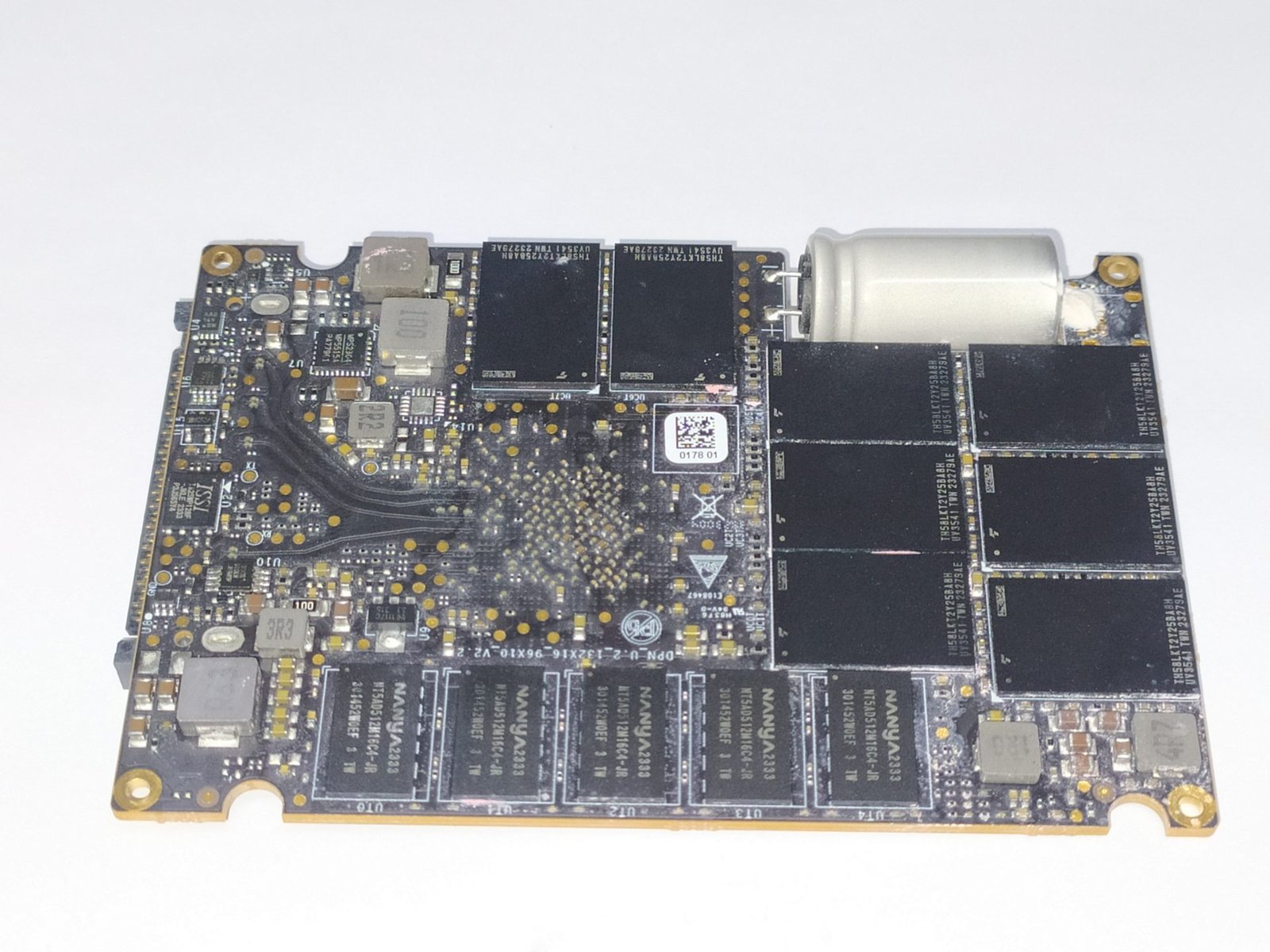
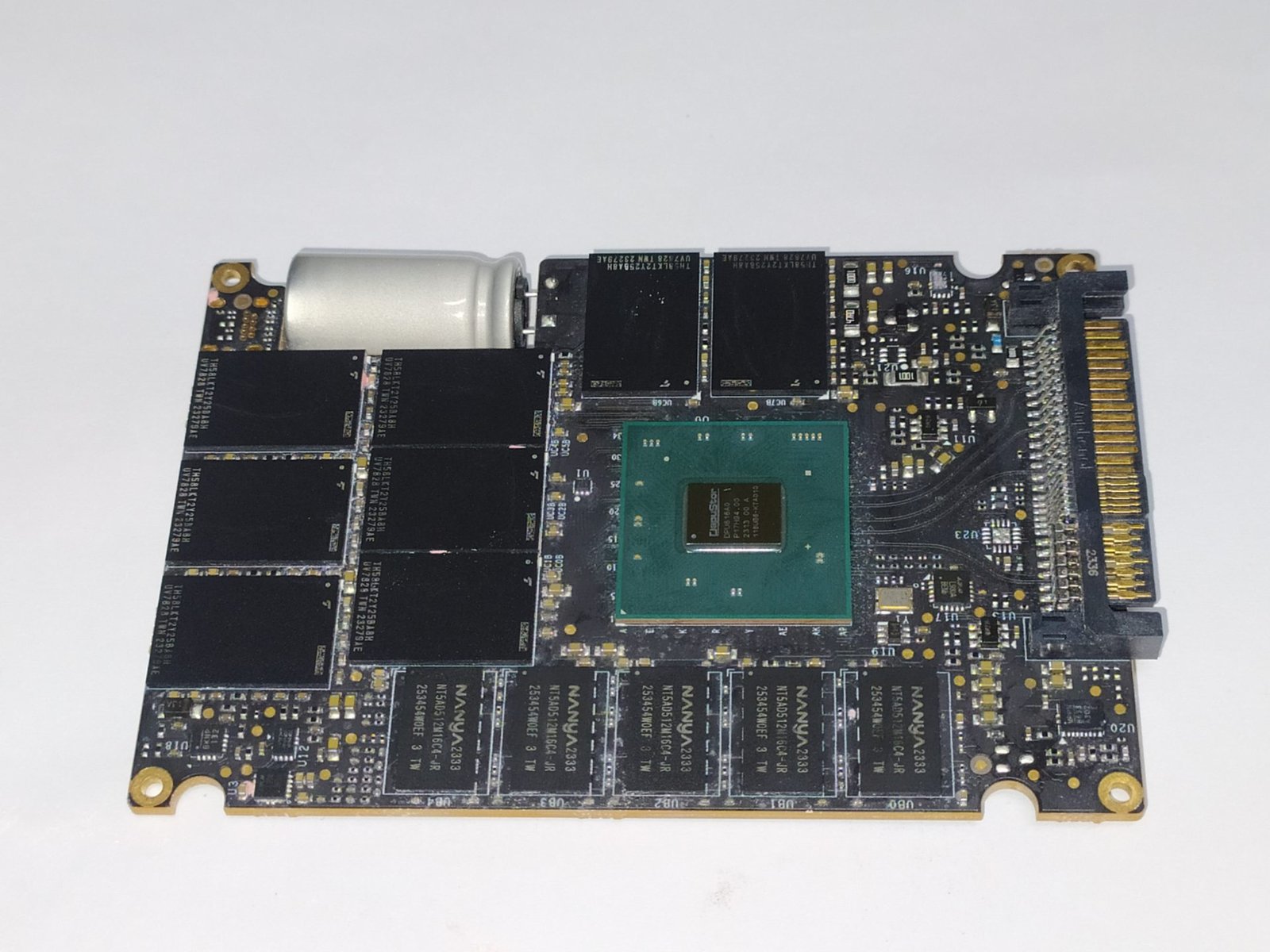
In the images above, we can see both sides of the PCB. In the left image, the back of the PCB is populated with components, including five DRAM cache modules, eight NAND flash chips, and numerous integrated circuits that make up the VRM.
In the right image, we see the front of the PCB, which houses the controller, along with another five DRAM cache modules and eight additional NAND flash chips. There is also a considerable number of VRM components, as well as a large capacitor responsible for power-loss protection.
By default, the SSD has 14.5% of its volume allocated for over-provisioning, meaning that out of the 8192GB of storage, 7680GB is available for the user.
Controller
The SSD controller is responsible for managing all data, over-provisioning, garbage collection, and other background functions. This, of course, contributes to the SSD’s overall performance.
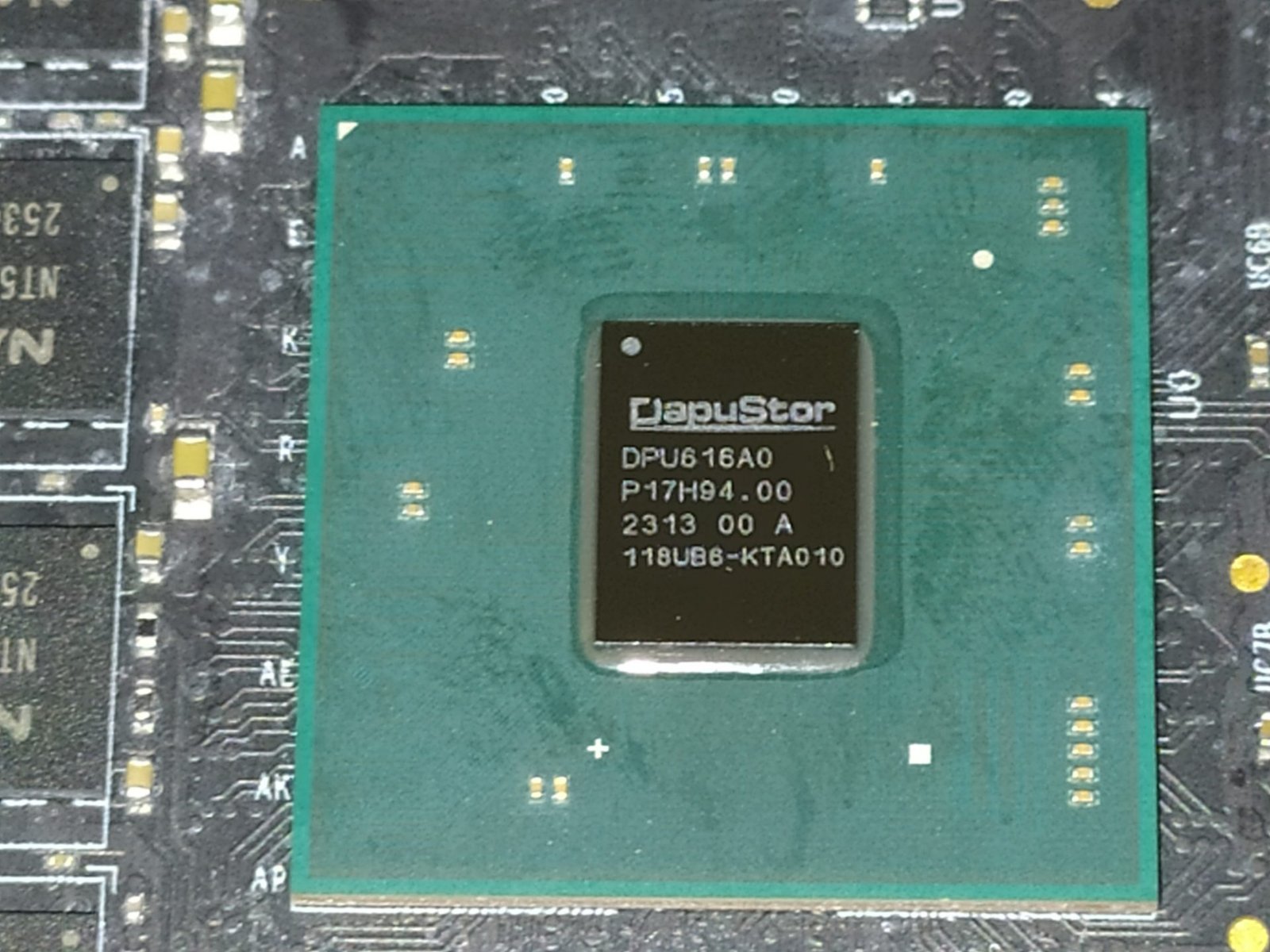
Datacenter SSDs typically do not use the controllers found in consumer SSDs, so we won’t see controllers like the Phison E18 or other controllers such as the Silicon Motion SM2264.
In this SSD, DapuStor has developed its own controller, which we will explore a bit more now: the DPU616.
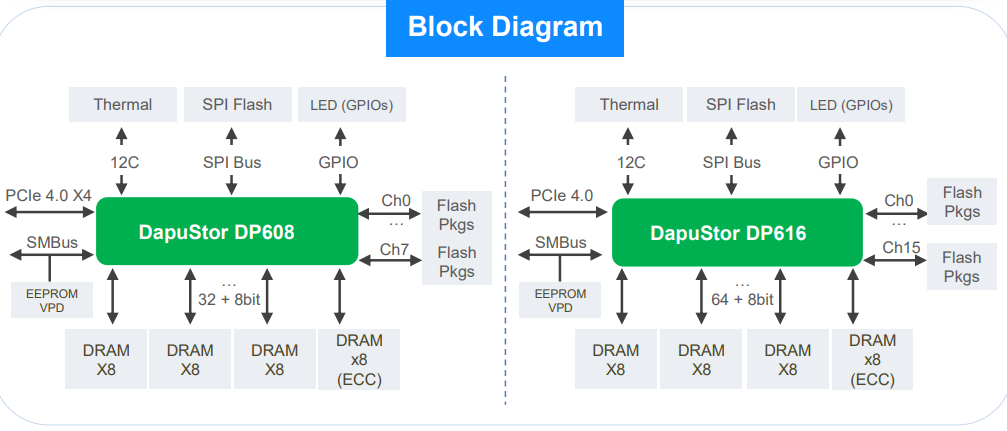
As a datacenter controller, this SSD has features that are uncommon in consumer SSD controllers.
The controller is built on a 64-bit ARM architecture with eight Cortex-A53 cores (octa-core) running at 1.8GHz. These are the same ARM cores found in devices like the Raspberry Pi 3, as well as in smartphone SoCs like the MediaTek Helio G36.
This series includes two versions: the DPU608 and the DPU616. The primary difference between these controllers is the number of available NAND flash channels. As the names imply, the DPU608 has 8 channels, while the DPU616—which is used in the model we’re testing—has 16 channels.
The controller also supports DDR3 and DDR4 DRAM cache, with speeds up to 3200 MT/s on the DPU616 and 2666 MT/s on the DPU608, using a 72-bit DDR interface (64-bit data and 8-bit ECC).
The DPU616’s 16 channels operate on an NV-DDR3 bus at 1600 MT/s (800 MHz), a speed similar to what’s found in consumer SSDs using controllers like the Phison E18.
Most consumer-grade controllers, particularly high-end ones like the Phison E18 and Phison E26, support up to 32 dies (8 channels with 4 chip enables per channel). In contrast, the DPU616 supports 16 channels with 8 chip enables per channel, allowing up to 256 dies in interleaving. Meanwhile, the DPU608 supports up to 256 dies as well but with support for 64-C.E.
DRAM Cache or H.M.B.
Every high-end SSD aiming to deliver consistently high performance requires a buffer to store its mapping tables (Flash Translation Layer or Look-up table). This allows it to achieve better random performance and be more responsive.
Datacenter SSDs also make extensive use of DRAM cache for mapping tables, but they don’t always follow the typical 1:1000 ratio seen in consumer SSDs, where 1GB of DRAM cache is allocated for every 1TB of storage.
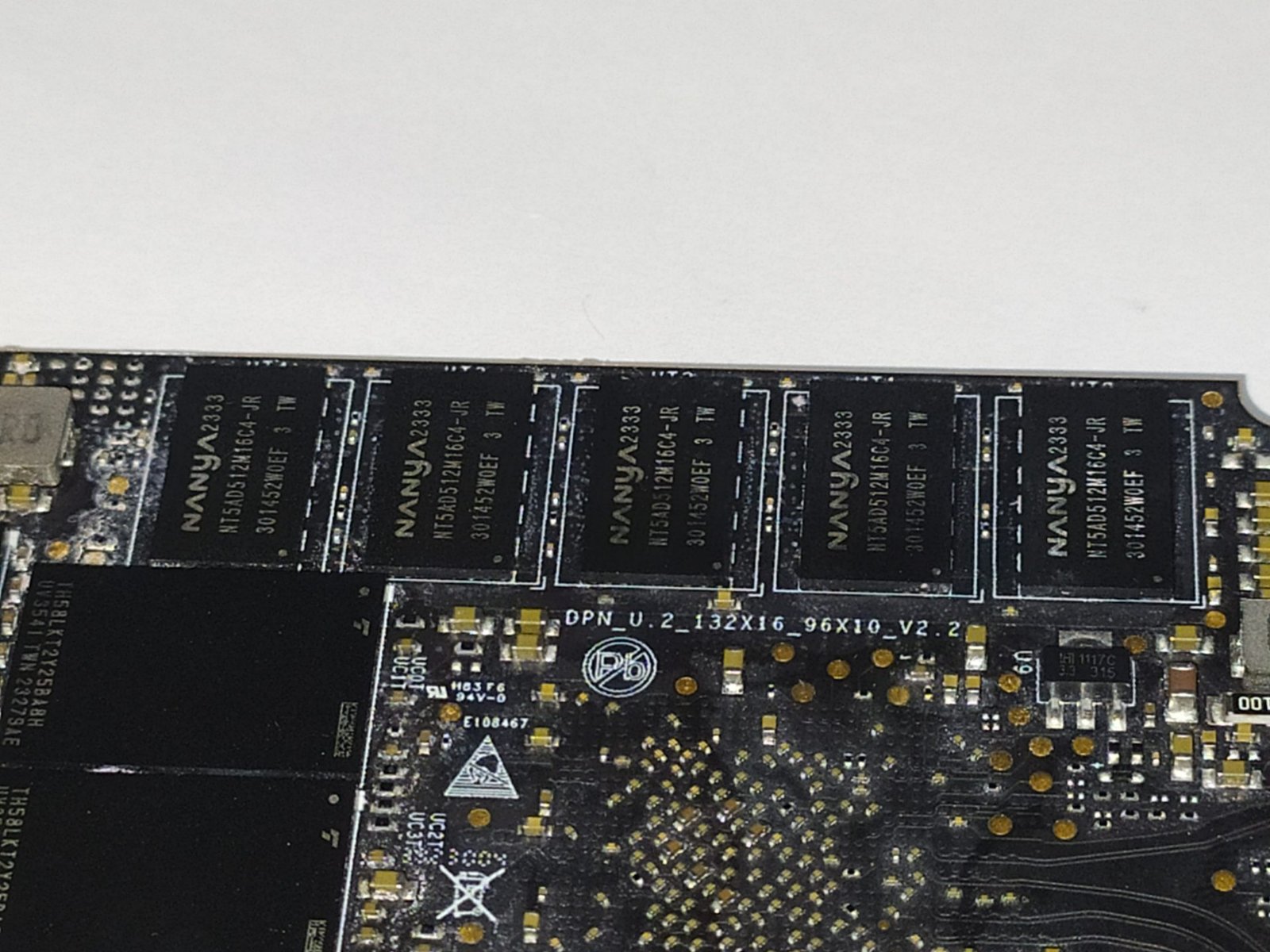
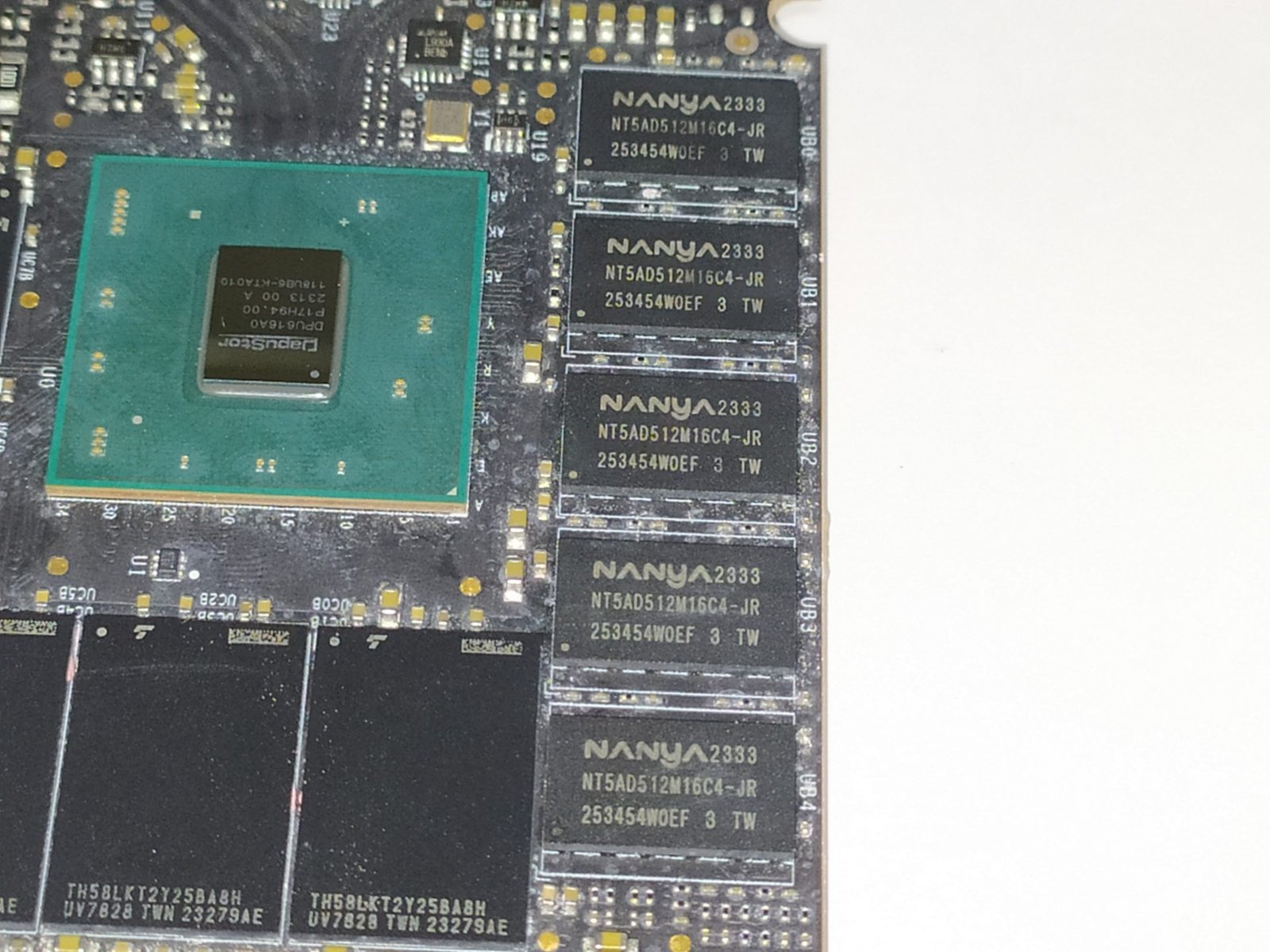
On the front of the PCB, near the controller, there are five DRAM cache modules from the Taiwanese manufacturer Nanya, model “NT5AD512M16C4-JR.” These are DDR4-3200 MT/s modules with a density of 8Gb (1GB) each, complemented by five more modules on the reverse side of the PCB, totaling 10GB of DRAM cache.
Not all of this DRAM is dedicated solely to metadata storage; some of it may be allocated for ECC (Error Correction Code) to enhance data security and reliability.
NAND Flash
Regarding its NANDs, the 7.68TB SSD contains 16 NAND flash chips marked as “TH58LKT2Y25BA8H.” These are NANDs from the Japanese manufacturer Kioxia, specifically BiCS5 eTLC models, with dies of 512Gb (64GB) containing 112 layers of data and a total of 128 gates, resulting in an array efficiency of 87.5%.
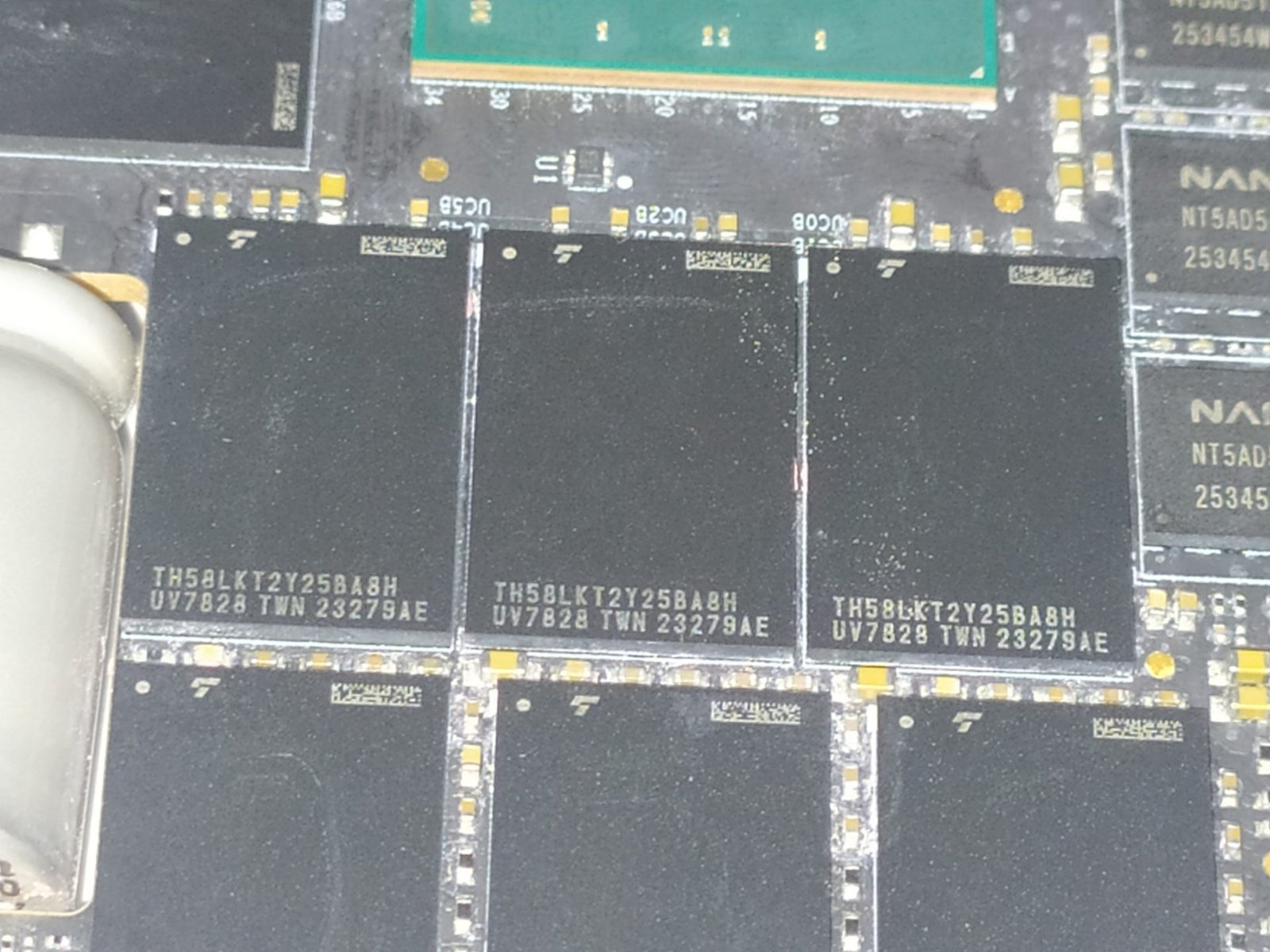
In this SSD, each NAND Flash has 8 dies with a density of 512Gb, totaling 512GB per NAND, which adds up to 8192GB overall. They communicate with the controller via a bus speed of 1200 MT/s.
Something I found very interesting is that, as we previously mentioned and will show below, the Kioxia BiCS5 NANDs have several variants, including the BiCS5 with 2 planes and those with 4 planes.

As shown in the image above, Kioxia initially designed this NAND Flash die with 4-plane NANDs, which would significantly boost performance. Additionally, they incorporated a design using CuA (Circuitry under Array), where the NAND management circuitry is placed beneath the cell array to improve manufacturing efficiency. However, due to costs and the number of dies per wafer, Kioxia generally supplies more BiCS5 NANDs with 2 planes and without CuA.
In Roealsen R5101 SSDs with capacities of 1.92TB and 3.84TB, Kioxia’s eTLC BiCS5 512Gb 4-plane NANDs are used. In contrast, the 7.68TB and 15.36TB versions feature the 2-plane NANDs.
An interesting point is that enterprise-grade SSDs typically have NAND with higher durability. While BiCS5 NAND in consumer SSDs typically endures around 1,700 to 3,000 Program Erase Cycles (P.E.C.), the eTLC NAND used in this project boasts an endurance of 7,000 P.E.C.—an impressive figure.
PMIC (Power Delivery)

Like any electronic component performing work, SSDs have power consumption levels that can range from just a few milliwatts to nearly 10 watts, approaching the limits of certain connectors or slots. Power management is handled by the PMIC, or “Power Management IC,” a chip responsible for supplying power to other components.
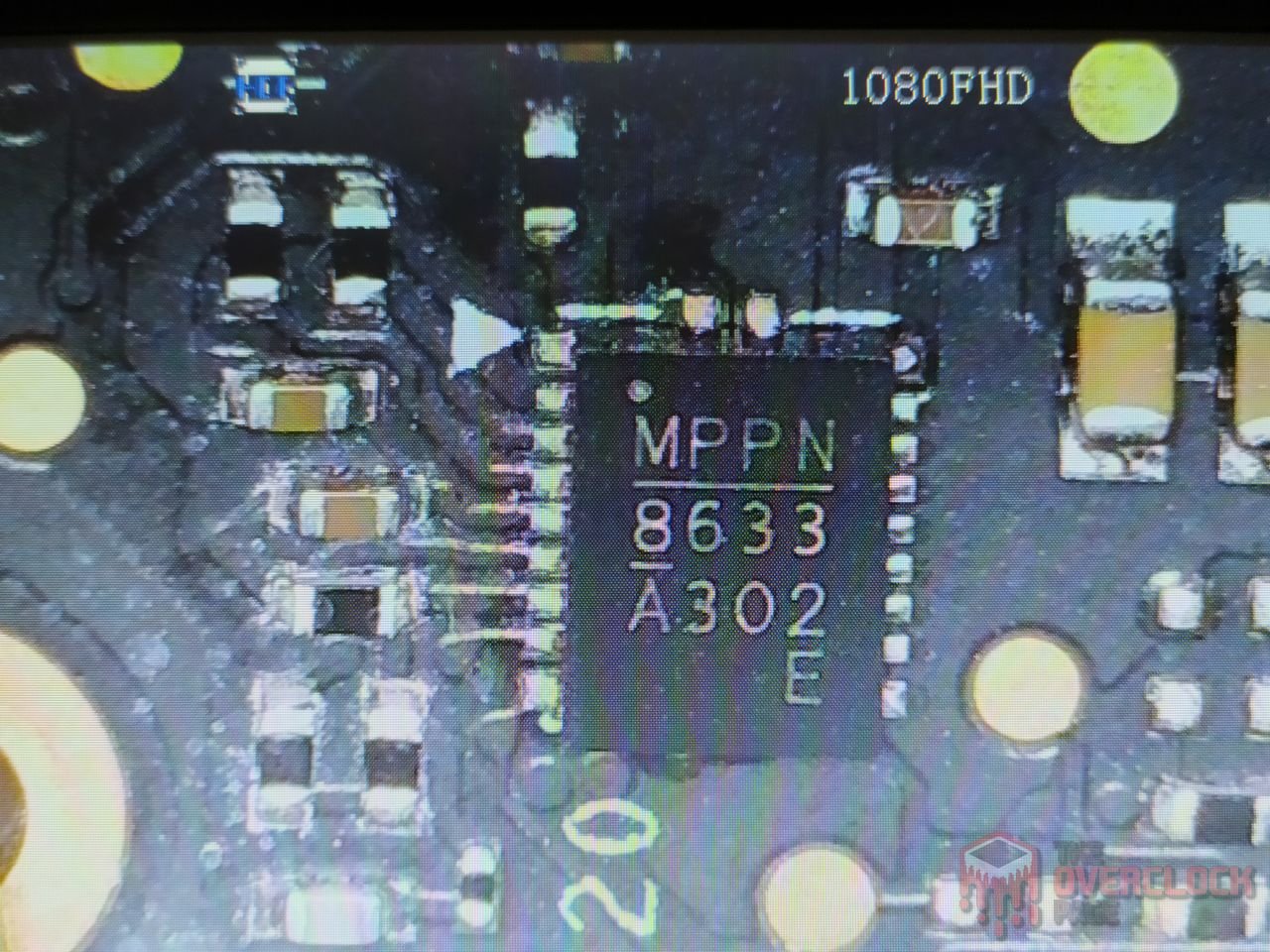
In this project, the left image shows an IC labeled “MPPN 8663” from the manufacturer Monolithic Power Systems, known for producing numerous power ICs for SSDs, motherboards, GPUs, and more. Here, this model corresponds to the “MPQ8633AGLE,” a Synchronous Step-Down Converter with an adjustable current limiter. It operates with input voltages up to 16V, supplies up to 12A of current, and supports operating temperatures up to 170°C. This model is commonly used in routers, high-end televisions, portable consoles, and other devices.
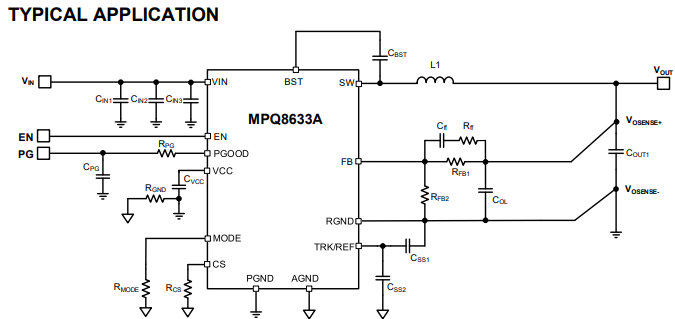
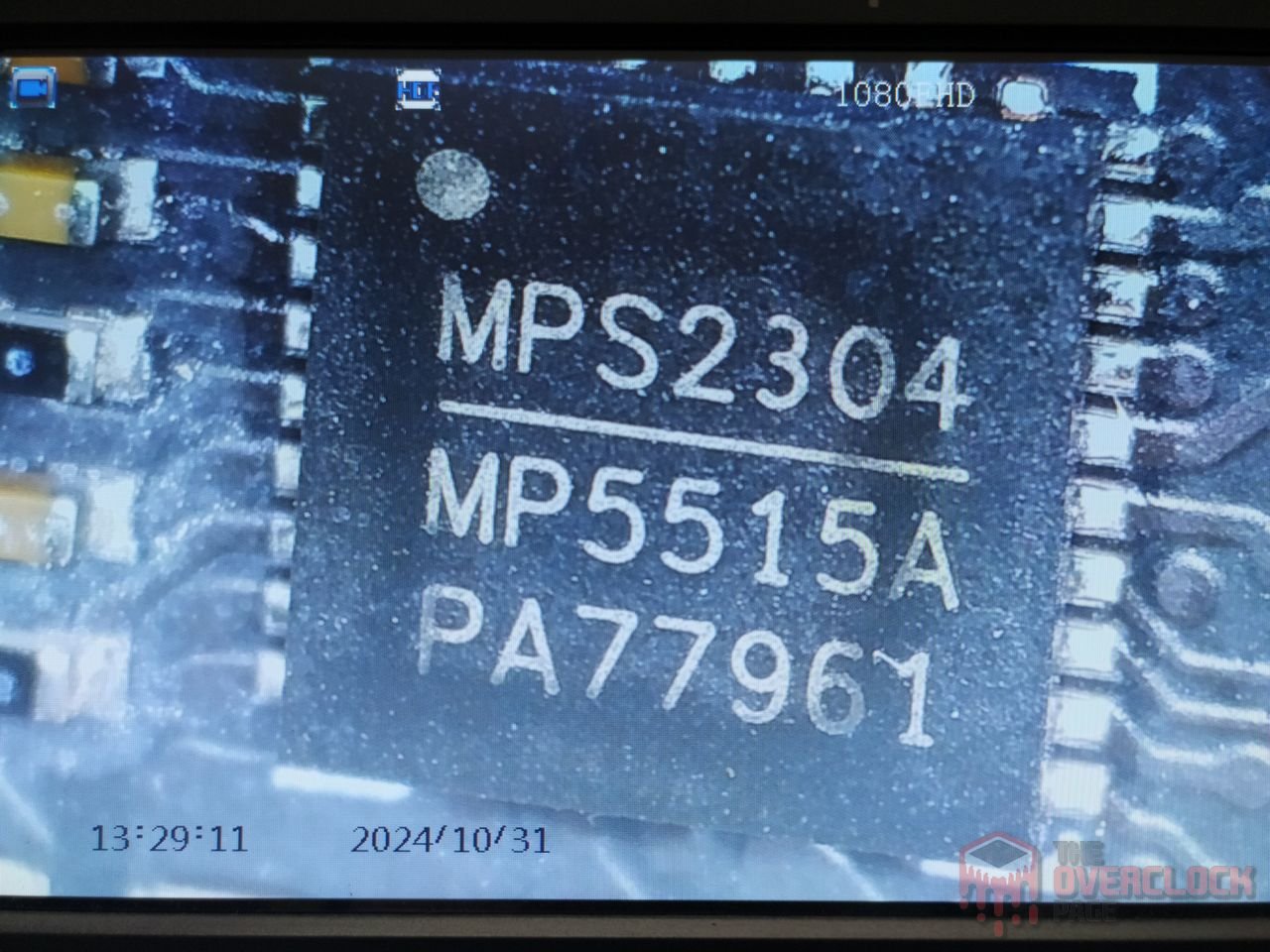
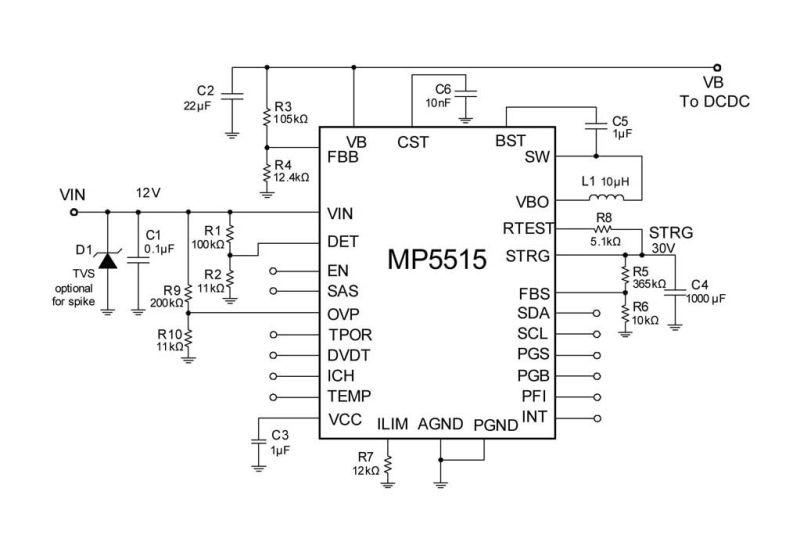
In the right image, we have another component also from M.P.S., which is the main PMIC for this project. It supports operation with up to 32V, providing peak currents of up to 6A at the input with integrated MOSFETs of 14m?.
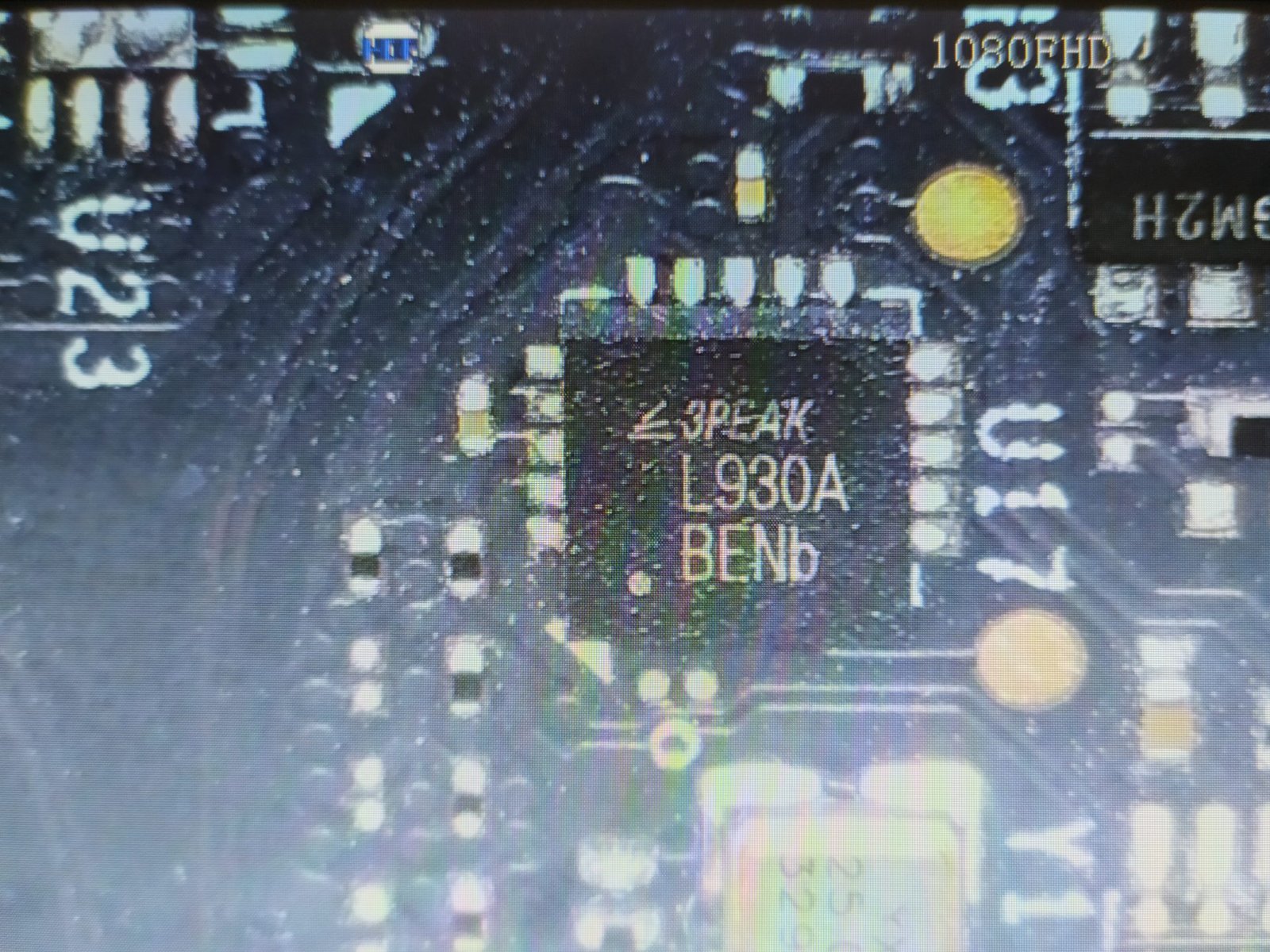
In the left image, we find a component from the manufacturer 3Peak, model L930A. It is a Low-Noise LDO Regulator, which is a low-dropout linear regulator that provides a stable output with low noise, essential for circuits sensitive to interference, such as audio devices and SSDs. It can deliver currents of up to 3A.
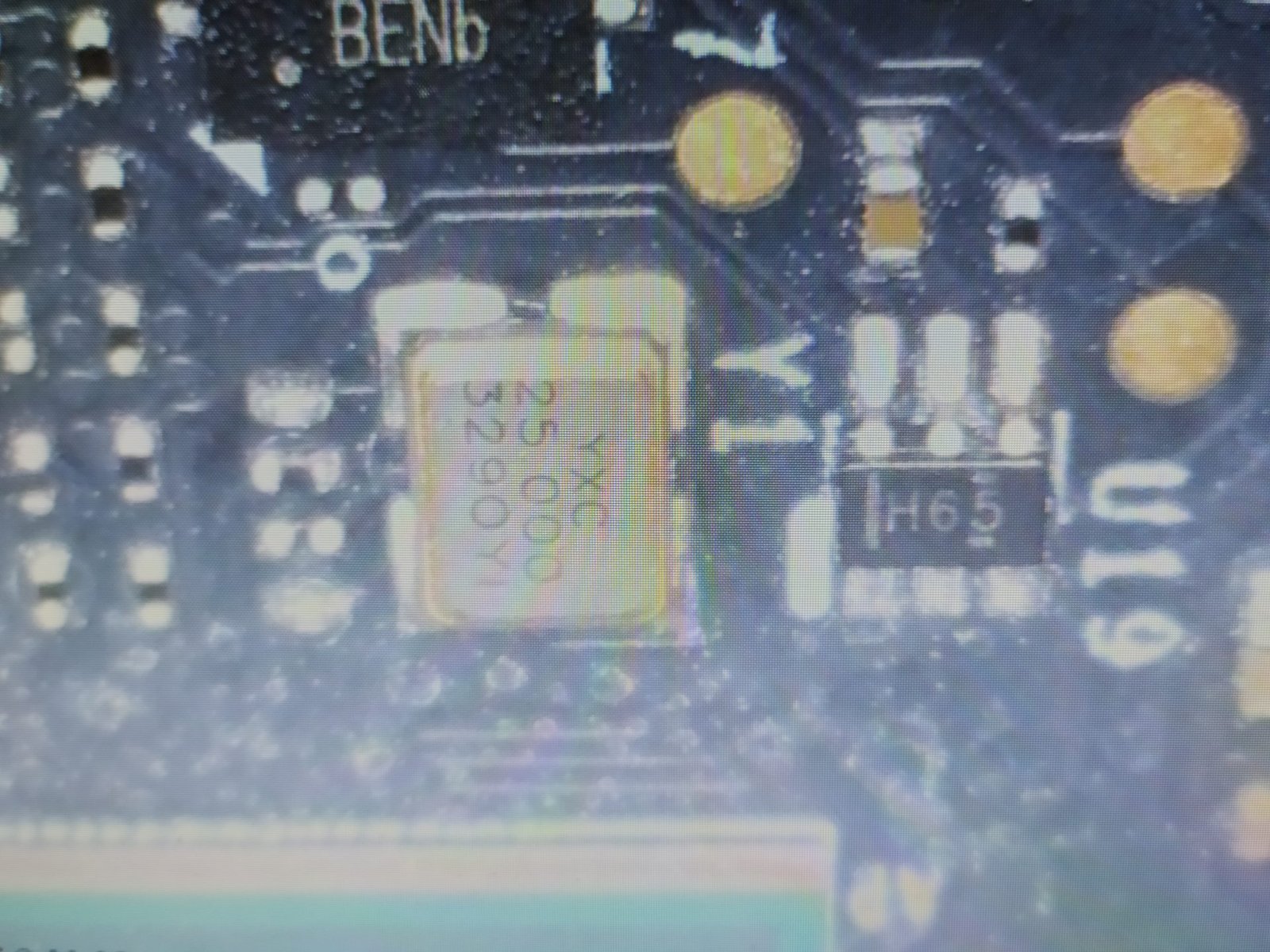
This other component marked as “H65” is from Texas Instruments, model “SN74AUP2G14,” and it is a “Low-Power Dual Schmitt-Trigger Inverter.” In SSDs, it serves as a logic component that consumes little power and stabilizes noisy input signals, converting them into well-defined digital signals. This helps prevent read/write errors when dealing with unstable signals in the SSD.
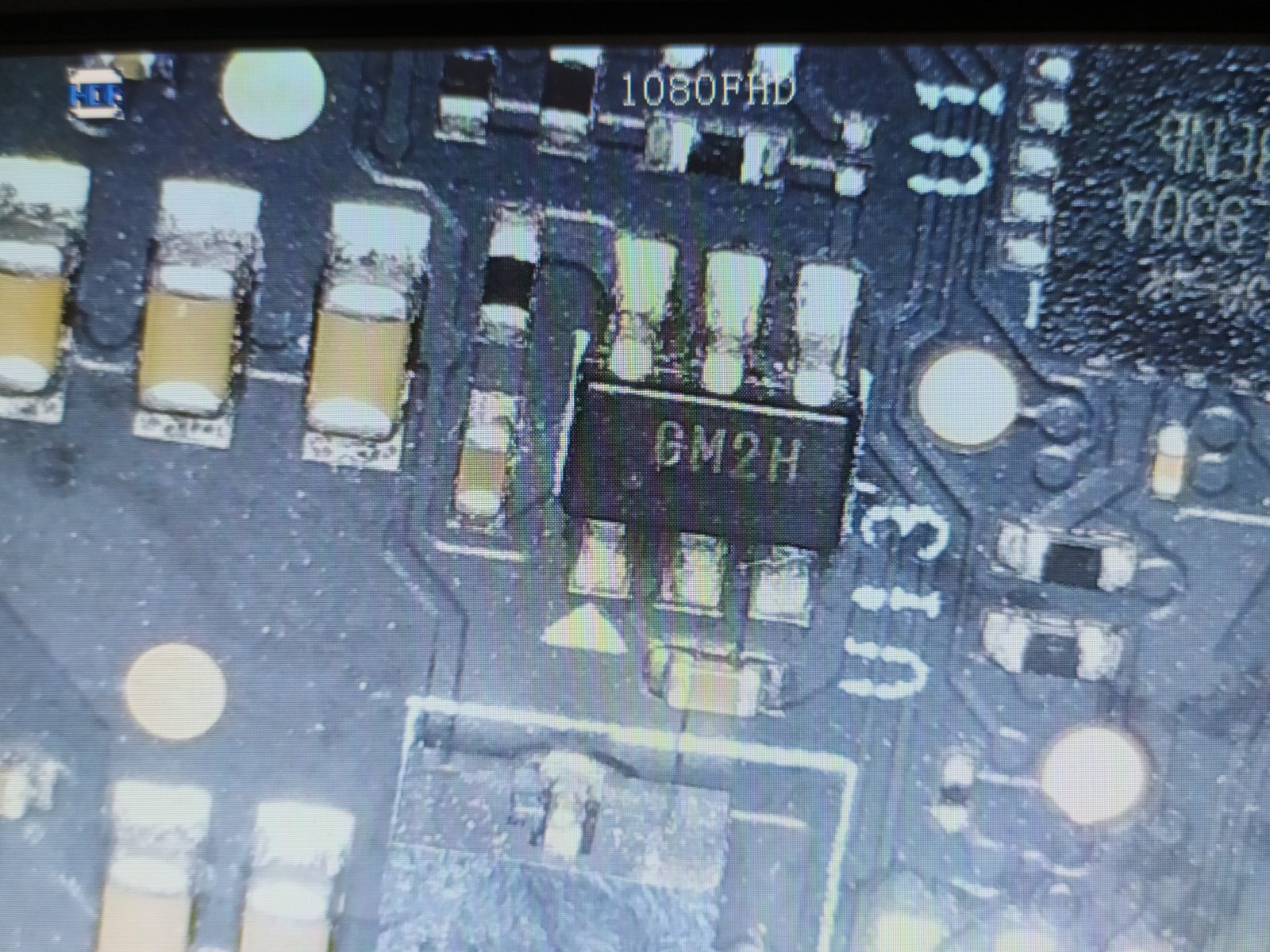
Unfortunately, we could not identify the component on the left, but we know that it is a Step-down Converter, which essentially acts like a small MOSFET. It receives a higher input voltage and outputs a lower voltage.
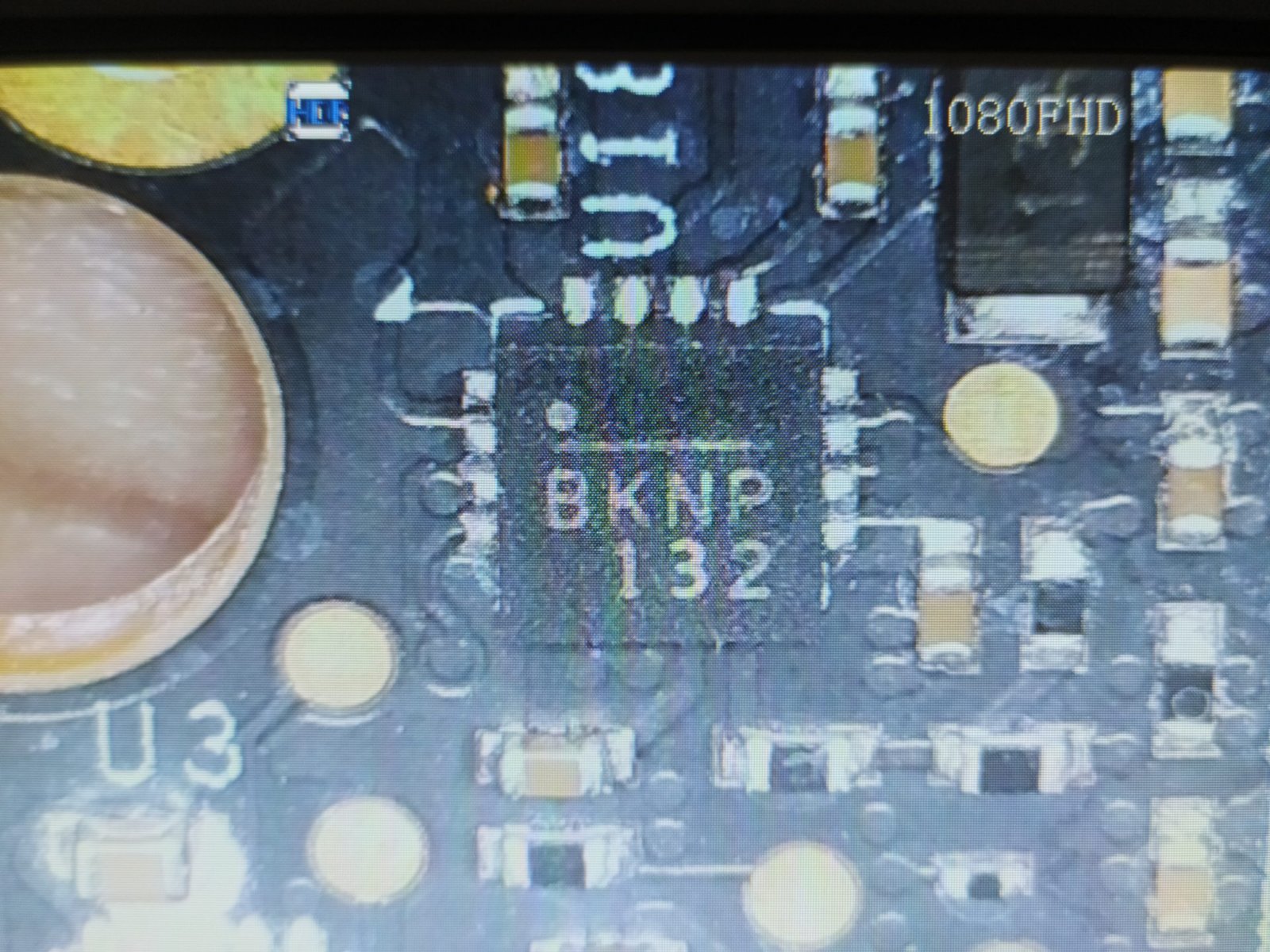
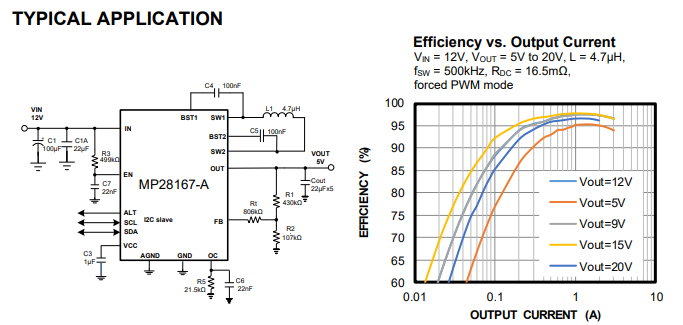
The IC marked as BKNP (MP28167-A) is another component from M.P.S. that functions as a Buck-Boost Converter, which adjusts the input voltage to provide a stable output, whether it is higher, lower, or equal to the input. This component is especially useful in SSDs to maintain a constant and efficient power supply, regardless of variations in the power source, contributing to the stability and longevity of the device. It supports operation with voltages ranging from 2.8V to 22V and can deliver up to 3A of output current and 4A input current.
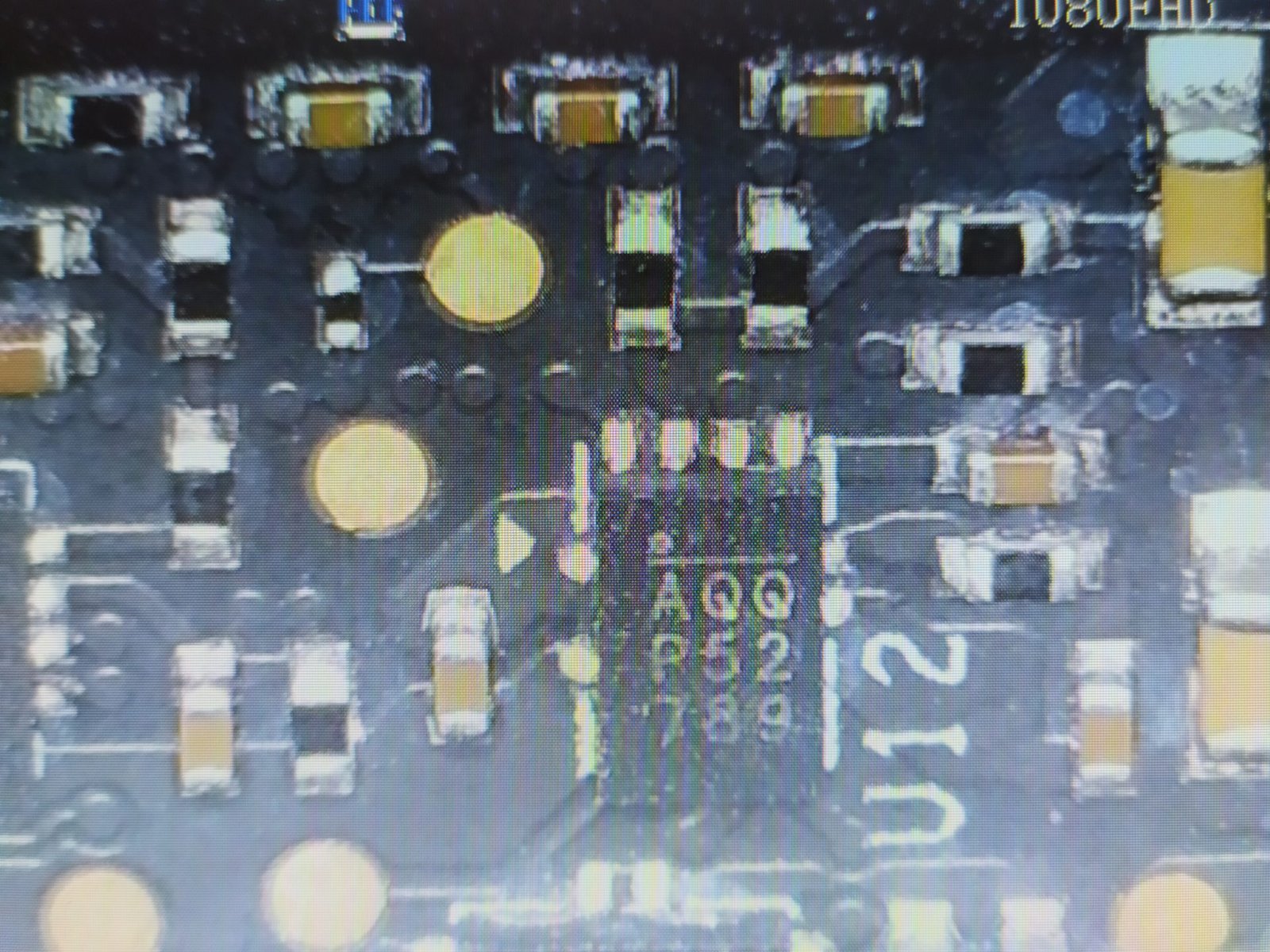
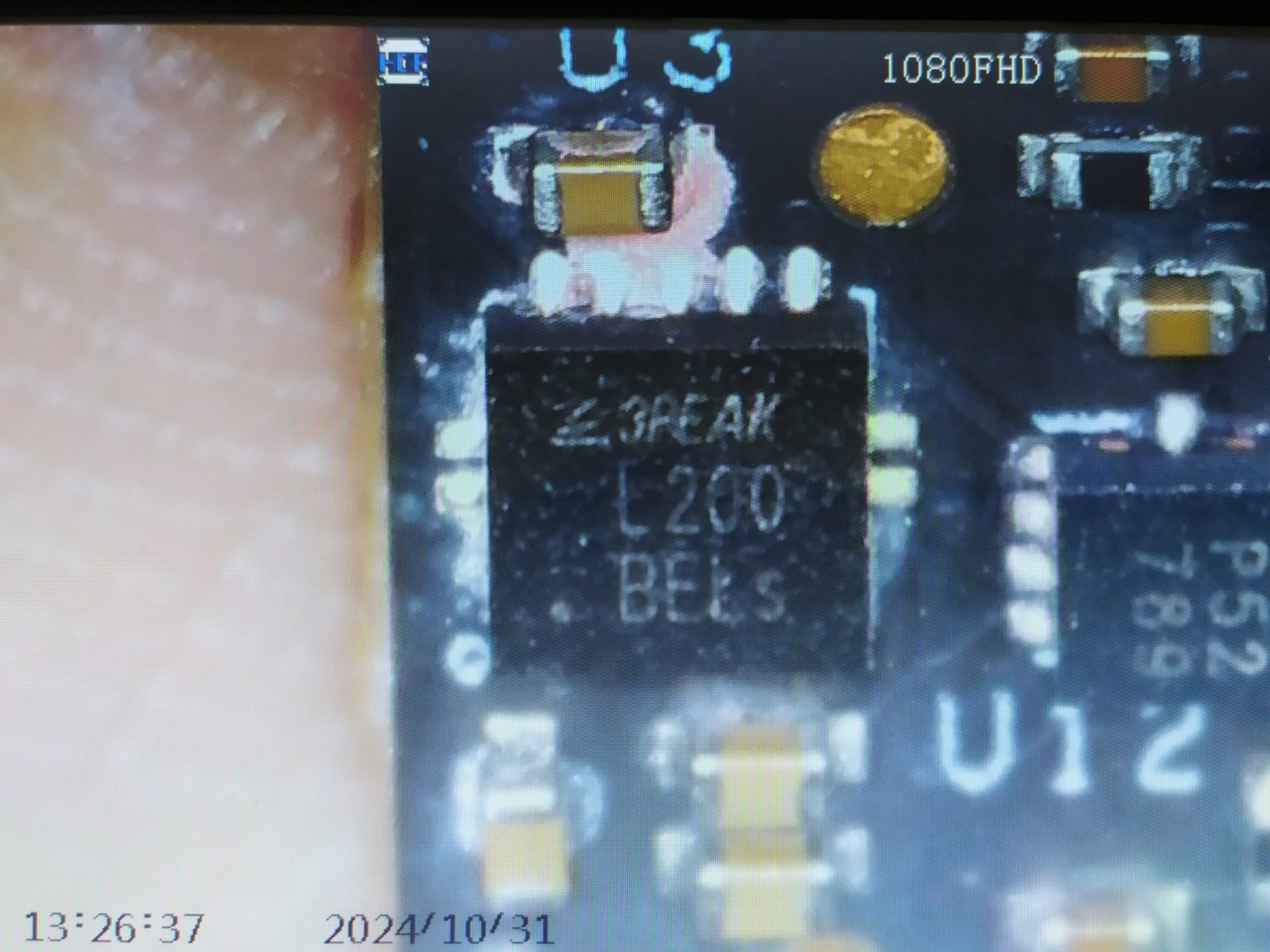
This component “AQQ” on the left is another from Monolithic Power Systems (MP8759), which is also a Step-down Converter but with support for much higher input currents, capable of operating with up to 8A.
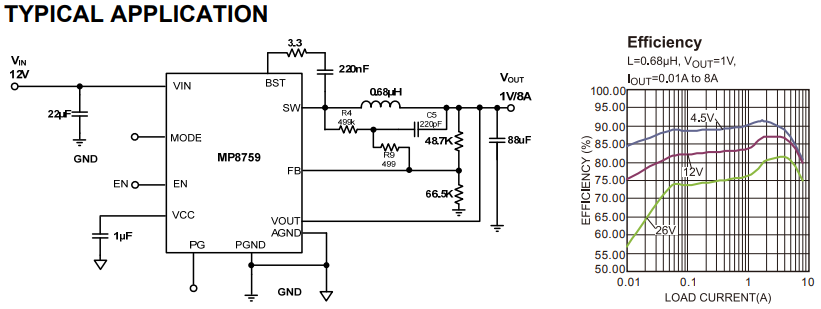
The component “L200” is a DDR termination regulator from 3Peak, model “TPL51200-S,” which is capable of sourcing and sinking current to maintain the correct voltage at the DDR memory terminals. In SSDs and other devices that use DDR, it ensures stable termination of the data signals, which is essential for signal integrity and reliable memory performance.
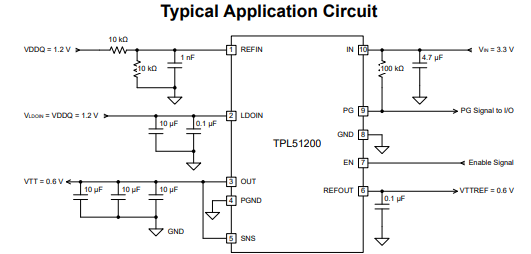
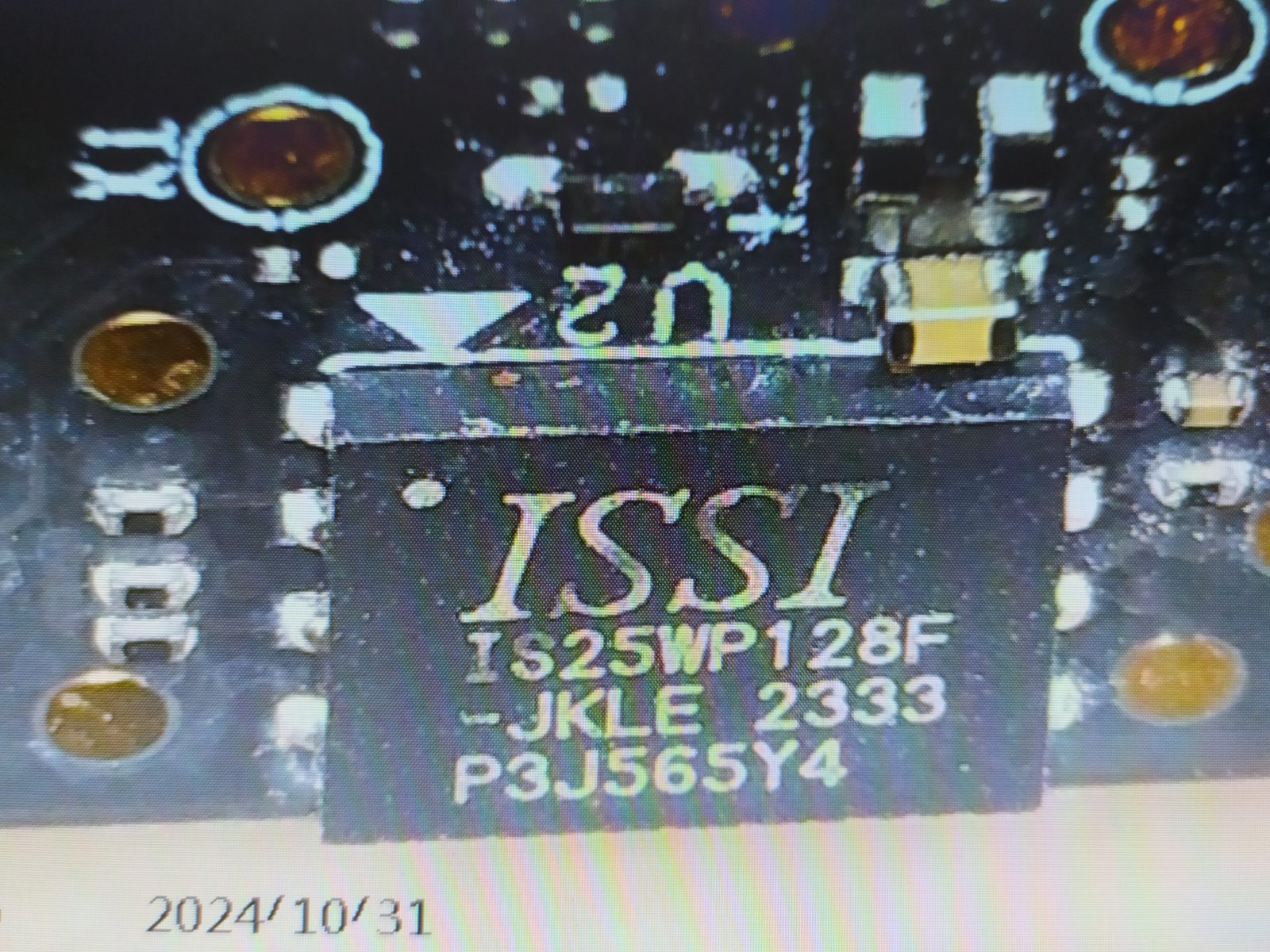
On the left, we have the IC “IS25WP128F-JKLE” from the manufacturer ISSC, which is a serial Flash memory of 128Mb (16MB) that is likely used to store the firmware of this SSD or other configuration data. This IC operates at frequencies of 166 MHz and operates within a voltage range of 1.65V to 1.95V. But these type of flashs typically stays at 1.8V.
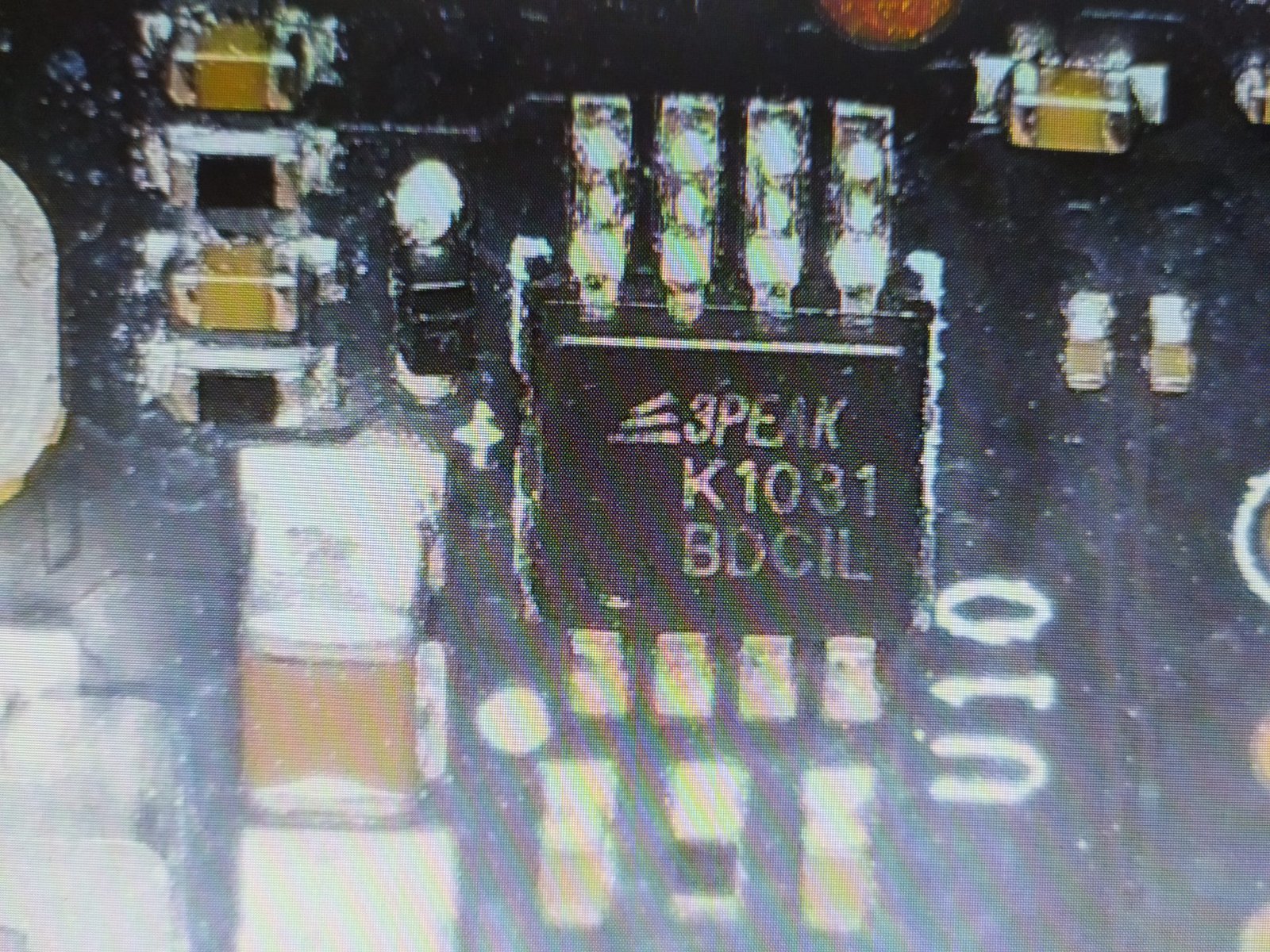
The “3Peak K1031” from 3Peak is a 3-channel power sequencer with adjustable timing control, used in SSDs to ensure that multiple voltages are activated in the correct order. This control prevents startup issues and protects the components, helping to maintain the stability and performance of the SSD.
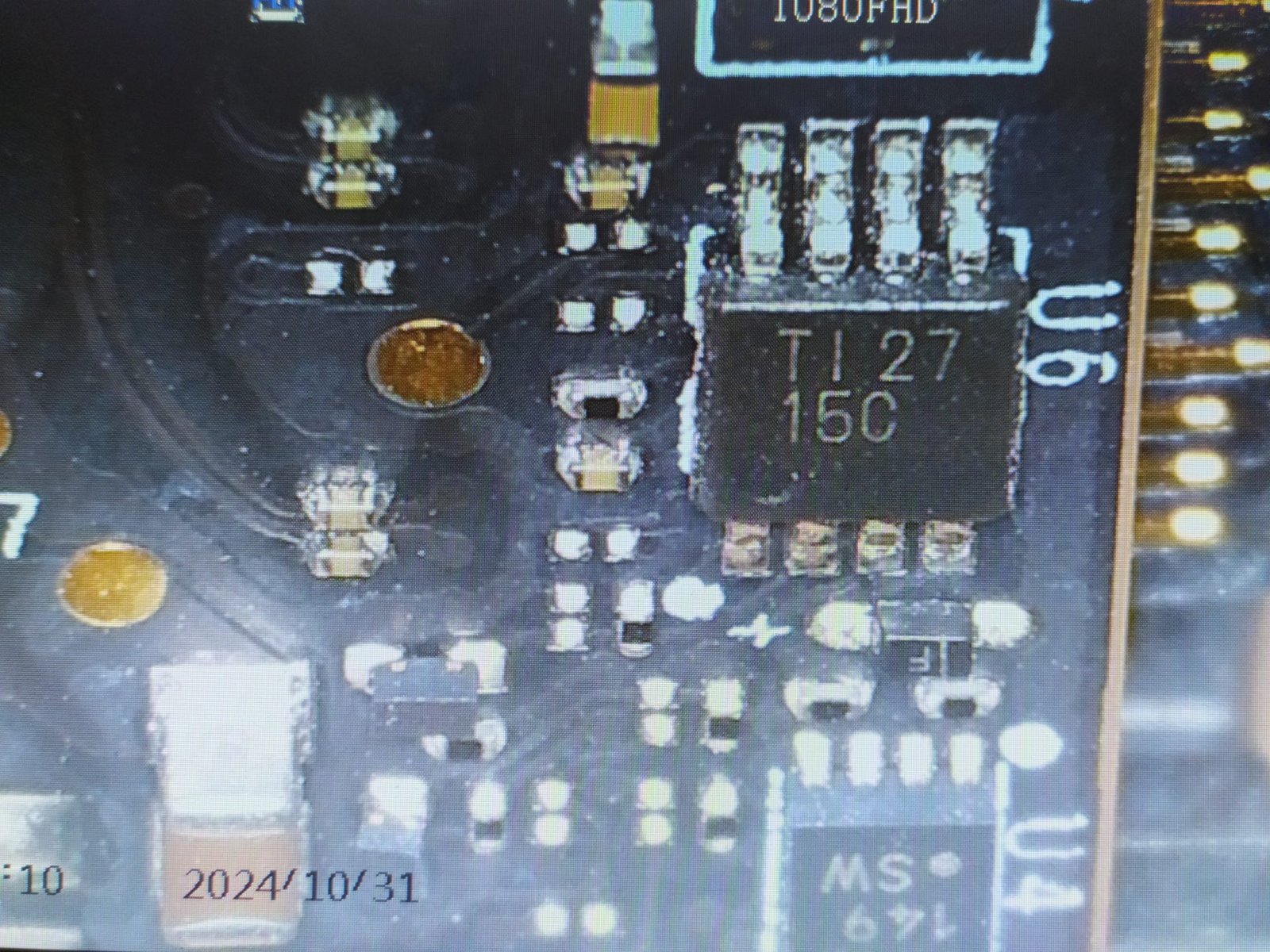
The “TI 27 15C” is from Texas Instruments, and its model is TCA9803DGKT. It is an I2C buffer/repeater with level translation that facilitates communication between I2C devices with different voltage levels. In SSDs, it ensures signal integrity between components operating at distinct voltages, enhancing the reliability of communication and compatibility between circuits.
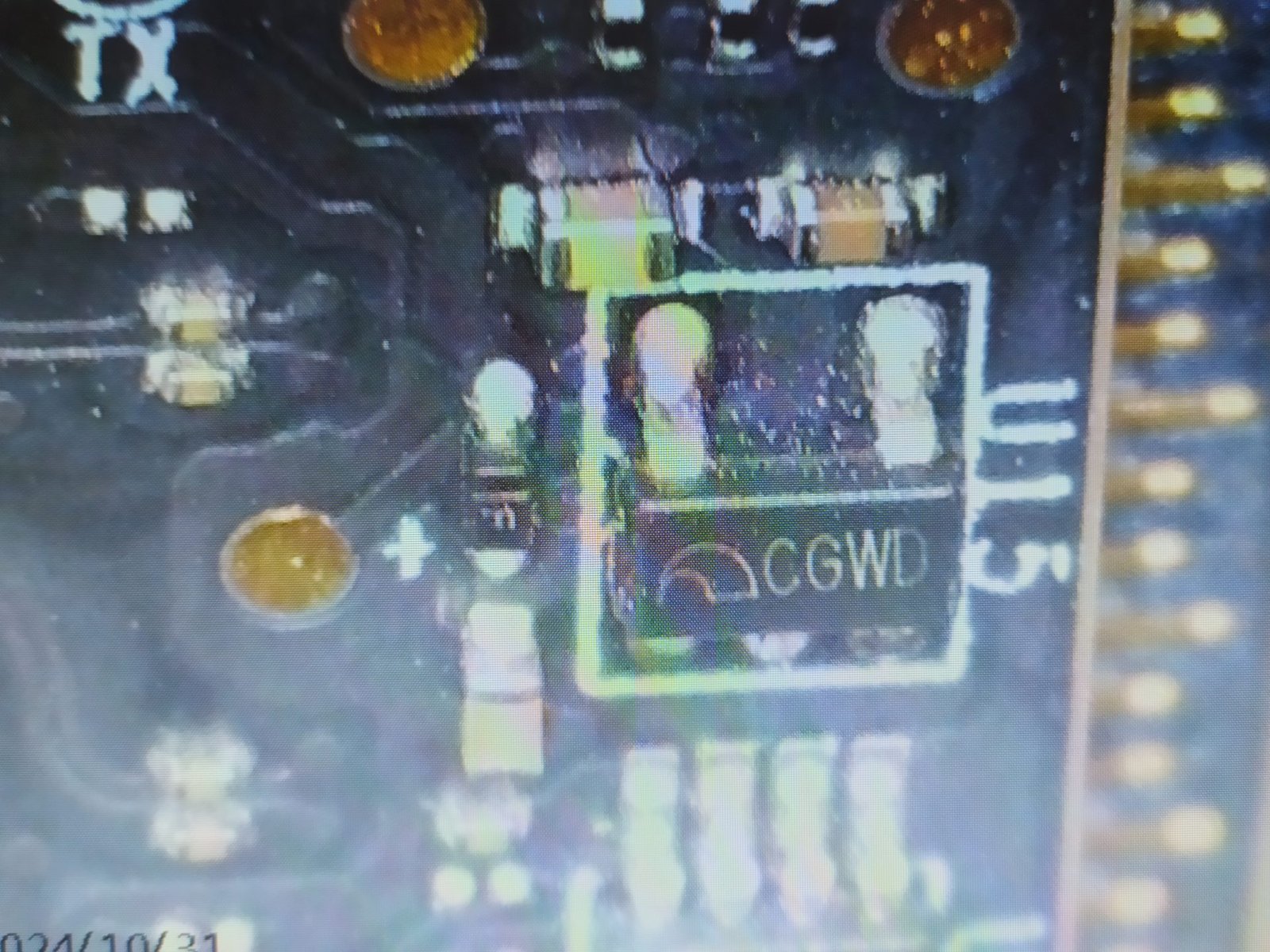
The CGWD is from Microne and is a fixed LDO regulator that provides a stable output of 3.0V with a capacity of up to 350mA, from an input voltage range of 2.0V to 6.0V. With a SOT23-5 package and marked “CGxx,” it is used in SSDs to deliver a stable and precise voltage to sensitive components, ensuring low noise and energy efficiency.
Special thanks to my colleague fzabkar on Reddit, who helped me identify these components.
Power-Loss-Protection
Power Loss Protection in datacenter SSDs is essential to ensure data integrity during power failures. By using capacitors or temporary energy storage, it allows for the safe completion of ongoing operations, preventing data corruption in critical environments. This ensures high availability and reliability of data.

This SSD has only one electrolytic capacitor from the manufacturer Nichicon, which is one of the largest and most reputable capacitor manufacturers in the market. The model of this capacitor is Nichicon UBY1V182MHL.
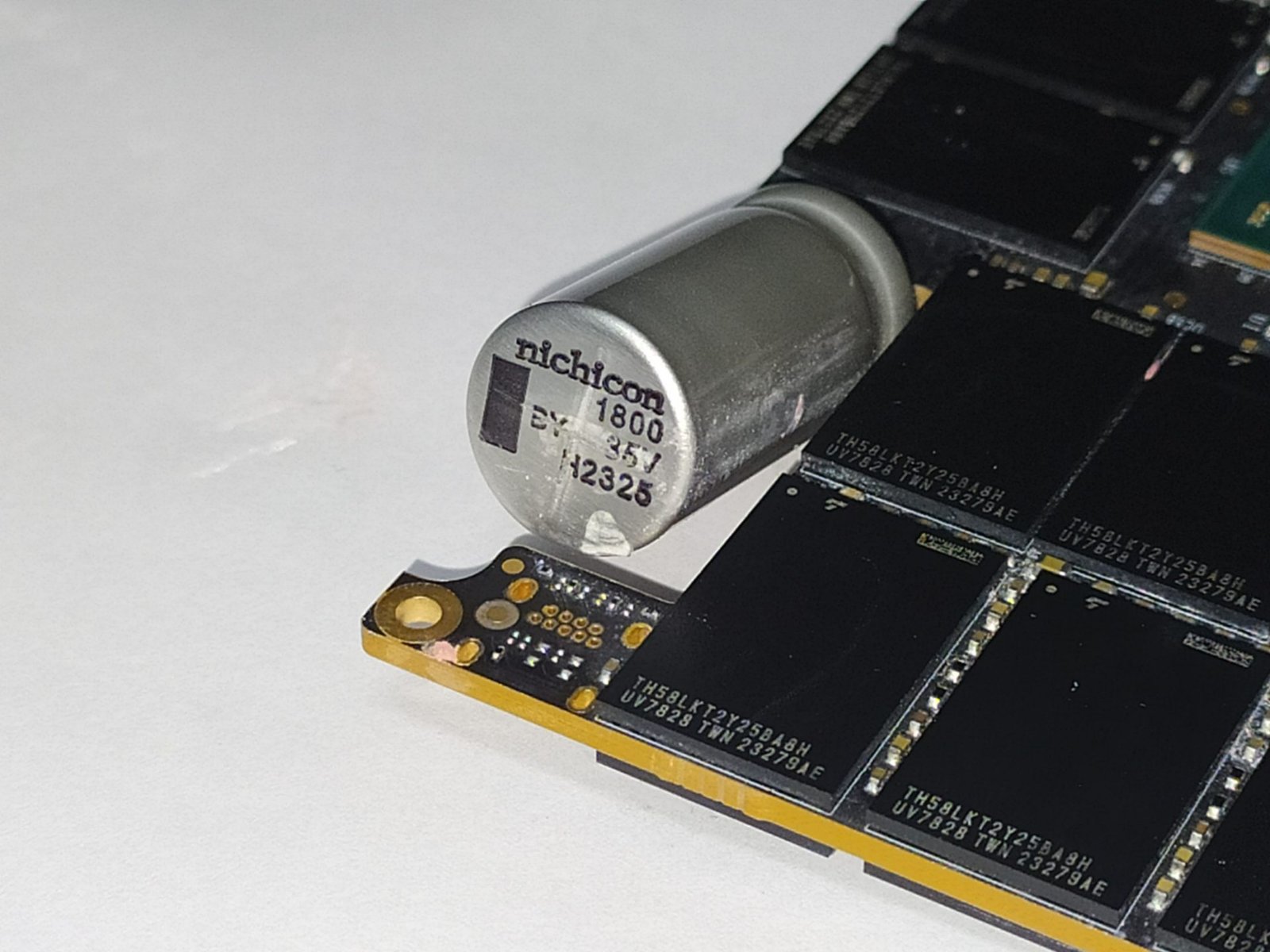
This capacitor can operate with voltages up to 35V and has a capacitance of 1800?F, functioning at temperatures exceeding 135°C.
To identify the Hold-up Time of an SSD, which is the time it takes to transfer metadata located in the DRAM (volatile) back to the NAND Flash (non-volatile), we use the following formula:
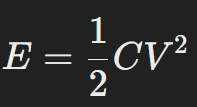
Where:
- E = Energy stored in the capacitors in Joulse (J)
- C = Capacitance of the capacitors in Farads (F)
- V² = Voltage of the capacitors
So from this equation, we can substitute the known parameters, leaving the equation as follows:
Etotal = [(1/2) x 1800(?F) x 35² (V)]
Etotal = 1.1025 Joules (J)
Now that we know the amount of energy stored in all 18 capacitors, we can calculate the Hold-up Time using this equation:
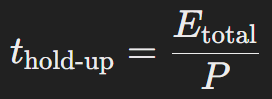
Where:
- T hold-up = Time in milliseconds that the capacitors can provide power for the flushing process.
- Etotal = Total amount of energy that can be stored in the capacitors
- P = SSD power consumption
Based on these parameters, we can substitute our data to generate this formula.
T = 1.1025 Joules / 19.94 W (Watts)
T = 0.05529 seconds
In this project, these capacitors can provide a significant hold-up time, which is approximately 55 milliseconds, a considerable amount of time.
Just to remember, this is not an exact time; it’s merely a basic calculation to illustrate how long an SSD like this might hold up. In practice, the SSD’s power consumption is not as high as in this case, allowing for a longer hold-up time.
SSD Power States
As we always mention in energy consumption analyses, in this section we will delve deeper into the power states of this SSD.
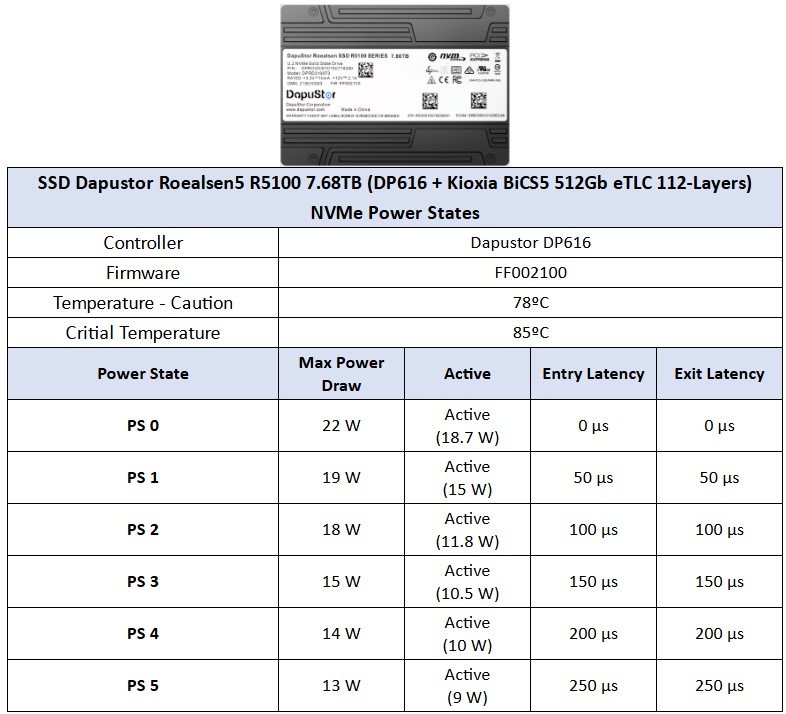
In this lineup of SSDs, we see that it includes a group of 6 main power states, where PS 0 has a maximum consumption of up to 22W, although in practical use, it hovers around 18.7W. Additionally, it features very low latencies, allowing for greater efficiency and speed in power state transitions.
CURIOSITIES ABOUT DAPUSTOR ROEALSEN5 R5100 7.68TB
Just as the integrated circuits in RAM modules can vary, the same happens with SSDs, where there can be changes in components such as the controller and NAND flash.
As of the time of this analysis, this lineup does not have hardware variants.
TEST BENCH
– Operating System: Windows Server 2022 64-bit (Build: 22H2)
– CPU: Intel Core i7-13700K (8C/8T) – All Core 5.7GHz – (Hyper-threading and E-cores desabilitados)
– RAM: 2 × 16 GB DDR4-3200MHz CL-16 Netac (w/ XMP)
– Motherboard: MSI PRO Z790-P WIFI DDR4 (Bios Rev: 7E06v18)
– GPU: Raptor Lake UHD Graphics 770
– SSD (OS): SSD IronWolf 125 1TB (Firmware: SU3SC011)
– SSD DUT: SSD Dapustor Roealsen5 R5100 7.68TB (Firmware: FF002100)
– Intel Z790 Chipset driver: 10.1.19376.8374.
– Quarch PPM QTL1999 – Measure power draw.
WHERE TO BUY
In case you’re interested in purchasing these products, refer to the link below.
ADAPTORS
Since this is a U.2 interface SSD, consumer PCs do not have the necessary interface to connect them. Therefore, we need to use a U.2 to PCIe adapter. In this case, we will use a PCIe 5.0 x4 NVMe adapter.
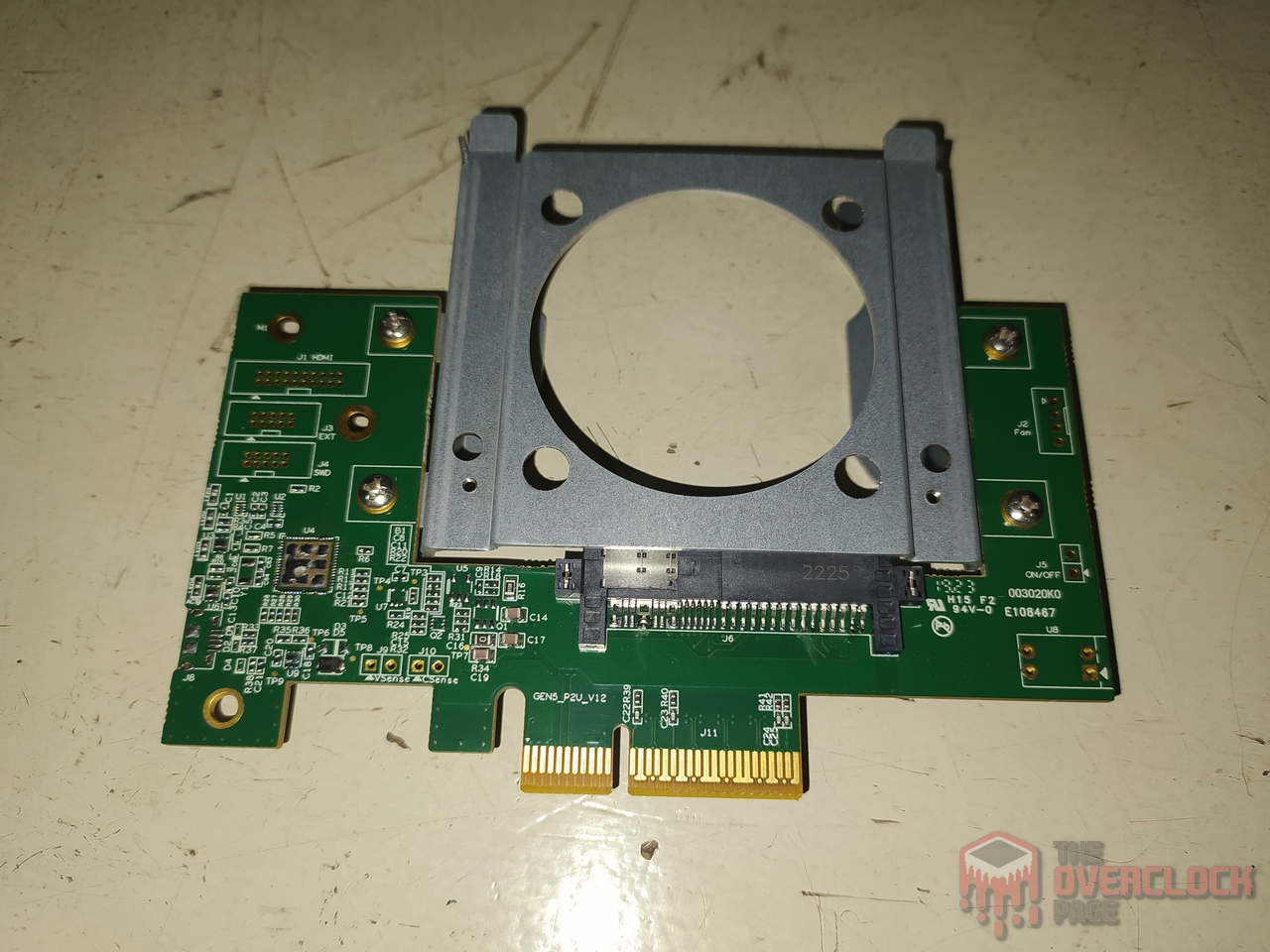

The only problem is finding adapters like this for such fast SSDs as those tested, because U.2 to PCIe 3.0 adapters are relatively affordable, typically found in the range of R$200 to R$300. Now, this Gen 5.0 costs over U$700, not counting the SSD, just the adapter alone.
TESTING METHODOLOGY
Since this SSD is aimed at servers, it does not make sense to test it with benchmarks designed for the consumer market. Therefore, we will use our testing suite for Datacenter/Enterprise SSDs.
– The Secure Erase process is performed multiple times at the end of each benchmark.
– To prepare the SSD, a minimum of 2 times the disk capacity is written sequentially before conducting the logging.
– A pre-condition of the SSD is performed at elevated Queue Depth with a specific workload for each benchmark before logging the results.
– After the disk is ready, we perform data writing for 5 minutes to monitor performance.
– Used Software: IOmeter 1.1
WHERE TO BUY
Unfortunately we weren’t able to find this drive for purchase.
IOmeter – Sequential and Random
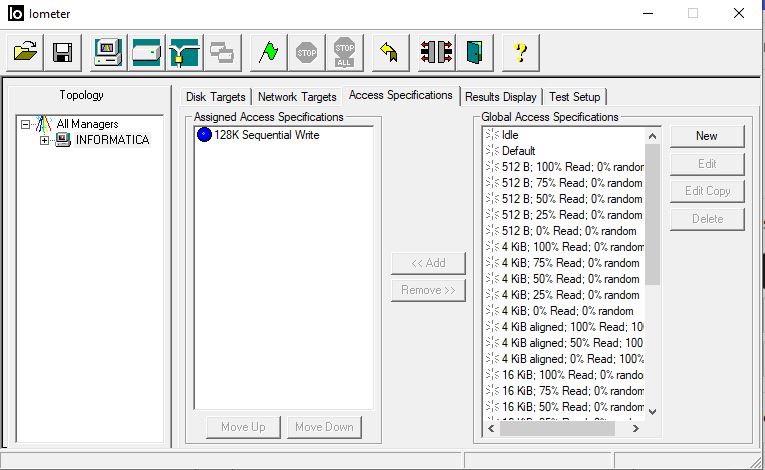
Sequential: Blocks 128 KiB 256 Queues 1 Thread
Random: Blocks 4 KiB 32 Queue 1Threads (100% Aligned – Write / Read)
Before measuring its speeds, the SSD needs to be “prepared” or preconditioned, as we call it in English, preconditioning, to ensure that the performance it offers is consistent. This is because an SSD has 3 states: Fresh-out-of-Box (FOB), the transitioning state, and the Steady State.
F.O.B. represents the state as soon as the SSD starts being tested under some workload. Transition, as the name suggests, is the state of change until it reaches the Steady State. Steady State is the continuous performance state where the SSD’s performance will not be affected by the workload, and it would remain in this state continuously.
A simple analogy to understand these 3 states would be this: Imagine you are a marathon runner, and at the beginning of the race, you give it your all, reaching your maximum speed. However, it is physically impossible to maintain that speed throughout the entire course. Let’s say that at this peak moment at the start of the race, you manage to average 15 km/h. Maintaining that pace for the entire distance is impossible, so as the race progresses, you begin to lose speed.
The moment when your speed starts to fluctuate would represent the Transitioning state. However, as you begin to stabilize, you would start running at a speed that you could maintain until the end of the race; this would be the Steady State.
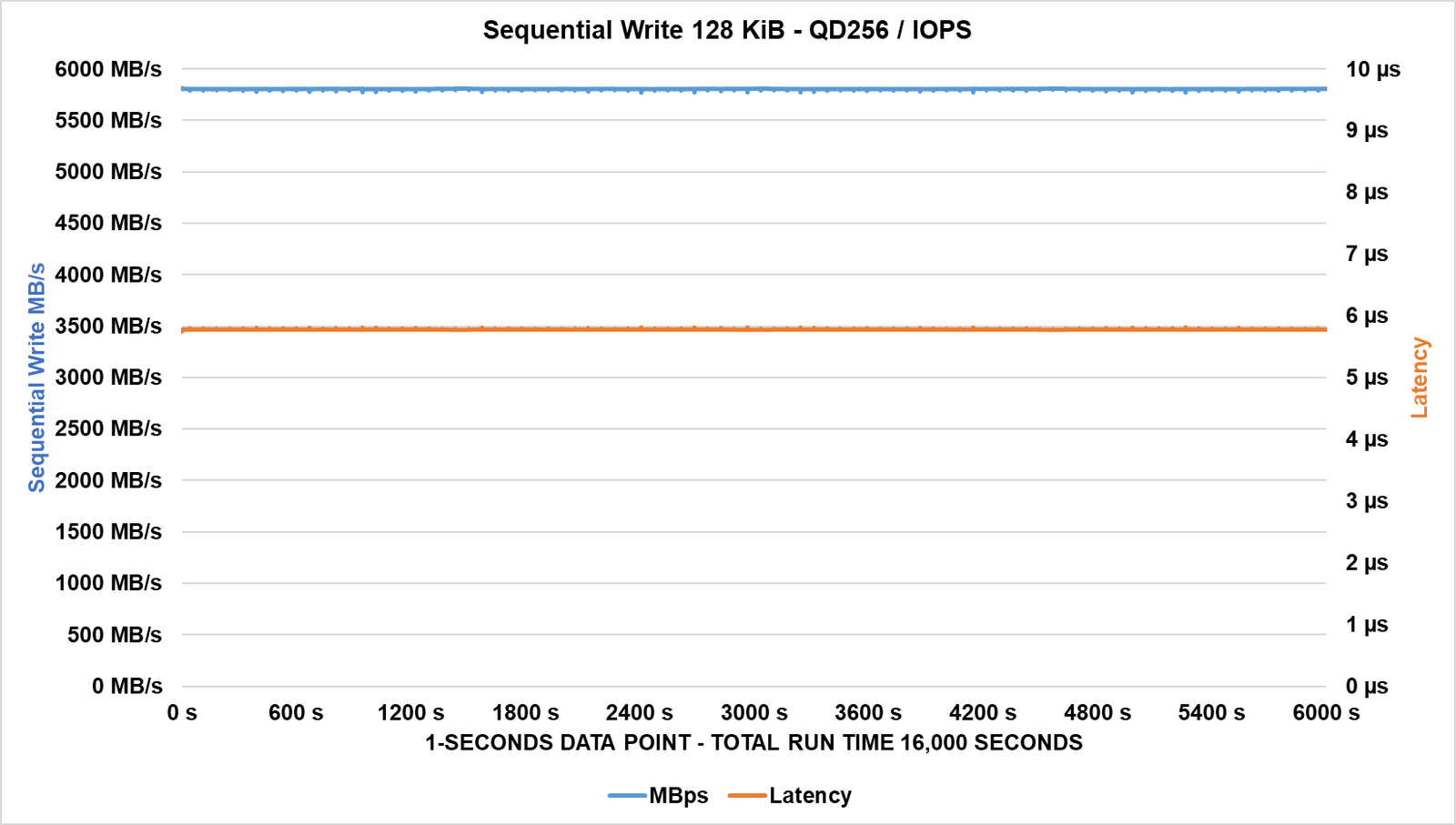
Starting with a sequential write test using 128 KiB blocks, we can see that throughout the test, its speed remains quite consistent. As mentioned, this type of SSD does not feature SLC Cache, and its latencies also showed good results even in this case.
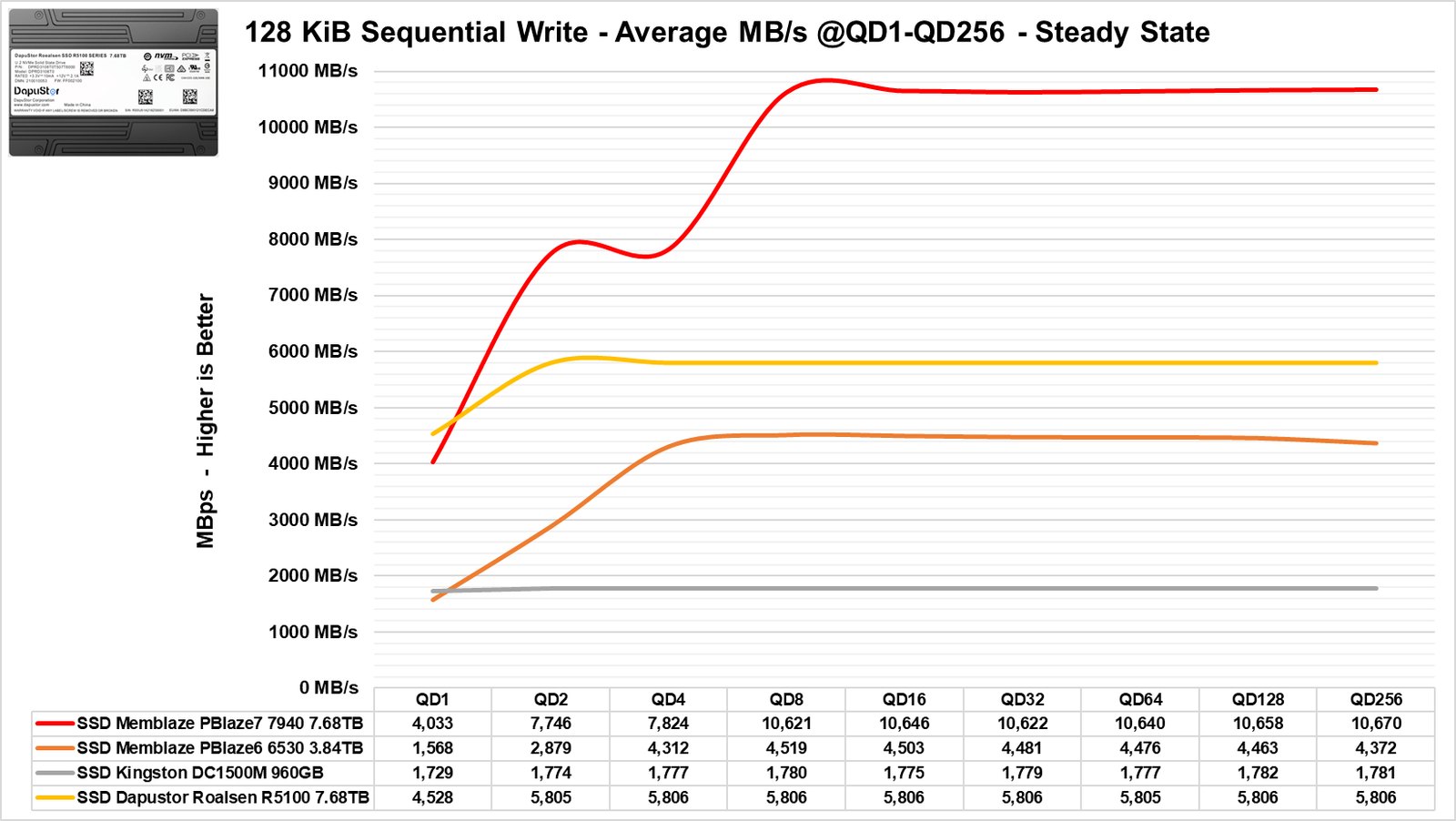
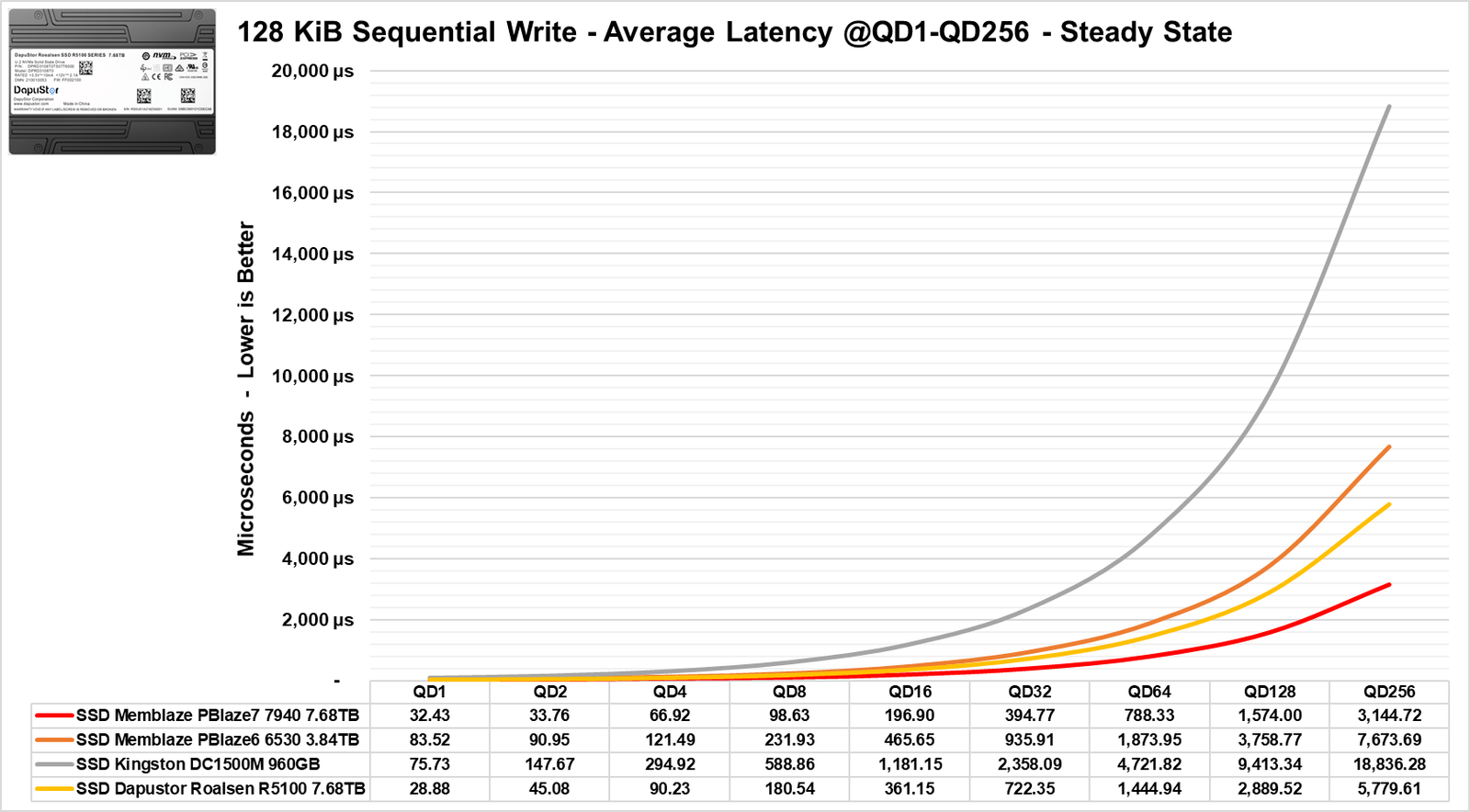
Now testing its sequential speeds at multiple Queue depths, we observe that in writing, it begins to saturate the PCIe 4.0 bus at QD2 to QD4 and performs better than the Memblaze 6530.
In terms of latency, it shows lower latencies than the Memblaze 6530, which is a direct competitor of this SSD.
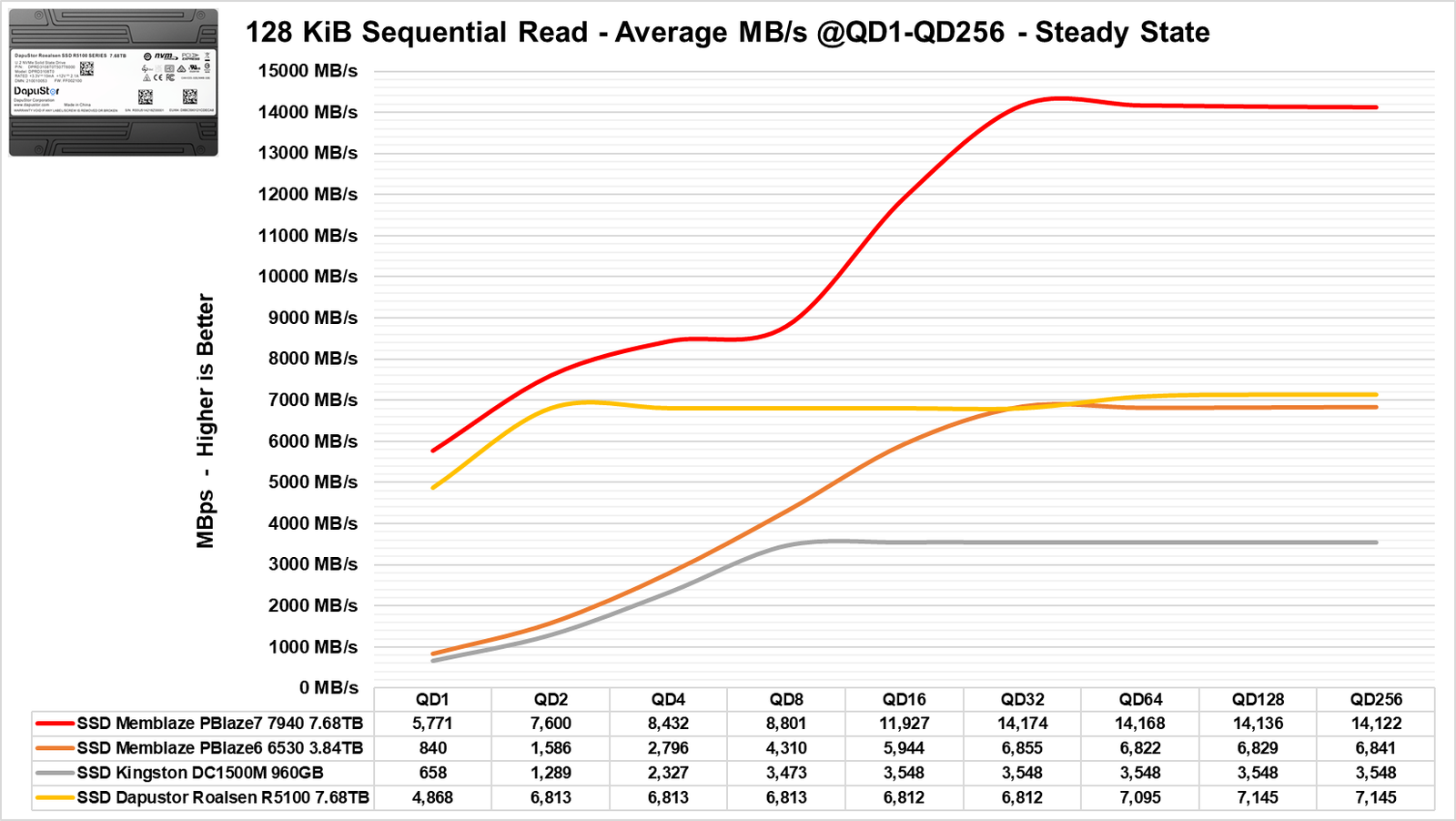
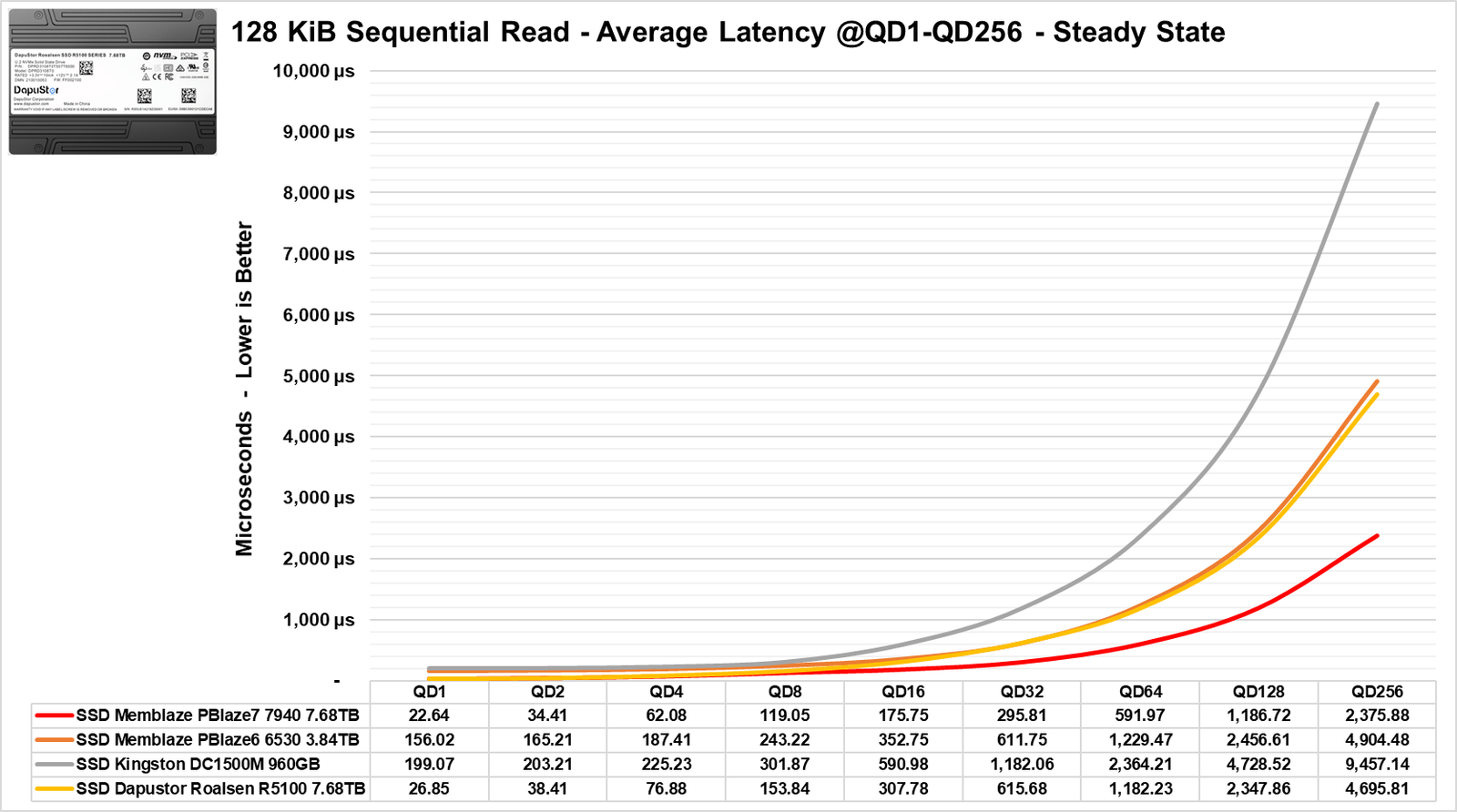
In its read performance, the same scenario is observed: while the Memblaze saturates the bus near QD32, this Dapustor SSD can saturate the bus at QD2.
Regarding latencies, it is significantly lower than that of the Memblaze, with the Dapustor SSD being even close to the performance of a Gen5 SSD.
Benchmark: 4 KiB Random
Let’s now perform the preconditioning of the SSD to conduct the benchmarks at 4 KiB.
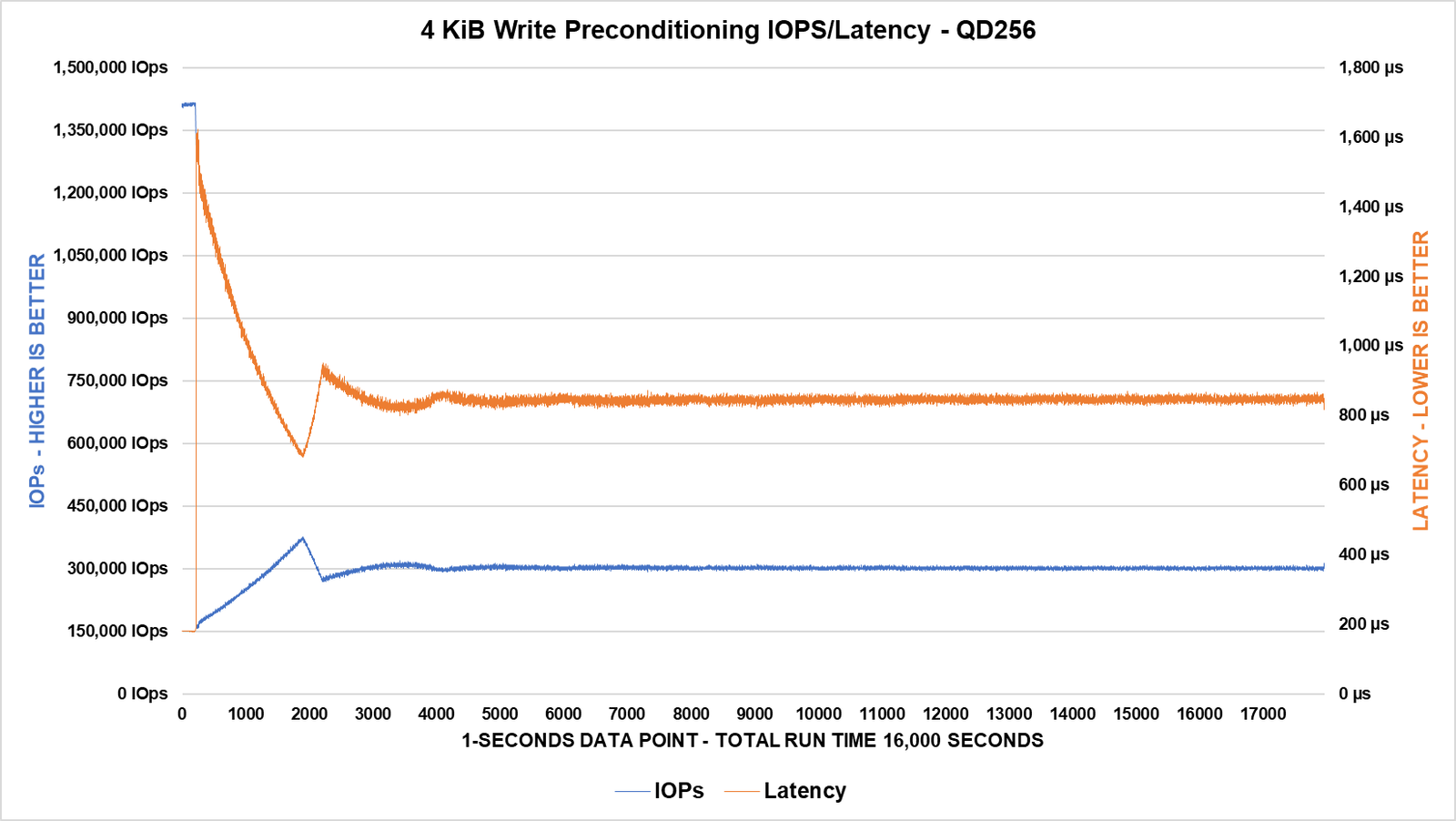
We can observe that the SSD starts by recording around 1.4 million IOPS in its FOB state, but shortly afterward, it drops drastically and then begins to rise again until it stabilizes after 4000 seconds. This period represents the transition phase, followed by the Steady State until the end of the benchmark, where it managed to stabilize slightly above the specified range, settling around 300,000 IOPS.
This behavior is mirrored in its latencies, which take the same amount of time to reach the Steady State.
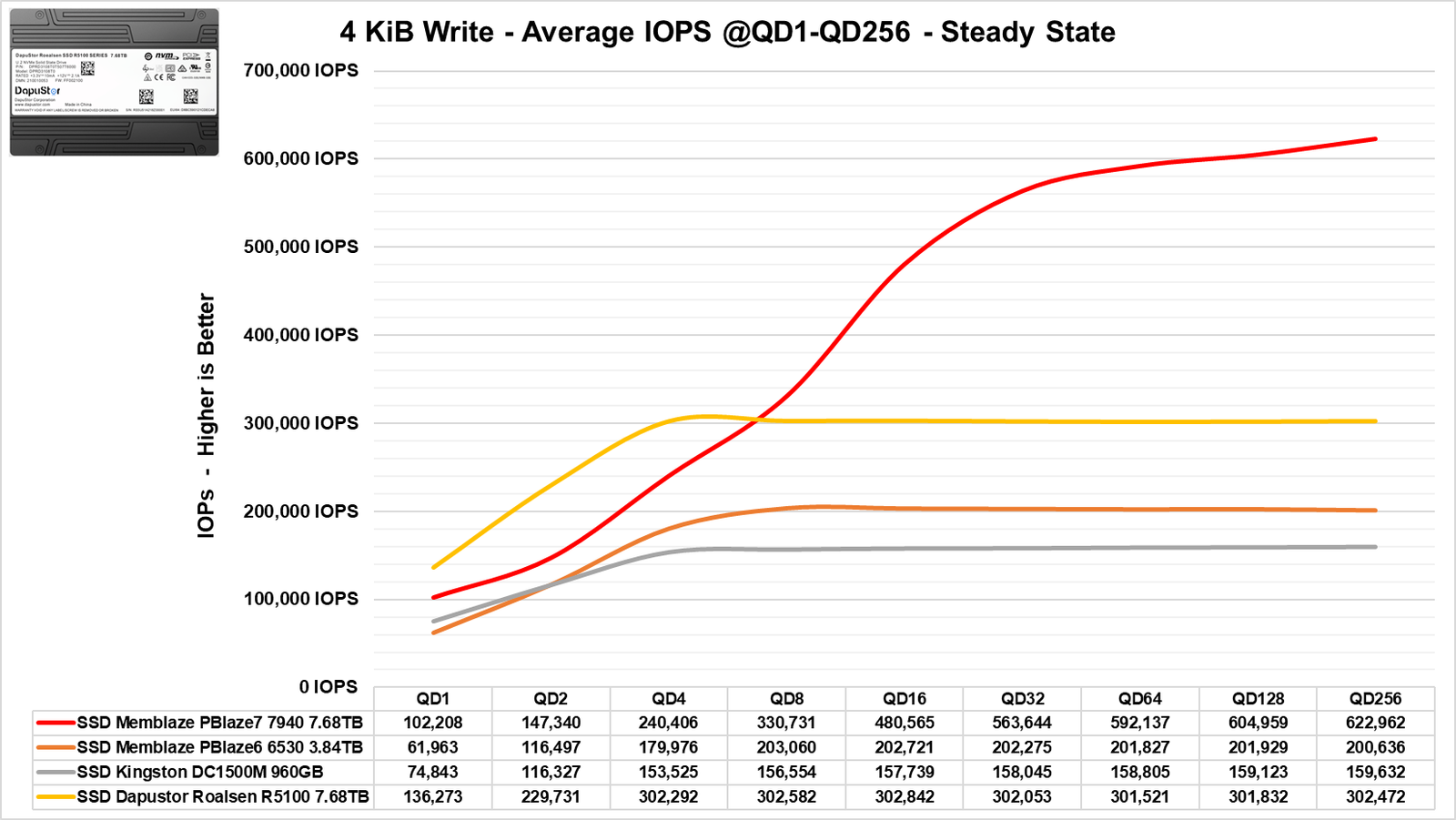
After completing the preconditioning, we proceeded to the write test.
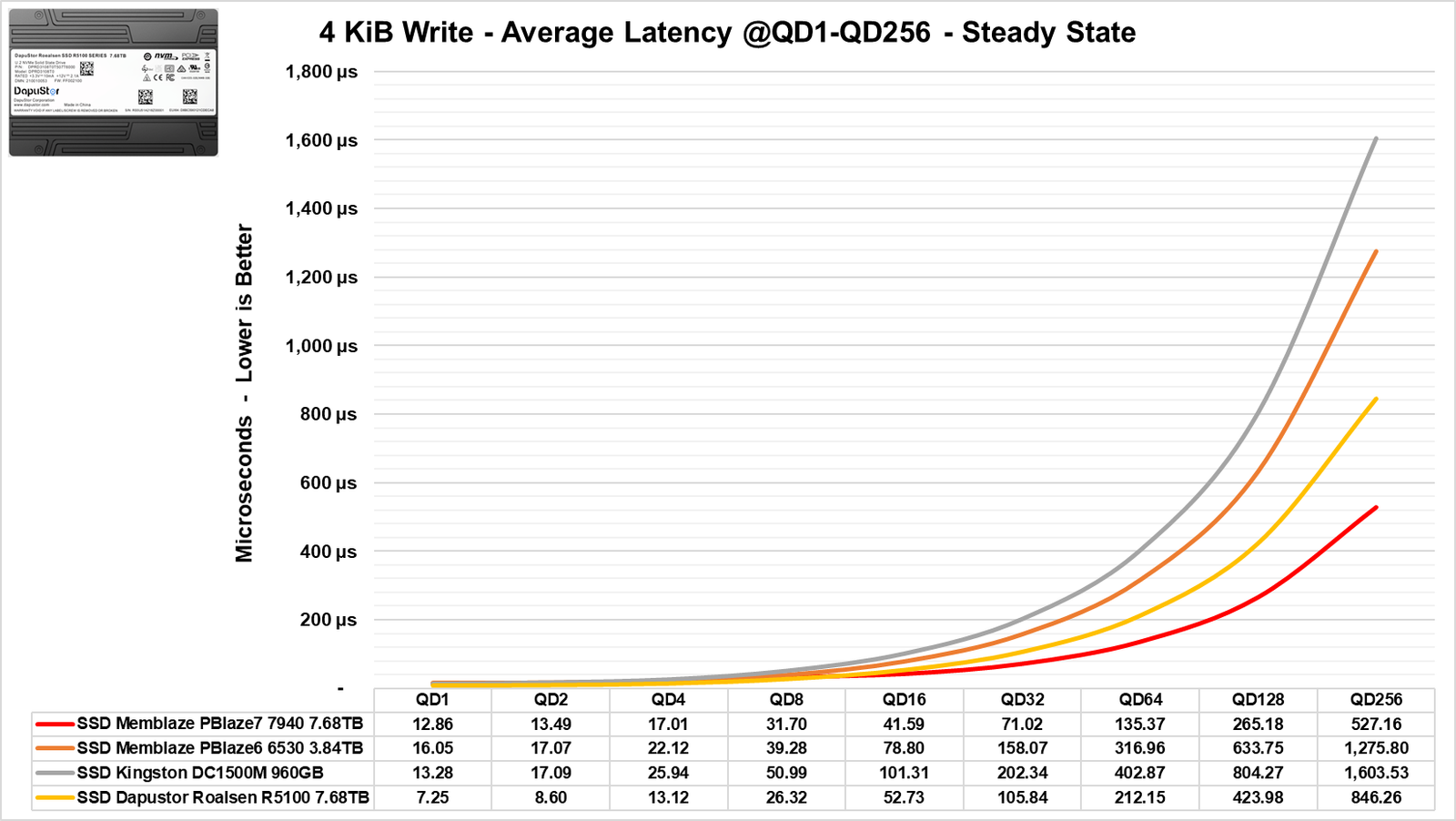
Initially, at lower QD levels, we see that these BiCS5 NANDs can provide incredible performance, even surpassing the Gen5 Memblaze 7940 SSD that we tested. Ultimately, it stabilizes around 300,000 IOPS, which is 100,000 IOPS ahead of the Memblaze Gen4.
In terms of latency, we see another impressive feat: the manufacturer claims 9µs at QD1, but it manages to deliver close to 7.5µs, which is surprising. Again, it outperforms the Gen5 at lower QD levels, although it is eventually surpassed by the Gen5. Nevertheless, it still remains well ahead of the Memblaze Gen4.
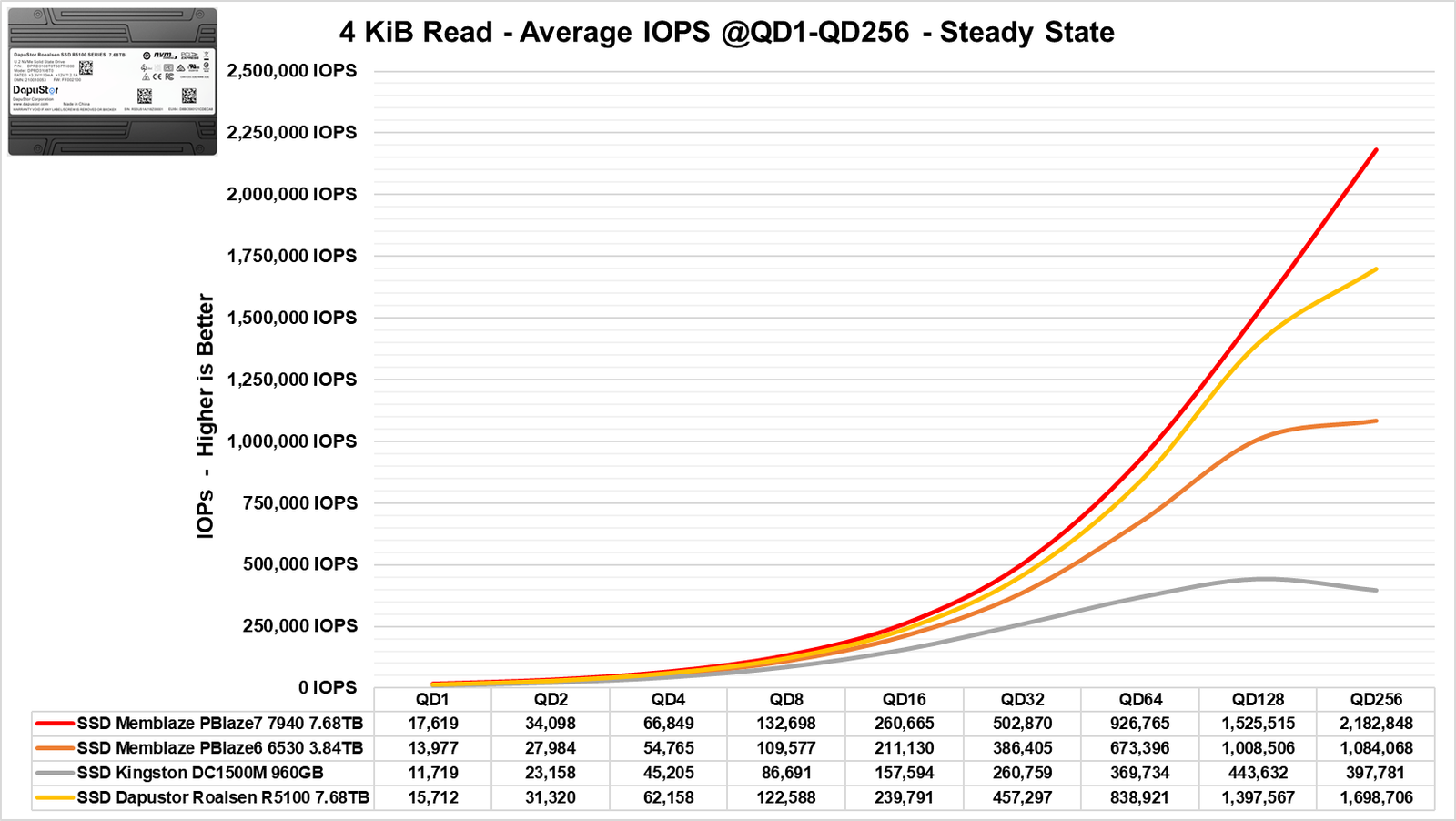
In its read performance, it reaches 1.70 million IOPS at QD256 or higher. Interestingly, at lower QD levels, it performs even close to the Gen5 SSD, significantly ahead of the Memblaze 6530, which is also a Gen4.
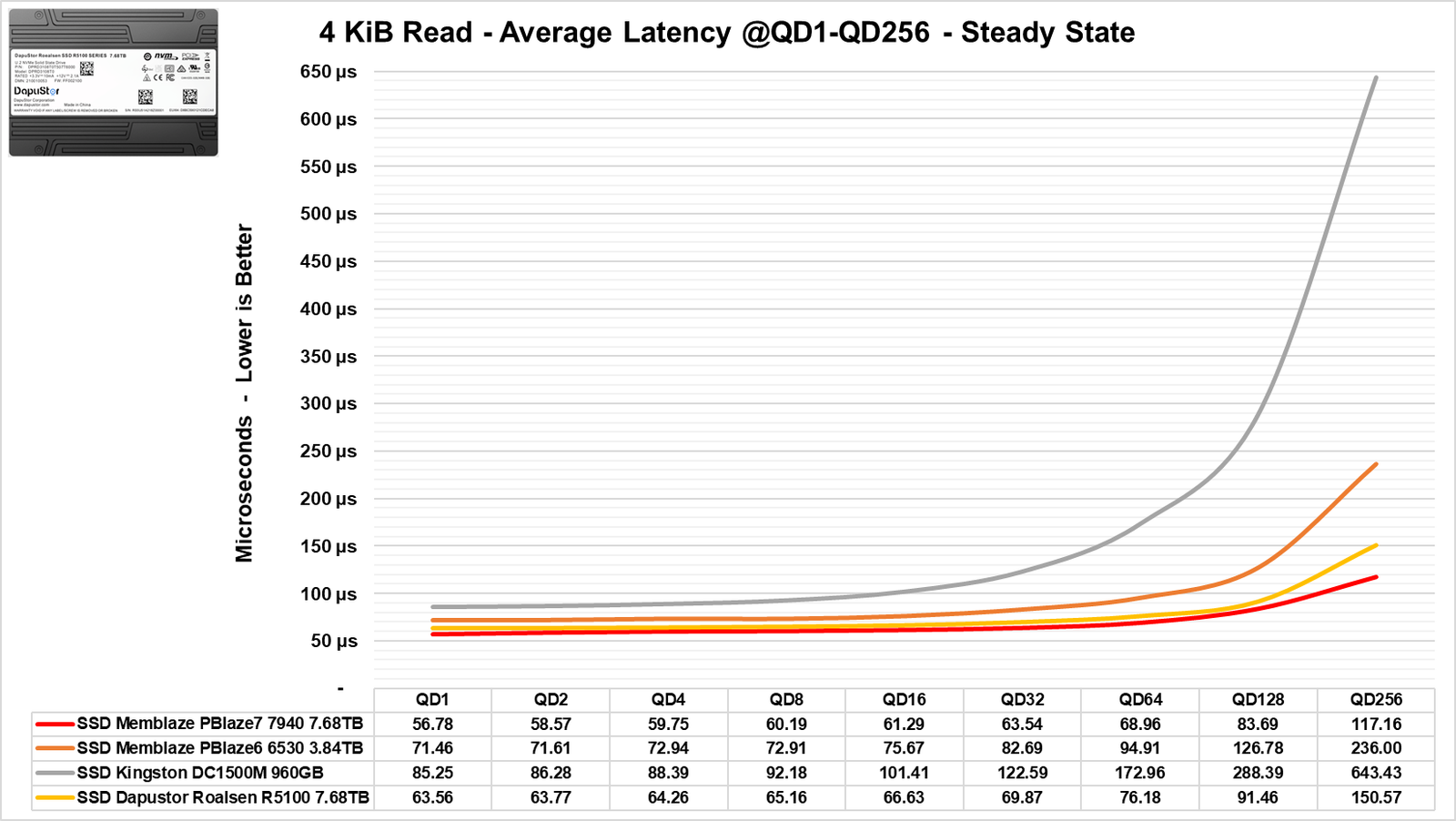
Regarding latencies, the manufacturer claims less than 65µs, and it indeed delivers on this promise, as it recorded approximately 64µs at QD1.
Benchmark: 4 KiB 70% Read 30% Write
One of the most commonly used metrics in SSD benchmarks that represents multiple uses in numerous servers and datacenters. In this benchmark, we will run the test for over 16,000 seconds to observe how the SSD performs.
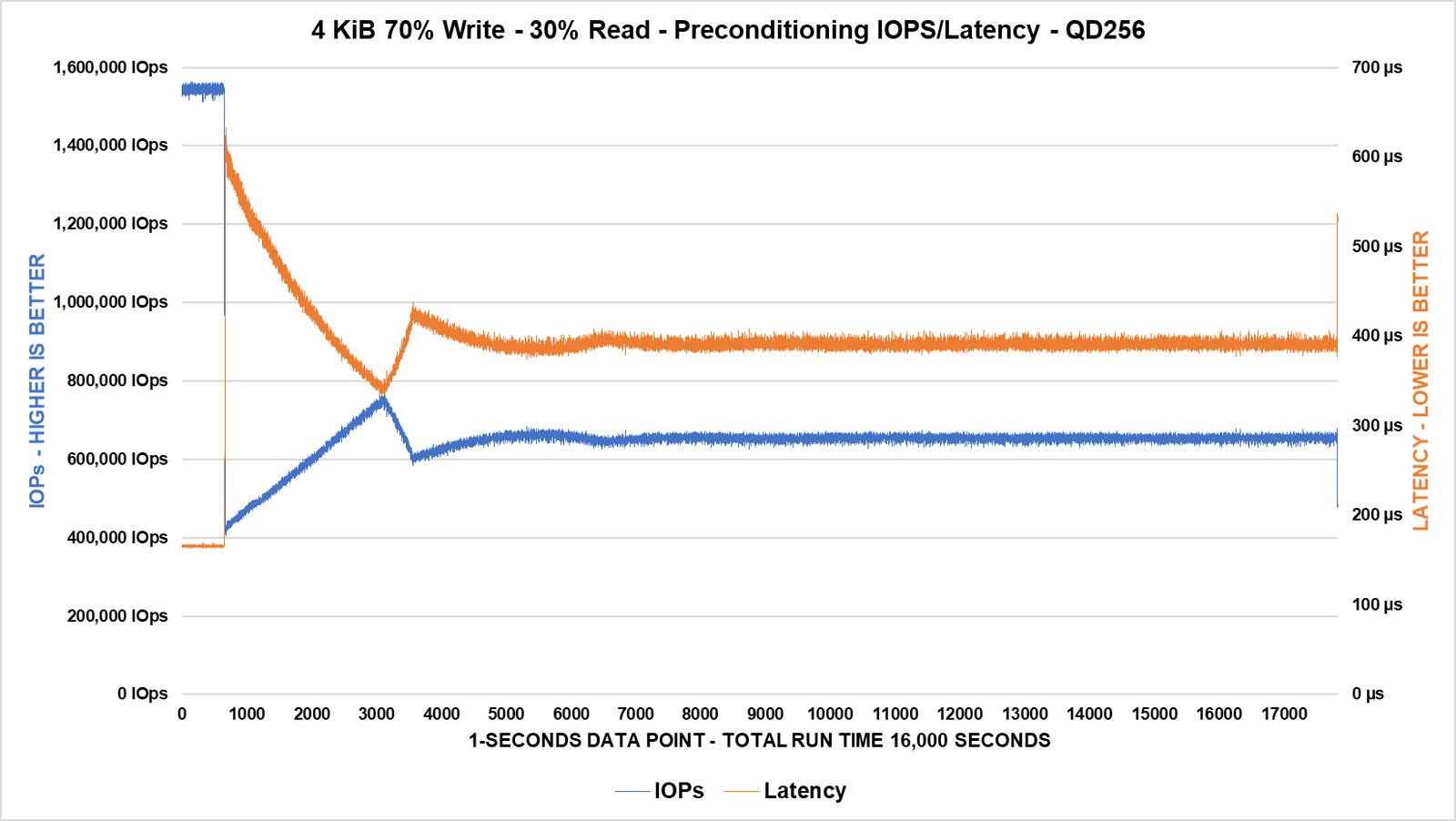
We can observe that the SSD starts strong with over 1.5 million IOPS, but shortly afterward, it drops and stabilizes until reaching Steady State at around 650K IOPS after 6000 seconds.
In terms of latency, it took the same amount of time to reach the Steady State.
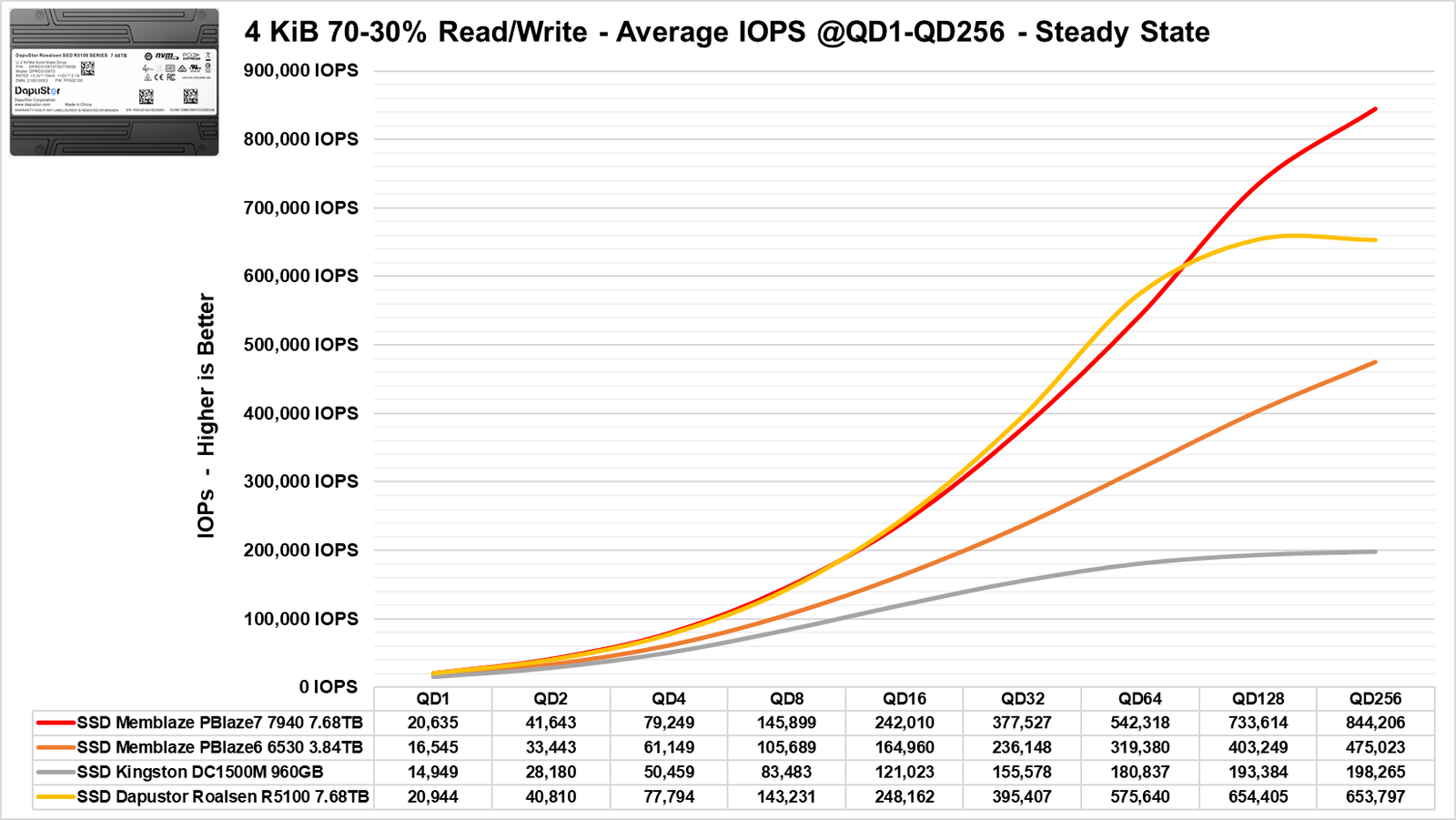
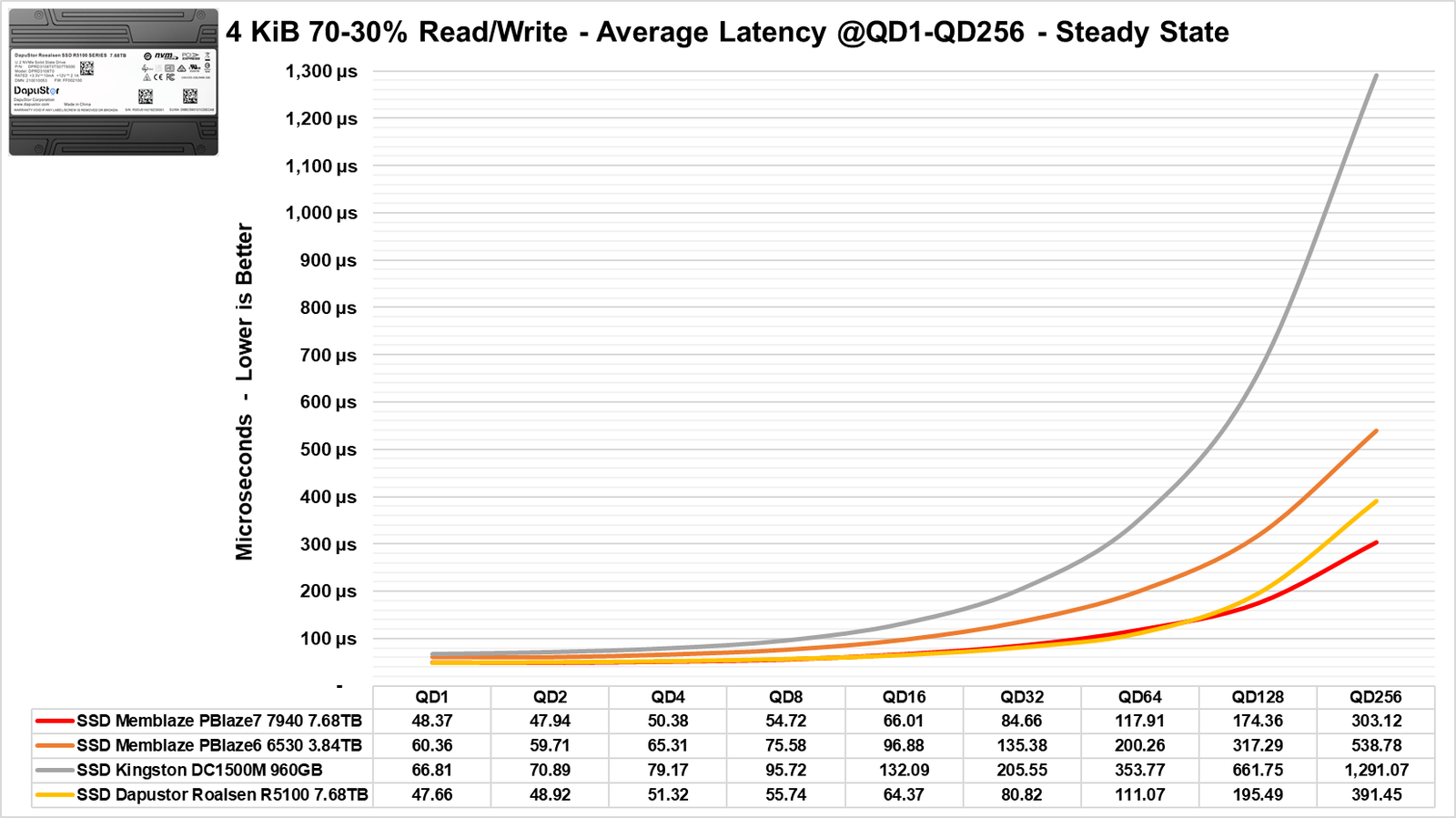
In all workloads, it consistently performs above the Memblaze Gen4, though slightly below the Gen5 SSD we tested, which is another impressive achievement.
Random Read and Write 8 KiB
In this section of the benchmark, we will use 8 KiB blocks as parameters, which are widely used in virtualized environments and in OLTP (On-Line Transaction Processing) scenarios, such as banking operations, purchases, and more.
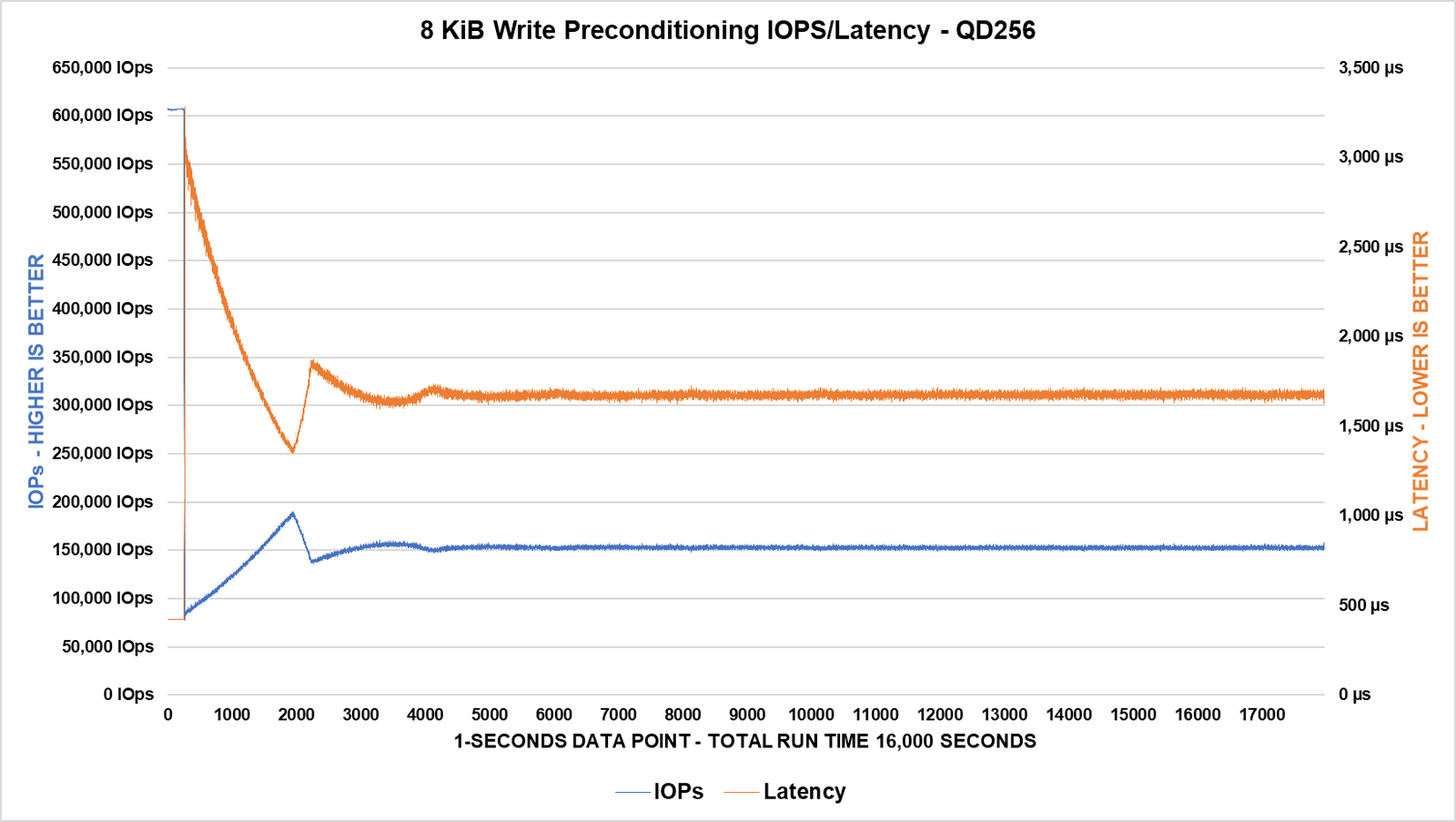
During the 16,000 seconds of plotting, we see that the SSD achieves the steady state point near 4,000, where it stabilizes quite quickly. Subsequently, the SSD maintains an average performance of over 160K IOPS, while its latency stabilizes below 1600µs or 1.6ms.
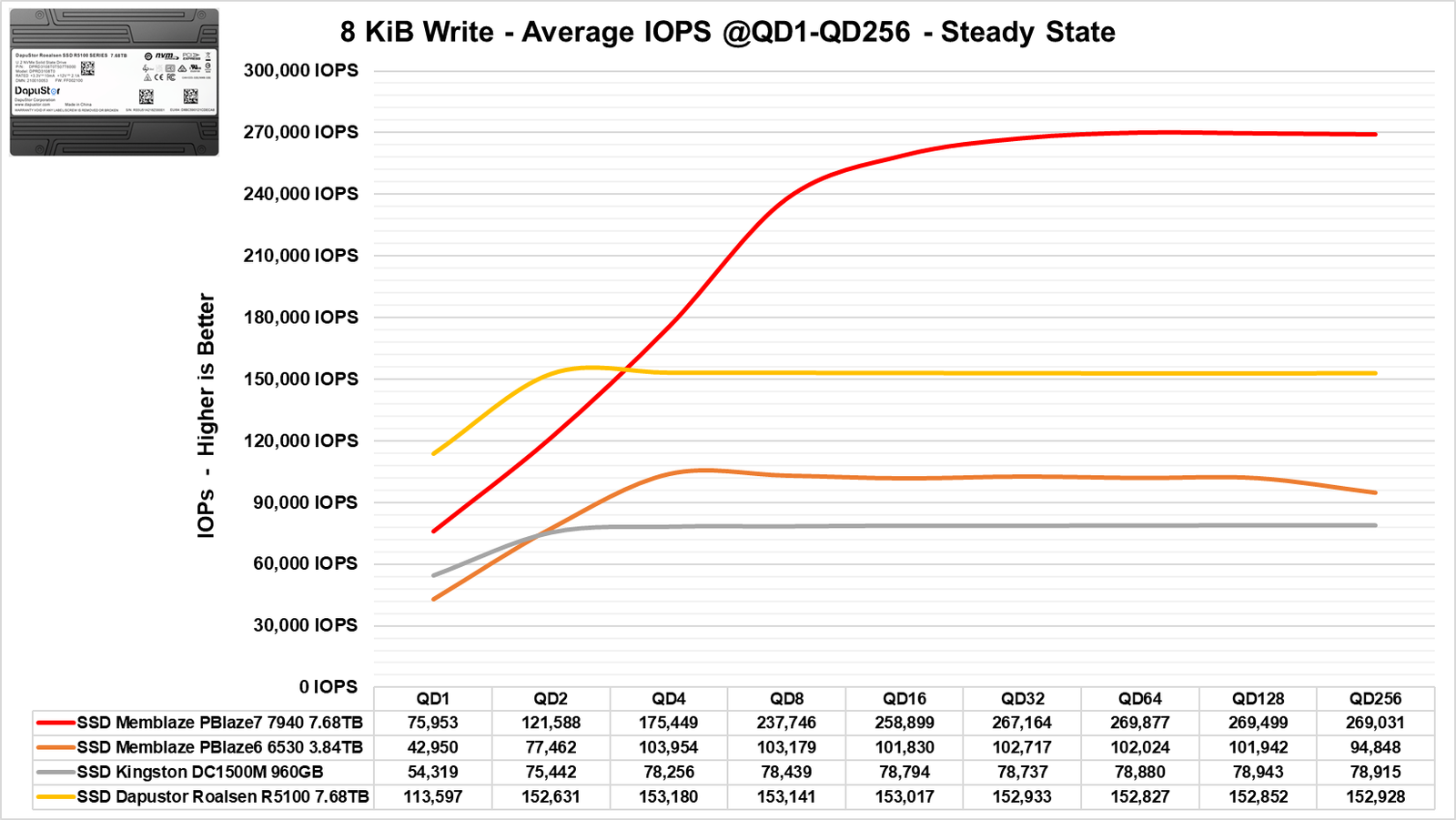
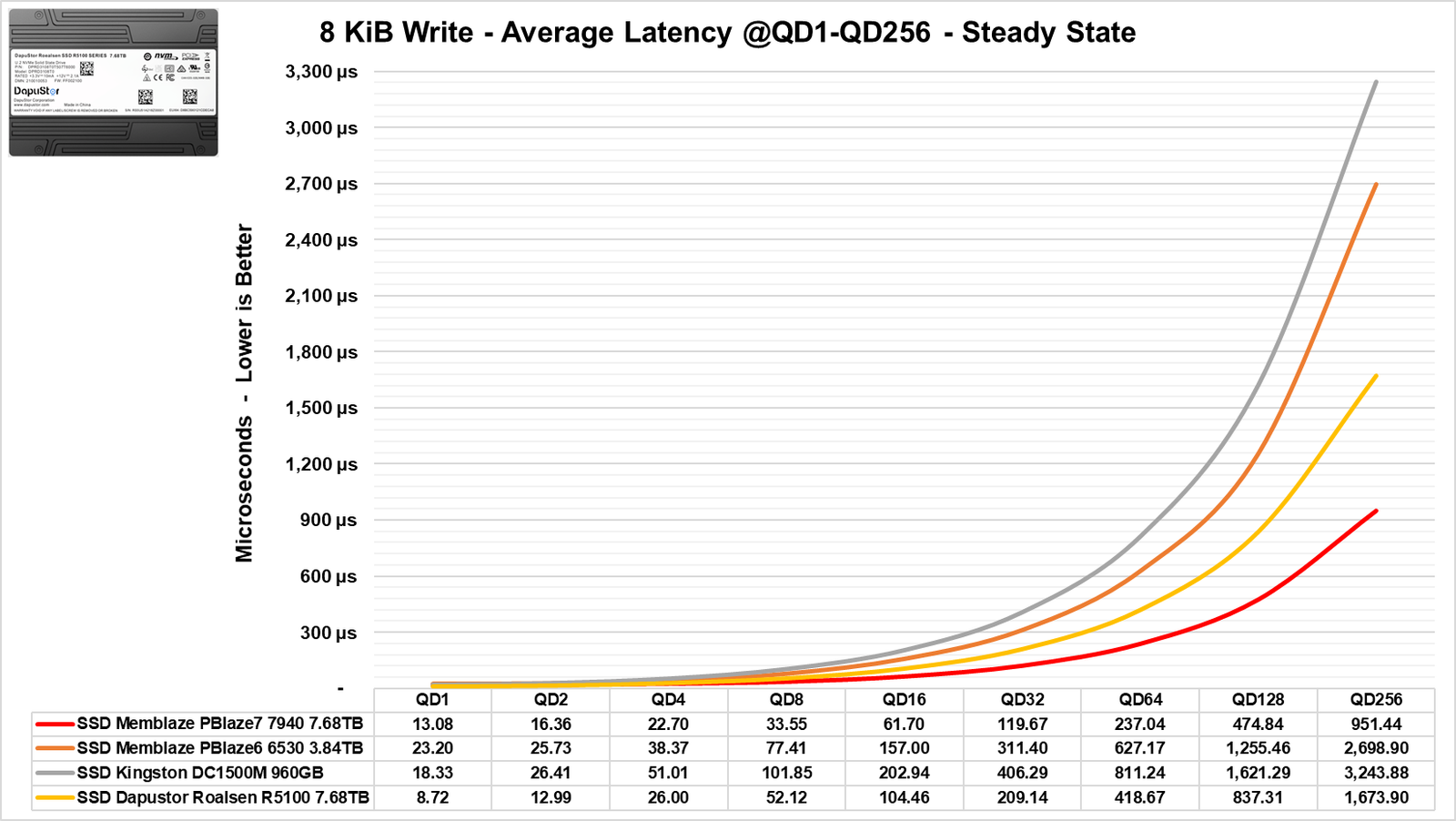
In terms of bandwidth in IOPS, it starts ahead of the Memblaze Gen5 at QD1 to QD2 but then falls behind. However, it ultimately surges ahead, well above the Memblaze Gen4.
The same can be said for its latencies, which are significantly lower than those of the Gen4 SSD.
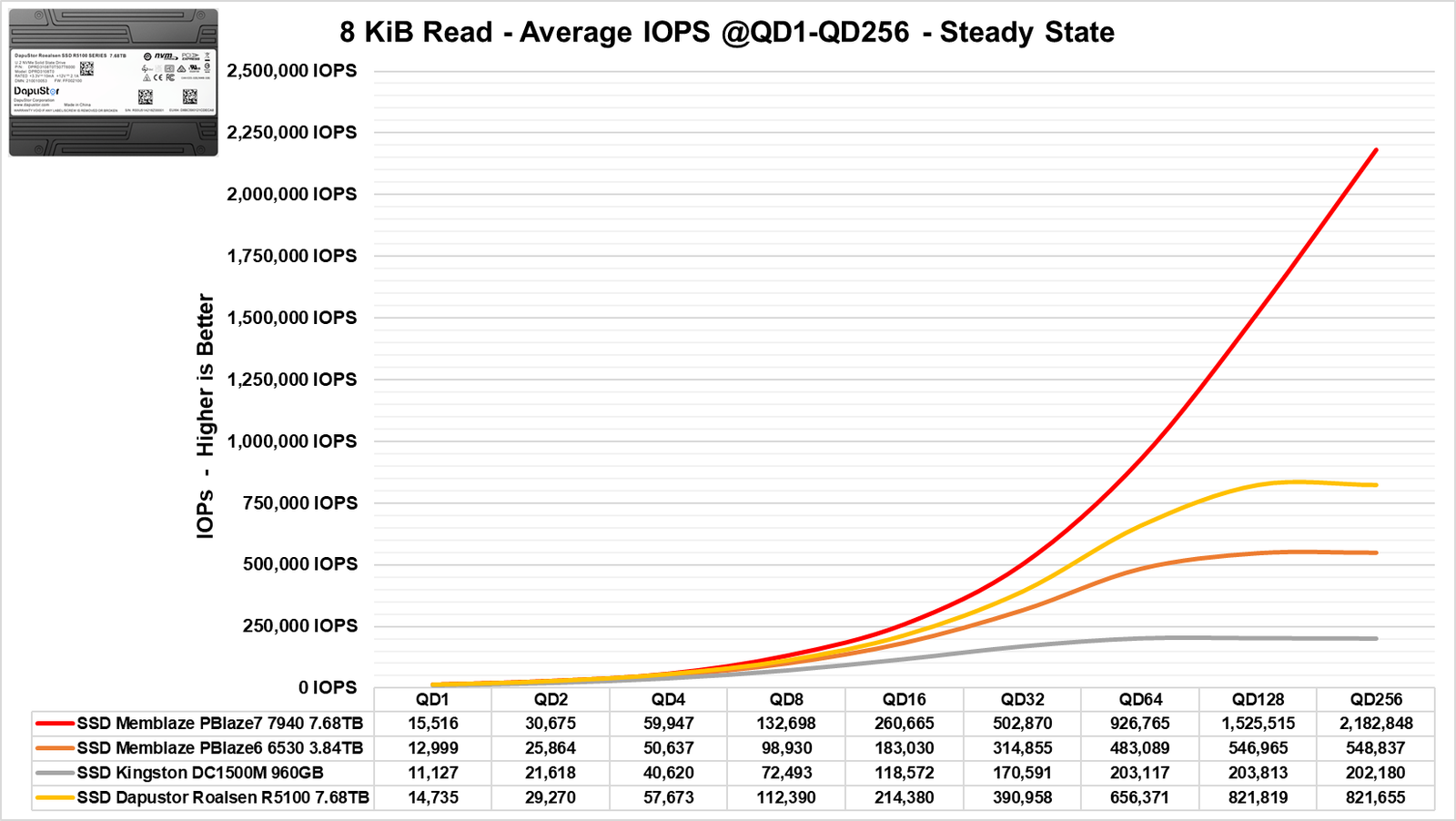
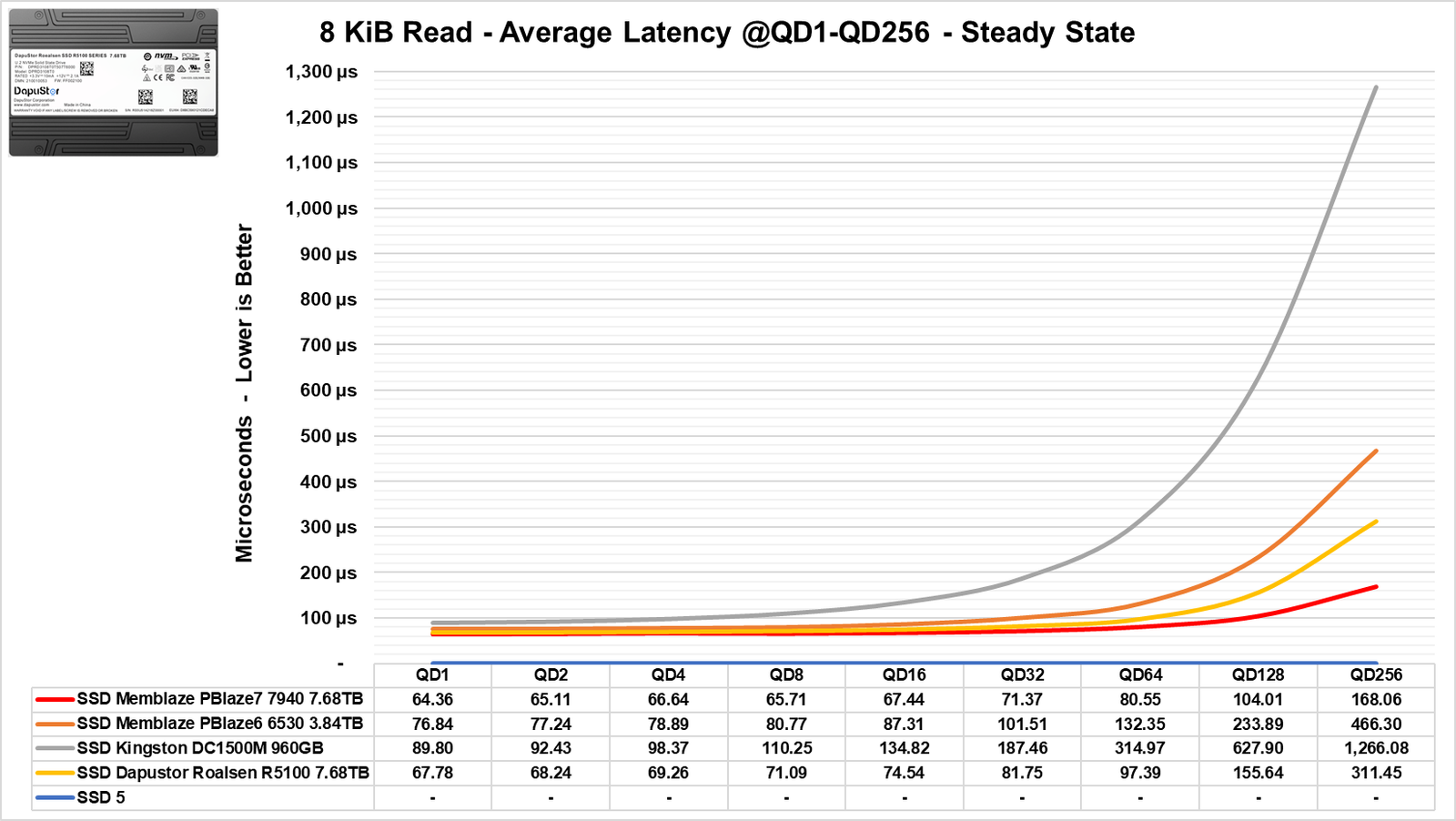
In its read performance, this is not the case; it remains below the Gen5. However, at lower QD levels, the difference is quite small. In comparison to the Gen4, the difference is larger.
Benchmark: OLTP Server Workload

In this section of the benchmark, we will replicate a typical workload found in servers that handle banking transactions or other online shopping environments that engage in transactions and HFT (High Frequency Trading). HFT refers to a financial trading strategy that involves the rapid buying and selling of financial assets, such as stocks, bonds, currencies, and commodities, at high speeds and with a large volume of trades.
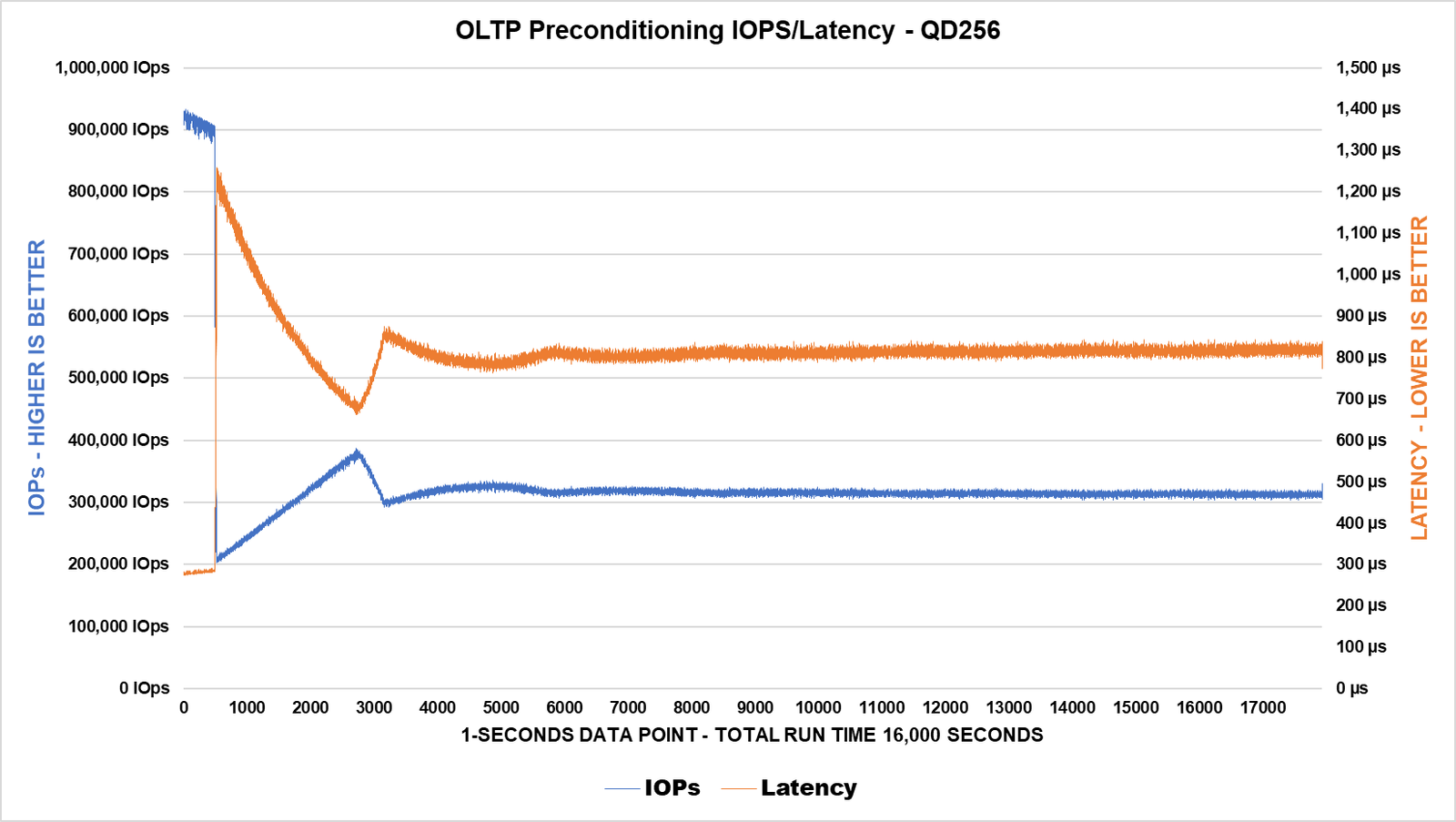
Upon completing the preconditioning of the SSD, we can see that it stabilizes (Steady State) after approximately 5,500 seconds into the benchmark, where its bandwidth stabilizes above 320K IOPS, while its latency settles around 820µs.
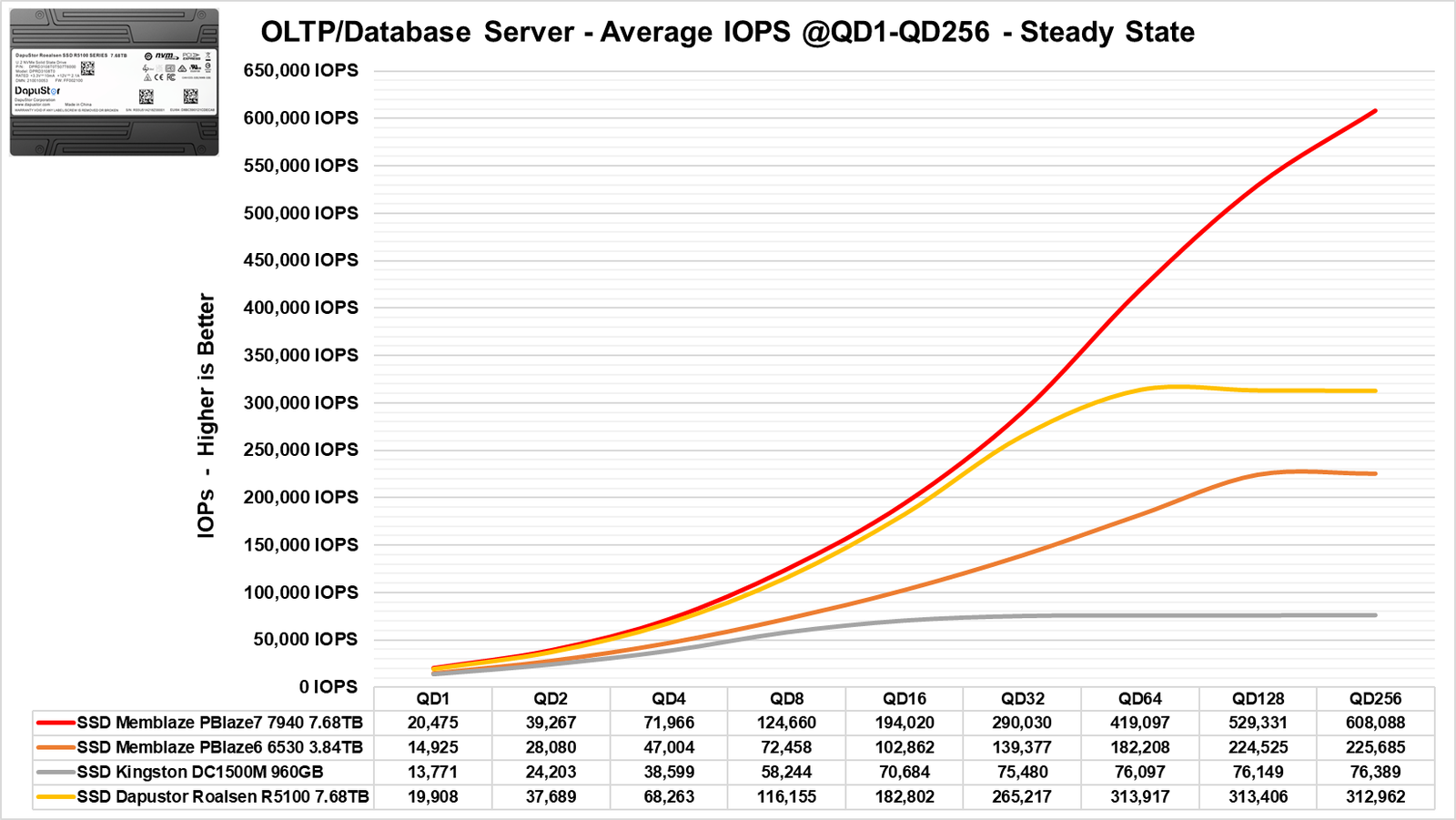
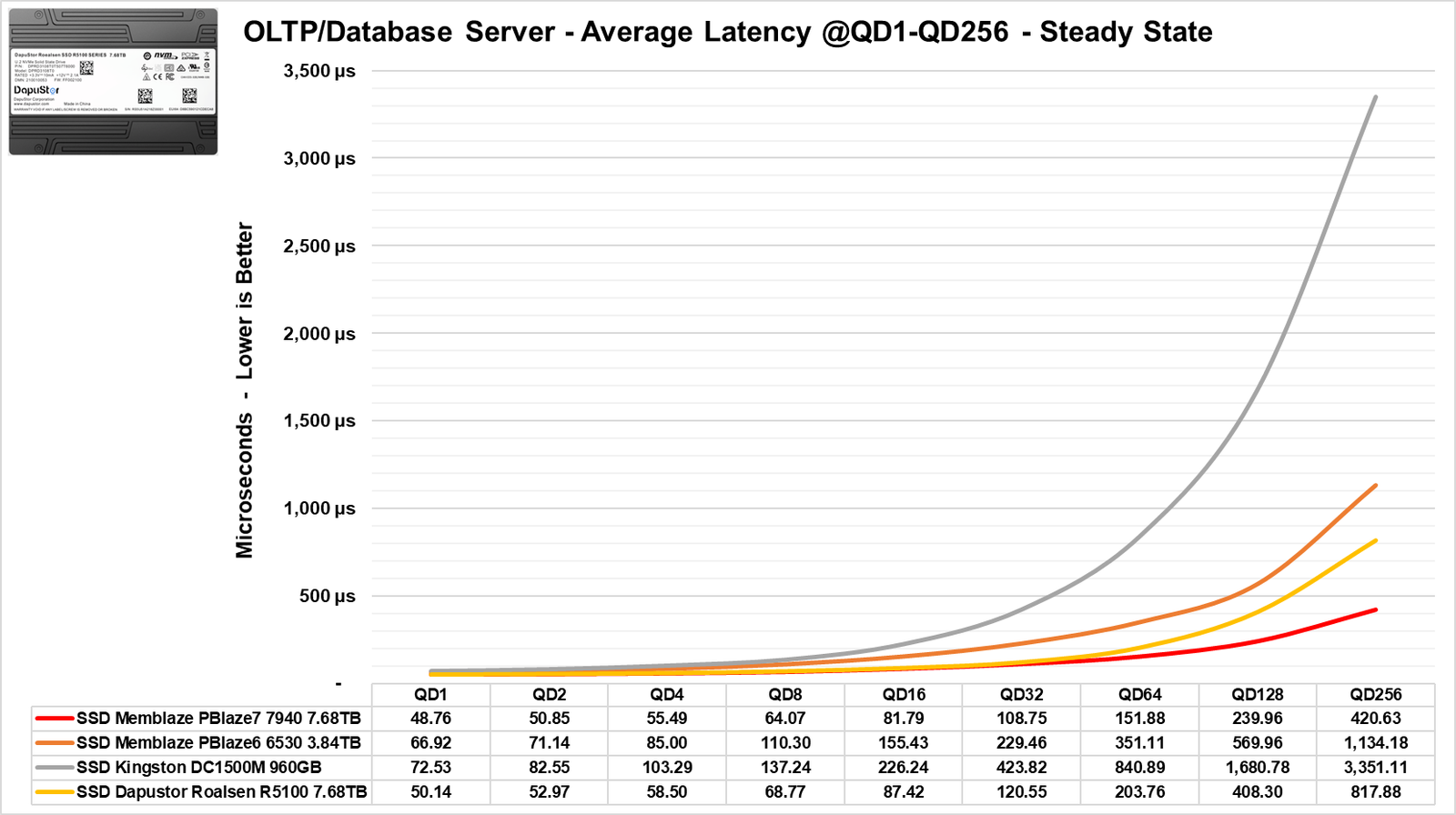
In this scenario, we see a similar pattern: at lower QD levels, it is quite close to the Gen5 SSD, but at higher QD levels, it lags behind the Gen5 while remaining well above the Gen4 in terms of bandwidth. The same behavior is observed in its latencies, as noted in the previous benchmarks.
Benchmark: Web Server Workload

In this test, a typical workload found in “web servers” was simulated, which often handles various file sizes and different block sizes, ranging from 512 bytes to 512KB. Additionally, various access methods were tested, including Read and Write, as well as a mix of the two at different percentages.
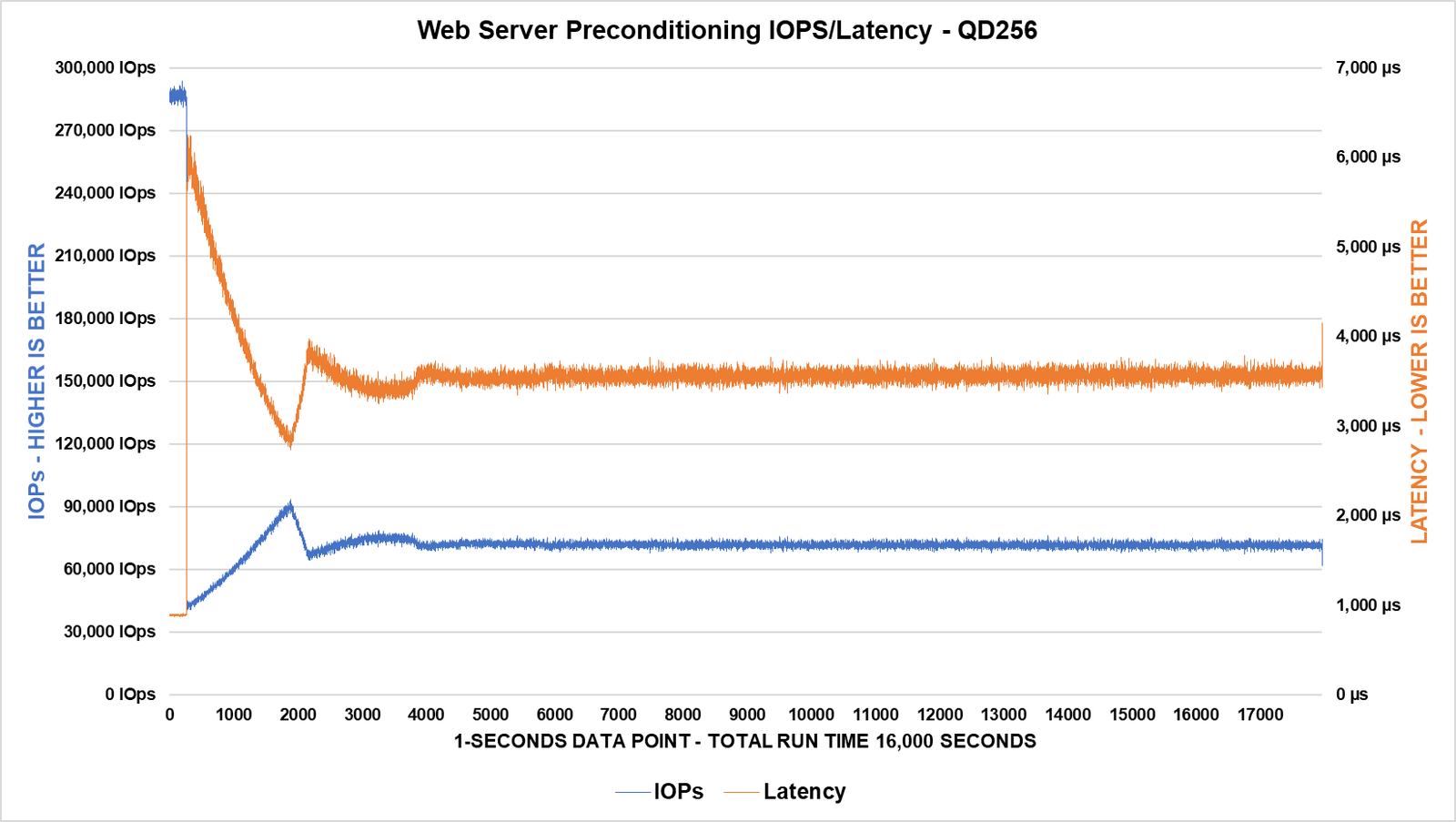
In this scenario, it takes approximately 4,000 seconds to reach the Steady State, with its latencies stabilizing around 3.6ms and its bandwidth settling at about 75K IOPS.
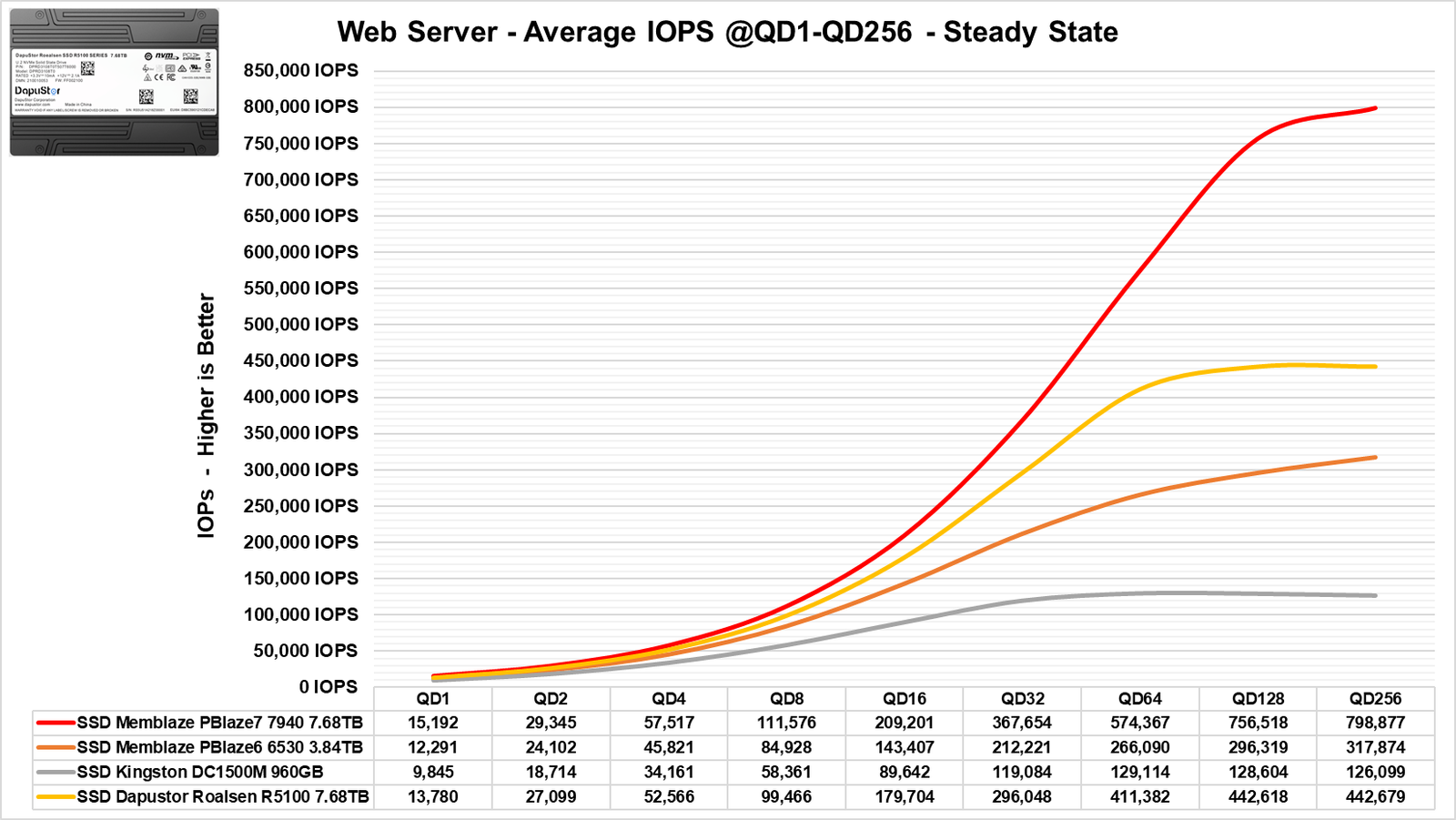
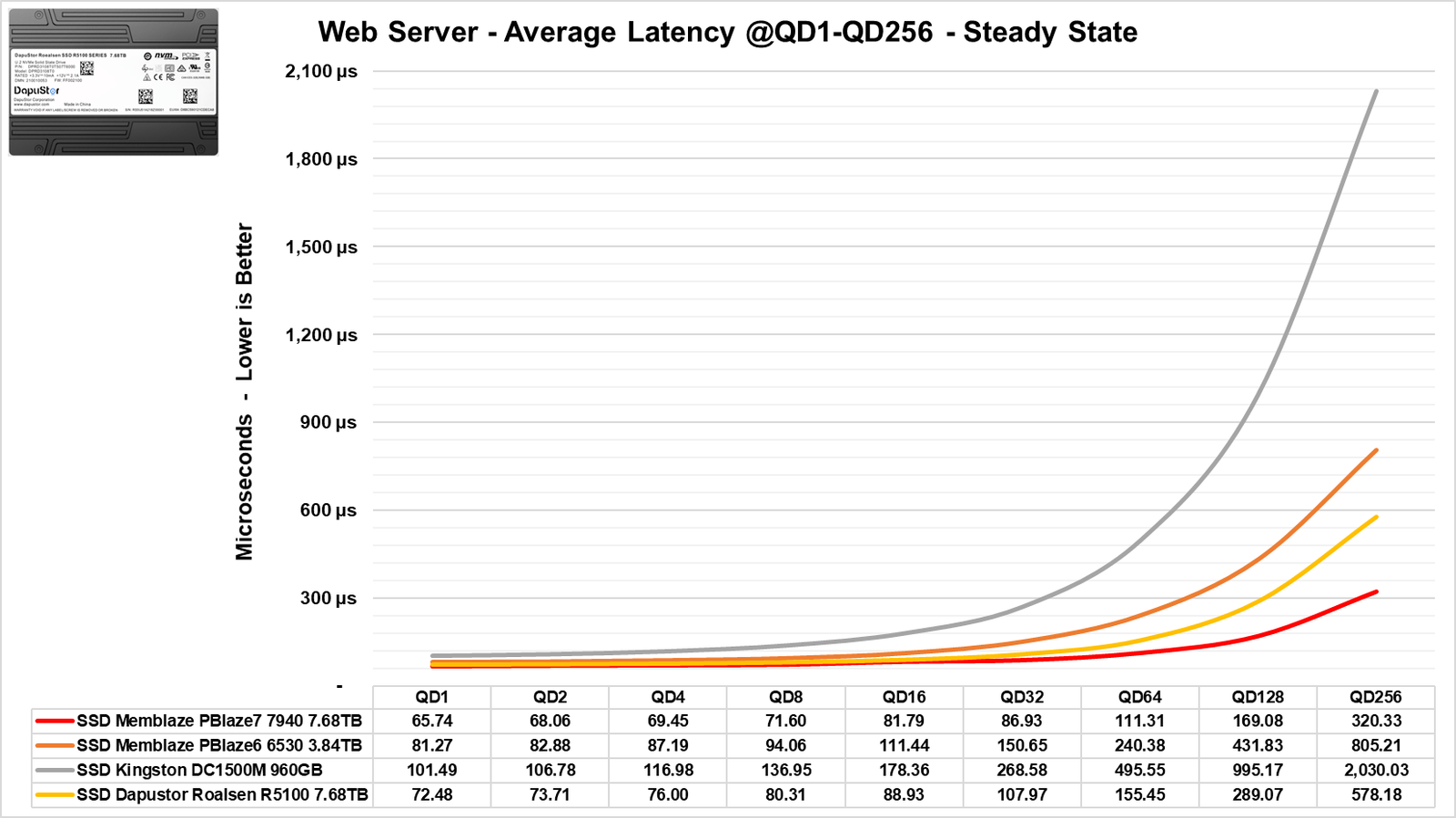
In this type of workload, we observed the same behavior as in other benchmarks, although the difference here was smaller at lower QD levels. It is only at higher QD levels that we see a greater difference compared to the Gen4.
The same can be said about its latencies; we see that it achieves very good latencies even at high QD levels.
Benchmark: Email Server Workload

In this section of the analysis, we will base our workload on a typical scenario found in email servers, which is traditionally known to work with 8 KiB block sizes and a 50% / 50% (Random Read/Write) distribution. This is also considered a more demanding scenario for writing on the device.
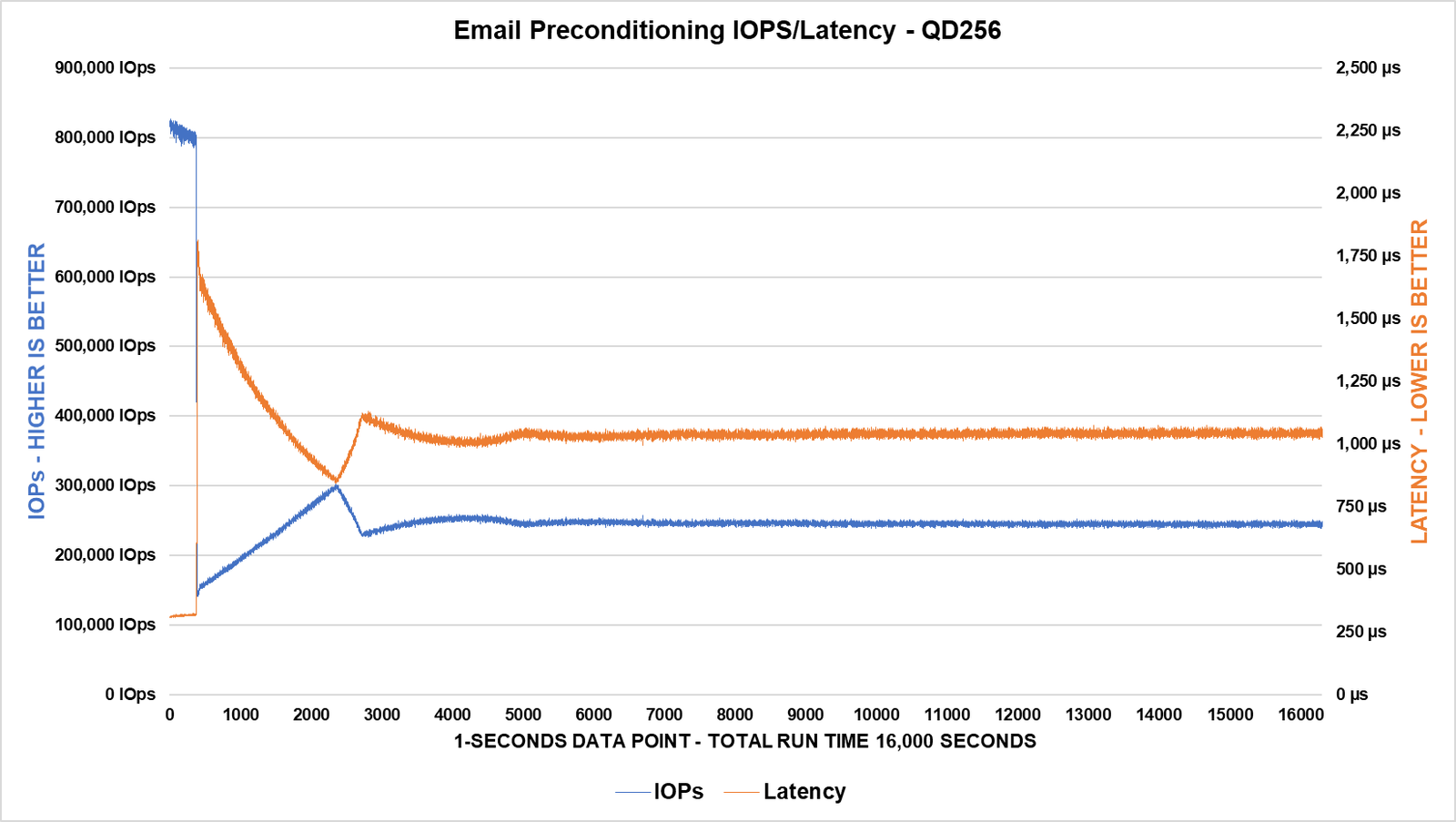
We can confirm that during this preparation, the SSD took approximately a little over 5,000 seconds to reach the Steady State, where it achieved a consistent performance in the range of 250K IOPS with latencies around 1100µs.
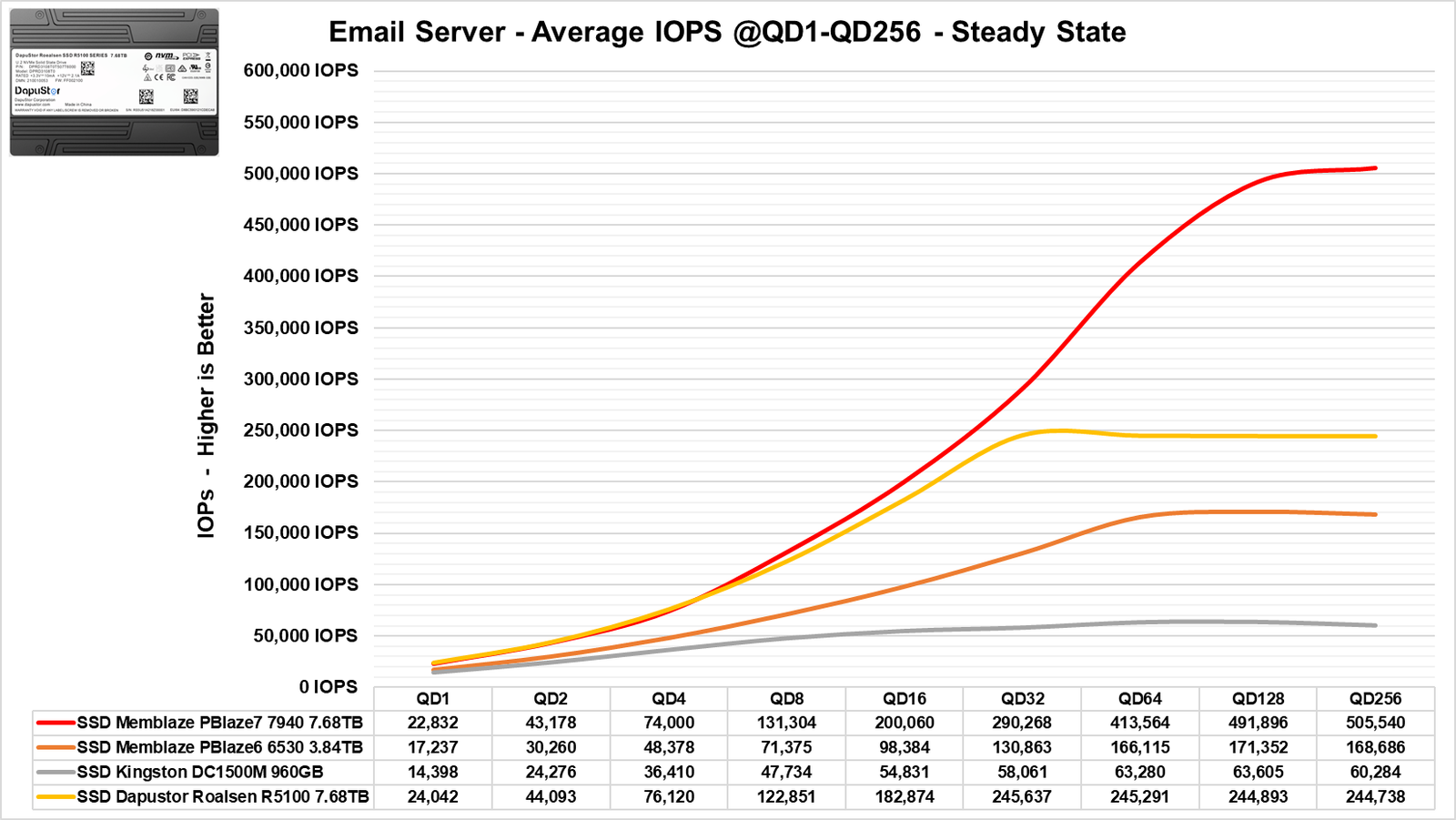
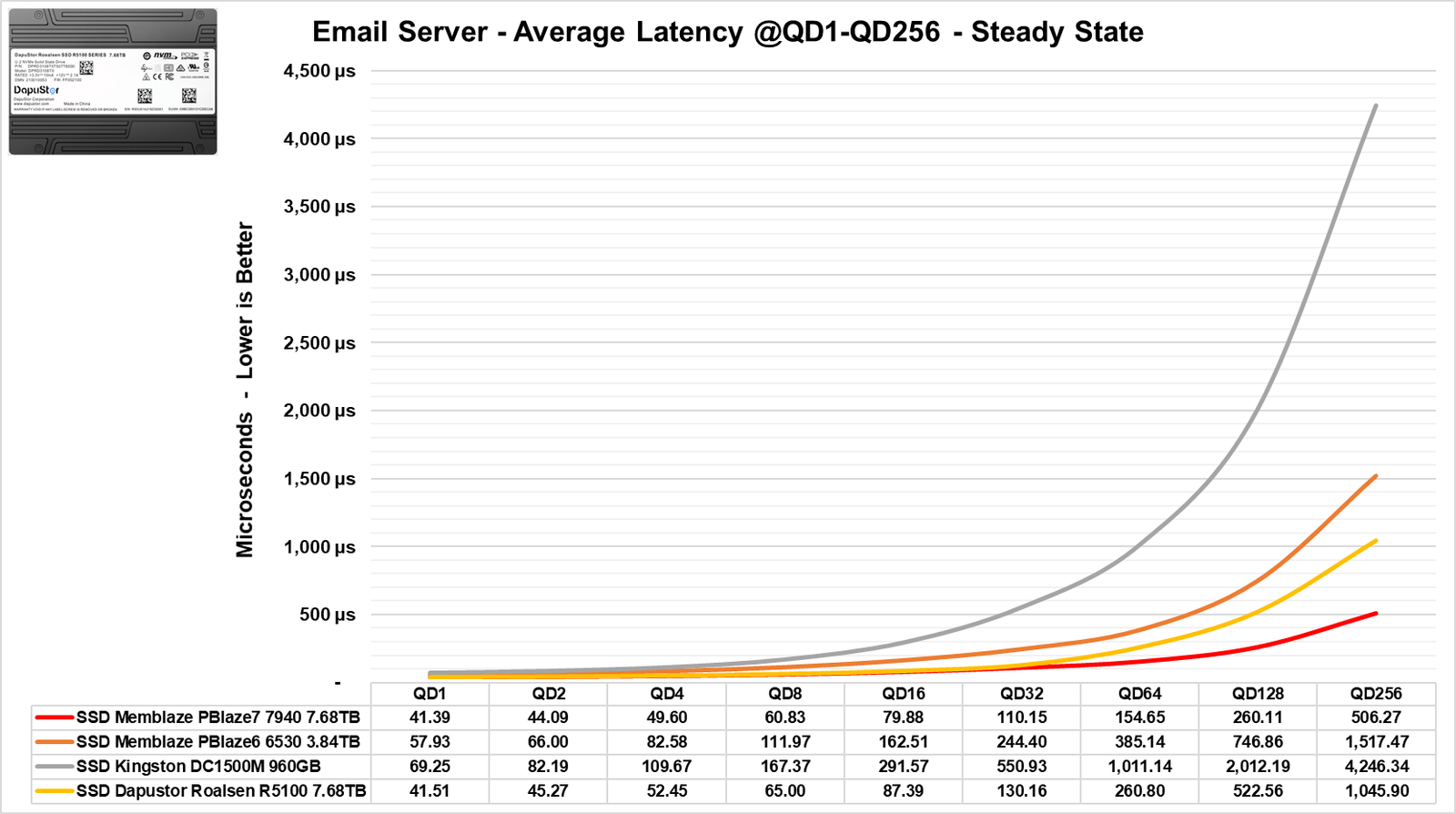
In this other benchmark, starting with its bandwidth, it leads among the other SSDs up to QD4. However, it is eventually surpassed only by the Memblaze Gen5, while the Memblaze Gen4 falls behind the DaPustor.
Its latencies were also similar to the Gen5 at the beginning of the benchmark, remaining just behind the Gen5 for the remainder of the test.
Benchmark: fSync
The fSync write performance evaluates a drive’s ability to ensure that data has been fully written to the disk with each operation. Critical applications, such as databases and high-availability systems, rely on the fsync() command to ensure data integrity by forcing the immediate writing of pending information.
Unlike consumer SSDs, which achieve high IOPS rates under less demanding conditions, enterprise SSDs are rigorously tested to maintain consistent fSync performance. This characteristic is essential for ensuring data persistence and stability in applications that require high reliability.
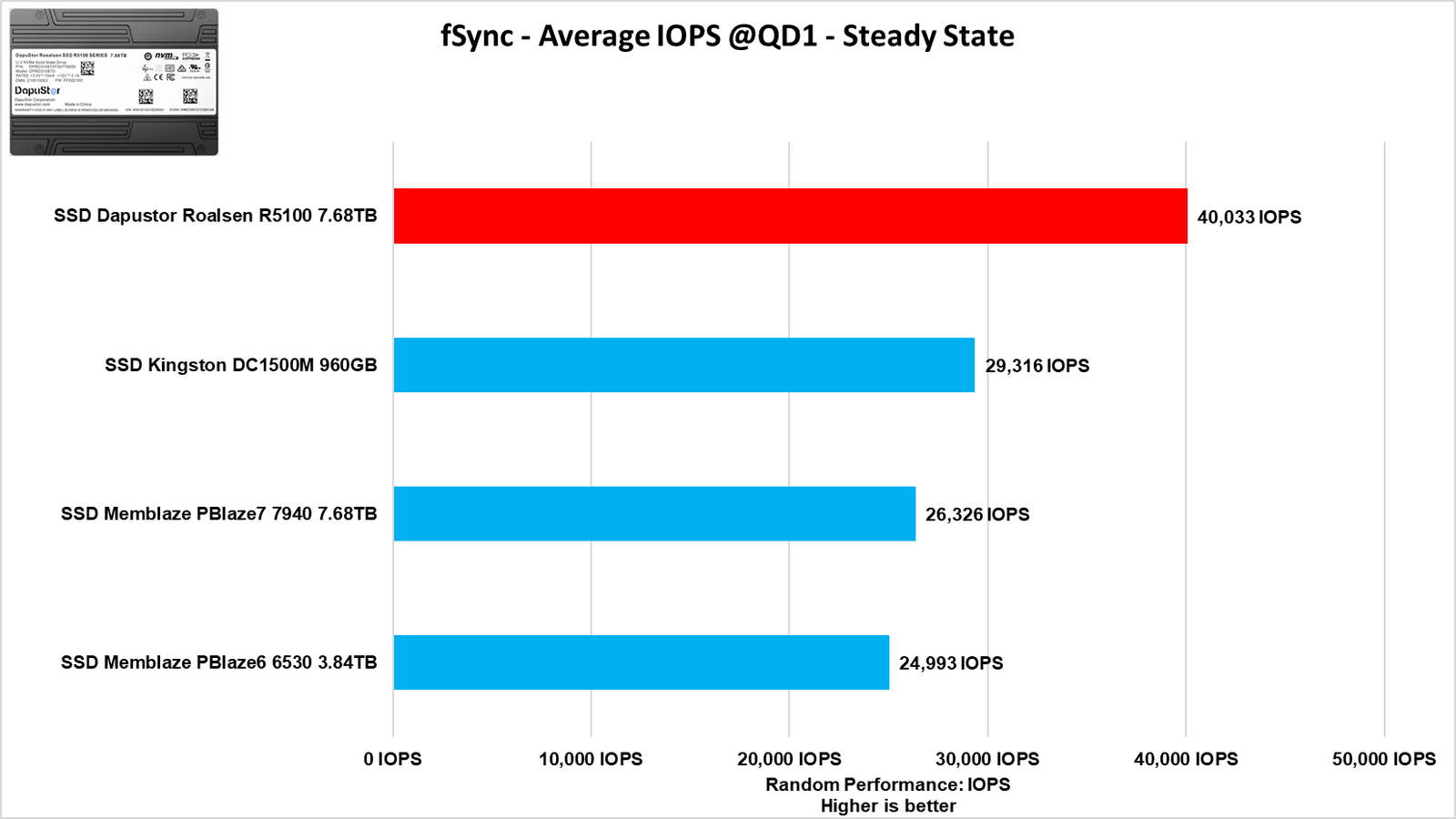
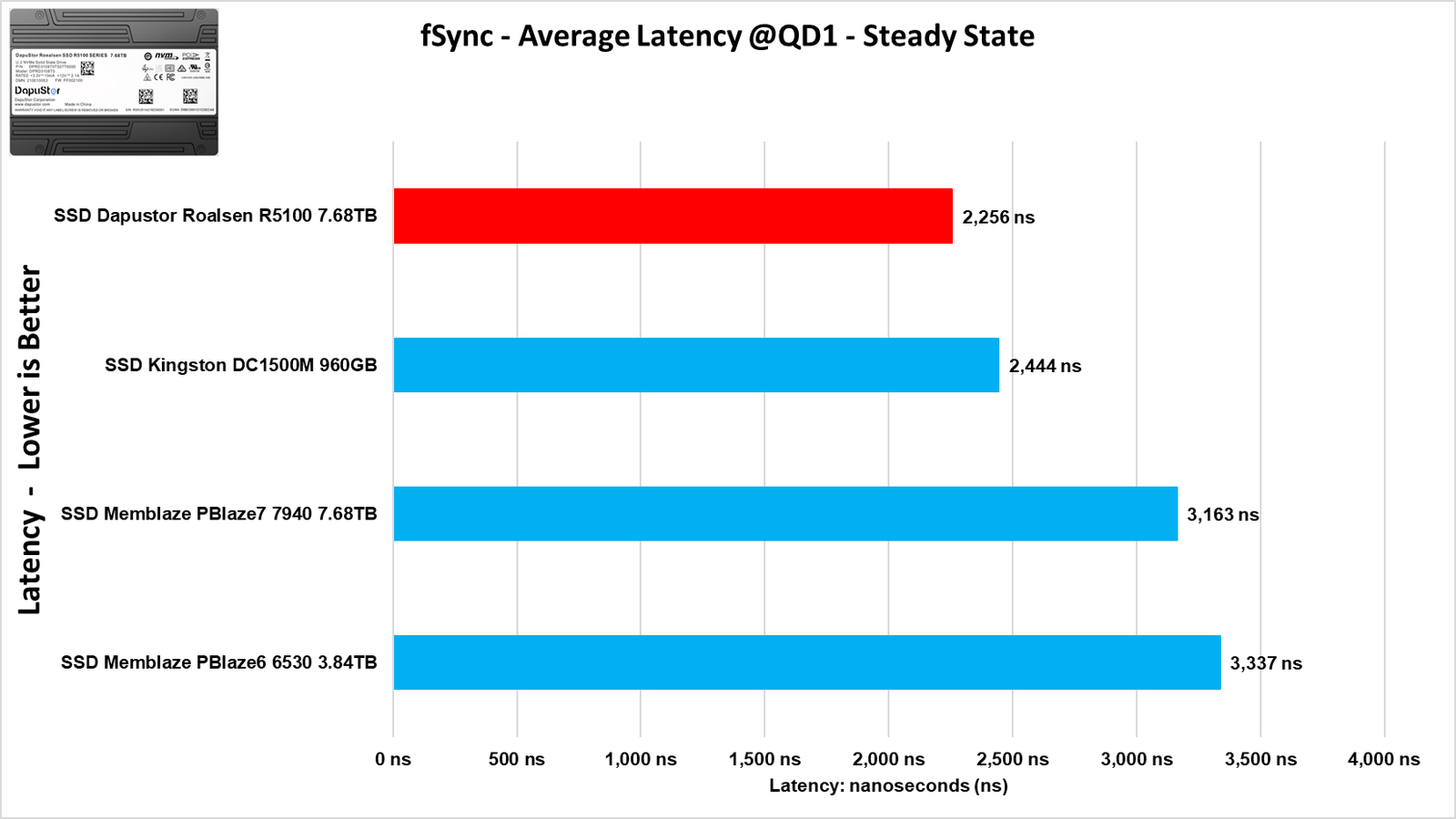
In this new benchmark, it was possible to observe superior performance from the Dapustor SSD, thanks to its 16 channels that enhance parallelism, which also contributed to achieving lower latencies of around 2 microseconds.
Benchmark: Big Data Analytics Workload

In this other section of our review, we will simulate a data workload found in the field. But what is BDA? Big Data Analytics is the process of examining and extracting valuable insights from massive and complex datasets to make informed decisions and improve business performance. We ran a sequential read test for 5 hours with 1 MiB block sizes, using 100% aligned sequential access.
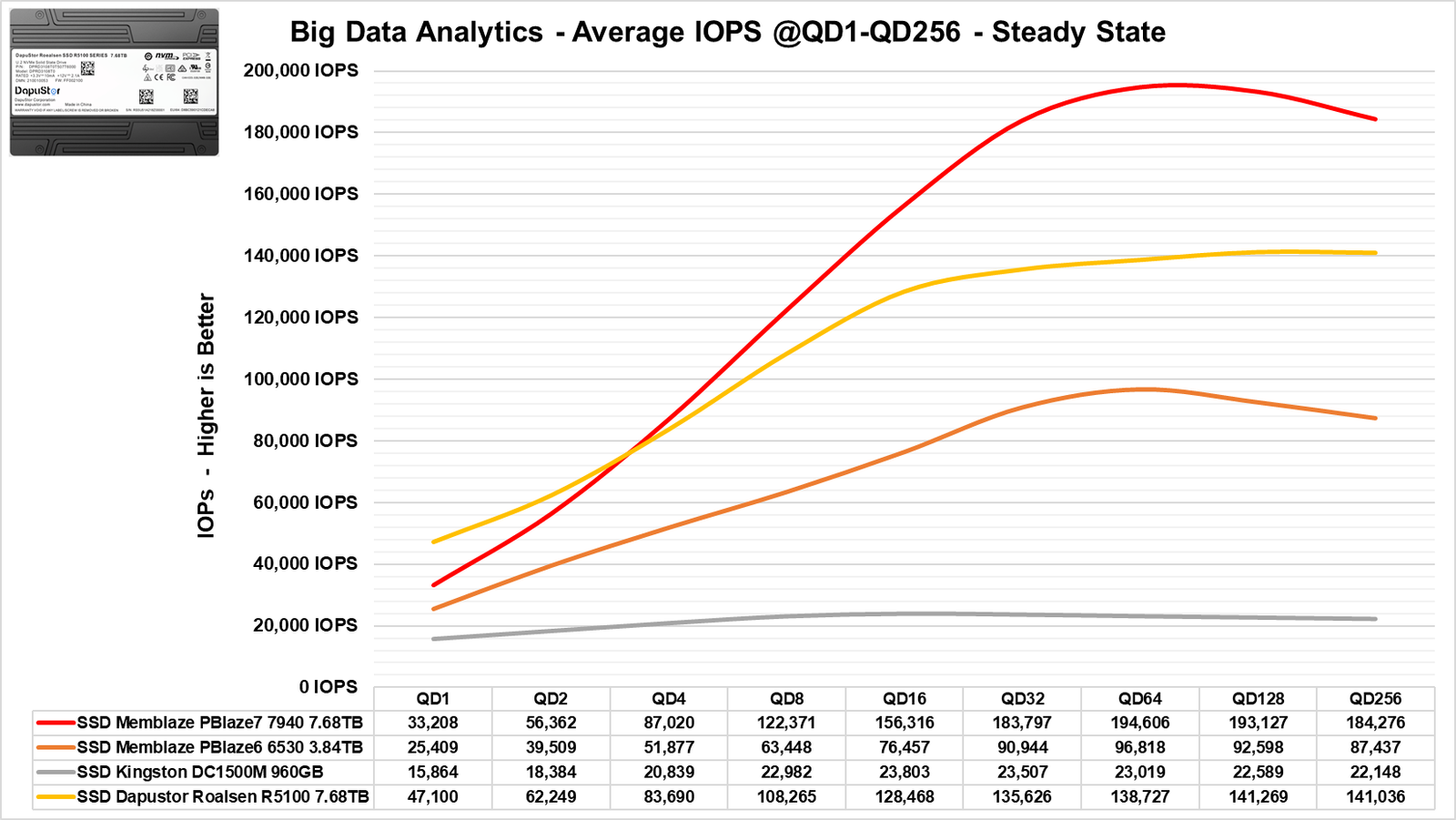
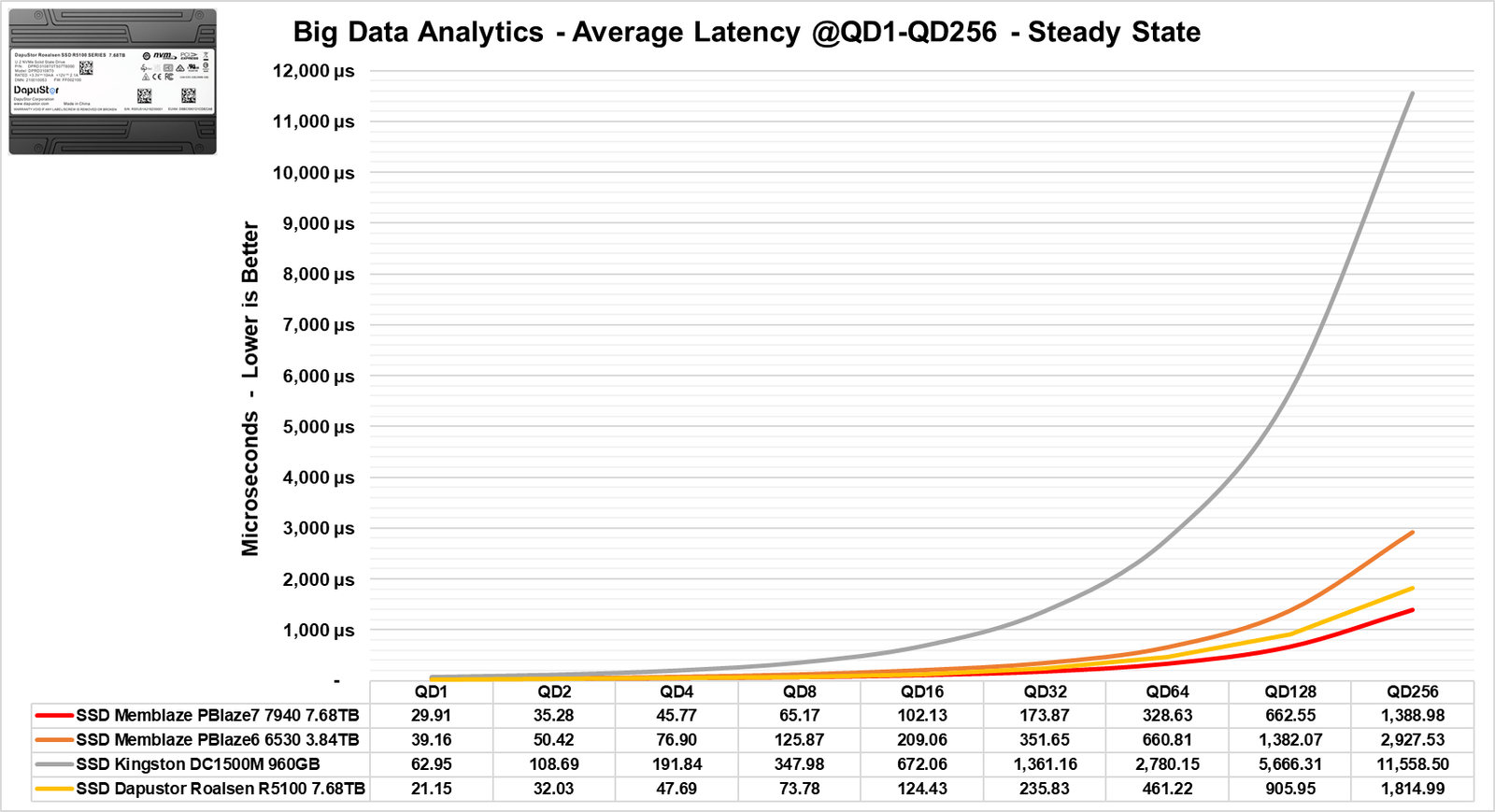
During this benchmark, we observed that the Dapustor performs excellently, coming slightly behind the Memblaze Gen5 and well ahead of the Gen4.
Benchmark: Machine Learning (A.I.)

Machine Learning is a subfield of artificial intelligence focused on developing algorithms and models that enable systems to learn and improve from data without explicit programming. This approach allows machines to identify patterns, make predictions, and make decisions based on the acquired information, making it a valuable tool in a variety of applications, from product recommendations to medical diagnostics.
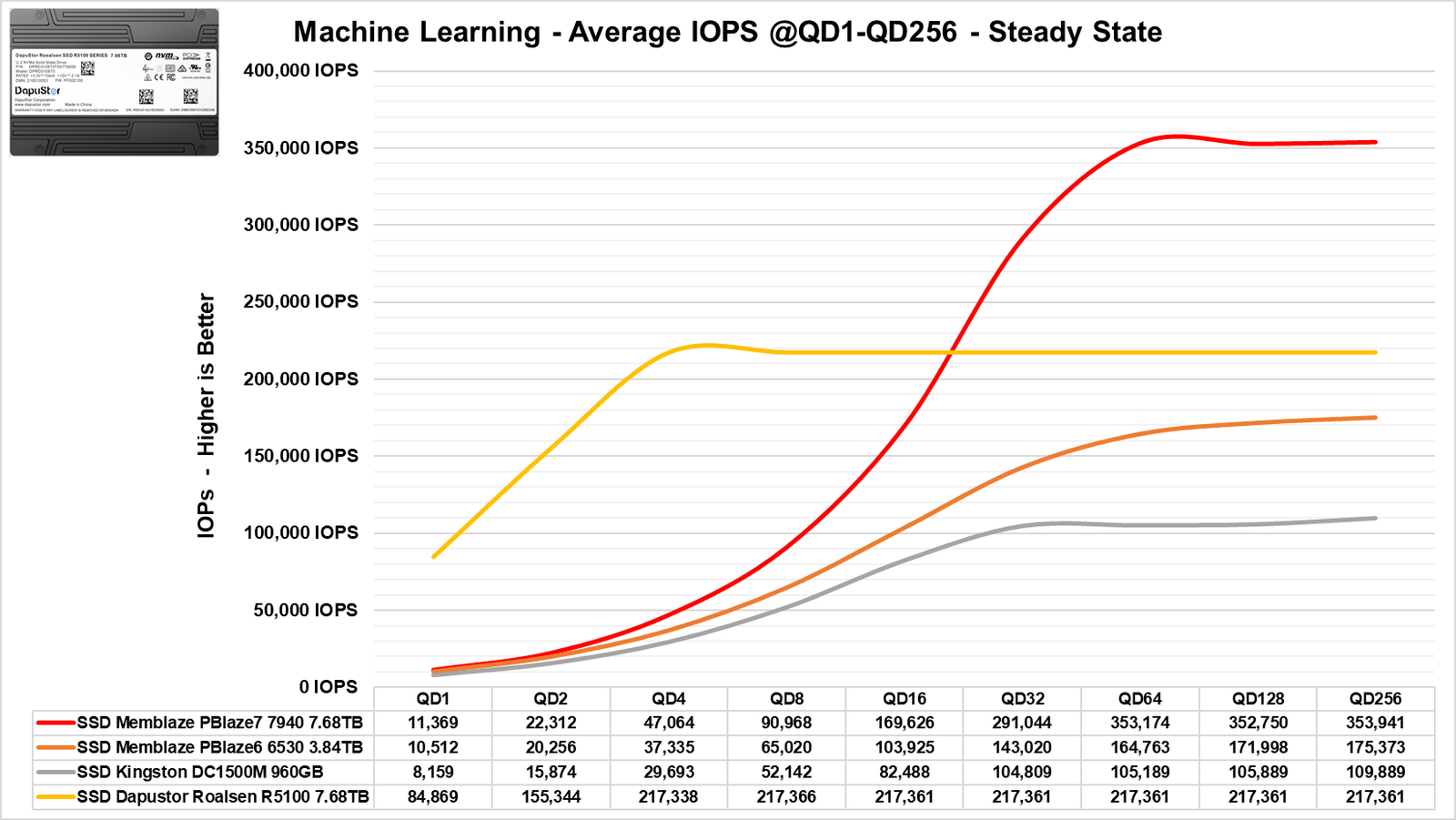
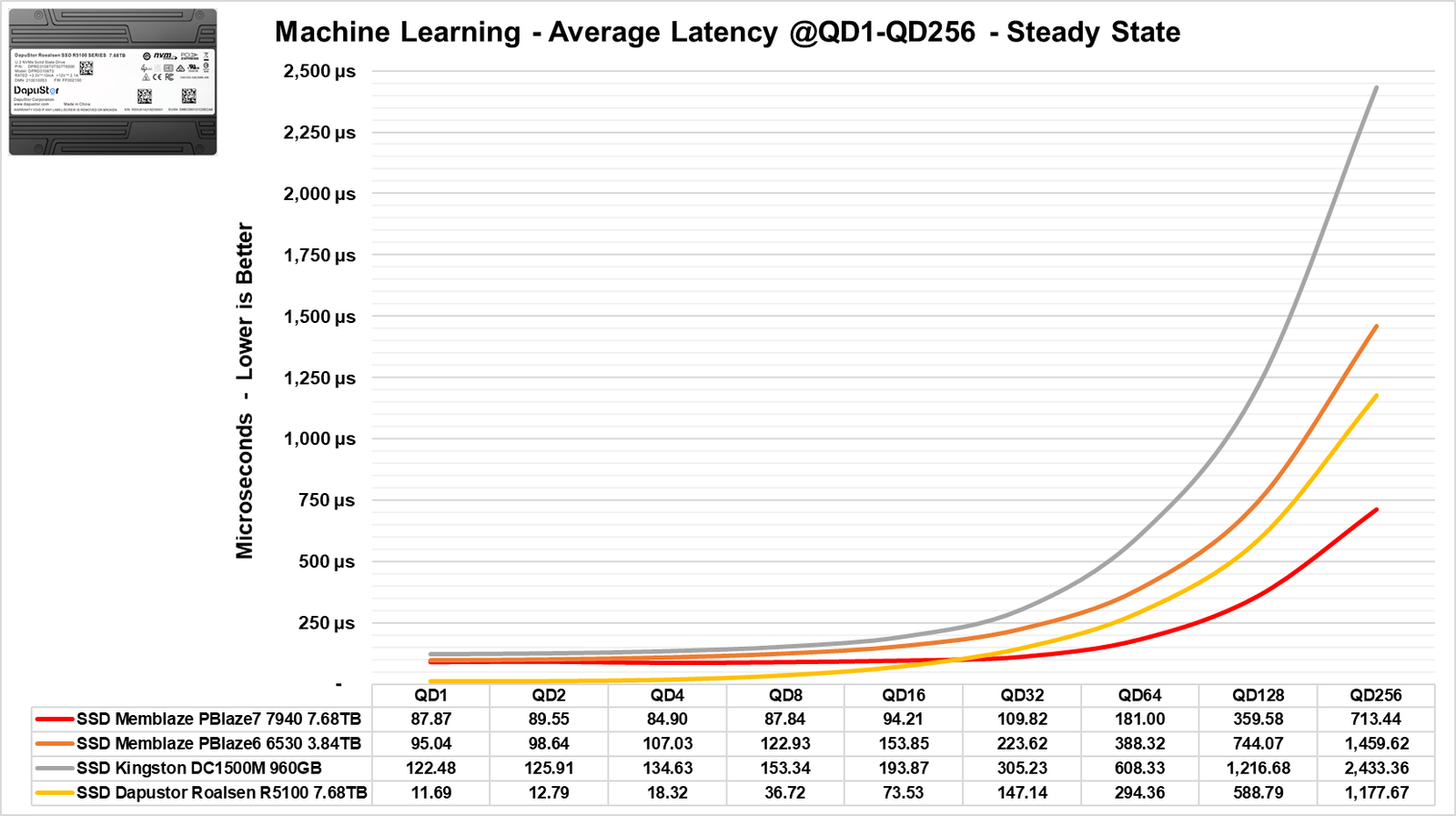
In this benchmark, where we used 32 KiB blocks for random read operations, the Dapustor outperformed significantly at lower QD levels. Initially, I thought it might be a bug, but the performance was indeed very high due to its use of 16 channels and 512Gb dies.
However, at higher QD levels, specifically from QD 32 and onward, it falls behind the Gen5 SSD, but it still achieved an impressive result.
IMAGE CLASSIFICATION MODELS – A.I. / MACHINE LEARNING
This benchmark is designed to measure the loading time of heavy image classification models, analyzing two main stages: the transfer of the model from the SSD to the CPU memory and the subsequent transfer to the GPU memory. Each model is loaded 20 times to calculate an average and the standard deviation of the times, ensuring an accurate and consistent evaluation.
The purpose of this test is to compare the loading efficiency between different model architectures, which is particularly relevant in cases where the model initialization time impacts the performance of applications in production environments, such as real-time inference systems or environments with limited resources. Through these results, it is possible to identify models that offer a good balance between performance and loading time.
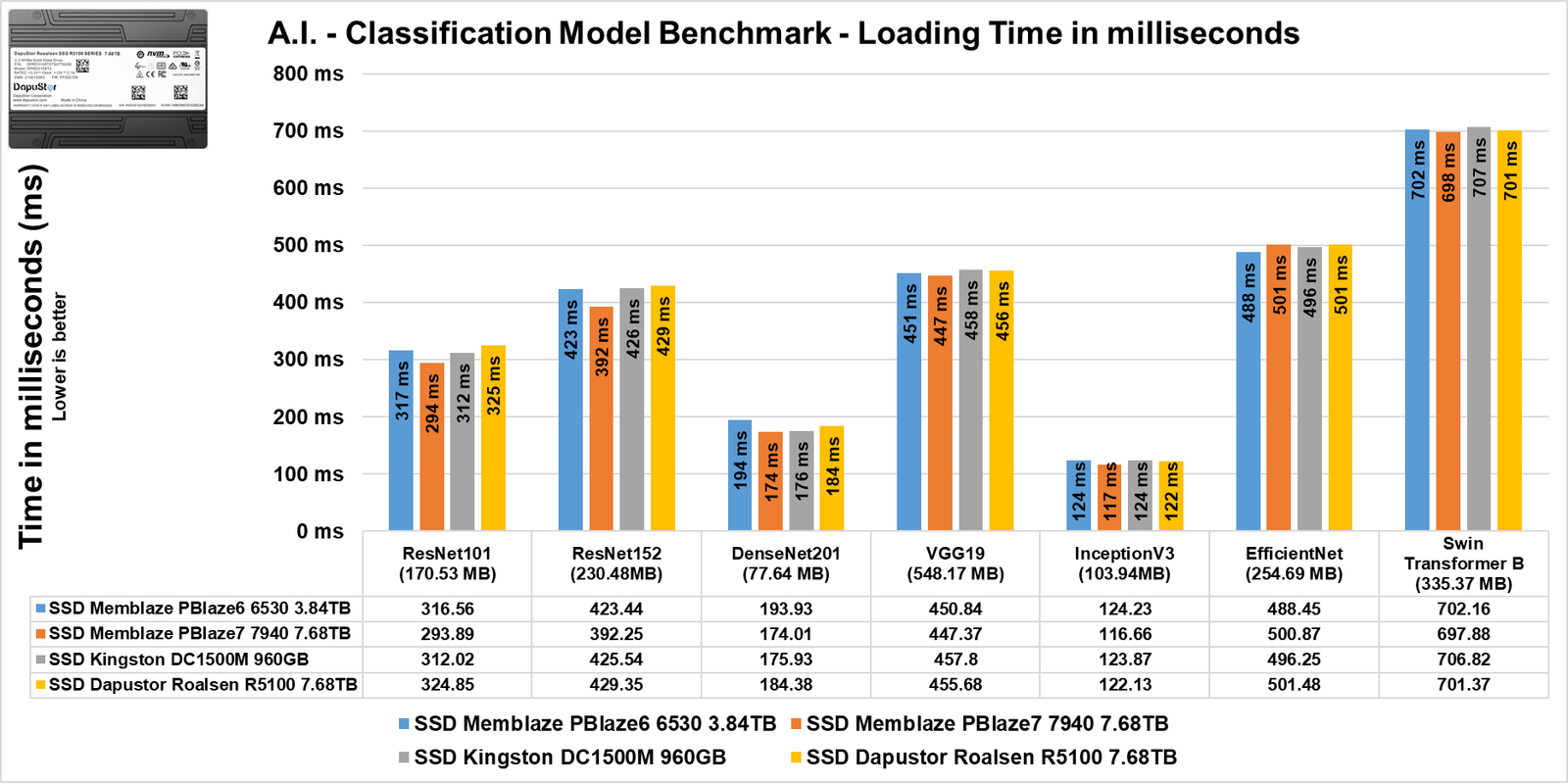
In these image classification models, we see that the difference between the SSDs is quite small due to the models being relatively small. Nowadays, there is a lot of talk about LLMs (Large Language Models), which are widely used in models like ChatGPT and Gemini, typically containing billions and billions of parameters. However, in tests like these, there might be a noticeable difference.
TEMPERATURE STRESS TEST
In this section of the analysis, we will observe the temperature of the SSD during a stress test, where the SSD continuously receives files. This will help us determine if there was any thermal throttling of its internal components that could lead to bottlenecks or performance loss.
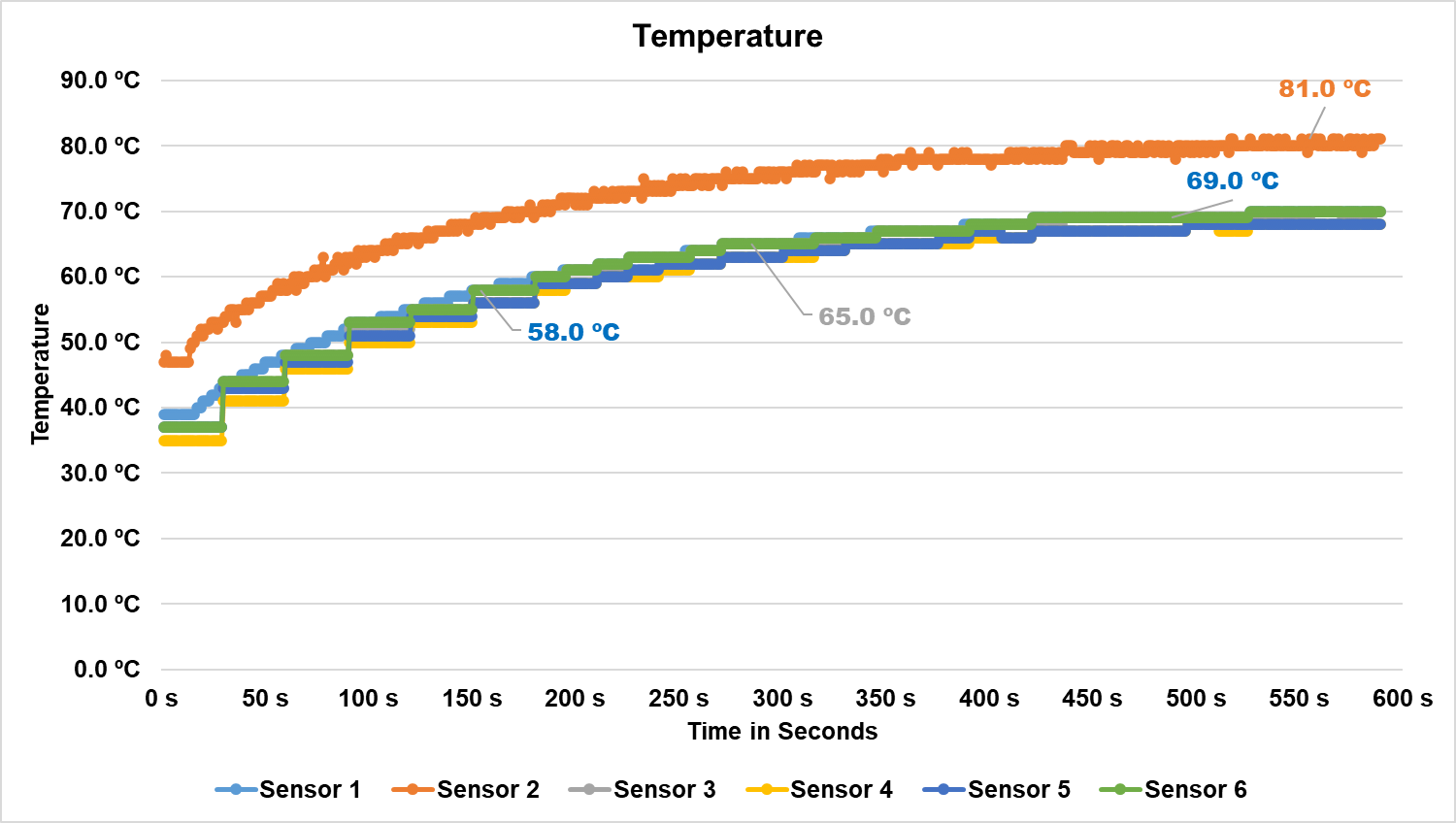
As seen above, although the SSD has 2 temperature targets of 78°C and 85°C, it remained slightly below these temperatures, and as a result, it did not experience thermal throttling.
As we observed in the video above, which is a time-lapse during the benchmark, it is noticeable that the exterior of its casing, which acts as a heatsink, reached a maximum temperature of approximately 66°C. While this is quite acceptable, it is no longer safe to handle the SSD at this temperature.
POWER CONSUMPTION AND EFFICIENCY
SSDs, like many other components in our system, have a specific power consumption. The most efficient ones can perform requested tasks quickly and with relatively low power consumption, allowing them to transition back to their idle power states, where they tend to consume less energy.
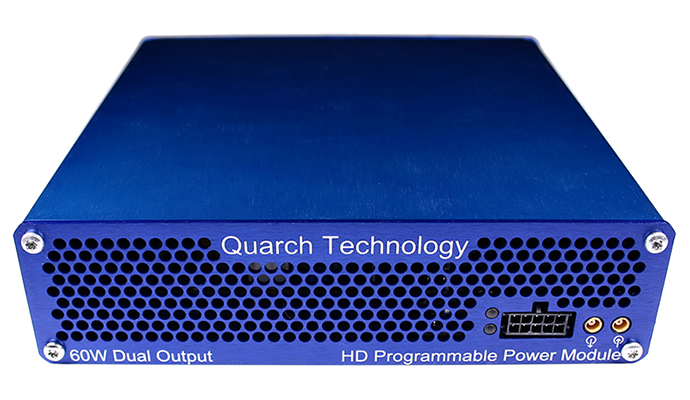
In this section of the analysis, we will use the Quarch Programmable Power Module, which was sent to us by Quarch Solutions (see photo above), to conduct these tests and evaluate the SSD’s efficiency. This methodology will involve three tests: the maximum power consumption of the SSD, an average in practical and casual scenarios, and its idle power consumption.
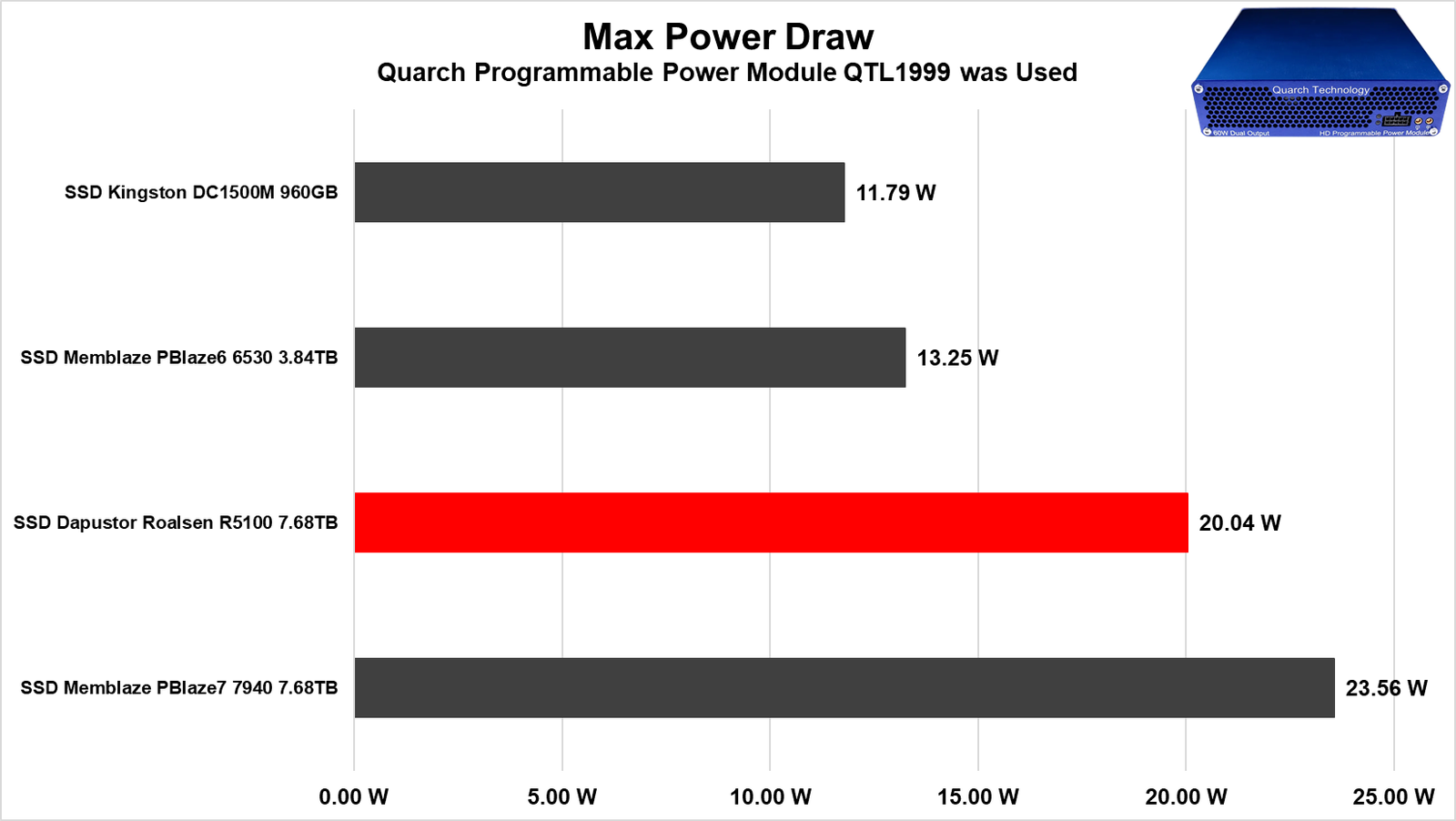
Although this SSD has its Power State 0 configured at 22W, it remains slightly below that, as we did not observe a consumption exceeding 20.04W in all the tests conducted. This is considerable for a Gen4 SSD, especially considering that the Memblaze recorded 13.25W which is another Gen4 drive. However, we must take into account that the Memblaze SSD had an 8-channel controller version, while this one has 16 channels, which significantly increases power consumption. Also the 7940 is a gen5 drive which will have a higher power draw, but also a higher bandwith.
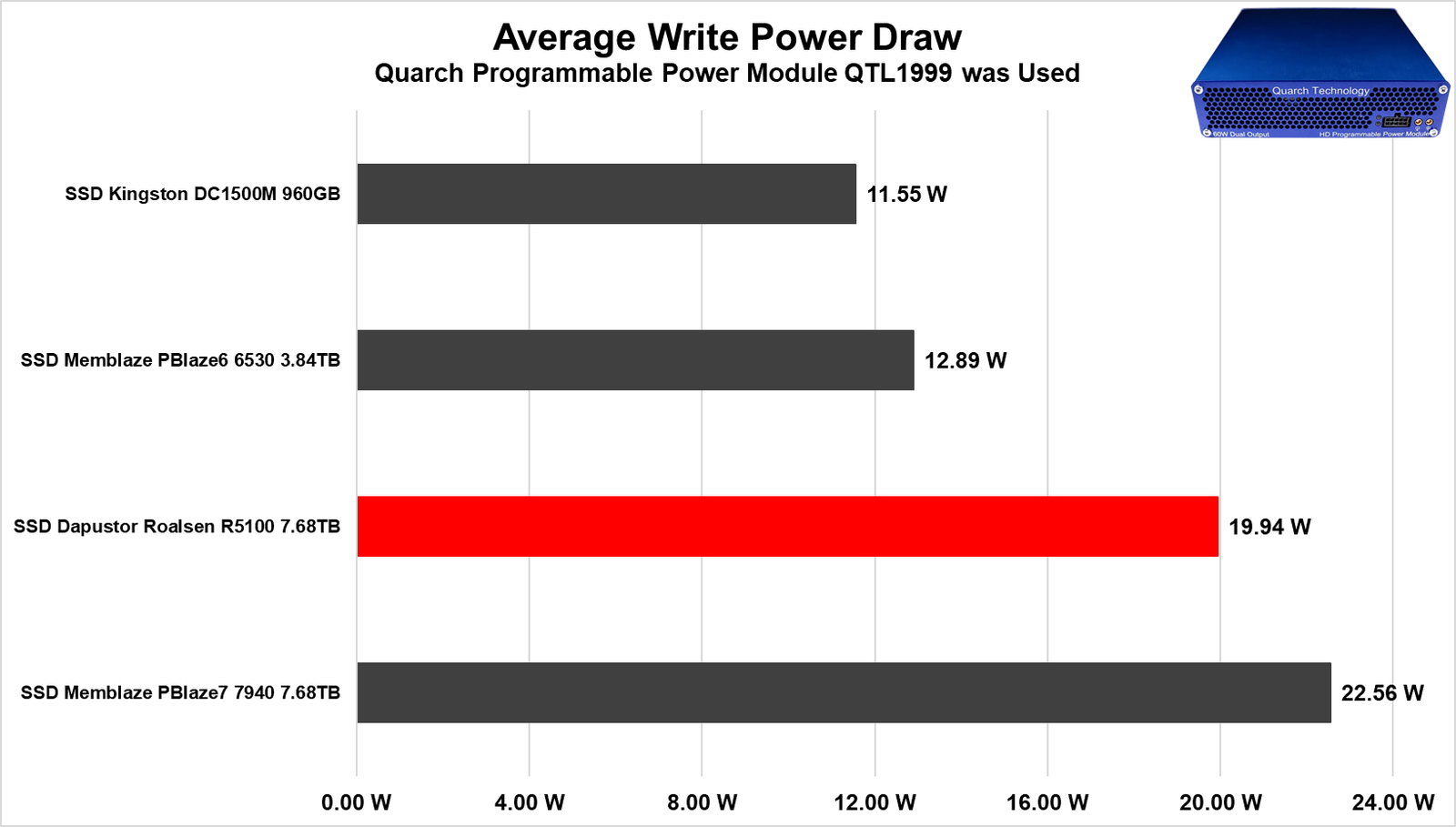
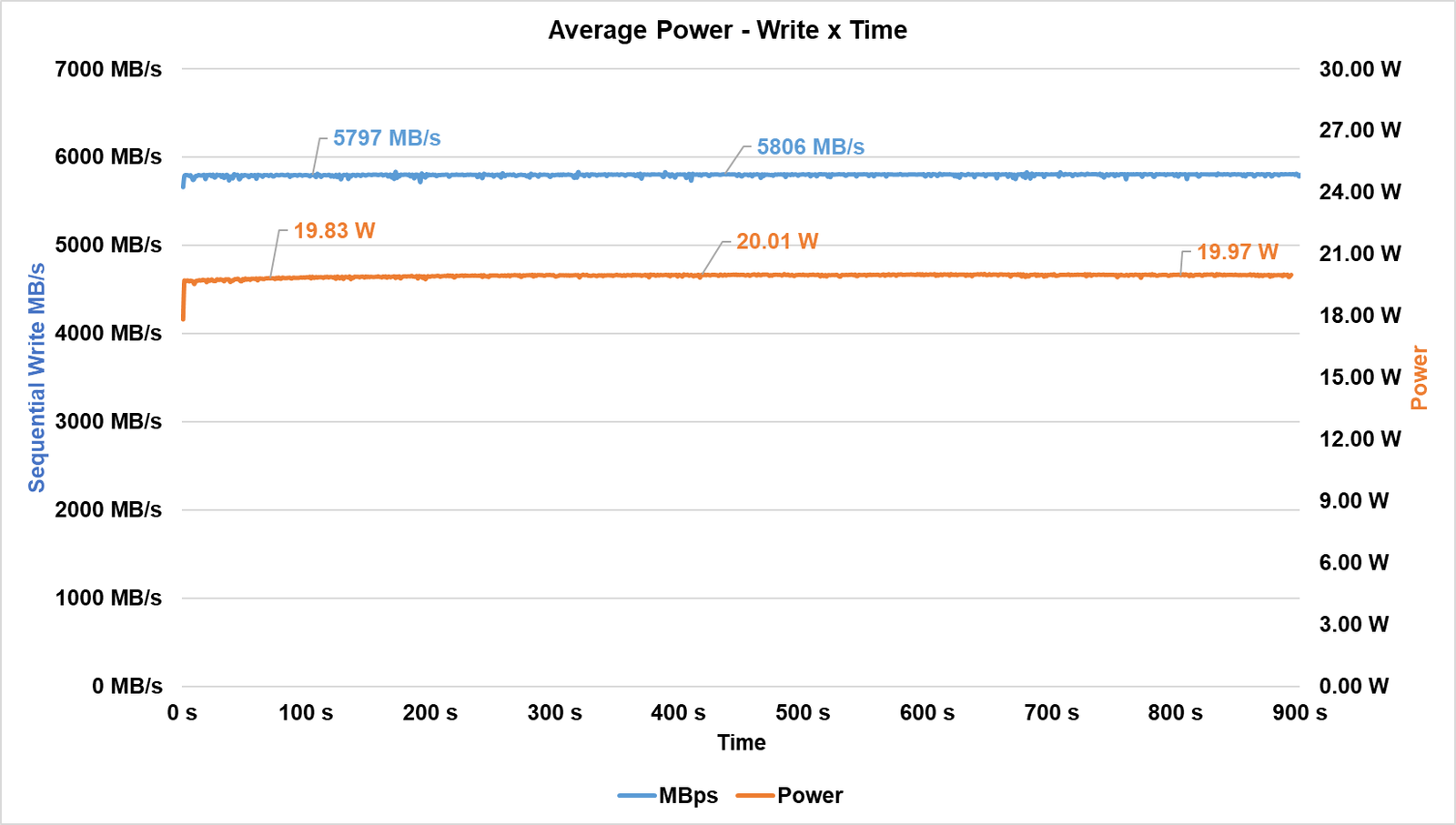
When we conducted our SSD filling test, starting with the write operation, we noted an average consumption of 19.94W during this benchmark. As we mentioned, this is a relatively high power consumption, but it can be attributed to its 16-channel controller and the number of dies in this SSD, as it has 128 dies in this project. Its bandwidth averaged around 5800 MB/s, slightly above the specification provided by the manufacturer.
Also we need to understand, that the higher the capacity, the higher the overall consumption, so lower capacities SKUs will have a lower power consumption.
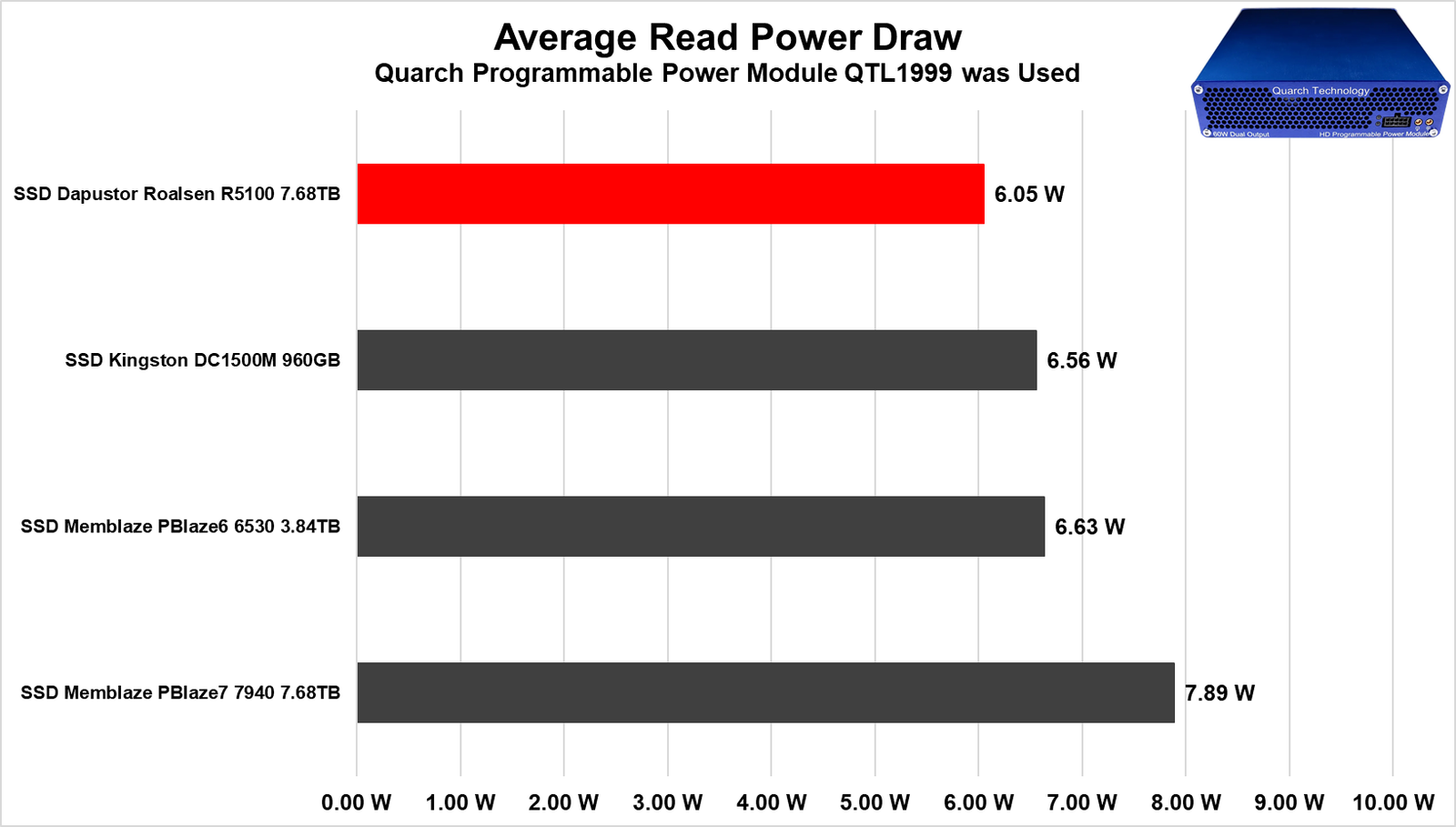
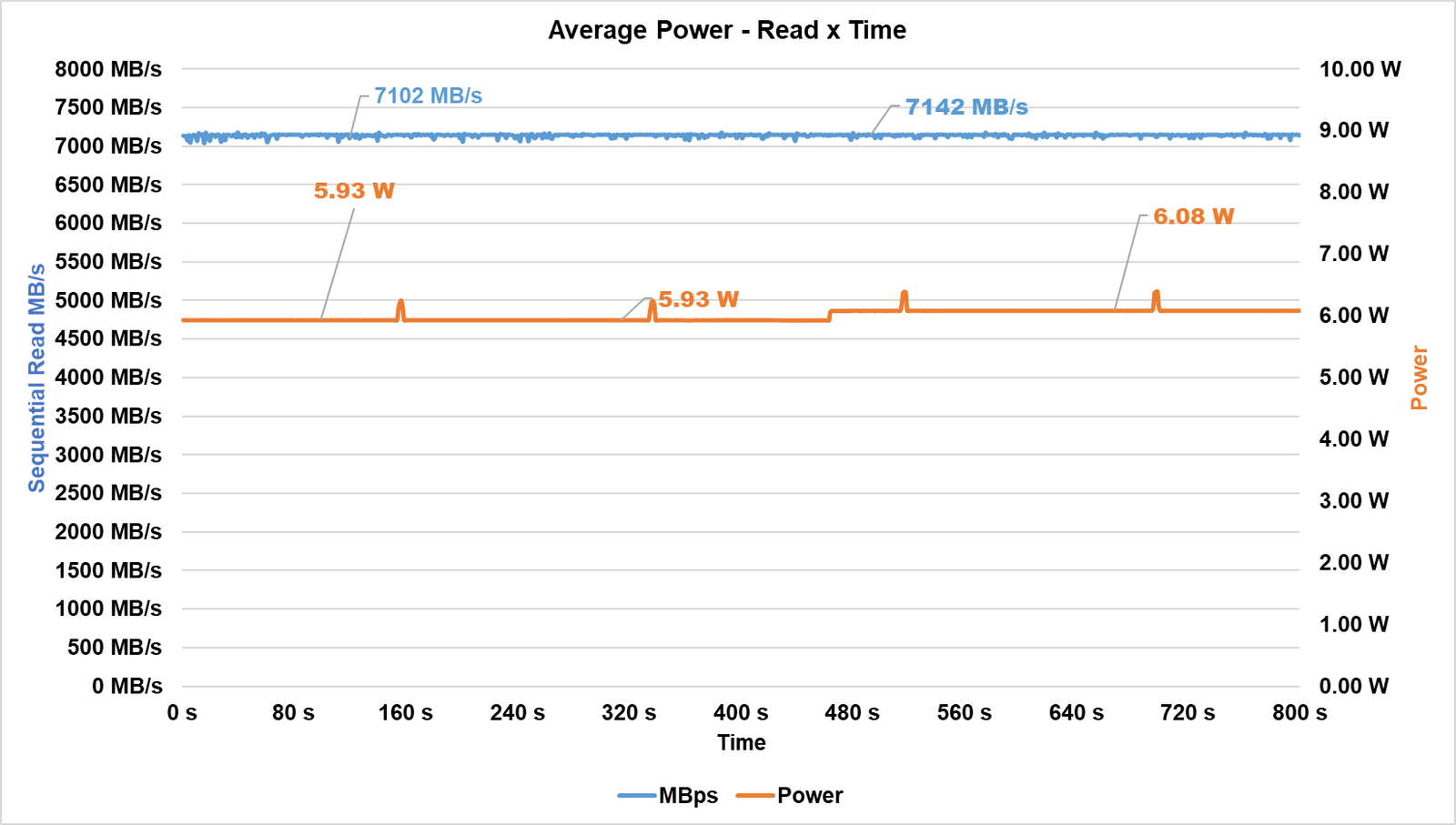
In the read test, it had a maximum consumption of 6.05W, making it more efficient than the other SSDs in the comparison, surpassing the Memblaze.
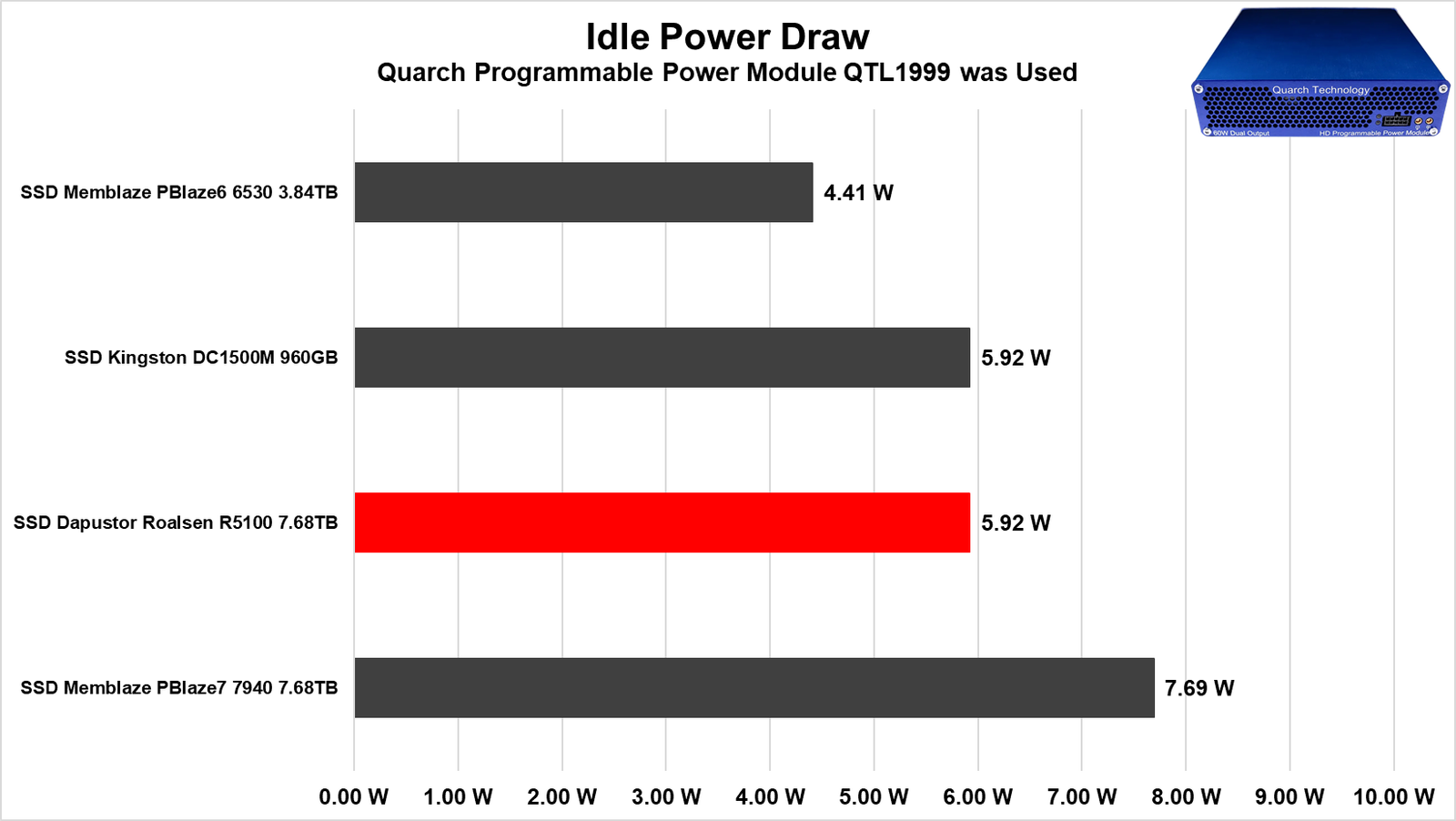
Lastly, and most importantly, we conducted the idle test, which is the scenario in which the vast majority of SSDs operate in everyday use. Although 5.92W is a “maximum” consumption that is quite high for an M.2 SSD, an enterprise datacenter SSD tends to have a significantly higher power consumption due to more robust controllers, many more NAND Flash dies, and DRAM Cache, as well as numerous capacitors and components for VRM and Power Loss Protection circuitry.
Furthermore, it had the same power consumption as a Gen3 SSD, which demonstrates that it can achieve good efficiency.
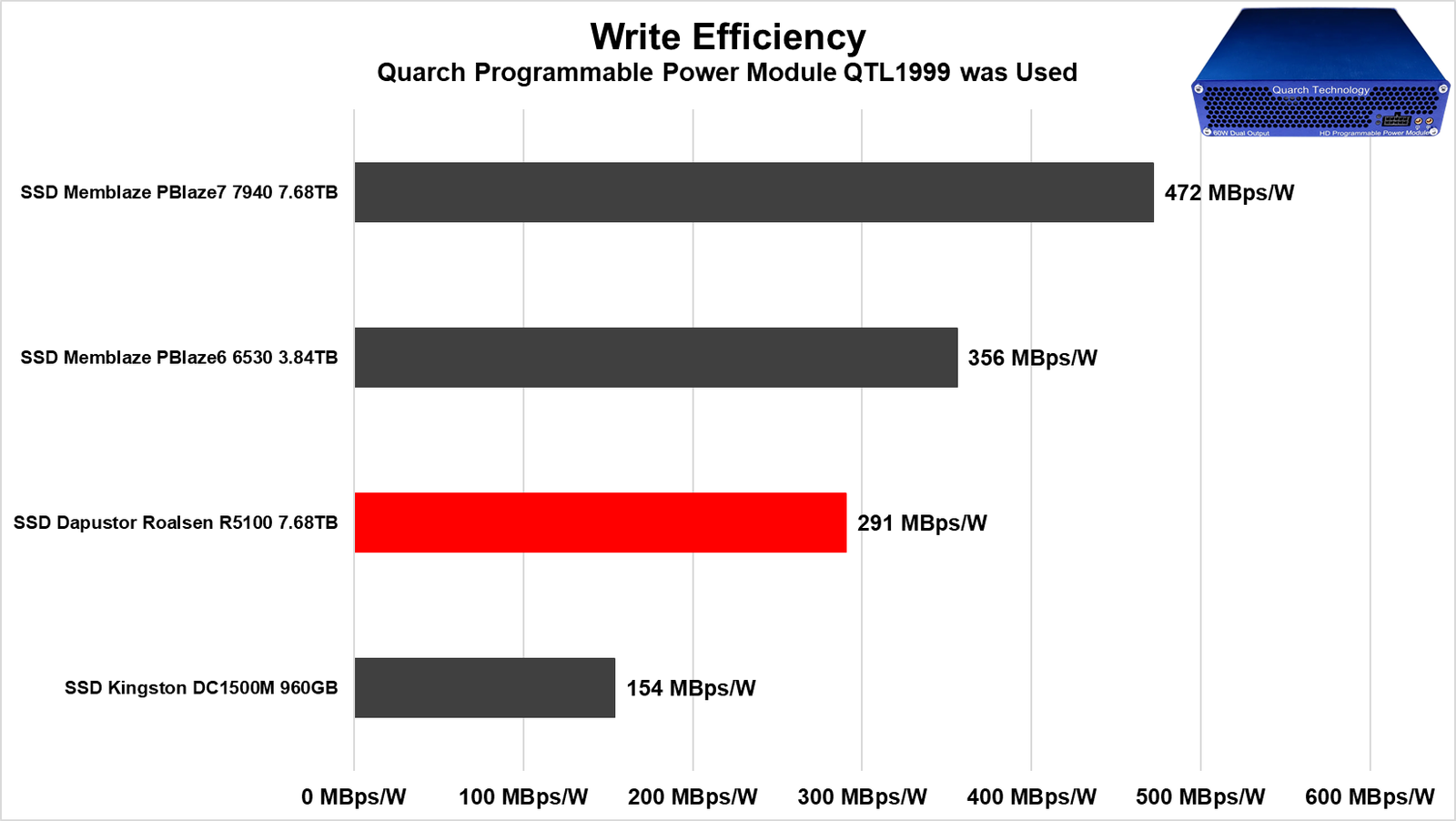
In terms of write efficiency, it is noticeable that it falls slightly behind the Memblaze 6530 we tested. This occurs because the power consumption of this drive was significantly higher than that of the Memblaze. While the Memblaze operated in the range of 11 to 13W, the DaPustor was in the range of 19 to 20W, which is a considerable amount. Even though its bandwidth was superior to that of the Memblaze, it was not enough to surpass it in overall efficiency.
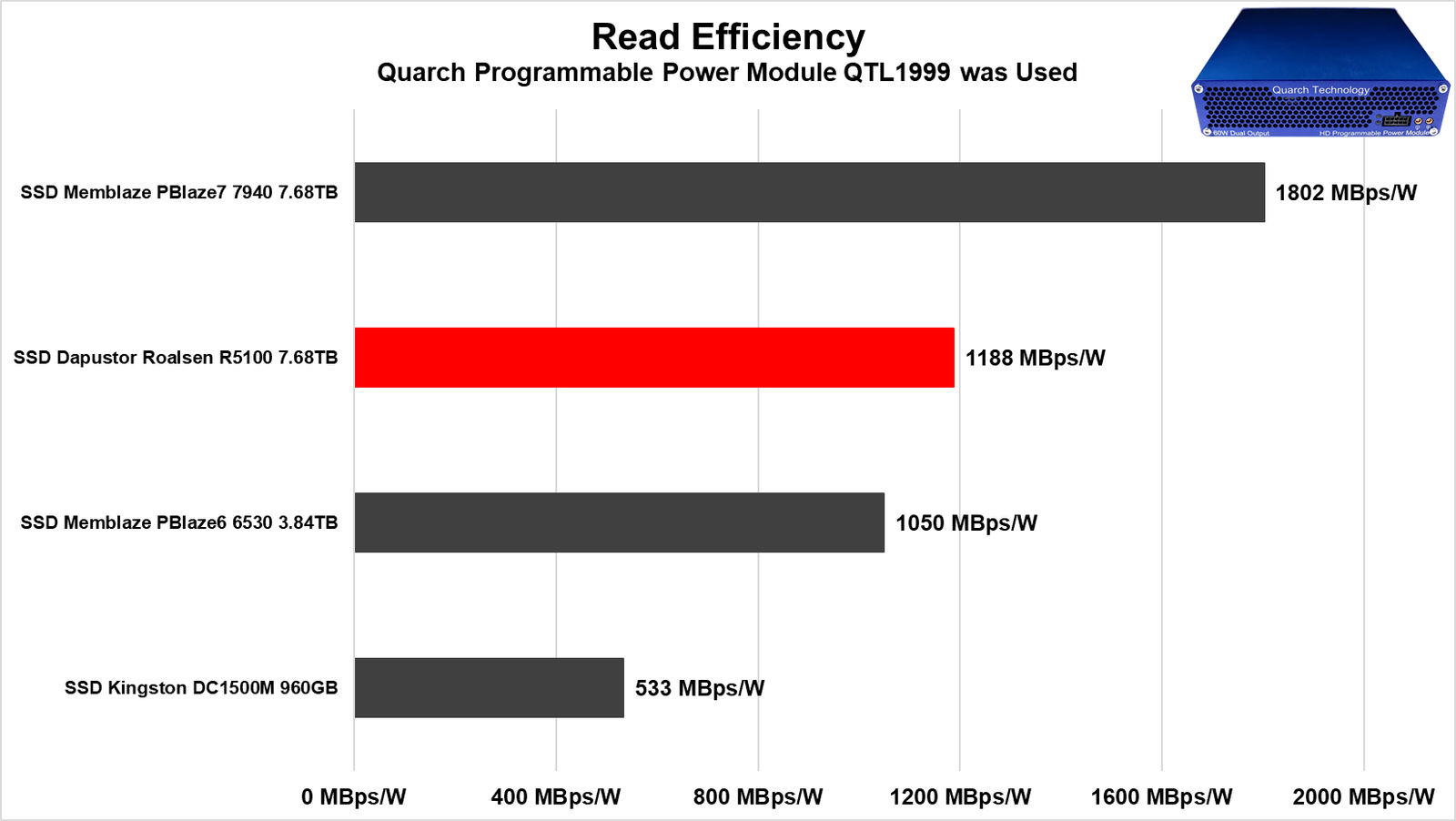
Now, in its read performance, we see a significantly different scenario. It achieves a very interesting bandwidth that is slightly above the Memblaze, with a slightly lower power consumption. This is why we observe that slight advantage in its efficiency.
Conclusion
Taking all of this into account, is it really worth investing in this SSD?
As we’ve highlighted throughout the analysis, this product is truly impressive. It consistently delivered performance at lower QD levels that was very close to that of our Gen5 SSD. Given this, even without knowing its exact price and with reports suggesting it is competitive in the market, it stands out as a strong contender.
So, YES, for medium and large enterprises, it is an excellent choice for servers—whether for cache, raw storage, transactions, or other uses. I would particularly recommend it for more demanding storage tasks.
ADVANTAGENS
- Great sequential speeds, very competitive with other models on the market.
- Incredible random speeds, especially at low QD levels
- Very low latencies at low QD levels
- Perfect for environments like OLTP, HPC, and Machine Learning
- Available in multiple formats such as U.2 and AIC HHHL
- Excellent internal build with a great controller and high-quality NAND Flash
- Good range of available capacities, ranging from 1.92TB to 15.36TB
- Does not suffer from thermal throttling
- No hardware variations
- High durability (TBW)
- Supports AES-256 bit encryption / Self-Encrypting Drive
- High energy efficiency in read operations
- Low idle consumption
- 5-year warranty
DISADVANTAGES
- Does not come with management software
- Price not specified
- High power consumption in intensive write scenarios, which affected its efficiency