
Turning an AliExpress Xeon and a Gaming GPU into a Homemade ChatGPT – Building a Local AI Server!
 by Giancarlo C. Dalmedico "NoMS" August 21, 2026 · Articles / Artigos / Guias / Guides / Local AI
AI is on everyone’s lips right now, sparking all kinds of debates ranging from concerns about technological security and social impacts to even the end of humanity. Despite its divisive nature, this article isn’t meant to focus on the controversies but rather on the practical side: What is it? How does it exist? How does it work? Can I run it local ai on my AliExpress Xeon at home? The answers to these and other questions are in the following article! 🙂

While it may seem like something extremely recent, the first publications on the subject date back to 1943 with ‘A Logical Calculus of the Ideas Immanent in Nervous Activity‘ by McCulloch and Pitts, where they established the foundations used by modern AI, describing the brain as a computational system and introducing the concept of artificial neural networks. Shortly after, in 1950, came the article ‘Computing Machinery and Intelligence,’ published by the father of computing, Alan Turing.

Throughout the following decades, various other works and papers were published that were vital to the development of what we now know as AI. Fast forward to 2020, when OpenAI introduced the GPT-3 model, one of the first Large Language Models (LLMs), and then to 2022, when ChatGPT was released using the GPT-3.5 model and became a massive success.
But what lies behind artificial intelligence, specifically LLMs? These are massive models specifically designed to process, understand, and generate text naturally. Behind these models lies an enormous amount of data converted into mathematical parameters, in which a neural network architecture reads a prompt and then calculates the statistical probability to predict what the next word in a sentence will be. This forms a text that makes sense to human eyes, appearing genuinely intelligent to the average person.
There are some terms we need to keep in mind because of their importance in this ‘Terminator’ world, and the main one is the token. Tokens are small units of text, usually up to four characters long, which the model uses as the foundation for all its processing. For example, the word ‘cat’ might be one token, while longer words might be broken down into multiple tokens. This means a 1,000-word text can result in anywhere from 1,500 to 2,000 tokens, depending on the language. This matters because, in generative AI, almost everything is measured in tokens. When you subscribe to ChatGPT or Claude, both the pricing and the usage limits are typically based on token consumption.
From the perspective of the model itself, we have parameters, which are millions, billions, or even trillions of numbers. During the training phase, the model learns what is relevant to a specific idea through weights. For example, when the model encounters the word ‘cat’, associations like ‘mammal’ or ‘feline’ carry a high weight, while ‘alligator’ (another animal) would have a lower weight, and ‘tractor’ would have an even weaker association.
Then there is also context, which refers to the maximum number of tokens an AI can use in a single conversation, with current models generally allowing for context windows between 131k and 1 million tokens! It is clear that the larger the selected context window, the more memory is allocated, which calls for caution on systems that are already nearing their memory limits.
The number of parameters is often associated with a model’s intelligence, but that isn’t always the case, as different models can be trained with different objectives. Furthermore, the quality of the training data and the specific architecture can also have a significant impact. The reality is that a higher parameter count usually leads to greater memory requirements, as the model is typically loaded entirely into RAM or VRAM.
To lower these requirements, since a medium model like Qwen3.6 27b takes up nearly 55GB in BF16 (BFloat16, the precision format that is usually standard for training), they developed something called quantization. This allows reducing floating-point precision to an integer format by using a mathematical scaling concept to bring back the decimals, making it possible to halve the model’s size when moving from BF16 to INT8, or even reduce it fourfold for INT4. Although this might seem like magic, the price of quantization is a drop in model precision, which can limit its capabilities or lead to errors. The impact usually varies between models, with larger ones tending to suffer less from it. Some models are built with ‘factory’ training specifically designed for quantization, a technique called QAT (Quantization-Aware Training), but this is a more complex approach and a design choice by the labs responsible for the model, such as GPT-OSS and Deepseek v4.
Another thing to consider is the KV Cache (Key-Value Cache), which is an internal draft of what has already been said that grows as the context increases. On a local server used by just one person, it tends to be more contained, but in a scenario with multiple users, it’s quite common for the KV Cache to exceed even the size of the model itself, becoming a problem. It can also be quantized to reduce its size, however, it shares the same trade-off as the model where quality is lost, usually resulting in the model starting to ‘lose its way’ during long conversations.
The issue is that the bottleneck isn’t just the amount of memory required, but also the memory bandwidth of the device used to run the AI. This happens because of the token-by-token nature of processing, which requires high memory bandwidth to spit out tokens at maximum speed. Therefore, it usually ends up being the primary bottleneck in these cases, which explains the use of expensive HBM memory in data center GPUs or the SP7 socket on Epyc 9006 chips, which come with up to 16 DDR5 memory channels and over 1 TB/s of bandwidth.
Despite the continued dependence on bandwidth, it is possible to mitigate this somewhat through model architecture, where we currently have two main paths: Dense models and MoE (Mixture of Experts). Dense models simply activate all available parameters for each generated token; for example, in a real-world scenario, when you ask something of Qwen3.6 27B, all 27 billion parameters are used. In contrast, with MoE, only a small number of these parameters, which act almost like ‘experts,’ are activated. For instance, in the Qwen3.6 35B A3B, only 3 billion parameters are used per token, which reduces both the computational effort and bandwidth requirements, creating a model that is usually faster despite its total parameter count. Another advantage of MoE is that if they don’t fit entirely into the VRAM, they tend to be much more friendly for offloading to RAM since only a small portion of the parameters is activated per token, resulting in less performance loss when using the CPU to compute part of the model.
Another important point is the difference between training and inference. Training is the part handled by the lab, which involves subjecting the model to a massive amount of data so it can ‘learn’ things through a process of trial and error to determine weight values correctly. This is a process that can take weeks and requires an extreme amount of processing power.
Inference, on the other hand, boils down to taking this new, ready-made model and running it to respond to the user. The hardware requirements in this stage are much lower, as they depend more on the model size, whether the architecture is MoE or dense, the number of experts, and simultaneous users than on any other factor.
How to run a model locally?
To run a local AI model, you need inference software that will load the model and set up a server to serve it either locally or over a network. The good news is that most of these tools are open source, with llama.cpp being the most popular along with its derivatives like Ollama and LM Studio. However, there are also vLLM and SGLang, which focus more on larger operations serving multiple sessions at once. While these software options are general-purpose and cover a vast number of models with different architectures, there are other projects optimized for specific models, such as Dwarfstar 4, which focuses on DeepSeek 4, and colibri, which aims to run giant models on common machines.
You need to pay attention to a few details before choosing the most suitable inference software, such as whether it supports the best API for your hardware. CUDA is usually the top choice for NVIDIA cards, with ROCm/HIP being the equivalent for AMD, and Vulkan serving as an alternative that works across all manufacturers. Curiously, Vulkan often performs better on AMD GPUs than ROCm does, at least when it comes to consumer-grade Radeon cards.
Another point is model formats, where SafeTensors is usually the standard, focusing on security and loading speed while often being distributed as multiple files. In addition to that, there is GGUF, which is the standard used by llama.cpp and also the king of local inference, mainly because it is distributed as a single file and allows splitting the model between the GPU and CPU.
There are many individuals or groups who offer ready-to-use GGUF files on sites like HuggingFace, where they take the original SafeTensors model and perform quantization (or not) into GGUF. In these cases, it is common to see nomenclatures such as Q4_K_M, Q4_K_S, or Q8_K_XL, which might look like alphabet soup but are actually relatively simple to understand:
The first two digits refer to quantization, where Q4 indicates that most of the weights come with about 4 bits per parameter, since the GGUF format allows for quantized layers at different levels, meaning the more sensitive parts of the model can remain in 8 or even 16-bit. Meanwhile, M stands for ‘medium precision’ and S is for ‘small precision,’ where ‘M’ tends to keep more critical layers with higher quantization while S, in this example, would be closer to pure INT4, keeping most of it at 4-bit to maintain a smaller model size.
Q4_K_M is generally considered the most balanced ‘quant’ regarding size versus loss, but there are variations between different models. Therefore, ideally, you should choose the least quantized version possible, as it should have fewer losses and deliver better results with fewer hallucinations. For those who are curious, this video clearly demonstrates what happens to the model’s capabilities across different quantization levels in benchmarks.
For this article, we will use llama.cpp, as it is the most widely used option for local inference, offering great support for a wide variety of models and being well-suited to our hardware, given that we will need to offload to RAM here.
Building a cheap server (or nearly so):
Unfortunately, cheap hardware is a thing of the past, but if you look closely, there are still some slightly more affordable alternatives available. A good example is Xeons paired with Chinese X99 motherboards, which support DDR4 ECC Reg memory, usually cheaper than their UDIMM counterparts. So, let’s see what the hardware for this article will be.
CPUs:
While the Xeon V3/V4 are already considered a bit dated, having been released over a decade ago, these processors have aged relatively well. Because of their ‘server leftover’ status, prices are extremely friendly. For instance, you can pick up a beast with 18 cores and 36 threads for cheap, or how about an unlocked octa-core for overclocking for only a bit more money?
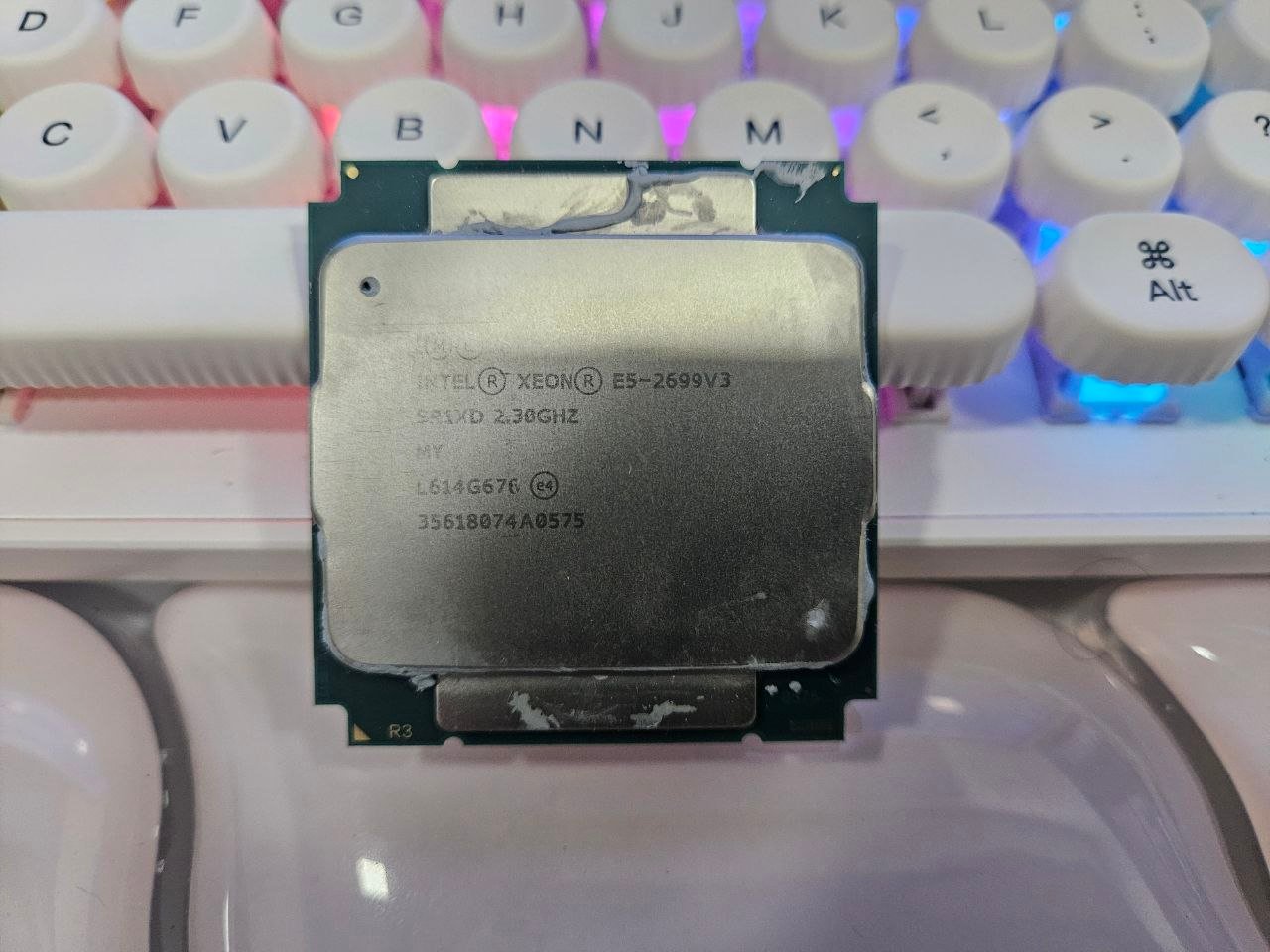
To find out which is the best option for this use, whether it’s the multithread beast or the high-clock single-thread model, we put the 2699V3 and the 1660V3 side by side, so we can discover Terminator’s favorite! Unfortunately, we don’t have any Xeon V4s to test, which would be interesting since there is a slight IPC gain due to the Broadwell architecture.
Motherboard:
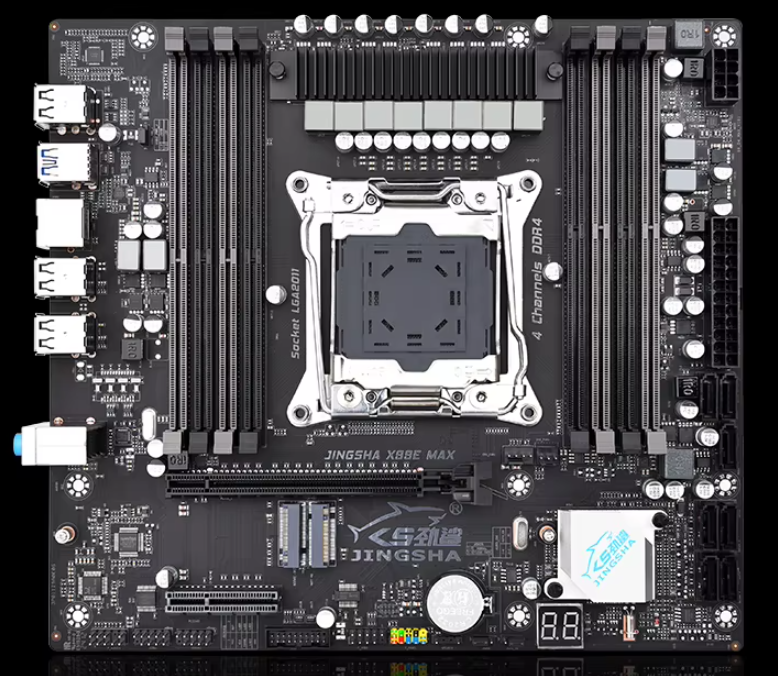
Because this is an old platform, new motherboards pretty much don’t exist except in the Chinese market, where there is an endless variety of X99 boards with different focuses and features. We actually have a review for one of the most popular models, the Qiyida X99-D4, but for this test, we are using the Jingsha X99-E Max. It is an mATX model featuring a C612 chipset, 8 memory slots, quad-channel support, two M.2 slots, and a PCI-E 16x 3.0 slot, which was purchased a few years ago for about R$300.
The most notable detail is that we are using jwagner’s graphical UEFI, developed by a Brazilian modder who created a UEFI with a graphical interface for these Chinese boards as long as they use the X99/C612 chipset. It includes support for ReBar, Turbo Unlock for Xeons, and overclocking for unlocked models, including the ability to go beyond 2400 MT/s on memory with functional adjustments for 2666 and 3200 MT/s, which might help us during our AI tests.
DRAM:
With the current memory crisis, this is where things get real! Normally, the recommendation would be to get as much of the best memory as possible; however, with current costs, the simple fact of having something to boot and use the PC without totally breaking the bank is already a huge win.
That being said, for these tests we used a massive haul of Samsung B-Die kits that have seen plenty of overclocking in their lives. Specifically, we used a 2x16GB Asgard DDR4-3600 kit, a 2x16GB G.Skill DDR4-3600 kit, a 2x8GB Zadak Spark 4133C19 kit, and a 2x8GB Asgard Bragi 4000C16 kit. And despite the mixed bag of components, all these memories use A2 and B2 PCBs and the same chips, which minimizes potential incompatibilities. Even with this old platform, it was possible to run DDR4-3200 easily with the 1660V3.
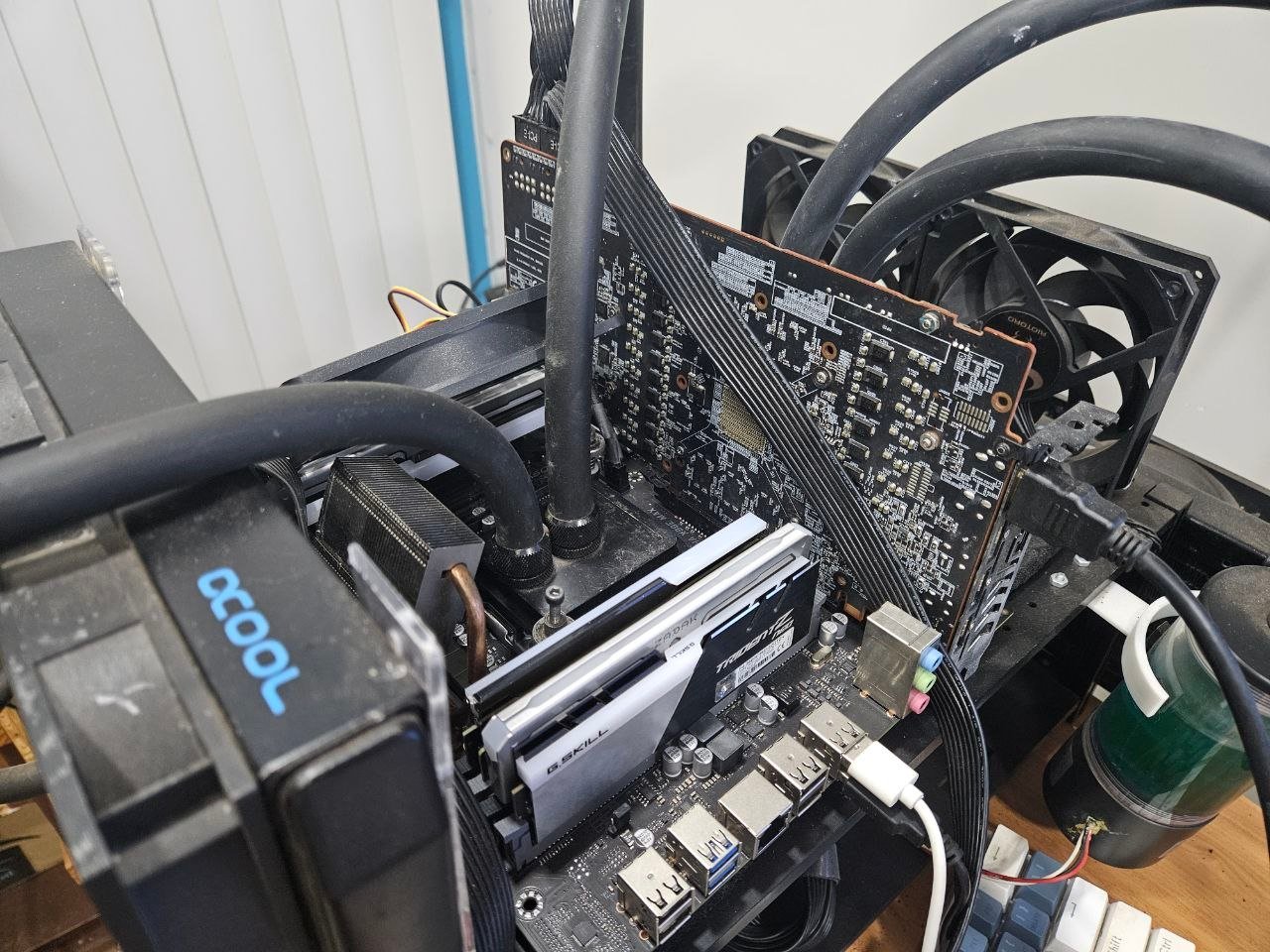
This mix totaled 96GB, which, as we’ll see in the tests, is kind of overkill for this platform, as 32GB would already be satisfactory for this. Another point is that these Samsung B-Die kits aren’t necessary, since they were never cheap and are now both expensive and relatively rare. You can use DDR4 ECC Reg without any major problems, even though it might end up limiting the overclocking.
GPU:
This is perhaps one of the most important parts of the build, since it’s usually the GPU that delivers sufficient performance and memory bandwidth to run inference at a satisfactory speed; however, VRAM capacity tends to be the biggest hurdle here.
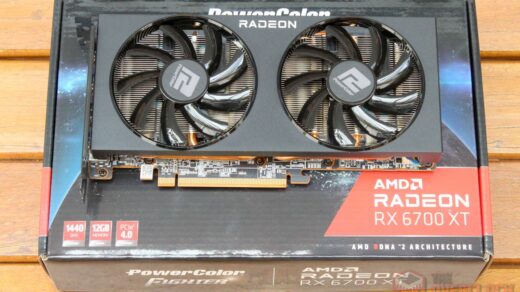
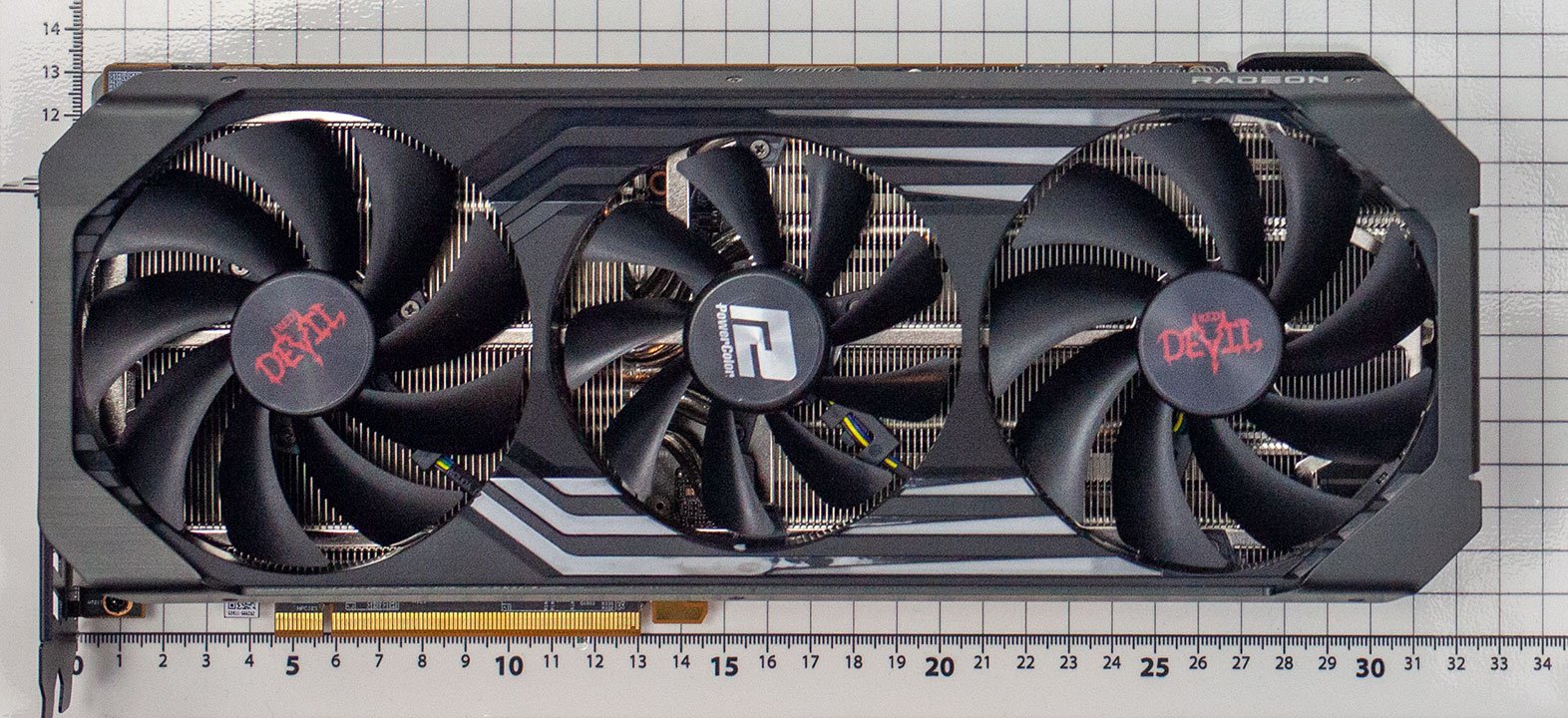
For this test, we pulled out the solid and not-so-old PowerColor RX 6800 XT Red Devil, which has been featured in numerous tests on our site. Even though it is still a capable card with 16GB of VRAM, the RDNA2 architecture starts to feel the strain when it comes to these AI workloads.
One detail that catches people off guard is the backend. While NVIDIA GPUs have CUDA, which is the absolute gold standard in this market, AMD uses ROCm/HIP, the equivalent libraries for Radeon/Instinct. The problem is that since they are far from being market leaders, the easiest option was to port applications written in CUDA, which is clearly a performance trade-off given that these GPUs have a different architecture than NVIDIA’s.
There is also the option of using a Vulkan backend, which tends to be consistently faster on Radeon cards than ROCm itself, plus it is easier to use since the Vulkan driver comes bundled with the graphics driver, so you don’t need any extra external libraries!
That said, anyone looking to build a server like this can use a different GPU. You just need to consider which model you plan to run and your target tokens per second, as in our specific case here, using a GPU with only 8GB of VRAM would mean pushing more layers to the CPU, which would slow down the overall speed.
Another possibility is using multiple GPUs by splitting the model across more than one card, resorting to pipeline parallelism or tensor parallelism. This would be a better option than offloading to the CPU, however, that would require a motherboard with multiple PCI-E slots, a more robust power supply, and so on, which is why it’s not the path we are taking here.
Software, Linux is the solution!
Although there are inference softwares for Windows, the choice here was to use Linux because of performance, which tends to be better on the ‘penguin’ OS, as well as ease of configuration and installation, since it is not uncommon that you will need to compile from source code, which is more trivial in Linux, and even the fact that we are dealing with free software.
Many people tend to have nightmares about Linux, but nowadays things are much simpler and the task of figuring out why something didn’t work almost always boils down to pasting the log or error into an AI and waiting for a response, so there is nothing to fear! :)”
For this specific build, the chosen distro was Xubuntu 26.04 Minimal because it is quite ‘lean’ and the XFCE graphical interface is very lightweight, with the following terminal steps to install llama.cpp and its dependencies:
- Update system and repository lists
sudo apt update && sudo apt upgrade -y
- Basic build tools and version control
sudo apt install -y build-essential cmake git wget curl ca-certificates
- Vulkan dependencies (graphics backend/ACPI)
sudo apt install -y mesa-vulkan-drivers libvulkan-dev vulkan-tools glslang-tools spirv-tools spirv-headers libshaderc-dev
- Support for HTTP/HTTPS requests (used by the server)
sudo apt install -y libcurl4-openssl-dev
- Clone the llama.cpp repository and compile with Vulkan support
git clone https://github.com/ggml-org/llama.cpp cd llama.cpp cmake -B build -DGGML_VULKAN=ON cmake –build build –config Release -j$(nproc)
With this done, llama.cpp should now be compiled and ready to use! The next step is downloading the models, and for this article, we are going to test two options:
- Qwen3.6-35B-A3B-MTP – Q4_K_M:
This Qwen model is the obvious choice for the hardware at our disposal, since it uses an MoE architecture that activates only 3 billion parameters per token, making it a sensible option for those who need to offload to system memory. Furthermore, it is considered remarkably capable for its size and is useful for tasks like agents or coding, which makes it much more than just a ‘toy.’
Even though we used the Q4_K_M version, the Q8_0 or Q8_K_XL would still run smoothly on a setup with 16GB of VRAM and 32GB of system RAM, albeit slightly slower than the numbers I will present later.
- GPT-OSS-120B
This might be a somewhat controversial choice, since it is an older model and there are already more capable options of similar size, but none of the modern alternatives activate only 5B parameters per token like the GPT-OSS-120B does. This makes it a good option to show what happens when offloading a large portion of the model to RAM, even with a decent GPU that has 16GB of VRAM in the system.
This is practically a demonstration of Amdahl’s Law in action, showing that it doesn’t help much to have a super-fast GPU with high bandwidth if, in practice, it only holds a very small portion of the memory used by the model. In this context, it is best that at least half of the model fits into the VRAM.
Starting Llama.cpp in the terminal, but what about the parameters?
Starting Llama.cpp is a task that is simple and complex at the same time. It’s simple because all you have to do is type a command in the terminal, but it’s complex because there are an infinite number of parameters that can make a HUGE difference in performance! Below are the commands with the parameters used and a brief explanation for each:
Xeon 2699V3:
./llama.cpp/build/bin/llama-cli -m ‘/home/user/IA_Models/Qwen3.6-35B-A3B-UD-Q4_K_M.gguf’ -c 170000 –spec-type draft-mtp –spec-draft-n-max 2 -t 18 -tb 18 -ngl 99 –n-cpu-moe 23 -b 2048 -ub 2048 -fa on -rea on
./llama.cpp/build/bin/llama-cli -m ‘/home/user/IA_Models/GPT-OSS-120B/gpt-oss-120b-Q4_K_M-00001-of-00002.gguf’ -c 131072 -t 18 -tb 18 -ngl 99 –n-cpu-moe 32 -b 2048 -ub 2048 -fa on -rea on
Xeon 1660V3:
./llama.cpp/build/bin/llama-cli -m ‘/home/user/IA_Models/Qwen3.6-35B-A3B-UD-Q4_K_M.gguf’ -c 170000 –spec-type draft-mtp –spec-draft-n-max 2 -t 8 -tb 8 -ngl 99 –n-cpu-moe 23 -b 2048 -ub 2048 -fa on -rea on
./llama.cpp/build/bin/llama-cli -m ‘/home/user/IA_Models/GPT-OSS-120B/gpt-oss-120b-Q4_K_M-00001-of-00002.gguf’ -c 131072 -t 8 -tb 8 -ngl 99 –n-cpu-moe 32 -b 2048 -ub 2048 -fa on -rea on
1. Model Parameters and Context
- -m … (–model): Defines the path to the GGUF model file that will be loaded.
- -c 170000 (–ctx-size): Specifies the maximum context size, as this limit varies from model to model. It is worth remembering that a larger context results in higher memory usage due to the KV Cache, so you should keep an eye on it.
2. GPU Acceleration and Memory Offloading (Vital for MoEs)
- –ngl 99 (–n-gpu-layers): Tells Llama.cpp to offload the model layers to the GPU. The value 99 is a shortcut to ensure that “all possible layers” are transferred to the video card.
- –n-cpu-moe 23: This is the real trick for MoE models that don’t fit entirely in VRAM, as this flag keeps the weights of the “cold experts” from the first N layers (the number set there) in system RAM and sends them to the GPU via PCIe as needed. This keeps the heavy attention core on the GPU while preventing Out of Memory errors. The smaller this value, the higher the VRAM usage and execution speed will be, however, you need to be careful not to run into OOM or slow things down by trying to use every bit of VRAM on a GPU connected to a monitor, since the desktop also uses some video memory.
3. Processing Acceleration: Batches and Micro-Batches
- -b 2048 (–batch-size): The number of tokens the system tries to gather in one processing round. It is the ‘plan’, the total amount of work it schedules for evaluation at once.
- -ub 2048 (–ubatch-size): How many of these tokens are actually sent to the hardware (GPU/CPU) for calculation at a time. It is the ‘physical execution’. In practice, a larger ub (greater than or equal to b) can make execution faster, but it uses more memory and might crash the system if you run out.
4. Processor Optimization (CPU)
- -t 18 (–threads): Defines the number of processor threads dedicated to the sequential generation phase of the response tokens. It is generally configured to match the number of physical cores on the machine.
- -tb 18 (–threads-batch): Defines the CPU threads used specifically during the batch processing of the initial prompt. HT/SMT has not proven useful here, and in fact, it actually made things worse, so you should use the core count rather than the thread count here.
5. Advanced Features: Speculative Decoding, Memory and Reasoning
- –spec-type draft-mtp: Enables ‘Speculative Decoding’ using Multi-Token Prediction (MTP). The magic behind this feature is that it attempts to predict the next tokens, shifting some of the memory bandwidth bottleneck toward compute, where there is typically plenty of headroom, speeding up token generation whenever it manages to get the prediction right.
- –spec-draft-n-max 2: Working alongside the previous parameter, this limits speculative draft guesses to 2 tokens per step. This limit prevents computational waste if the model starts getting the guesses wrong. It is generally worth testing values between 1 and 4.
- -fa on (–flash-attn on): Enables the Flash Attention implementation, which helps a lot with large contexts by reducing both memory usage and the computation time for each generated token.
- -rea on (–reasoning on): Enables the feature to show ‘thinking’ in the chat.
Even though we didn’t use these flags here, they might also be worth exploring:
- –cache-type-k/v + –cache-ram: Quantization and offloading of the KV Cache. When dealing with long contexts on limited VRAM, these are probably the parameters that make the biggest difference in real-world usage.
- –jinja: Template processing. This is necessary for models with structured reasoning to correctly format the ‘thinking’ block. An incorrect template can cause issues such as repetitive thinking or an excessive amount of tokens used during this stage.
- –no-mmap: Forces a full model load into RAM upon startup. This is useful for servers where you already know exactly what memory you will be using, as it bypasses the overhead caused by mmap page faults.
- –temp / –top-p / –min-p: Controls the randomness of the generation. These don’t affect speed, only the ‘tone’ of the responses. Generally, labs provide recommended values for these specific parameters.
Benchmarks
To benchmark this machine’s inference performance, we used the following tricks:
- The benchmark tool included in llama.cpp allows us to measure tokens per second (t/s) for both Prompt Processing (prefill) and Token Generation in a raw format, without resorting to features like MTP or Dspark. This is because those features would introduce variability into the results, which we want to avoid. It is worth clarifying that the bottleneck for the first is primarily processing, whereas the second is limited by memory bandwidth, meaning it is possible to have satisfactory token generation even with a slow prefill.
- We also used a combination of three consecutive prompts on an open server using the parameters mentioned above, but with MTP enabled for this specific test. The objective here is to gauge how the setup performs in a real-world scenario. The following prompts were executed sequentially within the same conversation, one after another:
- Create a Pong game using HTML and JS.
- Add sound effects to the game.
- Implement a high-score table.
Llama-Bench
Parameters:
Qwen3.6 35B A3B:
./llama.cpp/build/bin/llama-bench
-m ‘/home/terminator-xeon/IA_Models/Qwen3.6-35B-A3B-UD-Q4_K_M.gguf’
-t 18
-ngl 99
–n-cpu-moe 23
-b 2048 -ub 2048
-fa 1
-p 512 -p 8192 -p 65536 -p 128000
-n 128 -n 512 -n 1024
-r 3
GPT-OSS-120B:
./llama.cpp/build/bin/llama-bench
-m ‘/home/terminator-xeon/IA_Models/GPT-OSS-120B/gpt-oss-120b-Q4_K_M-00001-of-00002.gguf’
-t 18
-ngl 99
–n-cpu-moe 33
-b 2048 -ub 2048
-fa 1
-p 512 -p 8192 -p 65536 -p 128000
-n 128 -n 512 -n 1024
-r 3
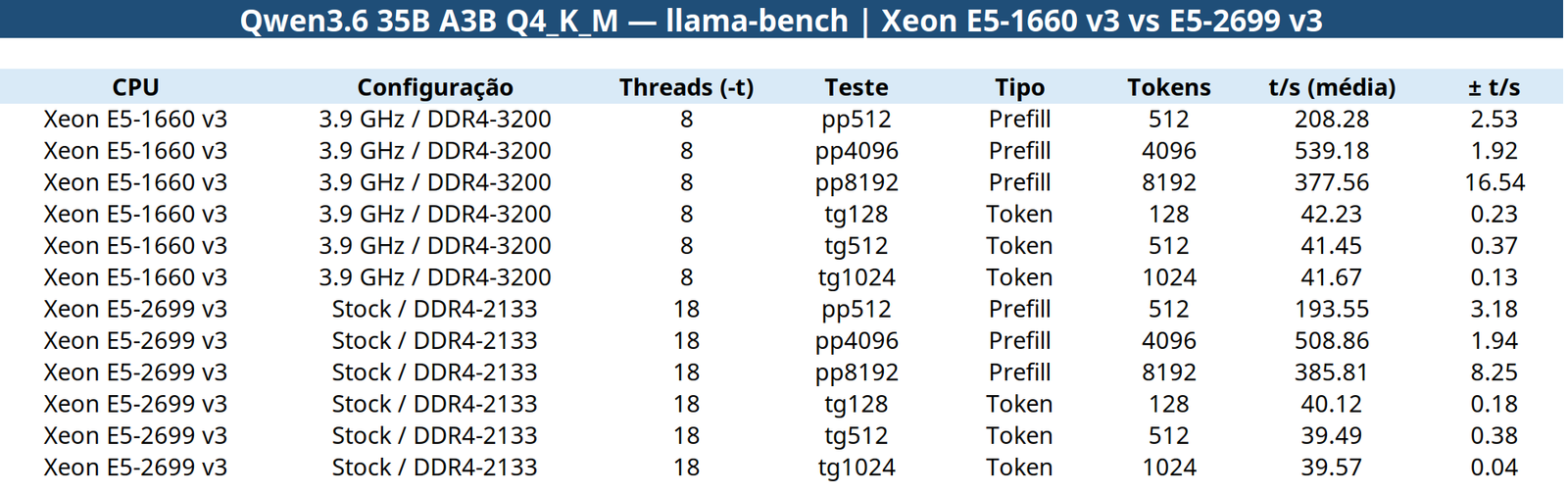
In this initial test, the significantly faster memory of the 1660 v3 managed to push it ahead of the 2699 v3 in most cases, although the margin was slim. For token generation, it was roughly 5% faster, while in prefill, it started with a 7.1% advantage on short prompts. This lead dropped to 5.6% at 4096 tokens, and the 2699 v3 managed to catch up at 8192.
In terms of raw numbers, they are high enough to guarantee a decent user experience, consistently hitting at least 40 t/s on both processors with prefill speeds remaining well within an acceptable range.
Pratical test – Qwen3.6 35B
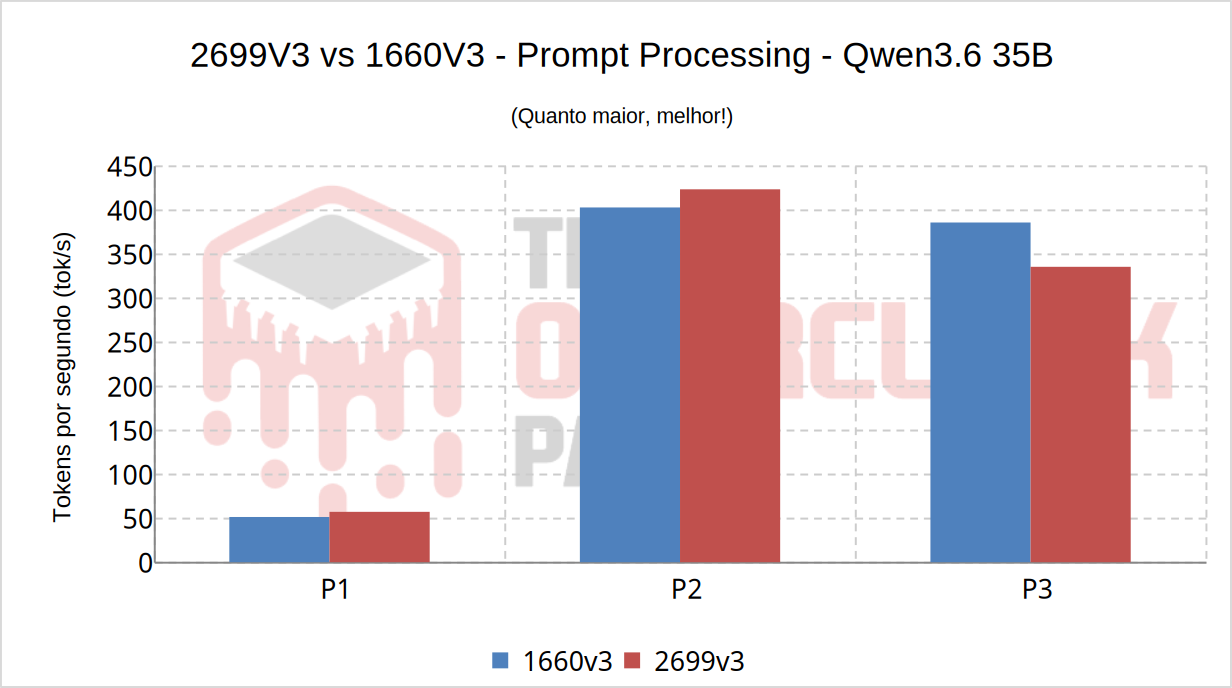
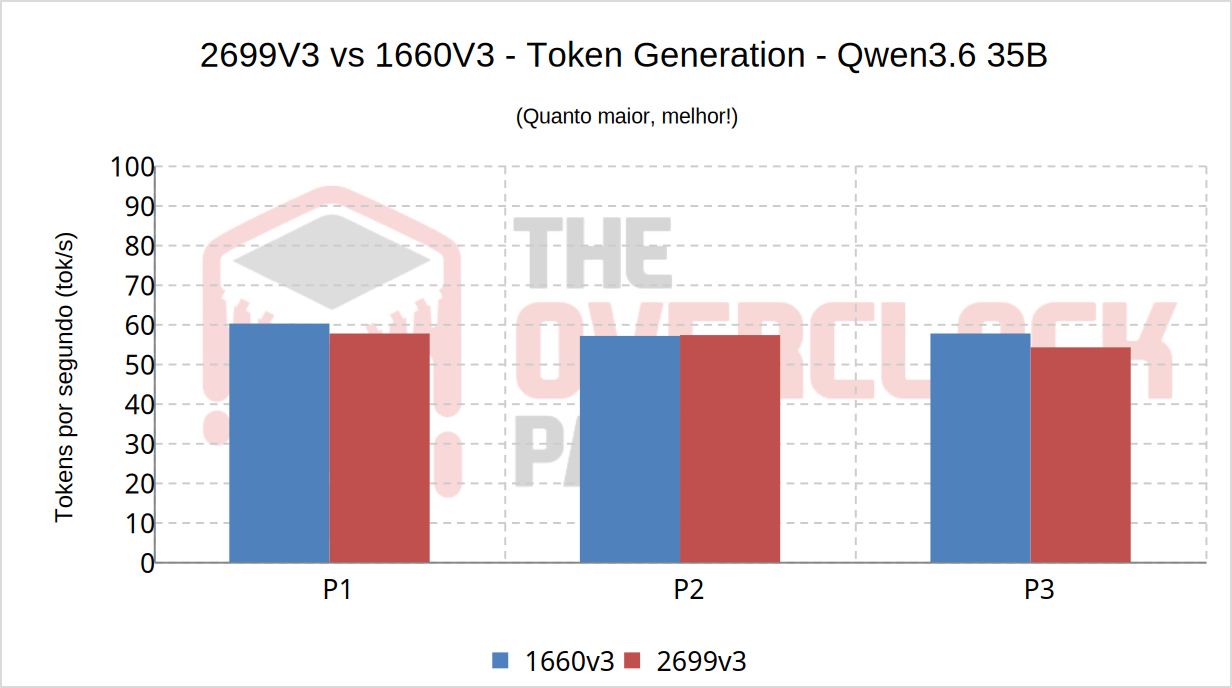
In practice, the results mirrored the ‘theoretical’ benchmark, with the 2699 v3 standing out in prefill, although curiously, it lost to the 1660 v3 by a reasonable margin after the third prompt.
As for token generation, with the help of tricks like MTP, it was possible to push performance from roughly 40 raw t/s to nearly 60 t/s, which is quite fast and completely comfortable for use as an agent.
Of course, this speed will likely drop with long contexts, but the point is that even if it were cut in half, which would be an exaggeration, it would still remain decent enough for practical use.
Pratical test – GPT-OSS-120B
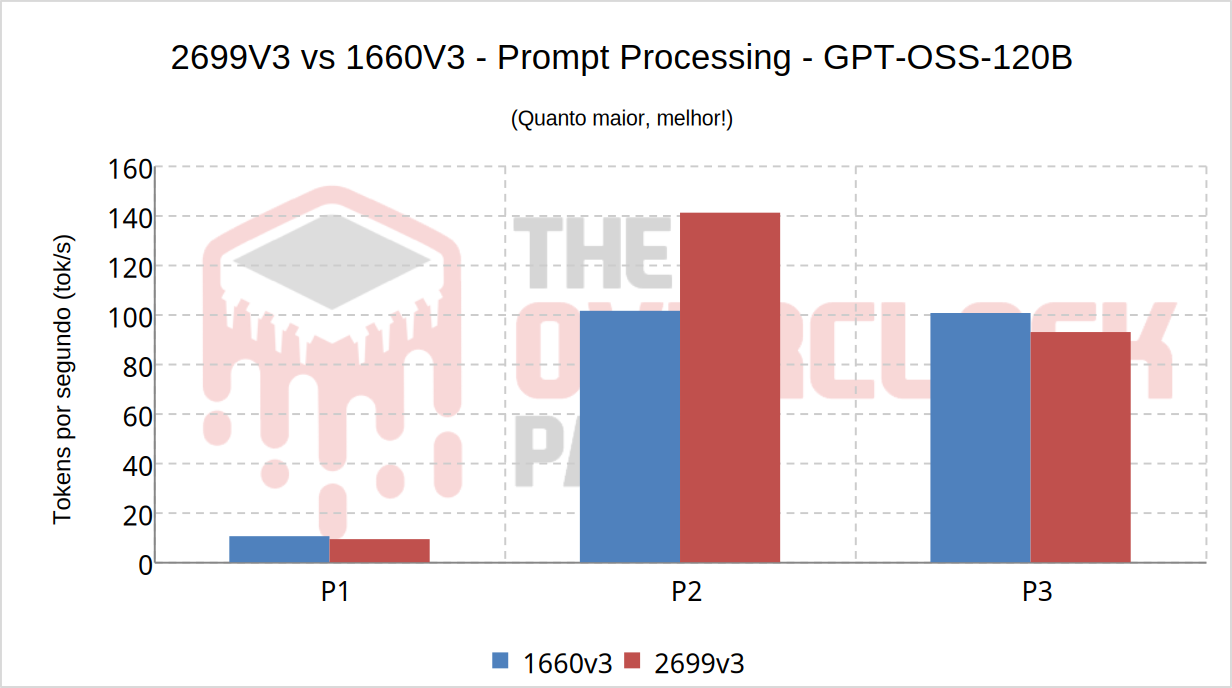
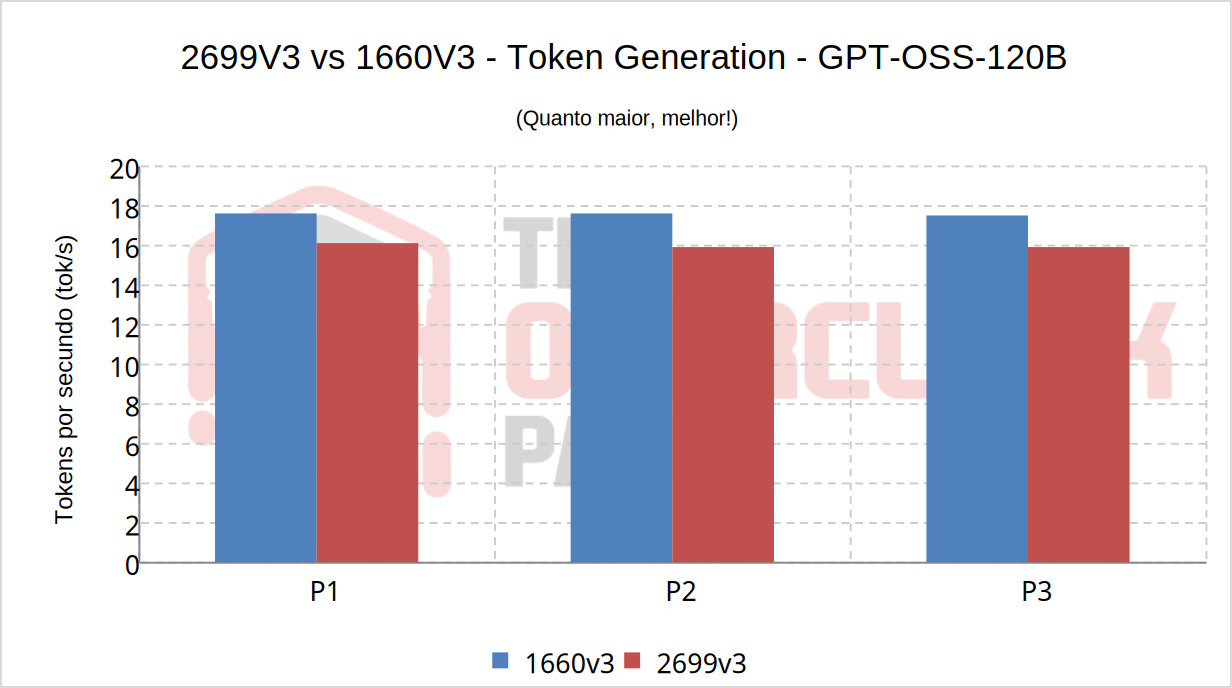
With the GPT-OSS-120B, which has significantly more parameters than the Qwen we tested, it becomes clear how much CPU and memory dominate over the GPU. As we explained earlier, this is a result of Amdahl’s Law, since more than half of the model is being pushed into RAM.
This scenario would repeat even if we used a much more modern and faster GPU, such as an RTX 5080. While the numbers might be slightly better, they would still fall far short of the graphics card’s potential. Just like with a gaming PC, an AI server has its own bottlenecks and needs to be well-balanced to achieve good results!
Power Consumption
One detail that can’t be overlooked is power consumption, and in an effort to make the machine as efficient as possible, we undervolted the GPU using the parameters listed below:
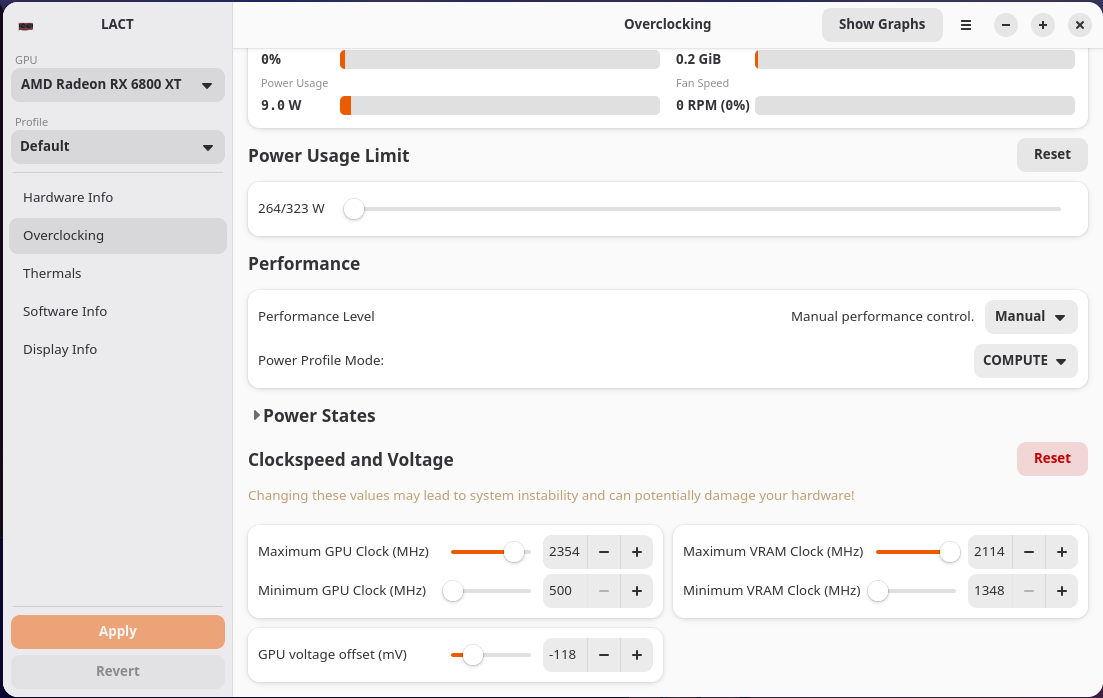
Thus, with the 1660 v3 at 3.9 GHz and 1.025V on the vcore, the machine’s total power consumption measured directly from the outlet during token generation was 310W, while it was only 285W for the 2699 v3.
While this might seem contradictory, it is easily explained because the 2699 v3’s 18 cores are far from full load. Furthermore, the memory subsystem is much more relaxed since it doesn’t support frequencies above 2133 MHz.
Conclusion
Based on everything presented, it’s clear that the X99 platform can still be a viable alternative for a local AI server, especially when the goal is to run MoE models with controlled offloading to RAM. The RX 6800 XT, despite being an RDNA2 card, still delivers comfortable performance on models like the Qwen3.6-35B-A3B-MTP in Q4_K_M quantization, especially with features like MTP enabled, although in this context, another modern GPU with 16GB of VRAM would also yield great results.
As for larger models, such as the GPT-OSS-120B, the bottleneck shifts heavily toward CPU, RAM, and memory bandwidth. In this scenario, the GPU ends up underutilized, and the user must accept lower speeds or invest in more VRAM and multiple GPUs.
Regarding the processors, the difference between the 1660 v3 and 2699 v3 was small, with the former being slightly faster at token generation. This is most likely due to the memory being overclocked to 3200 MT/s and having several hundred MHz more on the CPU cores, which isn’t possible on the 2699 v3.
The main point is that the 2699 v3 tends to be cheaper, consumes less power, and in the midst of the current memory crisis, it runs comfortably at just 2133 MT/s, especially since there is no possibility of going further. Logically, this makes it, or some other Xeon V4, the choice for a project like this.
In summary, local AI is possible without spending a fortune on hardware! Lastly, keep in mind that this is a series, and in the next article, I will cover a more modern system with a UMA architecture, which is unified memory that is still relatively affordable, given the necessary caveats regarding the current market situation. So, stay tuned!