

Review – Qiyida X99-D4 – An Affordable chinese Motherboard for Xeon with White PCB
 by Giancarlo C. Dalmedico "NoMS" April 21, 2024 · Motherboards / Reviews
In this review, we will analyze the Qiyida X99-D4, which is an entry-level Chinese LGA2011-3 motherboard designed for Xeon processors, in Micro-ATX format, and stands out with its white PCB, VRM with active cooling, and the C612 chipset, which theoretically offers support for overclocking on CPUs with unlocked multipliers. But is it a good motherboard? That’s what we’ll find out in this article! 🙂


Regarding the box, the front side only features the manufacturer’s name, an illustration reminiscent of RGB, and generic notes, while the back side contains only a table stating that the box contains a motherboard without specifying the model, along with several inscriptions in Mandarin.
As for the accessory kit that comes with the product, it includes SATA cables, a cooler adapter compatible with AMD, and the rear I/O shield.

The visual design of the motherboard is quite appealing, featuring white PCB and heatsinks, contrasting gray and black slots, and the large LGA2011-3 socket.
On the back side, you can see the metal backplate that supports the socket and also allows for the installation of heavy heatsinks without major complications.


When it comes to the PCB layout, Qiyida has done a decent job, with well-positioned SATA ports, an M.2 slot above the PCI-E slot, ensuring some airflow for the SSD, and power connectors located on the right edge of the PCB.
However, there are a few drawbacks to note. The motherboard only has two fan connectors, with only one of them being PWM-enabled. The M.2 slot is very close to the PCI-E slot, which could be a problem with some SSD heatsinks. Additionally, the use of jumpers to determine whether the installed unit in the M.2 slot is NVMe or NGFF can be a bit cumbersome.
It’s also important to clarify that Intel hasn’t produced new X99/C612 chipsets for several years, which means that reused chips are being used. In the case of our sample, this is quite visible, with the chip’s coloration indicating that it has experienced a lot of heat in its life, likely due to solder reworks.


Regarding storage, there is an M.2 slot that supports both NVMe and NGFF, which is connected to the CPU and therefore limited to PCI-E Gen 3. Additionally, there are four SATA ports available.

The audio codec used is the “veteran” Realtek ALC897, which is a familiar component and has been found in several of the B450 motherboards tested on this page. Although it has been installed on a separate layer of the PCB, the manufacturer chose to economize on filtering capacitors. Therefore, it’s reasonable not to expect top-notch quality from the integrated sound.
As for the LAN, it’s gigabit and utilizes the Realtek 8111H chip.

The rear I/O shield is quite basic and is in line with what is commonly found on most Chinese X99 motherboards. It includes two PS/2 ports, 4x USB 2.0 ports, 2x USB 3.0 ports, 1x LAN RJ45 port, and a sound panel with 3 jacks.

For the X99-D4, the manufacturer chose to include an aluminum heatsink with few fins, but with a small fan on the VRM that lacks PWM control. Although it proved to be quiet during operation, this was a somewhat lazy solution on Qiyida’s part. They could have easily addressed the issue with a better-designed passive heatsink with more fins.


Regarding the VRM, Qiyida chose to use a 6-phase (VCCIN) arrangement with the UP1649Q controller, which supports up to 4 phases. In this motherboard, it operates with only 3 phases, utilizing UP1961S phase doublers to achieve the 6 phases with independent control.
As for the MOSFETs, only one high-side and one low-side MOSFET per phase were used. Unfortunately, datasheets for these components could not be located, making it impossible to calculate the maximum supported current and heat dissipation. However, the presence of only one low-side MOSFET per phase suggests that efficiency may not be the strong point of this VRM under heavier loads.
Despite this, it’s worth noting that in this generation, Intel introduced FIVR (Fully Integrated Voltage Regulator), which are voltage regulators integrated into the CPU die, deriving power from each domain (e.g., Cores, Cache, VCCSA) from VCCIN supplied by the motherboard’s VRM.
Since VCCIN voltage is 1.8V, the current demand on the VRM is lower than it would be directly on VCORE, which typically runs around 1.2V. This can be demonstrated by Ohm’s Law, and the implication is that the VRM has a bit more margin than it would without FIVR, making it simpler, more compact, and cheaper.


The UEFI follows the standard of other Chinese X99 motherboards, lacking a graphical interface, mouse support, and similar features.
The version that comes with the motherboard allows for changing memory frequency, timings, and even supports ReBar. However, it doesn’t offer options for overclocking locked CPUs or voltage adjustments.
It’s important to mention that this motherboard can be crossflashed to the BIOS of the Huananzhi X99-F8, which includes overclocking settings. However, some features may stop working as a result, such as the integrated LAN. Nonetheless, it’s essential to clarify that if anyone chooses to do this, we do not take responsibility for any damages or potential losses. 😉


If anyone is interested, here is the link to the product listing on AliExpress, where you can find the specifications of the product. Using one of the links below helps support the website/channel to continue bringing content.
Vamos então às configurações utilizadas e resultados!
Hardware Used:
CPU: Intel Xeon E5-1660 V3
MOBO: Qiyida X99 D4
RAM: 2x16GB G.Skill Trident Z Neo 3600CL16 / 2x16GB Asgard Freyr T3 3600CL14
GPU: Powercolor RX 6800 XT Red Devil
PSU: Coolermaster MWE Gold 1250 V2 Full Modular (Obrigado Cooler Master!)
COOLER: 1STPlayer TS-360
STORAGE: SSD Crucial BX300 120GB
TEST EQUIPMENTS: ElmorLabs PMD-USB, ElmorLabs KTH-USB
Software: Windows 10 x64, 3DMark, Blender 4.0, Crystalmark 8.0.4 x64 HWiNFO 8.0.0, Geekbench 3.4.4, TM5 0.12 v3.
Testing Objectives:
The purpose of this article is to assess whether the Qiyida X99-D4 is indeed a good motherboard option. We’ll test how its VRM performs under load, memory compatibility, SATA and M.2 port performance, and the included heatsink performance.
Explanations regarding the adopted methodology or how the tests were conducted are included in the text accompanying the results below.
Performance of SATA and M.2 Ports:
To assess the performance of the M.2 and SATA ports, we used CrystalDiskMark 8.0.5. The goal here is to test whether the manufacturer has implemented these interfaces effectively, using SATA and NVMe drives capable of reaching the bandwidth limits offered by these buses.


As expected, the performance of the SATA ports was as anticipated. However, the M.2 slot is limited to the PCIe Gen 3 interface, which should cap sequential read/write speeds at around 3200 MB/s.
A positive note is that the NVMe drive is bootable on this motherboard, so it can be used as the primary storage without any issues.
ResizableBAR:
An interesting aspect of this motherboard is that despite being a relatively older platform, it supports Resizable BAR (Base Address Register), which can be implemented through a UEFI patch on almost any platform with PCIe Gen3 support, with some successful cases even with Gen2 CPUs.
This feature is important because it can bring performance gains in certain situations, and it is necessary for the functioning of Intel Arc GPUs. We were able to activate ReBar without any issues using the RX 6800 XT in our tests, although the gains were modest.
Memory Compatibility and Overclocking:
Originally, the Qiyida X99-D4 doesn’t support overclocking, either via BIOS or through XTU, with the only adjustable setting being frequency, limited to DDR4-2400 on Haswell-E (Xeons V3 and i7 5xxx) and some timings.
In our tests using a Xeon E5-1660 V3, we didn’t encounter compatibility issues with the memory we tested. This includes models equipped with Micron E-Die and Samsung B-Die chips in various configurations (single-rank or dual-rank) and PCBs (A0, A2, and B1), as well as different manufacturers such as G.Skill, Crucial, and Asgard. We also tested configurations with mixed capacity modules (16GB and 8GB).
VRM and Operating Temperature:
To monitor the VRM temperature, we installed a type K thermocouple with a sticky thermal pad on the back of the motherboard, just below one of the phases, as shown in the photo below.

We used Blender to render the “Classroom” demonstration for half an hour, using HWiNFO to monitor/record the system’s “vital signs” during the test. At the end, we noted both the ambient temperature and the thermocouple installed on the motherboard.
In order to test how the VRM would perform under heavier load, we installed a modified BIOS from the Huananzhi X99-F8, which allows the Qiyida X99-D4 to overclock the CPU. The frequency was adjusted to 4.2 GHz with 1.2V VCORE and 1.8V VCCIN, resulting in power consumption around 245W during rendering, measured directly from the EPS connector.
It’s worth noting that while this BIOS allows overclocking, it’s not fully compatible with this motherboard, with some features not working, such as the integrated LAN. Therefore, we don’t recommend using it for daily use.
It’s important to emphasize that these tests were conducted on an open bench, and the “ambient temperature” inside a case can be higher depending on the hardware used, the case’s ventilation design, and the room’s temperature where the computer is located.
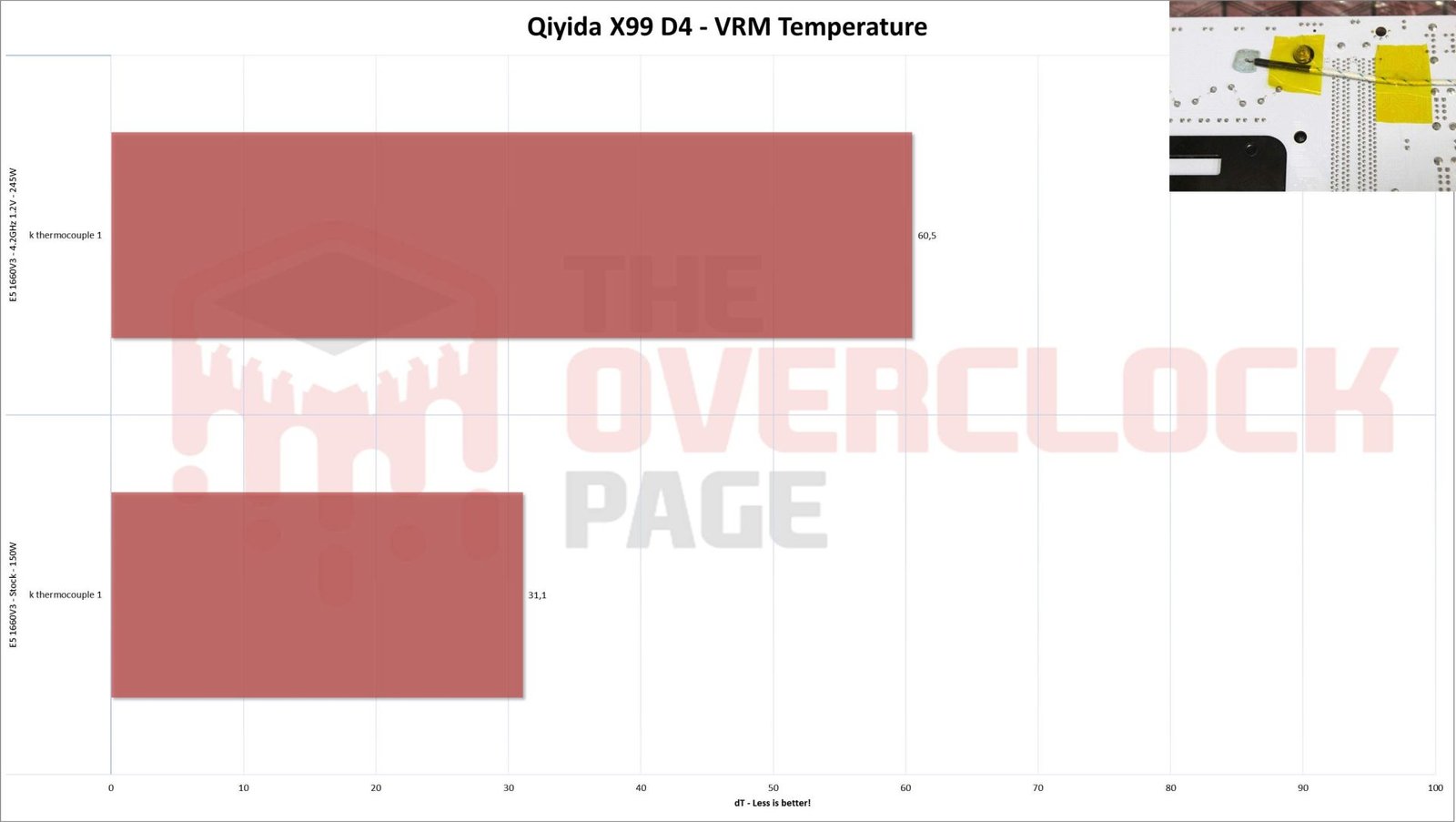
The Qiyida motherboard showed excellent results with the stock BIOS and CPU settings, with a delta of only 31.1 K, which should not be a problem even with an ambient temperature of a sweltering 40ºC.
However, with overclocking, which increased CPU consumption by about 100W compared to stock settings, the VRM temperature skyrocketed with a delta of 60.5 K. This would result in temperatures around 90ºC in a 30ºC environment, something the motherboard handled without issues. However, due to the lack of MOSFET datasheets, it’s not possible to guarantee that this is safe in the long run.
This confirms that the VRM heatsink is not particularly effective, as even though it performed well with the CPU at stock settings, it’s worth noting that the manufacturer had to include a fan to achieve that, and this was for a load of only 85A.
Conclusion:
From a layout, quality, and feature standpoint, Qiyida did a decent job with the X99-D4. Components are positioned reasonably well, with some caveats like the M.2 slot being too close to the PCI-E slot, potentially causing compatibility issues with certain NVMe heatsinks. The two fan headers and the somewhat Spartan rear I/O shield are also areas for improvement, but these are common traits in many Chinese LGA2011-3 motherboards.
Regarding the offered features, both LAN and audio are from Realtek, and their implementation is quite basic. Don’t expect top-notch quality in these areas.
The BIOS follows the standard of Chinese “X99” motherboards, lacking a graphical interface and being quite basic. However, it does support ReBar, bootable NVMe, and functional memory timing adjustments. Unfortunately, the decision was made to omit CPU overclocking support despite the C612 chipset’s capability in this regard.
In terms of memory compatibility and overclocking, all tested memories were stable at DDR4-2400, even with different chips and densities.
Regarding the VRM, the 6-phase arrangement had no issues with the stock E5-1660 V3. However, with a modified BIOS supporting overclocking, the temperature delta reached 60 K, which may not be safe without MOSFET datasheets to reference. The VRM heatsink design could have been better, perhaps with more fins, which might have allowed for passive cooling and better overclocking results.
The price of the Qiyida X99-D4 on AliExpress is around USD 43. Combined with affordable 8 or 10-core Xeons and similarly inexpensive DDR4 memory, this allows for a budget-friendly build with acceptable performance. However, keep in mind that these are largely reused components with no manufacturer support, which can be challenging in some cases.
In conclusion, the legendary “Chinese Little Dragon Xeon” combo can be a valid alternative for those on a tight budget who understand the limitations of what they’re getting. In this context, the Qiyida motherboard can be considered a valid option due to its low cost and relative quality.

Can you share a download link of the modified Huananzhi F8 BIOS? Thanks in advance!
There is: https://drive.google.com/file/d/1_KTYcJYjarQSkG69ywiV8RHGeUA3s_pT/view?usp=sharing
Just a reminder that I am not responsible for any damage to the hardware or losses! This BIOS is experimental, and although I haven’t encountered major issues beyond the LAN, it is good to have a CH341 on hand in case something doesn’t go as expected.
Hi, appreciated what you did for complete review on this mobo. I have the same mobo and same CPU as you had . I had no problem to run it at stock speed and would like to try the Huananzhi X99-F8 BiOS. Can you please provide the bois version and download link?
Thank you
There is: https://drive.google.com/file/d/1_KTYcJYjarQSkG69ywiV8RHGeUA3s_pT/view?usp=sharing
Just a reminder that I am not responsible for any damage to the hardware or losses! This BIOS is experimental, and although I haven’t encountered major issues beyond the LAN, it is good to have a CH341 on hand in case something doesn’t go as expected.
hi there, Can I use the xeon E5-4667V4 on this motherboard? regards
I am using E5-4680V4 with no issues.
I really appreciate the valuable content; I have exactly the same motherboard. However, I’m using a Xeon E5-2670 v3 processor, which seems quite powerful to me. But there appears to be some issue with the motherboard—when I insert one or two RAM sticks into the black slots, the motherboard doesn’t start at all (not even error beeps). It only starts with error signals when I insert two RAM sticks on one side into a black and gray slots, either on the left or right side. This might be a BIOS-related problem. If you know anything about it, please let me know.
Also, could you share a link to download the modified Huananzhi F8 BIOS? Thanks in advance!
Hello all, may I know if the sleep and hibernate functions work please?
And is the board use C612 chipset please?
Este post es algo viejo sin embargo buenos días, tengo la configuración del e5 2670 v3 16GB Ram DDR4 3200mhz
mi problema es que el sonido se oye realmente bajo, algo que bien comentaste no seria de buena calidad pero quería saber si no hay un driver o algo que pueda solucionar el problema! y si por favor puedan ayudarme
can i use tpm with this motherboard if yes can u explain where
Hola, tengo la qiyida con un e5-1650v3 y 2x8gb ddr4 a2666 marca netac en las ranuras grises y se renicia y no da imagen ni emite sonidos. Que será?