

The Definitive Guide to Ryzen 7 8700G Performance: Overclocking, Benchmarks, and Results
 by Giancarlo C. Dalmedico "NoMS" July 28, 2024 · CPUs / CPUs / Reviews / Reviews
As manufacturers invest in increasingly intelligent boost algorithms with limited room for manual tweaking, many claim that overclocking is a thing of the past. Historically, however, APUs have benefited significantly from this practice, with notable performance gains. But does this still hold true for the latest Ryzen 7 8700G? That’s what we will investigate in this article! 🙂
The Ryzen 8000G series marks the first APUs for the AM5 socket. Although the Ryzen 7000 series features integrated graphics, their primary focus is not performance but merely providing display output, a demand from the corporate market. In contrast, the new APUs follow in their predecessors’ footsteps, boasting a monolithic chip using Zen4, RDNA3 architectures, and in some cases, an XDNA1 NPU.
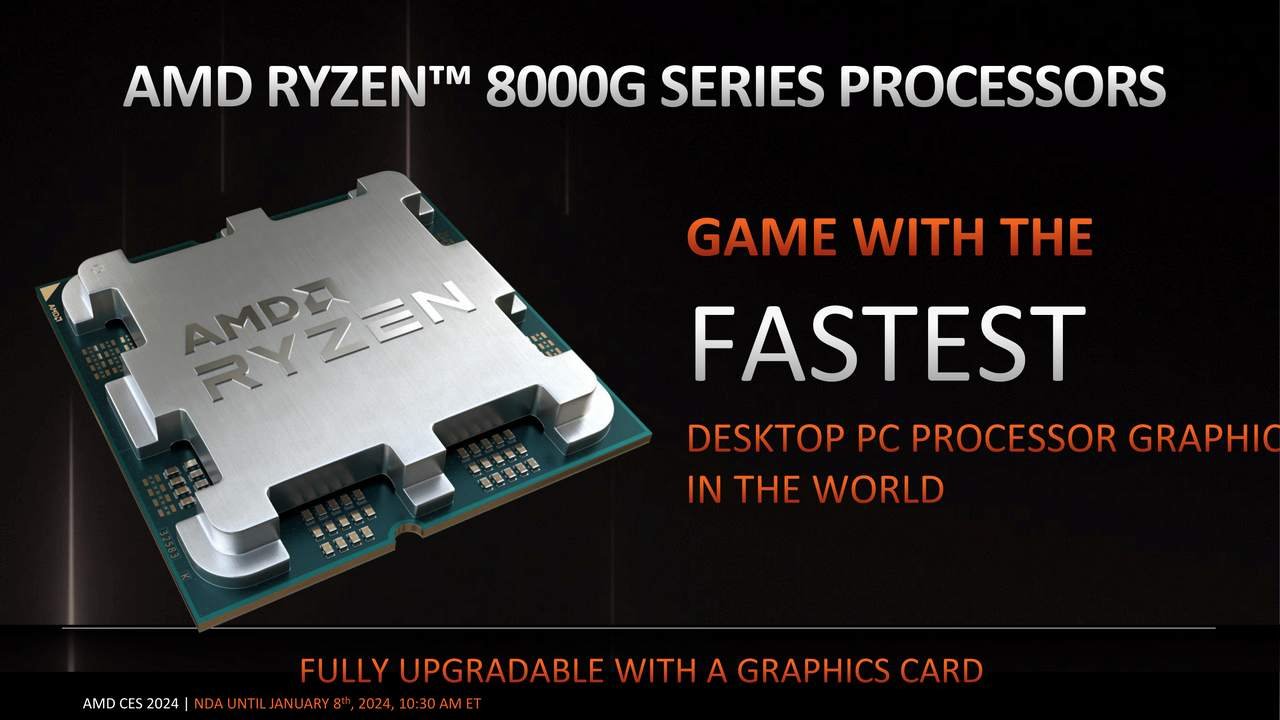
The Ryzen 8000G series includes six main models: Ryzen 7 8700G, Ryzen 5 8600G, Ryzen 5 8500G, Ryzen 3 8300G, and the new Ryzen 7 8700F and Ryzen 5 8400F. Interestingly, AMD chose to use two different dies, with the 8700G, 8700F, 8600G, and 8400F based on the Phoenix die, and the other two based on the Phoenix2 die.
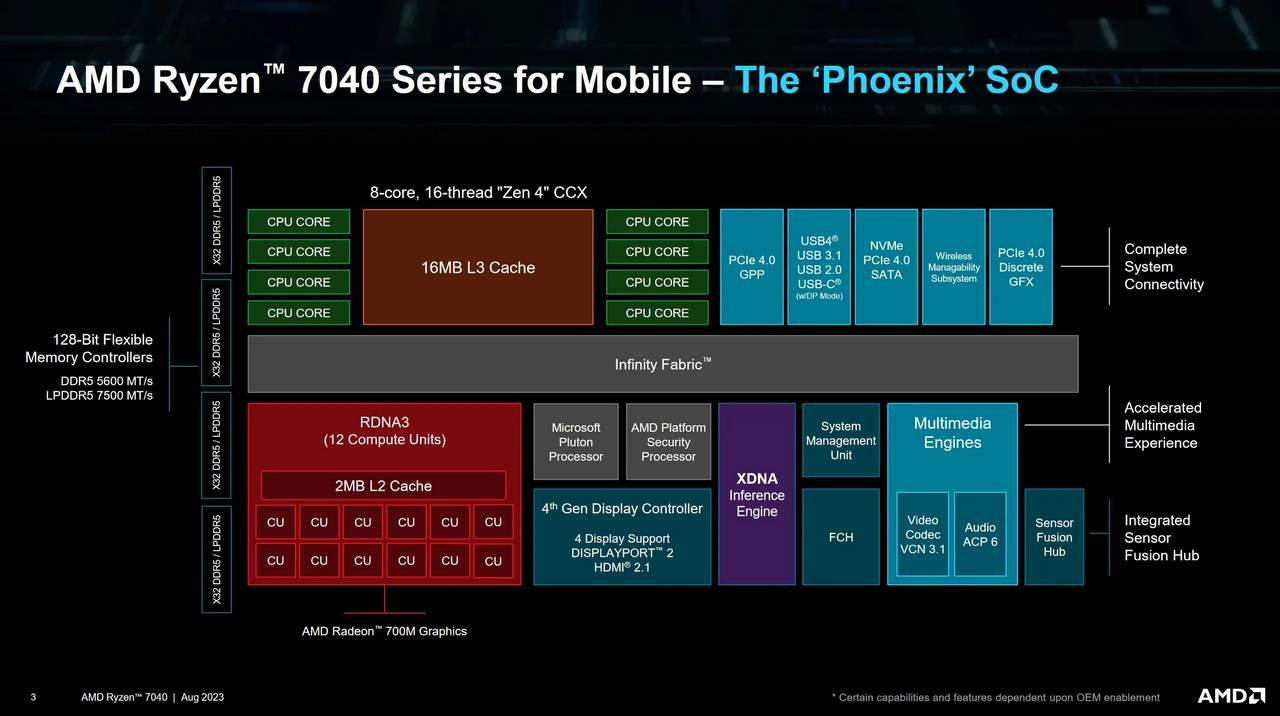
The difference between these dies is significant. The Phoenix die features eight Zen4 cores, a GPU with 12 Compute Units, an XDNA1 NPU, and 16 PCIe 4.0 lanes. In contrast, the Phoenix2 die includes only two Zen4 cores, four Zen4c cores, a GPU with just 4 Compute Units, and 10 PCIe 4.0 lanes.
Both Phoenix and Phoenix2 are manufactured by TSMC using the N4 process, which is actually a derivative of the N5 process. The N4 process incorporates optimizations in area and performance, and fewer manufacturing steps due to increased use of EUV (Extreme Ultraviolet Lithography), resulting in lower costs.

The Zen4 architecture has been with us since the release of the Ryzen 7000 ‘Raphael’ series, and in the APU, it retains the same capabilities but with optimizations for use in notebooks and other devices with reduced TDP and power consumption. These are necessary due to cooling system limitations or improve battery usage. Consequently, the maximum frequency of this variant is slightly lower, and the L3 cache is halved compared to Raphael. This trade-off keeps the die more compact, at 178 mm² for the Phoenix.
The integrated GPU uses the same RDNA3 architecture as the Radeon RX 7000 series. It supports HDMI and DP 2.1, up to four displays, Freesync, and Decode/Encode for H.264, H.265, and AV1.
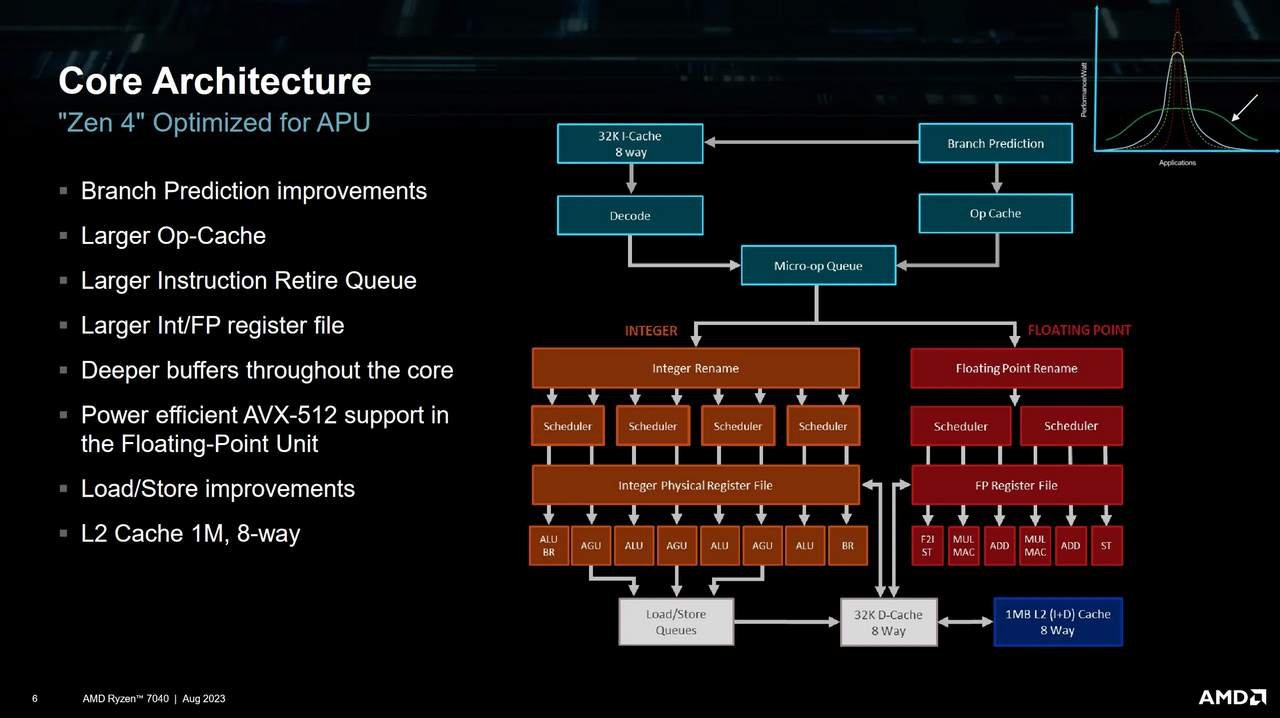
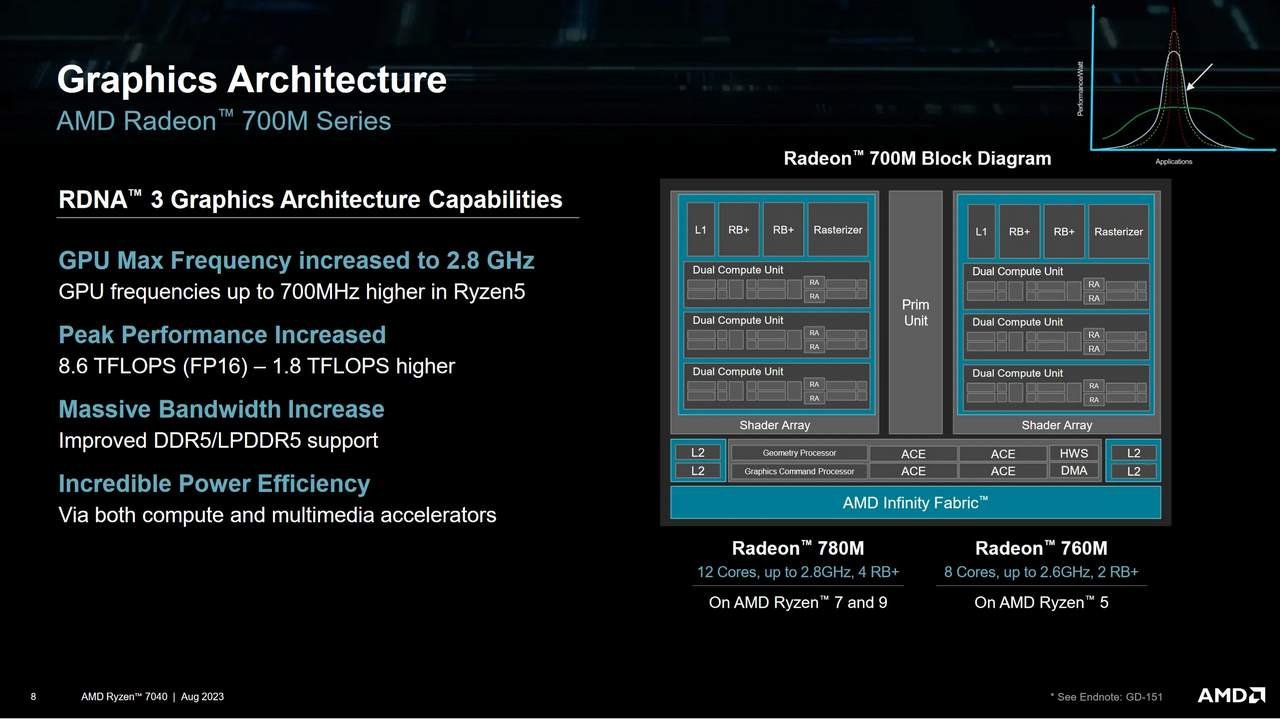
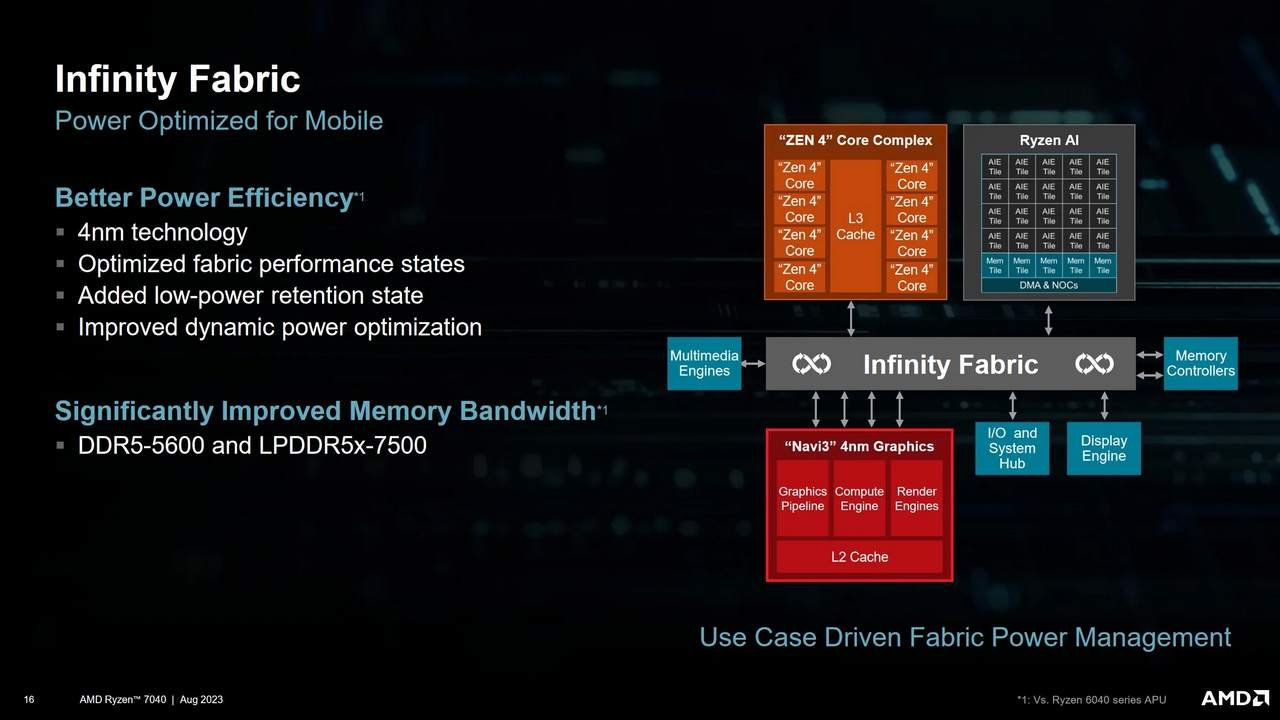
To ensure everything works seamlessly, a bus is needed to interconnect not only the CPU and GPU but also other components like memory controllers, SMU, and the ‘southbridge’. This is where Infinity Fabric comes in. It has been around since the first generation of Ryzen, or perhaps even earlier, as it is based on Hyper Transport. Infinity Fabric has been continuously improved for various uses since its introduction.
Configurations Used
CPU: AMD Ryzen 7 8700G (Thanks AMD!)
Motherboard: ASUS ROG Crosshair X670E Gene
RAM: 2x24GB Kingston Fury Renegade 6400CL32 1.4V – KF564C32R-24 (Thanks Kingston!)
GPU: Radeon 780M (Integrated Graphics)
PSU: Cooler Master MWE 1250 Gold V2 (Thanks Cooler Master!)
Cooler: 1STPlayer TS-360
SSD: Kingspec SATA 240 GB (Operating System) and Teamgroup T-Force Vulcan Z 1 TB (Thanks Teamgroup!)
Software: Windows 11 2405.13.0, Cinebench R24, PCMark 10 2.2.2701 x64 – System Benchmarks 1.1, UL Procyon 2.8.1207 64 – Ai Computer Vision Benchmark 1.5, Dolphin 5.0 Benchmark, Horizon: Zero Dawn 1.11.2, Starfield 1.12.30, Shadow of the Tomb Raider v1.0 build 492.0_64.
Test Objectives and Methodology
We’ll assess the performance of the Ryzen 7 8700G through a series of benchmarks, operating at different memory frequencies, FCLK, IGPU, and CPU settings. This will help us determine how well this APU scales with overclocking across these various parameters. Detailed information on our findings is included in the following sections.
Results
For the benchmarks, we used an updated version of Windows 11. The numbers were obtained with HPET disabled and through a minimum of three rounds for each test, discarding the best and worst results to ensure accuracy. It’s also important to note that the tests were conducted on an open test bench.
Benchmarks Used:
- Cinebench R24: A traditional rendering benchmark software utilizing the Cinema 4D engine. It scales across multiple threads and allows running tests in both single-thread and multi-thread modes.
- Dolphin 5.0 CPU Benchmark: This test uses the Dolphin emulator, which emulates GameCube/Wii systems, to process the luabench. It provides a sense of each processor’s performance in emulation. For standardization, the “for dummies” version 5.0 was used in the tests.
- PCMark10 Express: A general-purpose benchmark tool that tests various aspects of everyday computer use, such as application startup times, web browsing, video conferencing, and office applications. This tool is particularly interesting because it integrates real, open-source software to perform each function, making it more than just a synthetic benchmark. The “Express” preset was used for these tests, with details available in the provided document.
- UL Procyon: A suite of benchmarks designed for professional users across industries, businesses, government, and media. It includes benchmarks for Office suites, battery life, and Machine Learning.
- 3DMark Time Spy: A synthetic benchmark that uses DX12, compute shaders, SSSE3, and various other features common in modern games, making it a good comparative base for these scenarios. It is also used in overclocking rankings. The whitepaper for 3DMark Time Spy can be found here.
- Horizon: Zero Dawn: Tested at 1080p with the “Ultimate Quality” preset. The included benchmark tool and CapframeX were used to log the results.
- Shadow of the Tomb Raider: The integrated benchmark was used with settings at 1080p High + TAA.
- Starfield: Bethesda’s latest release, tested at 1080p with the “Medium” preset. The test was conducted following a standardized path from the entrance of Akila City to the central building, as shown in this video.
Regarding the memory configuration, the timings for each adjustment are shown below. For the DDR5-5200, DDR5-6000 1:1, and DDR5-6000 2:1 configurations, the EXPO profile with automatic timings was used. For the remaining configurations, starting from DDR5-6000 1:1 OT onwards, manual adjustments were made.


Results:




Percentage Charts:


Discussion of Results
UCLK (Memory Controller Frequency)
For the Ryzen 3000 and 5000 series, it was recommended to maintain a 1:1:1 ratio, referring to the same proportion between the frequencies of the Infinity Fabric (FCLK), Memory Controller (UCLK), and Memory (MEMCLK). This approach was preferred because it improved performance by avoiding latency penalties associated with synchronizing the circuits.
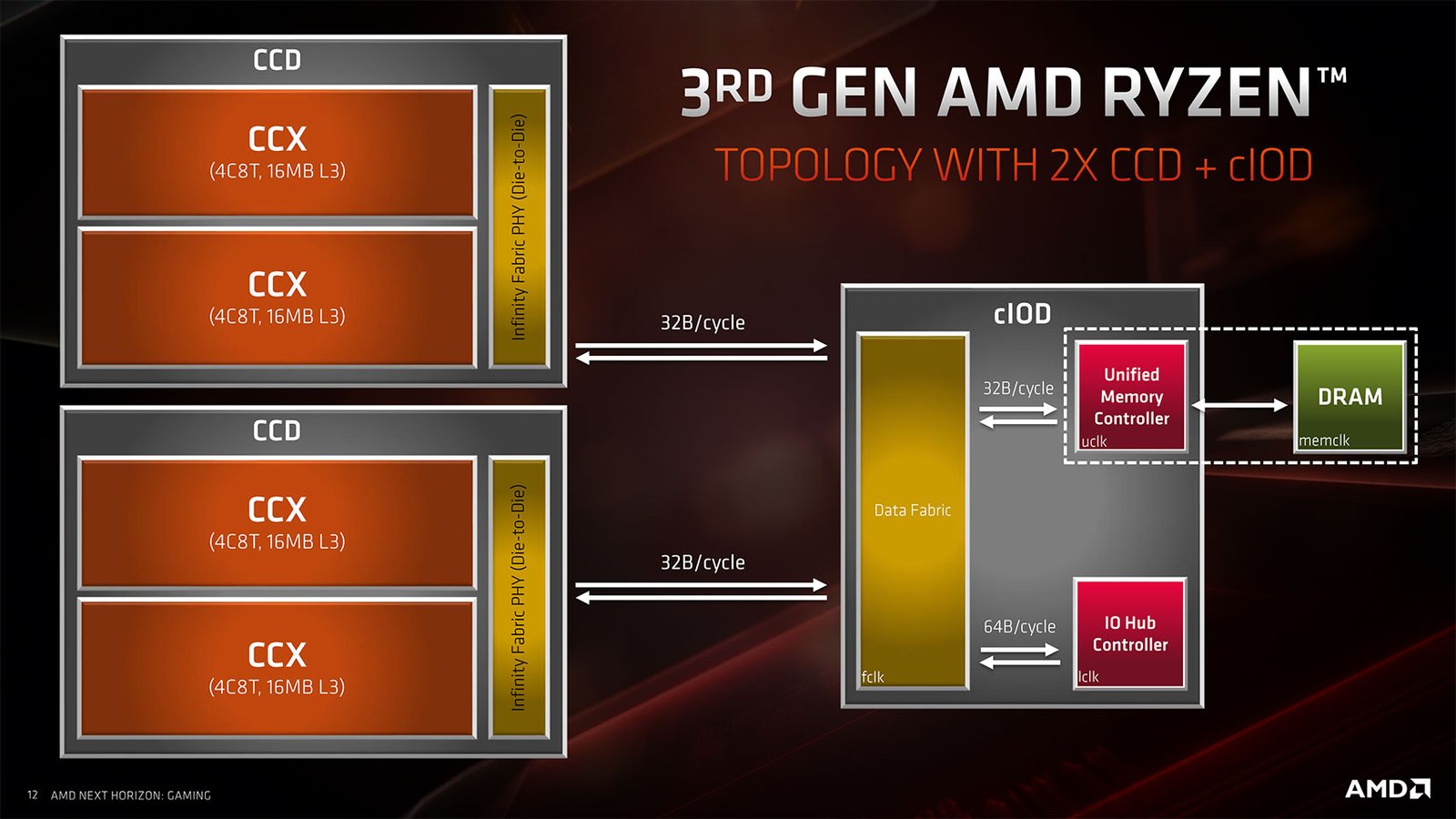
With the Ryzen 7000 series and the adoption of DDR5 memory, this changed. Maintaining synchronization was no longer feasible due to the new memory technology. As a result, FCLK became asynchronous, while the 1:1 ratio (MEMCLK) remained viable up to around DDR5-6400. Beyond that point, the 2:1 ratio (MEMCLK) came into play.
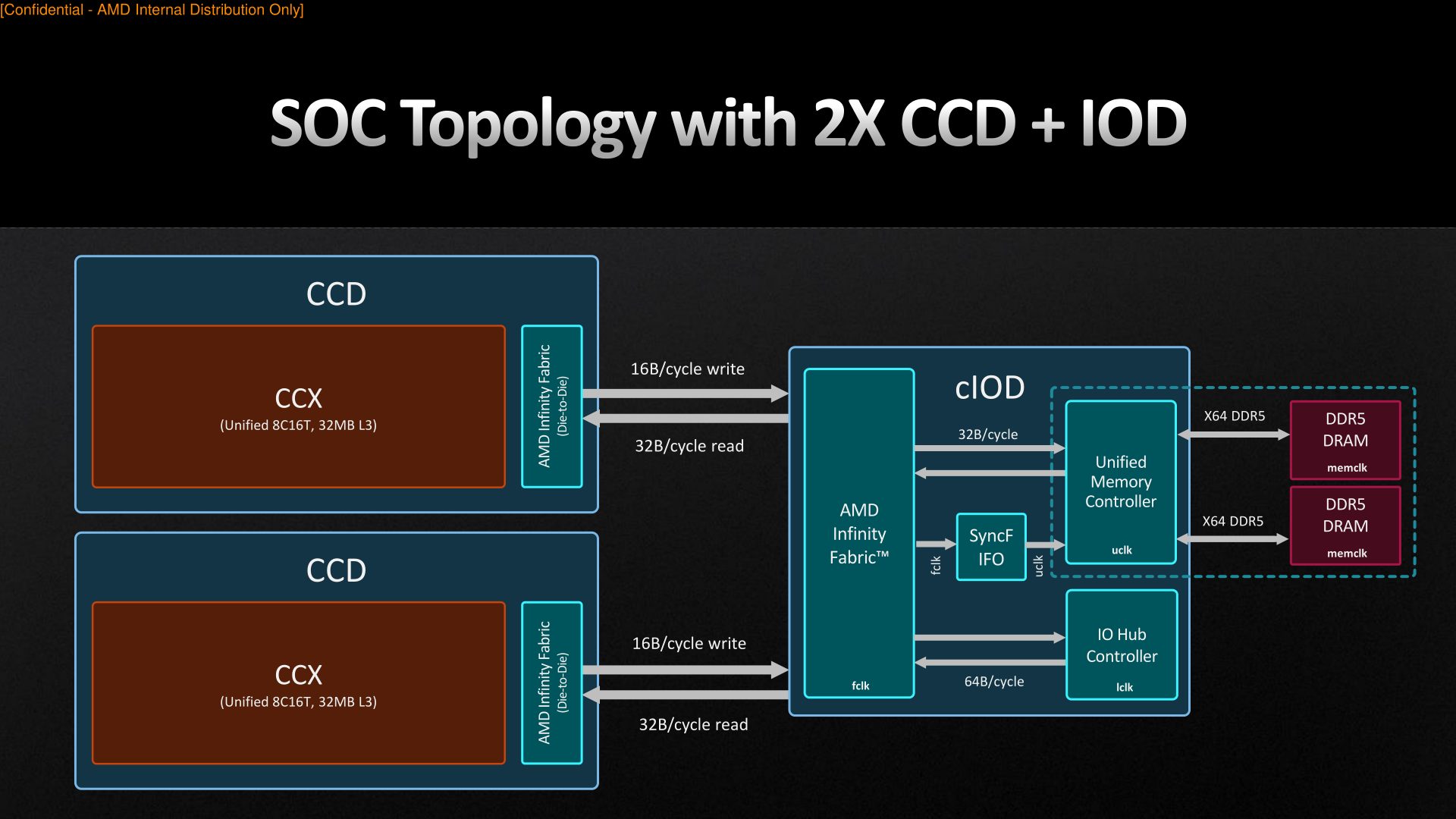
With the Ryzen 8000G APUs, despite their monolithic design, the situation remains similar to the Ryzen 7000 series. The 1:1 ratio still has comparable limits, up to around DDR5-6400, while the 2:1 ratio allows for higher frequencies, which is important with integrated graphics in play.
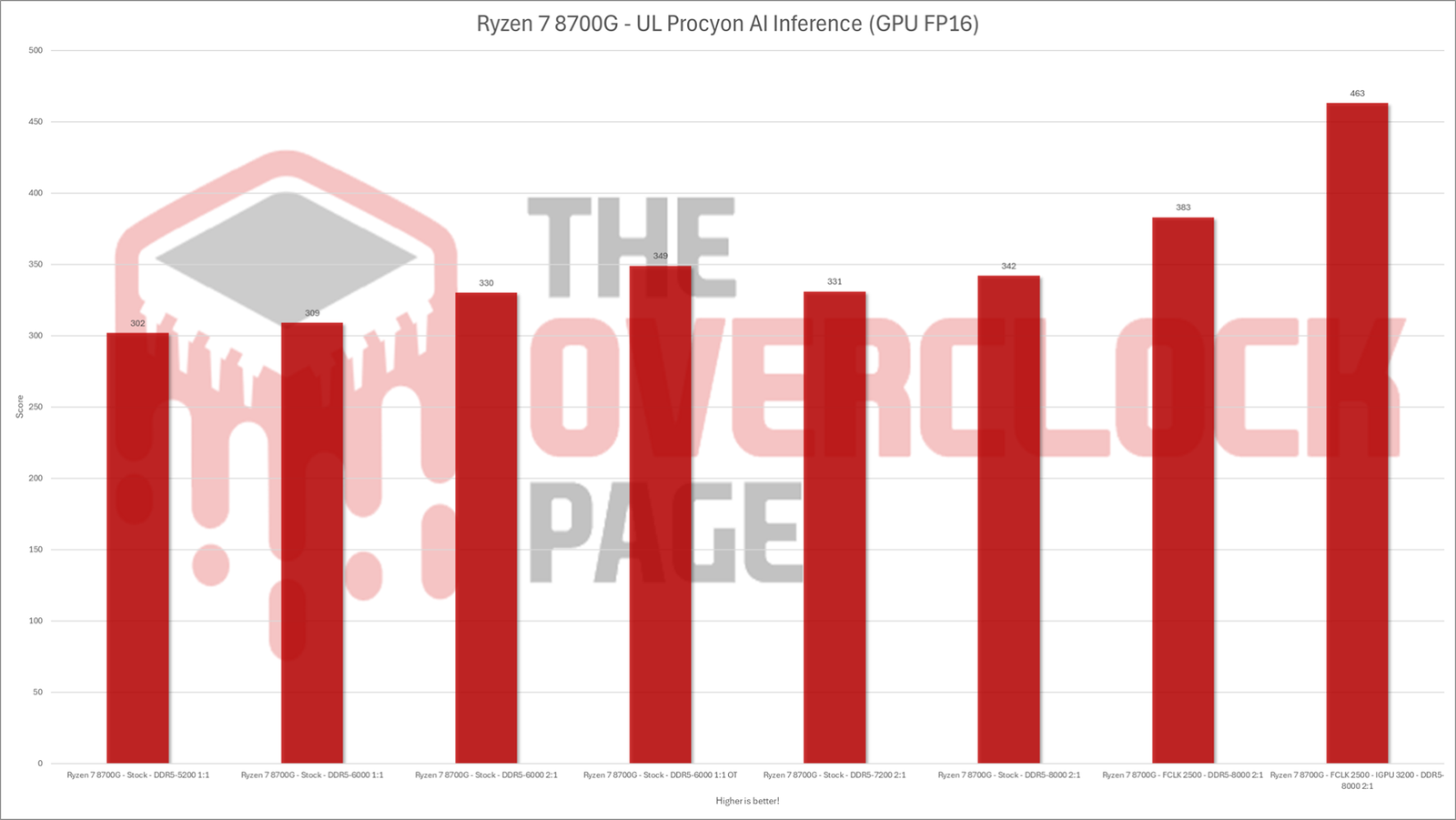
Overall, the difference between the 1:1 and 2:1 ratios with DDR5-6000 EXPO was quite small. It was virtually negligible in 2D benchmarks and no greater than 3% in games. The UL Procyon benchmark showed the largest discrepancy, being the only one to perform better with the 2:1 ratio.
MEMCLK (Memory Frequency)
Historically, integrated graphics have been the most affected by memory bandwidth bottlenecks, whether due to contention for access to main RAM with CPU cores, limitations in bus width, or the memory standard itself. This is also true for the Ryzen 8000G series, although DDR5 and even LPDDR5X have significantly improved the situation.
AMD’s own diagrams show that integrated graphics have the most “links” with Infinity Fabric, highlighting their greater bandwidth requirements. But can this small Navi3 GPU with 12 Compute Units benefit from memory overclocking? The answer is a resounding YES! 🙂
Increasing the memory frequency from the standard DDR5-5200 to DDR5-6000 resulted in performance gains ranging from 7% to 13% in games, and up to 20% with optimized timings on DDR5-6000, where parameters like tRFC and tREFI were among the key contributors to these improvements.
Further increasing the memory frequency continued to show almost linear gains, approaching 40% with DDR5-8000. While this might impress some, achieving such results with the Ryzen 8000 series is relatively straightforward with memory equipped with Hynix A-Die chips, including relatively affordable Chinese models, and practically any AM5 motherboard that supports memory overclocking.
On the other hand, the benefits of using faster memory in 2D benchmarks were minimal, with gains not exceeding 5% compared to the standard DDR5-5200.
FCLK (Infinity Fabric Frequency)
In nearly all the previous slides, the importance of Infinity Fabric was evident, as it is the bus responsible for connecting all the functional blocks of the CPU, including the memory controller. Increasing the frequency of this bus results in lower latency and greater available memory bandwidth.
When maintaining memory at 8000 MT/s but with an FCLK of 2500 MHz, compared to the DDR5-5200 default, we observed performance gains of around 50% in SOTTR, 3DMark Time Spy, and Horizon: Zero Dawn, with Starfield maintaining the same 40% improvement as the standard FCLK.
In 2D benchmarks, there was a modest improvement compared to DDR5-8000 with the standard FCLK, but it remained within the 5% range compared to factory settings.
GFXCLK (Integrated Graphics Frequency)
The integrated graphics in the Ryzen 8000 series share the same RDNA3 architecture as the Radeon RX 7000 series. According to AMD’s slides, this architecture is designed to exceed 3 GHz, a frequency often achievable in dedicated GPUs. Achieving this performance usually requires good cooling and tools like the Elmorlabs EVC2 to adjust the GPU’s voltage and power limits.
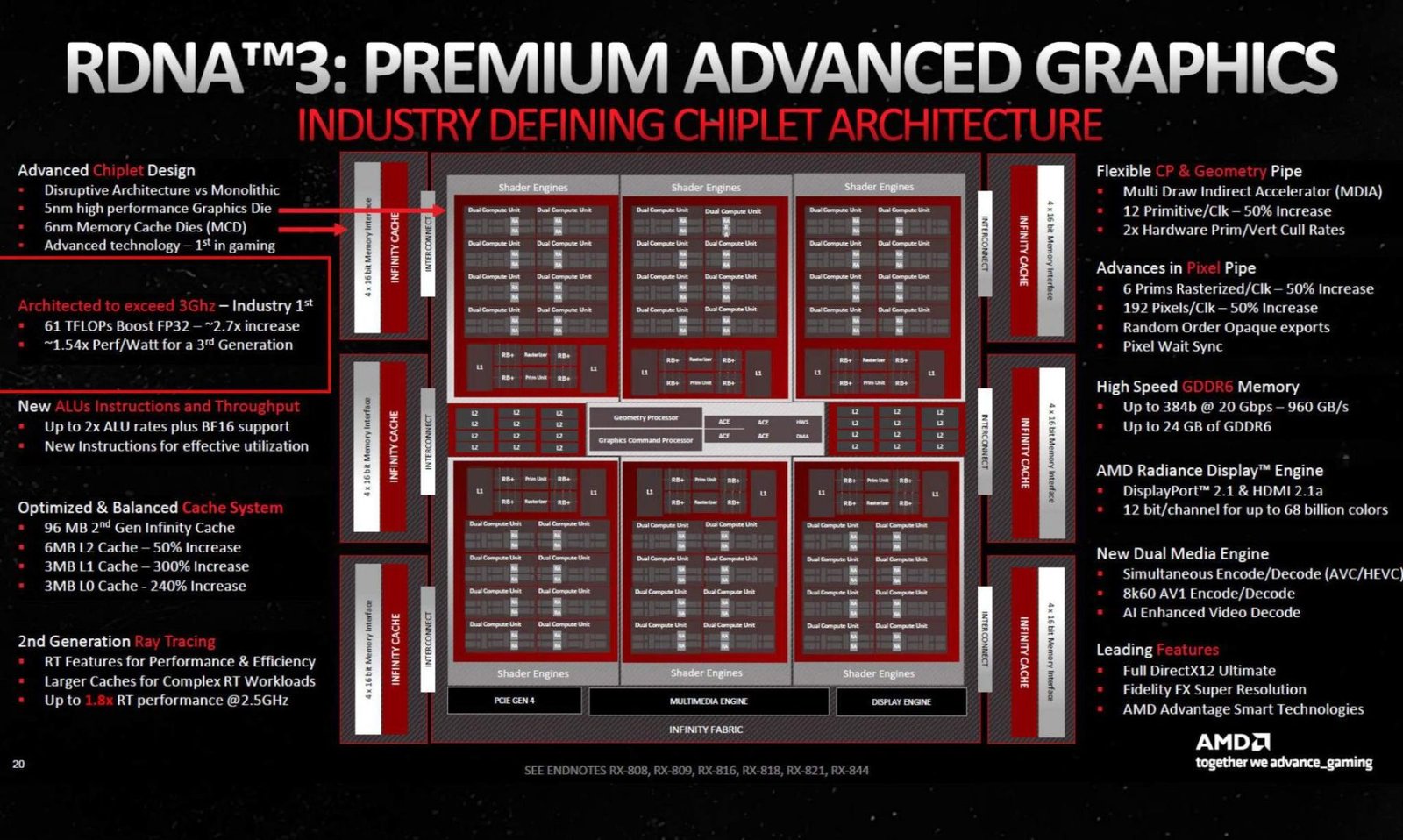
Ryzen CPUs don’t have the same complexities as dedicated GPUs; you just need to adjust the integrated graphics voltage via BIOS to unlock overclocking potential. The standard frequency for the Radeon 780M is 2.9 GHz, and if AMD’s slide for RDNA3 architecture is accurate, there’s room for overclocking.
In our Ryzen 7 8700G sample, we achieved 3.2 GHz with 1.25V on the integrated graphics. Combined with DDR5-8000 memory and FCLK 2500, this resulted in performance gains ranging from 54% to 70% compared to factory settings. In other words, this represents a significant generational leap achieved solely through overclocking!
CORECLK (Core Frequency)
One thing that has become clear is that the CPU cores performance benefits little from a faster memory subsystem, with modest gains of up to 5% likely due to reduced memory latency. However, there is still the possibility of overclocking the eight Zen4 cores!
According to specifications, the maximum boost for the Ryzen 7 8700G is 5.1 GHz, and in practice, it reaches 5.15 GHz. This boost is rarely achieved across all cores in full-load applications like Cinebench or Blender. Nevertheless, manual adjustments allowed us to reach 5.1 GHz on all cores with a voltage of 1.29V.
This adjustment resulted in gains of 5% to 11% in 2D benchmarks, with a slight decrease in the single-thread test of Cinebench R24, which felt the 50 MHz reduction from the maximum boost. On the other hand, there was no difference in gaming performance, which was expected since the integrated graphics, not the CPU, are the limiting factor for gaming performance.
Bonus – Overclock to the Max!
As mentioned earlier, everything we’ve observed so far can be replicated with most Ryzen 7 8700G samples, using relatively inexpensive Chinese memory, though attention must be paid to the chips used, and a more basic motherboard like the ASRock B650M-HDV/M.2. However, for these tests, we used a Crosshair X670E Gene, which can go well beyond DDR5-8000. With that said, why not test if performance continues to scale beyond this mark?

To test this, we pushed the memory to DDR5-9200 CL42, a milestone that’s not easy to achieve with integrated graphics. Not every motherboard can reach this level, and for this Ryzen 7 8700G sample, it wasn’t a stable adjustment. Therefore, for practical purposes, DDR5-8000 is much more realistic. So, this test is conducted purely for scientific purposes! 🙂
Performance continued to scale, with gains in games ranging from 64% to 82% compared to factory specifications. This is impressive, considering that there are samples capable of achieving this stability, all with ambient cooling alone!
Conclusion
Based on the tests and results presented, the following conclusions can be drawn:
- FCLK and Memory Ratios: Unlike the Ryzen 3000 and 5000 series, the Ryzen 7000 series and beyond use an asynchronous FCLK. The 1:1 and 2:1 ratios now refer to the MEMCLKproportions. In our tests, these ratios had minimal impact on performance, yielding only about a 3% difference in games. The 1:1 mode is only beneficial with relatively slower memory, below 6400 MT/s, and even then, the performance gains are modest.
- Memory Tuning: Fine-tuning memory settings yielded more noticeable gains compared to using just the EXPO profile at the same frequency. Parameters like tREFI and tRFC, which are often left relaxed with automatic profiles, can make a significant difference.
- Memory Overclocking: Overclocking memory with well-tuned timings resulted in nearly linear performance scaling, with gains reaching up to 40% with DDR5-8000 compared to factory settings. This is quite significant. However, 2D benchmarks showed only minimal benefits, with gains barely reaching 4%.
- FCLK Adjustment: Increasing the FCLK to 2500 MHz while maintaining 8000 MT/s memory was beneficial for most games, resulting in nearly a 50% performance gain compared to standard specifications. However, not all titles benefited, with Starfield showing no gains.
- Integrated GPU Overclocking: The integrated GPU, based on RDNA3 architecture, has the potential to exceed its factory frequency of 2.9 GHz. We achieved up to 3.2 GHz, with gaming performance gains ranging from 54% to 70%, equivalent to a generational leap in dedicated GPUs.
- CPU Overclocking: Overclocking the CPU to 5.1 GHz across all eight Zen4 cores provided the most substantial gains in 2D applications, reaching up to 11%, though it had no impact on gaming performance.
In summary, for these APUs, overclocking remains more relevant than ever, delivering substantial performance improvements. These gains can be achieved even with more basic motherboards and affordable memory, though it’s important to verify memory chips before purchasing and ensure adequate ambient cooling.

it is possible to disable 4 cores to give more overclocking room to GPU and the other 4 cores?
Just found your page. Good work! These 4nm APUs are not covered well enough on other sites 😉 Too bad they still have the “same” memory controller as the 7000 + 9000 CPUs. I was hoping AMD would “test” new stuff in this monolythic APUs… Maybe with the next AM5 refresh!