Review – 2x16GB Teamgroup T-Create DDR5 7200CL34 – A 16-Gbit Hynix A-Die kit for content creators?
 by Giancarlo C. Dalmedico "NoMS" November 23, 2025 · DRAM Memory / Memórias / Recomendado / Reviews / Reviews / Selos
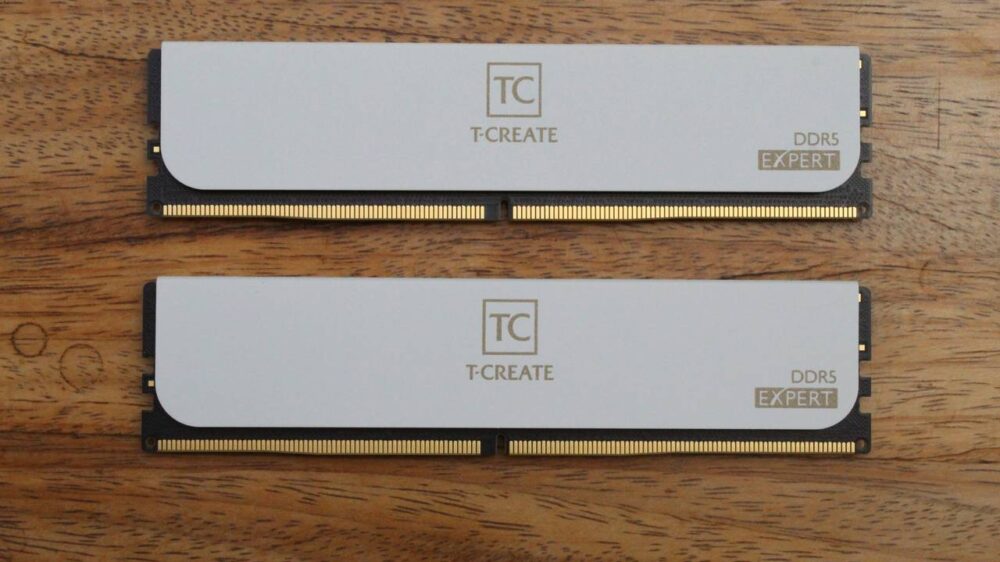
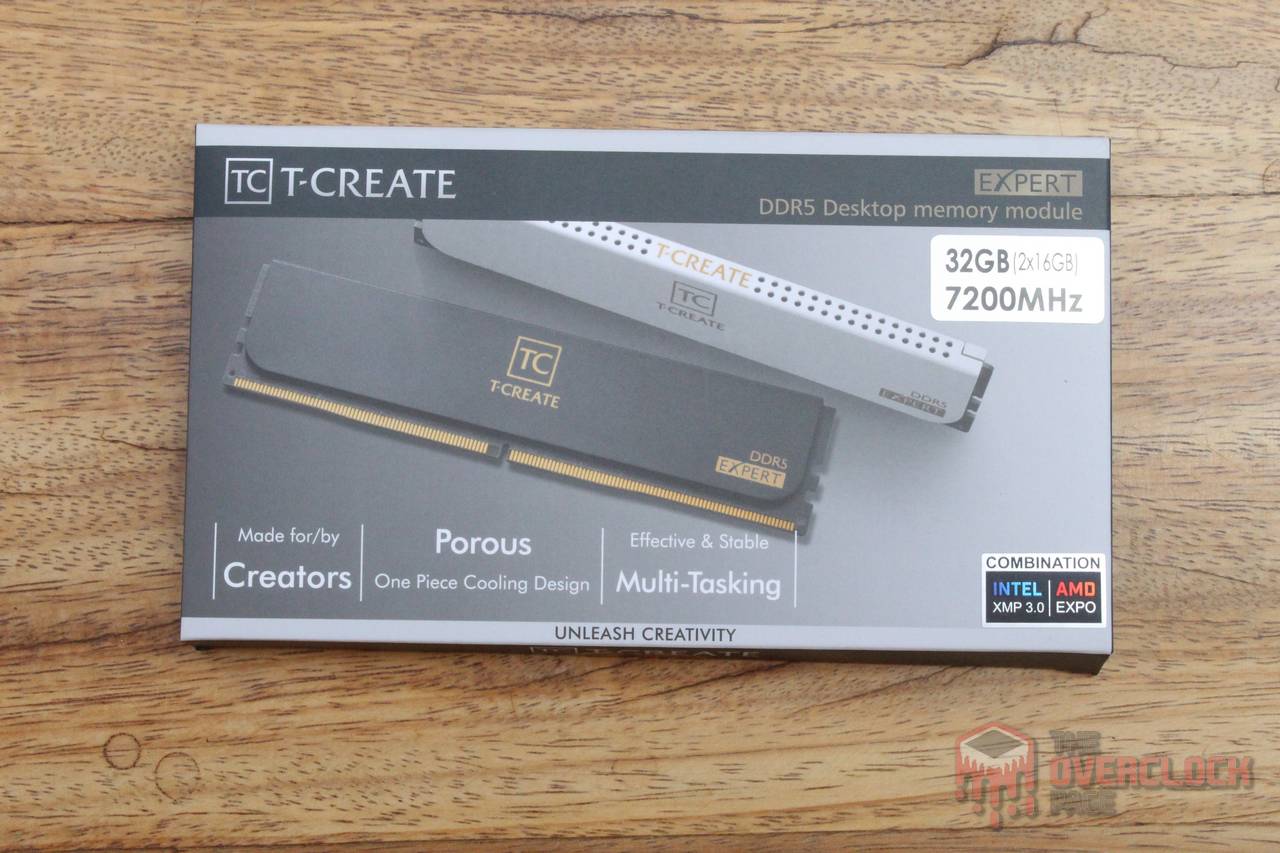
In this review, we will take a look at a DDR5 memory kit from Teamgroup, part of the T-Create DDR5 series. This line offers models ranging from 5600 to 7600 MT/s and can be purchased in kits from 32 GB up to 128 GB. The product in this analysis is made of two 16 GB modules, forming a 7200 MT/s kit with 34-42-42-84 timings and an operating voltage of 1.4 V.
The memory sticks come in a rectangular box. On the front, there is an illustration of the product. On the back, there is a description of the memory’s features in several languages. The code for this model is CTCWD532G7200HC34ADC01.


The heatsink used in this series is a low-profile aluminum model with a textured surface that feels a bit like ceramic. This kit is offered in two colors, black or white, and it does not include RGB lighting.


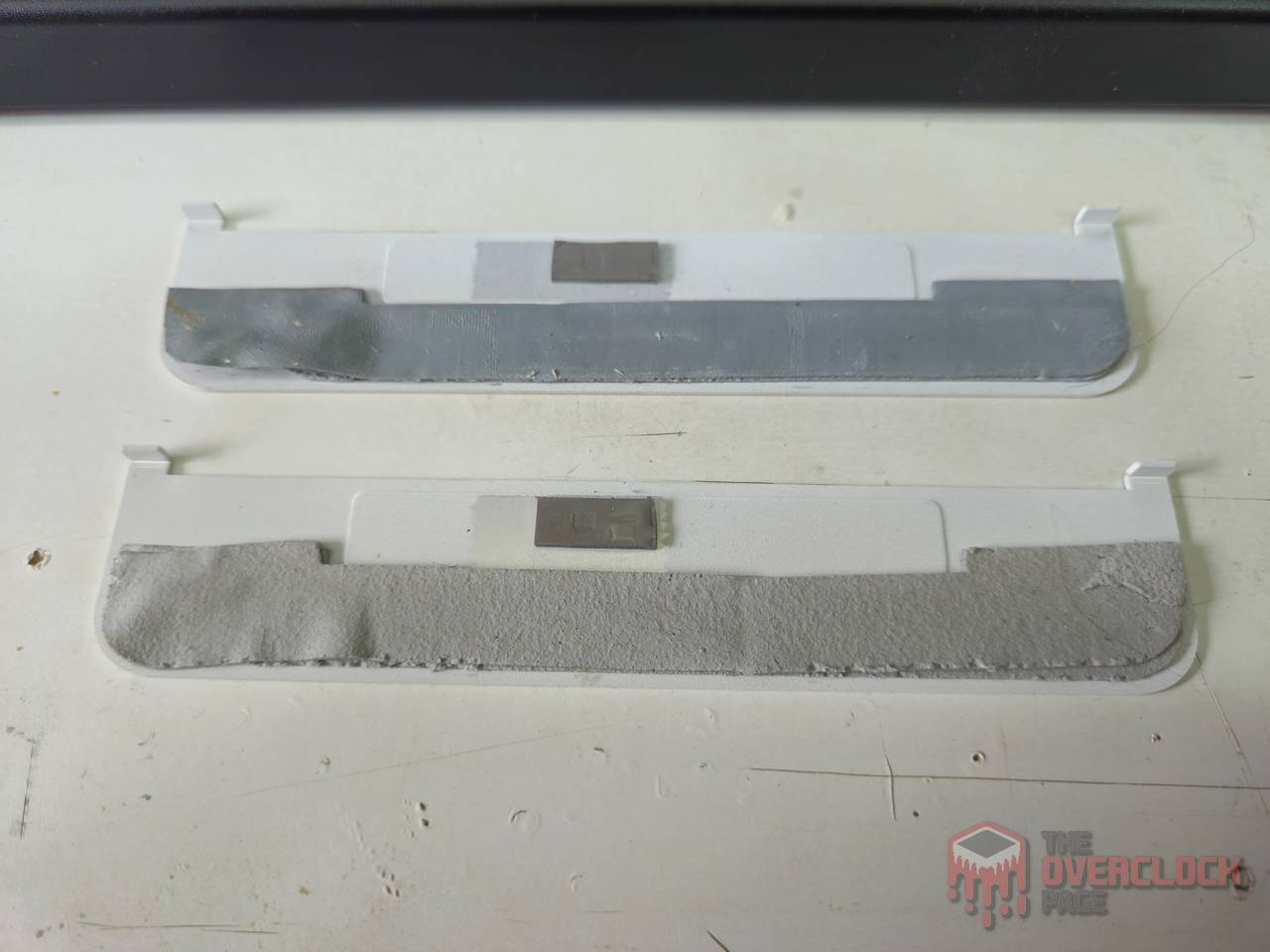
The heatsinks can be removed after light heating, using a plastic spatula to open a small gap at the top of the module. In this case, the metal plate is simply glued to the chips through the thermal interface, which, as you can see in the photos below, is quite thick. This most likely does not help much with heat transfer. We will see in the tests how the modules performed in overclocking and stress testing.
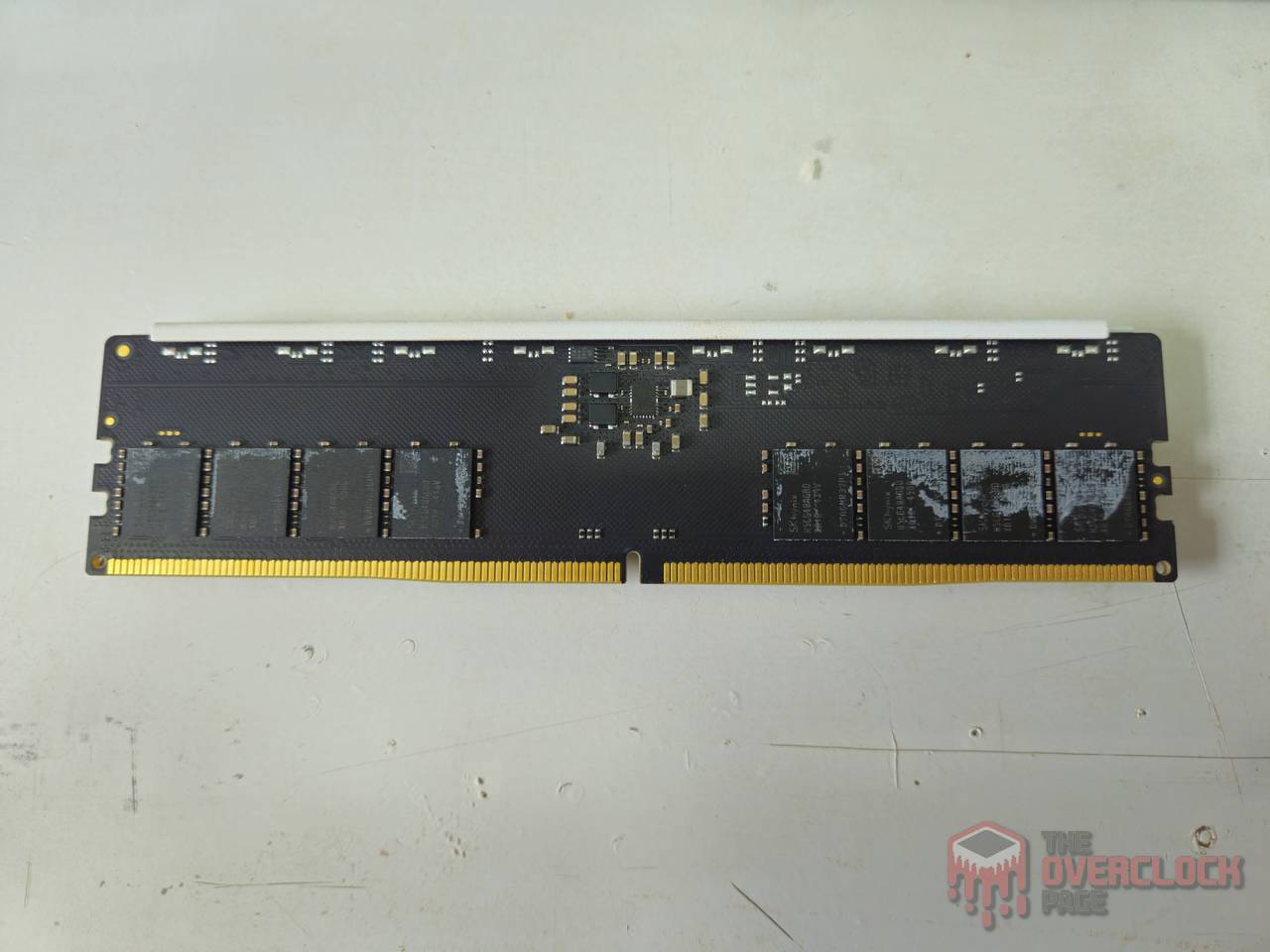
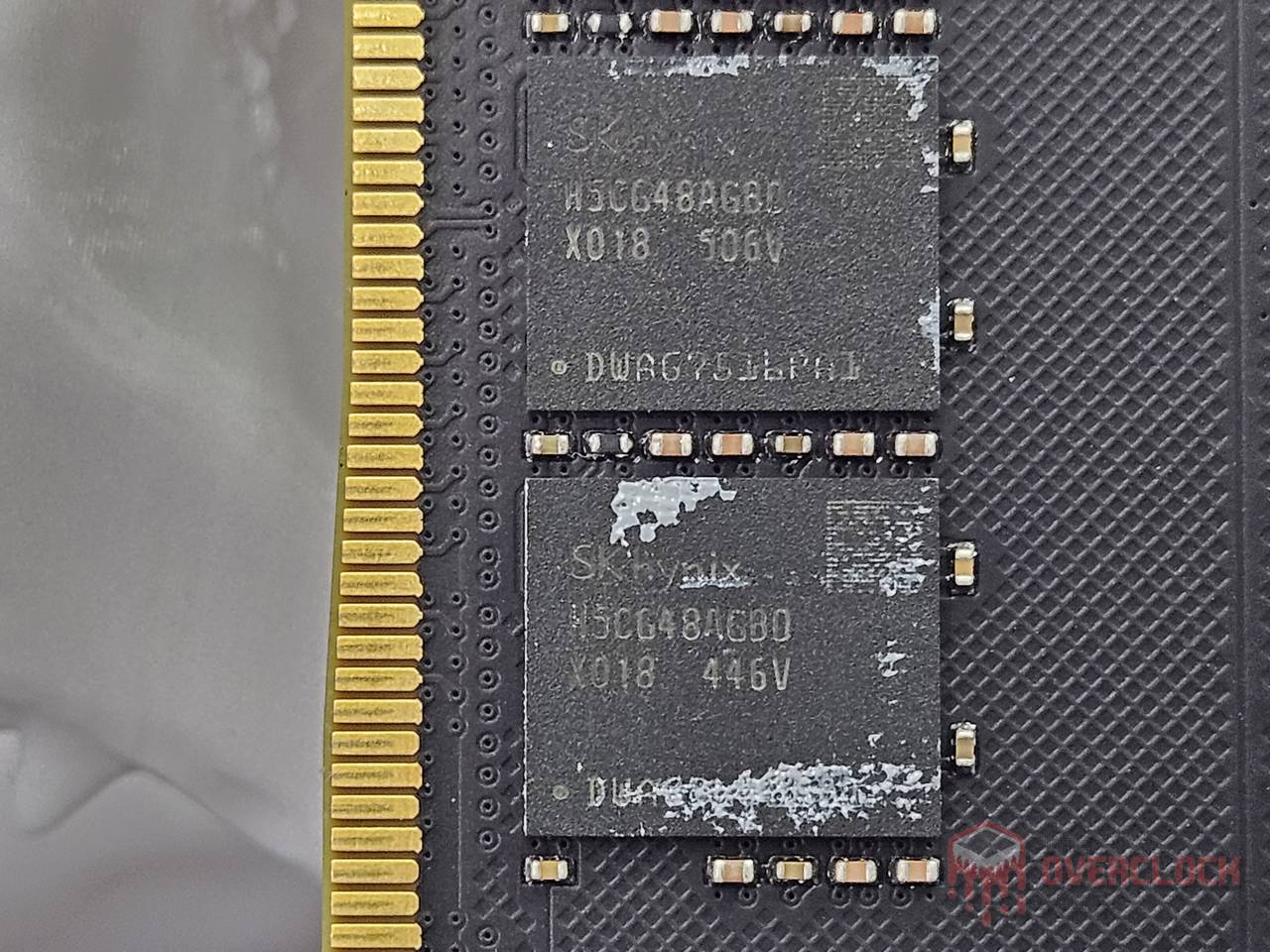
As for the chips, they are the well-known SK Hynix A-Die, which are the second-generation die from the Korean manufacturer. They have a density of 16 Gb and are widely used in 2×16 GB and 2×32 GB kits aimed at enthusiasts.
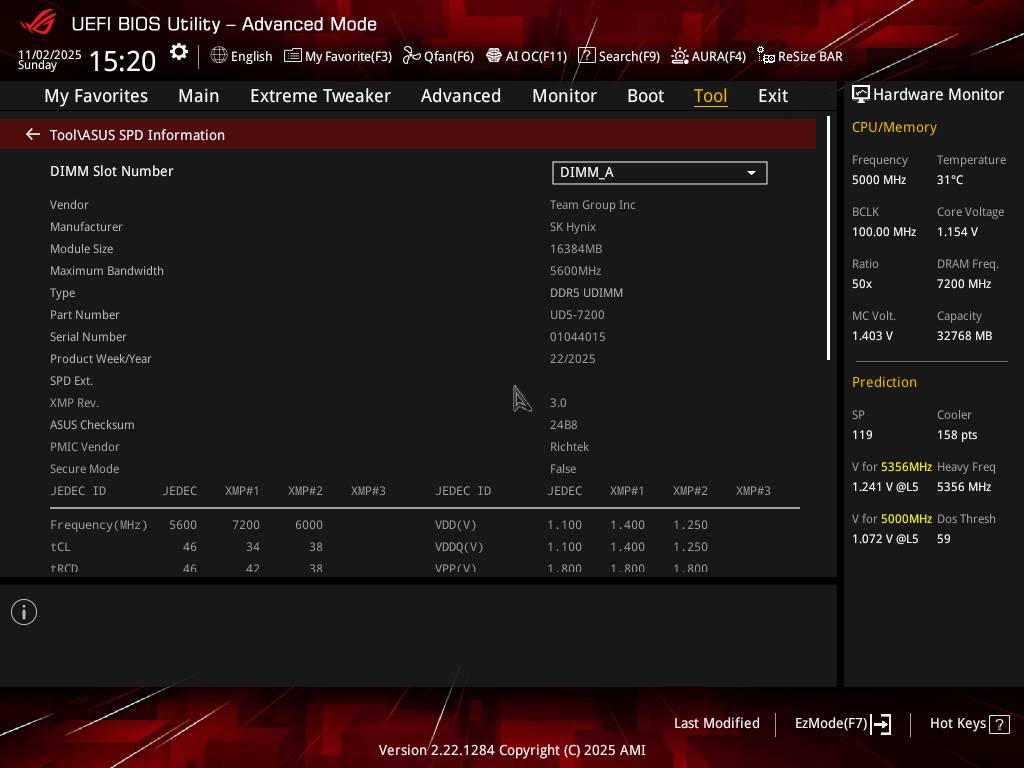
Regarding the PMIC, which is the integrated circuit responsible for powering the memory module, a Richtek unit was used. It supports High Voltage Mode, allowing VDD/VDDQ above 1.43 V on motherboards that include this feature.
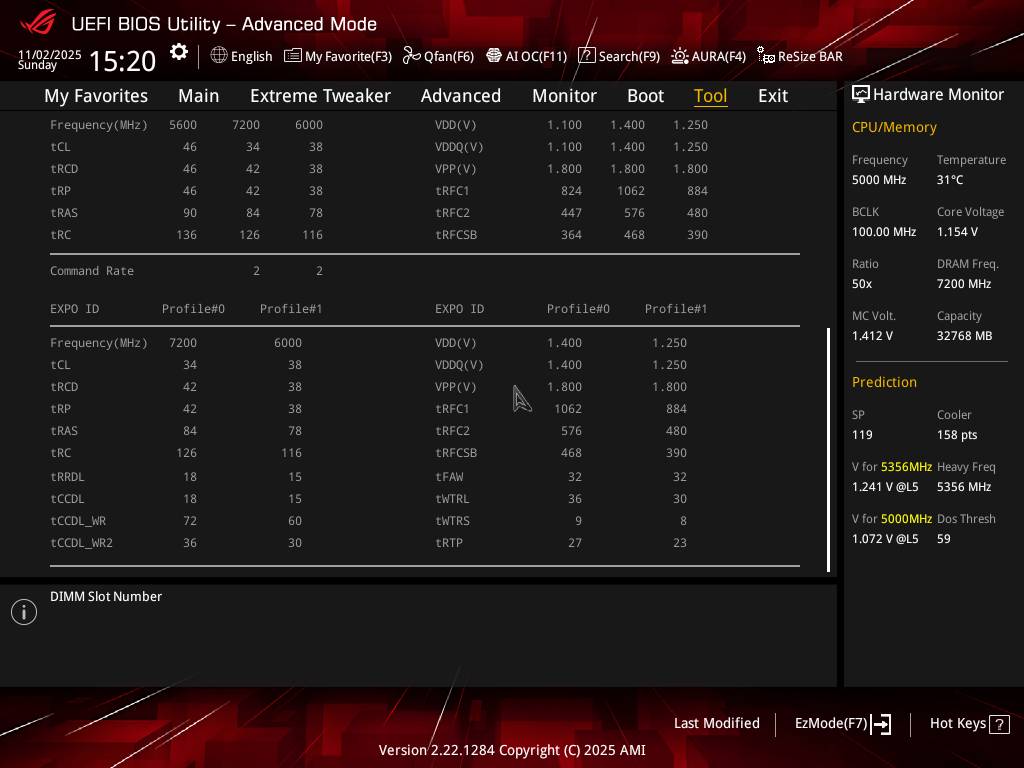
Here you can also see the XMP and EXPO profiles stored in the module’s SPD, which confirm the chip manufacturer and the PMIC as well.
If you are interested, the product page on the manufacturer’s website can be accessed through this link.
Hardware used
CPU: AMD Ryzen 7 8700G e Ryzen 7 9700X (Obrigado AMD!)
MOBO: ASUS ROG Crosshair X670E Gene
RAM: 2x16GB Teamgroup T-Create Expert DDR5-7200CL34 1.4V – CTCWD532G7200HC34ADC01 – (Thanks Teamgroup!)
GPU: GIGABYTE RX 5500 XT
PSU: Coolermaster MWE 1250 Gold V2 (Obrigado Cooler Master)
COOLER: Custom Watercooling.
SSD: Goldenfir 256GB NVMe
Software: Windows 11 x64 24H2, TM5 0.13.1 profile 1usmus, Geekbench 3.4.4, y-cruncher 1b, 3DMark11.
Test objectives and methodology
The goal was to find the daily-use limit of the Teamgroup modules on the Ryzen 7 8700G, taking advantage of the powerful memory controller integrated into these processors, which allows us to push the memory limits and also test a 1:1 setup using the Ryzen 7 9700X. To make the results easier to understand, they were separated into two groups:
- XMP/EXPO: The goal here is to test whether it is possible to operate with stability using the EXPO profile, when available, and the factory XMP profile, skipping that overclock test we used to run in these conditions.
This change was necessary because this easy overclock no longer makes sense. With DDR5, the gains from doing this are almost nonexistent, since motherboards tend to relax subtimings a lot, canceling out any benefits from the overclock.
- 24/7 with fine tuning: Here, manual adjustments were made to all possible parameters to achieve the best result with daily-use viability, pushing the limits of both 1:1 and 1:2 modes.
In both cases, TM5 0.13.1 with the 1usmus profile was used to check stability, along with Geekbench 3.4.4, y-cruncher 1b, and 3DMark11 Physics Test to get a better idea of how each adjustment affects benchmarks that are sensitive to memory subsystem performance.
For these tests, both CPUs were locked at 5.0 GHz, with FCLK at 2400 MHz on the 8700G and 2200 MHz on the R7 9700X in the overclock tests, and FCLK at 2000 MHz in the XMP/EXPO tests. It is important to remember that on Ryzen AM5, that old recommendation to keep the FCLK working in the same proportion as the memory clock no longer applies. Before adjusting the memory itself, it is useful to test the FCLK limit. On Ryzen 7000 and 9000, this limit usually falls between 2000 and 2200 MHz, and on Ryzen 8000, between 2200 and 2700 MHz.
Timings – AMD
- XMP / EXPO:
For this model, Teamgroup included XMP profiles for DDR5-7200 and DDR5-6000, and both worked well on the two processors used in this test.
- 24/7 with fine tuning:
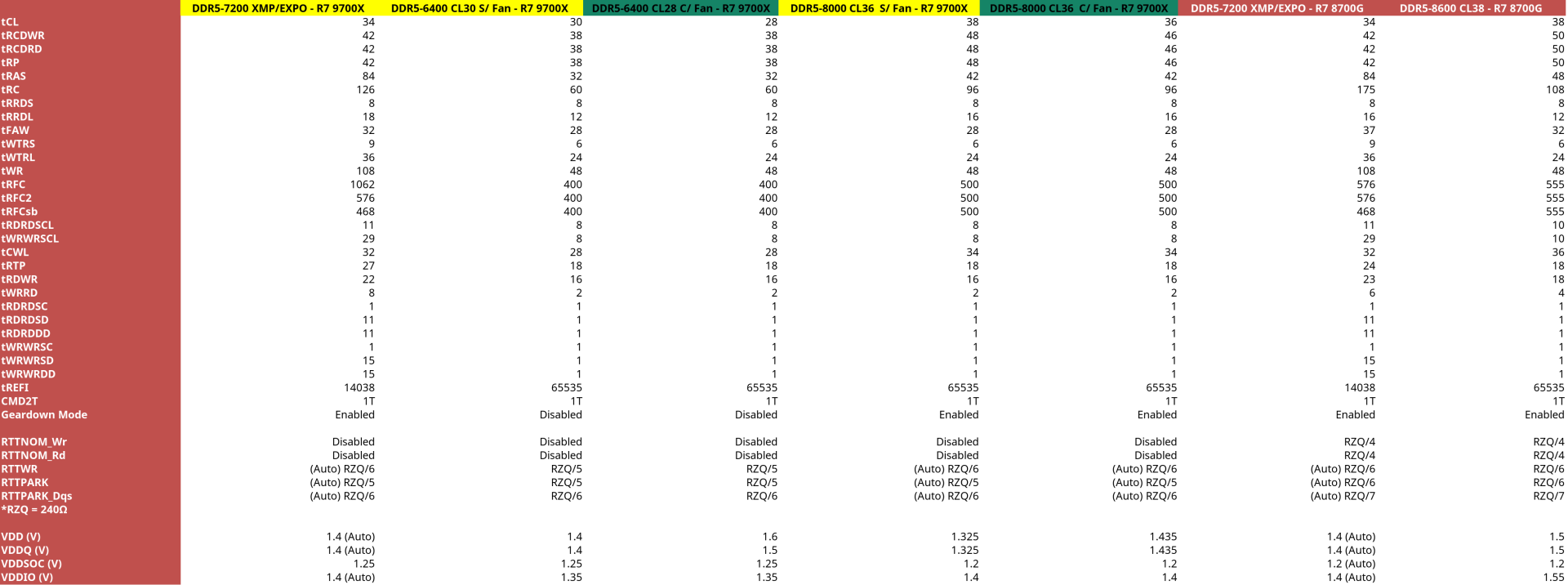
With fine tuning, it was possible to improve several timings and reach very respectable results for Hynix A-Die memory. However, temperature became a problem during testing. For example, to reach 8000 CL36 at 1.435 V with stability, it was necessary to use a fan, because without it, TM5 errors were unavoidable.
When temperature becomes the limiting factor, the first thing to relax is tREFI, since this parameter is known to be sensitive to heat. Even so, lowering it to under 12K did not stop the errors. To run 8000 stable without a fan, it was necessary to relax the primary timings and use only 1.325 V for VDD/VDDQ, where 1.4 V was the stability limit without extra cooling.
In any case, 1.5 V was the maximum the stock “heatsinks” could handle, even with a fan blowing on the modules. To go past that without temperature-related errors, it was necessary to remove the heatsinks and keep the fan directly on the chips. This could probably have been improved if Teamgroup had used a thinner thermal interface.
Regarding frequencies, as mentioned earlier, it was possible to reach 8000 MT/s on the Ryzen 7 9700X, and in some cases it is possible to go even higher depending on chip quality, temperature, and the motherboard. Still, the gains are usually small because the FCLK becomes a bottleneck even at 2233 MHz. In 1:1 mode, the limit was the usual 6400 MT/s CL30 at 1.4 V without a fan. In extreme mode, without heatsinks and with a fan, the same frequency was possible but with CL28 at 1.6 V VDD. It is important to note that the 6400 MT/s 1:1 limit came from the CPU sample used, not the memory, and that these Ryzen 7 9700X settings should also apply to Ryzen 7000 processors.
Finally, with the Ryzen 7 8700G, it was possible to stabilize DDR5-8600 CL38 at only 1.5 V with fan support, which is quite good and should give a solid performance boost to users of the integrated graphics, helping to offset the fact that this CPU has only half the L3 cache of the Ryzen 7000 series.
Benchmarks
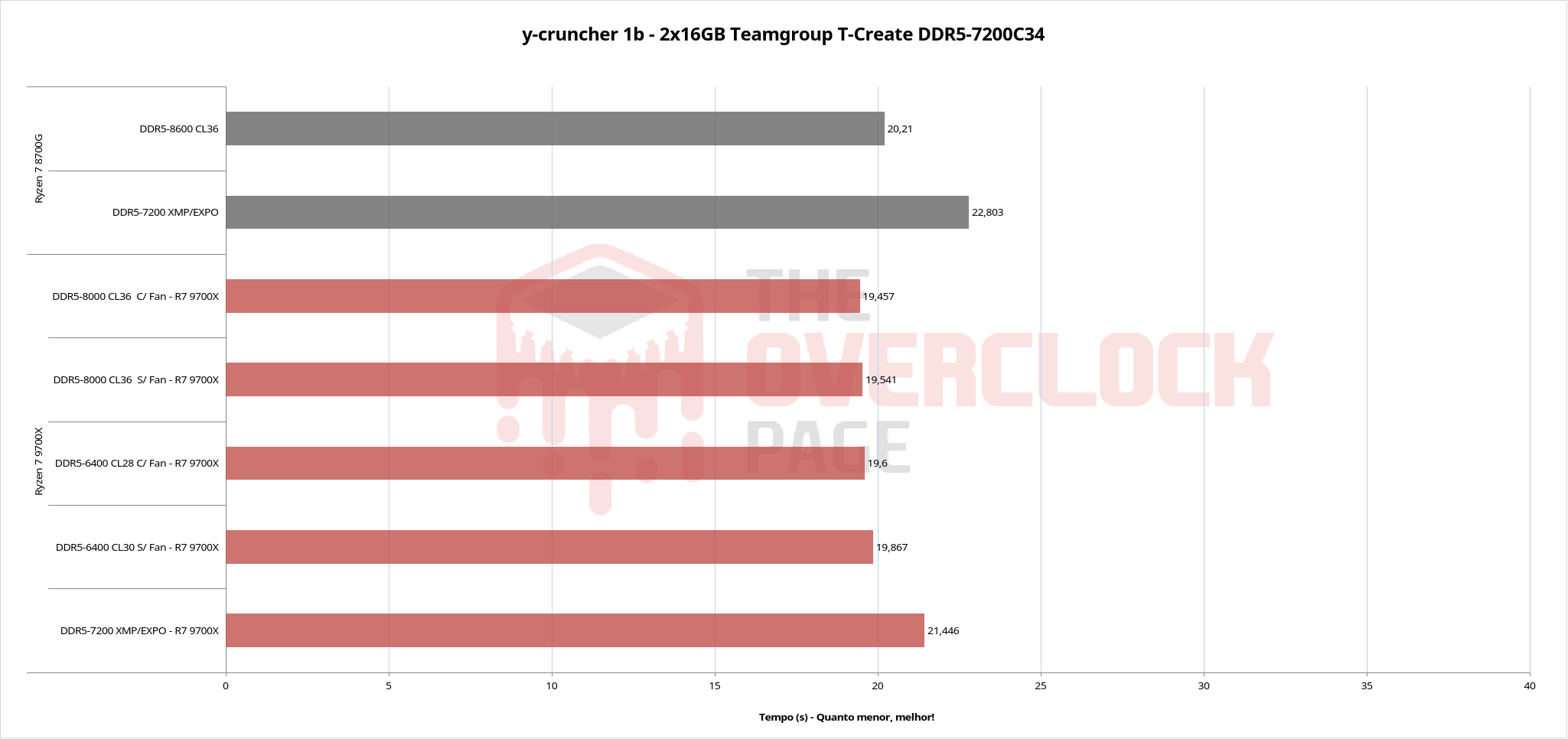
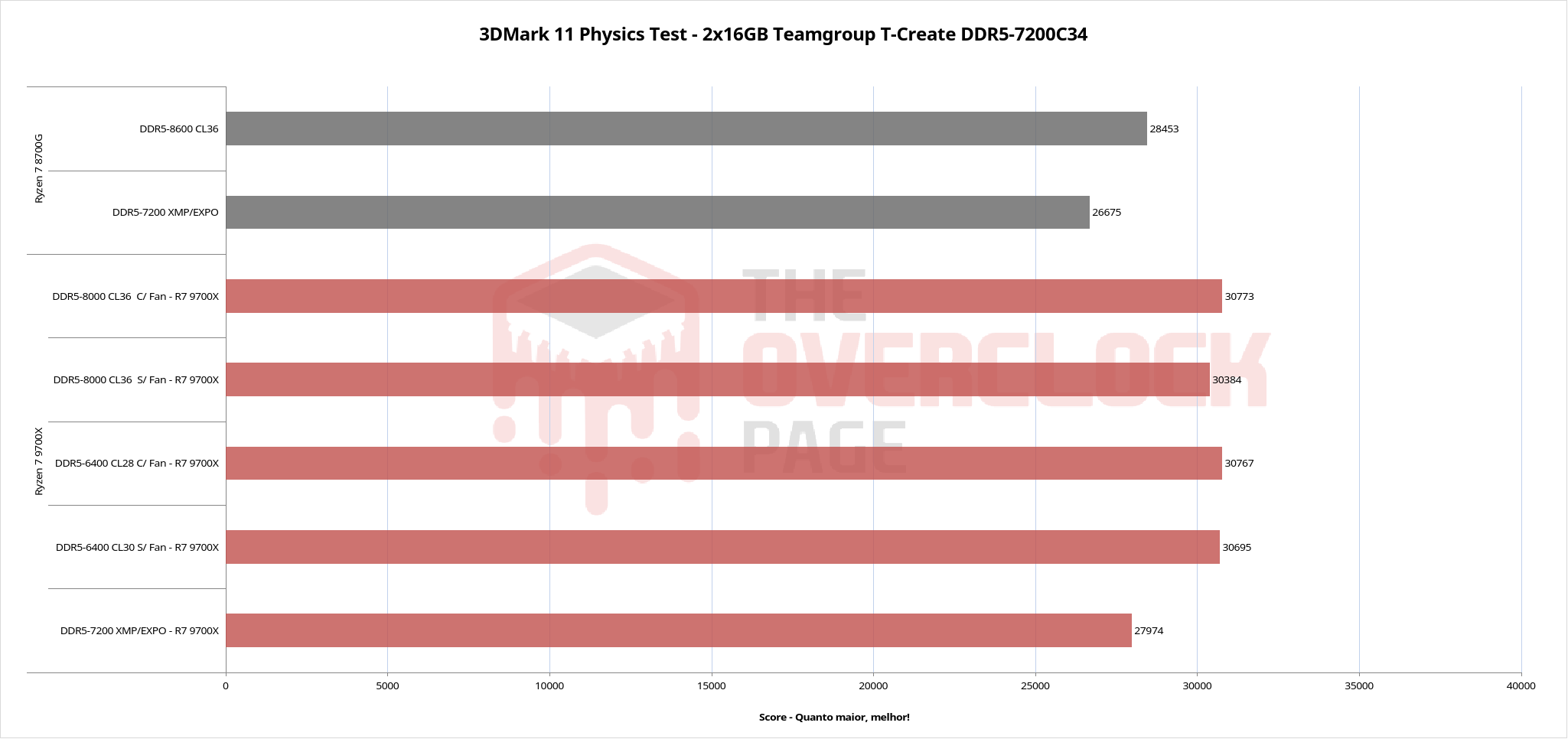
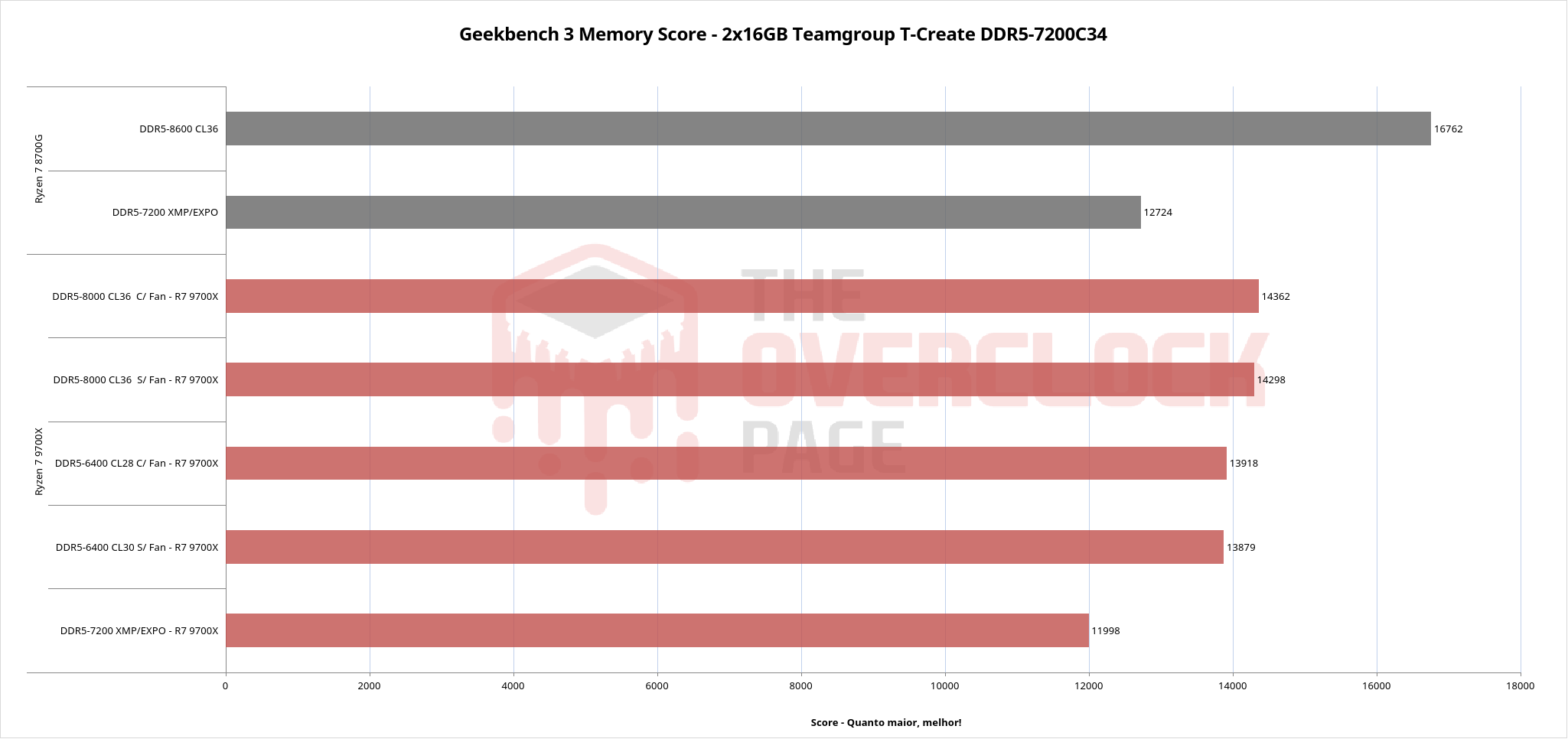
Below are the performance numbers from the memory subtest in Geekbench 3.4.4, y-cruncher 1b, and the 3DMark11 Physics Test. Of course, these numbers can vary on other processors and platforms. For example, the gains from higher memory frequency are usually more noticeable on Intel 12th, 13th, and 14th gen CPUs, while on Ryzen 7000 and 9000, the improvement in games tends to be zero in 1:2 mode, even at 8000 MT/s.
It is worth noting that all these results passed TM5 0.13.1 stability testing and, at least for these specific samples, represent settings that can be used daily.
Conclusion
The Teamgroup T-Create DDR5 32 GB kit (2×16 GB) DDR5-7200 showed good compatibility with the AMD platform, working normally on both Ryzen 8000 and 9000 processors, using all built-in profiles.
With manual tuning, the Ryzen 7 8700G was able to reach 8600 MT/s CL38 with decent subtimings, which is expected for memory equipped with Hynix A-Die chips, and it can go even higher with more voltage. On the Ryzen 7 9700X, both 6400 MT/s 1:1 and 8000 MT/s 2:1 were easy to achieve with good timings. The second setup can be used even better on CPUs with 2 CCDs and higher TDP.
The only note is that even with a fan for cooling, going above 1.5 V on VDD was problematic, making it necessary to remove the stock heatsink to get stability.
As for availability and price, this kit is selling on Amazon for over 400 USD, which is very high, but DDR5 memory prices in general are all over the place and have been rising fast because of that AI frenzy. With that in mind, if you plan to upgrade or need a kit for a new PC, the advice is to buy it as soon as possible, since the trend for 2026 does not look good. Price issues aside, the Teamgroup T-Create line is definitely worth recommending.